KVM stands for Keyboard, Video, and Mouse. In traditional equipment rooms, a KVM system allows operators to control multiple servers or computers through shared displays, keyboards, and mice. This reduces repeated hardware deployment and makes server operation more centralized.
A distributed KVM system extends this idea by combining KVM control with audio and video encoding, decoding, and network transmission. Instead of being limited to a short-distance connection inside one rack, video signals and control data can be transmitted through an IP network or fiber network. This makes it possible to share, switch, display, and control computer sources across command centers, control rooms, meeting rooms, and large-screen environments.
From Traditional KVM to Network-Based Operation
A traditional KVM system is usually designed for local server management. One operator can control several computers or servers by switching keyboard, mouse, and display signals. This is useful in server rooms, but the distance, flexibility, and display capability are limited.
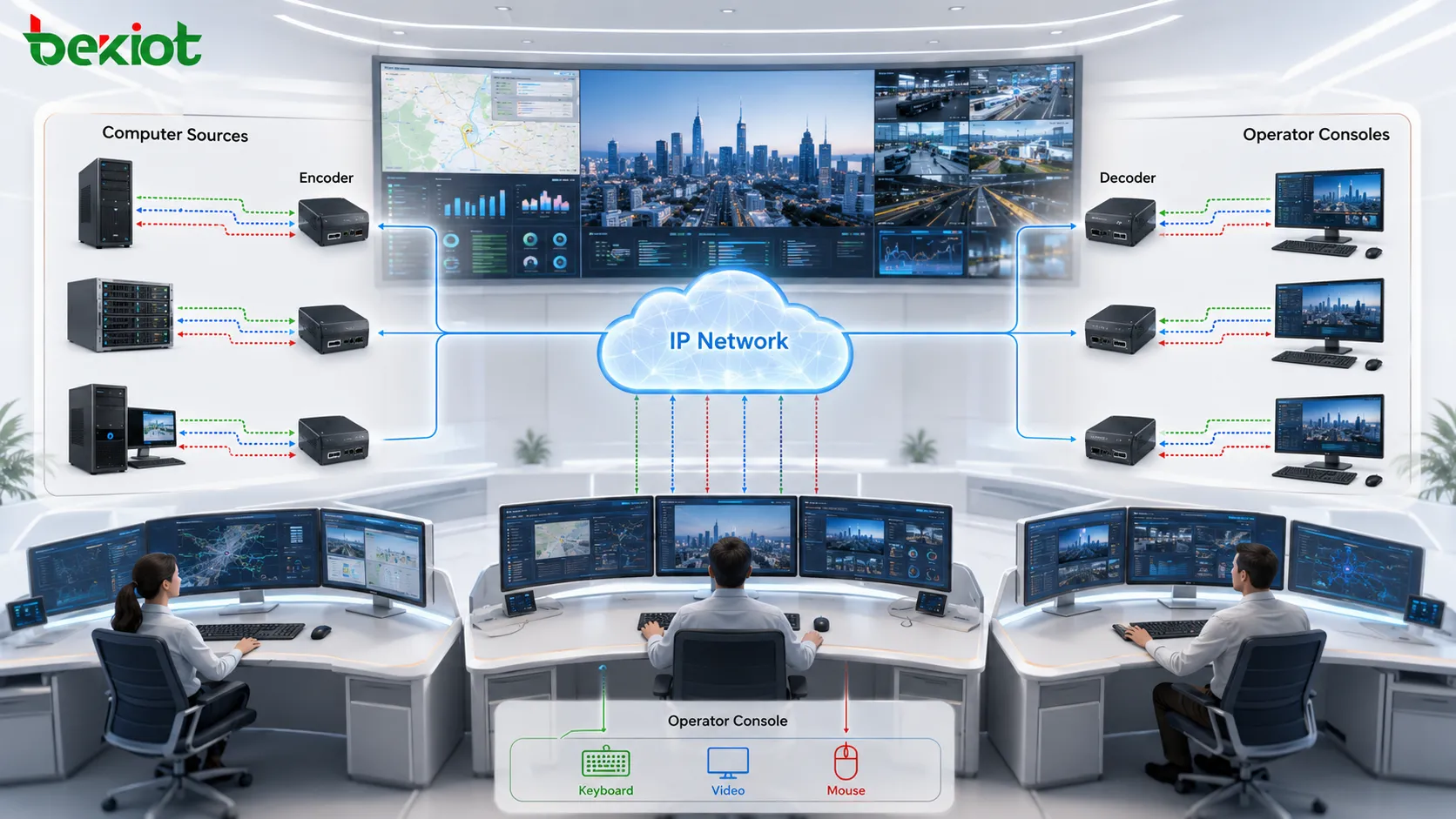
A distributed architecture changes the structure. At the video source side, an encoder converts the computer screen signal into a network stream. For example, the HDMI output of a computer can be connected to an encoder and transmitted over the network. At the display side, a decoder receives the network video stream and outputs it to a monitor, video wall, or large-screen display.
With this design, video sources no longer need to be physically close to the display location. Operators can call up different computer screens, display them on different screens, copy the same source to multiple locations, or manage remote sources through a centralized interface.
The Core Building Blocks
The basic structure of a distributed KVM system is made up of encoders, decoders, and a transmission network. Encoders are placed near the computer, server, workstation, or signal source. Decoders are placed near the display devices. The network connects both sides and carries video, audio, keyboard, mouse, and control data.
In a simple project, this may be enough to complete point-to-point or point-to-multi-point signal transmission. In a larger project, the system will also include management software, video matrix control, video wall processing, centralized control, permission management, signal routing, and third-party platform integration.
This is why a distributed KVM system should not be understood as only a group of encoders and decoders. In command and control environments, it becomes a complete visual collaboration platform that combines video switching, remote control, large-screen display, system linkage, and operator workflow management.
IP and Fiber Transmission Options
Many distributed systems use IP networks because they are flexible, scalable, and easier to integrate with existing network infrastructure. IP-based transmission allows devices to be deployed across different rooms, floors, buildings, or control areas as long as the network design supports the required bandwidth and latency.
For projects that require higher bandwidth, lower latency, and more stable long-distance transmission, fiber-based distributed systems may also be used. Fiber transmission is common in command halls, high-resolution display environments, and large control centers where signal quality and response speed are important.
However, fiber deployment usually requires dedicated cabling and higher construction cost. Therefore, the choice between IP and fiber should be based on signal resolution, latency requirements, project scale, building conditions, and long-term expansion plans.
Unified Switching Through Video Matrix Control
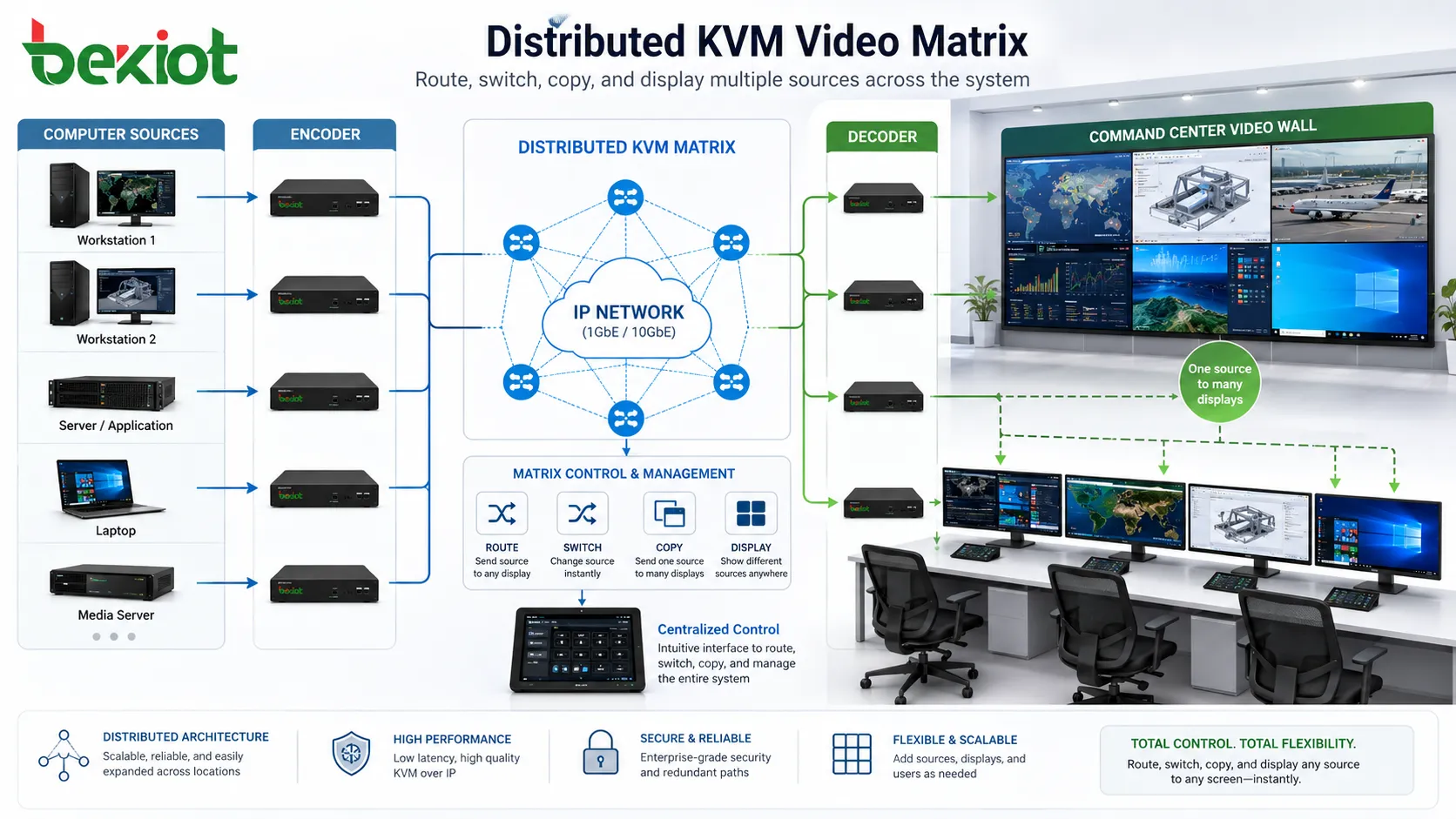
When a project includes many video inputs and outputs, the system needs a way to manage signal routing. This is where video matrix control becomes important. A video matrix organizes different video sources and display devices into a controllable input-output structure.
Through matrix control, operators can send any authorized video source to any screen within the distributed system. They can switch sources, duplicate a source to multiple displays, assign screens to different users, or manage source allocation based on operational needs.
This capability is especially useful in command centers, traffic control rooms, energy dispatch centers, security monitoring rooms, and industrial operation centers. Operators often need to compare multiple sources, share key information on a large screen, or quickly switch from routine monitoring to emergency response.
Large-Screen Processing and Visual Layout
Distributed KVM systems are often used in command centers and control rooms, where large-screen display is a core requirement. In these environments, operators may need to show several systems on one display wall, split the screen into multiple windows, or move video windows freely across the screen.
Video wall processing equipment or software can support functions such as splicing, windowing, roaming, polling, layout switching, and multi-source presentation. This allows one large screen to display monitoring video, computer desktops, GIS maps, data dashboards, conference content, and emergency information at the same time.
Compared with simple screen projection, video wall processing gives the command center more flexible visual organization. During routine operation, the screen can show standard dashboards. During an incident, the layout can be quickly changed to highlight key camera feeds, workstation screens, maps, or remote consultation content.
Control Layer for Devices and Operator Workflows
A complete system also needs a control layer. Part of this control layer comes from traditional central control systems. Through serial ports, IP control, RS-485, or other control methods, the system can manage audio and video equipment, lights, air conditioning, projectors, display screens, and other room devices.
Another part of the control layer focuses on KVM operator workflows. Users may need to call up video sources, control computers remotely, copy a screen to another display, start audio or video communication, switch layouts, or assign sources to different operator seats. These functions usually require dedicated software and a management server.
Permission management is also important. Not every operator should control every computer or display every source. A well-designed system should support user roles, access permissions, source grouping, operation records, and management policies so that control remains secure and traceable.
Integration with External Video and Communication Systems
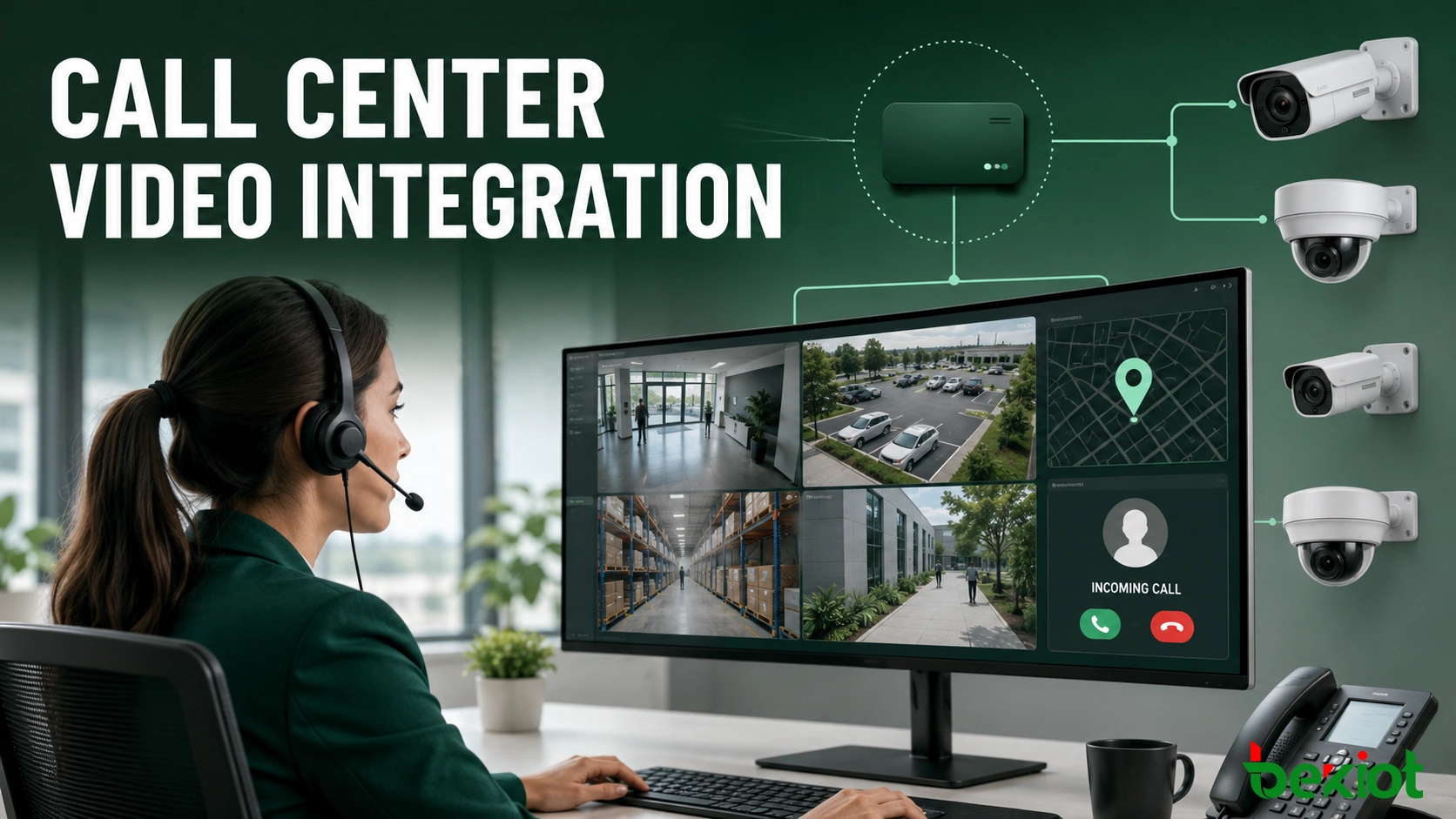
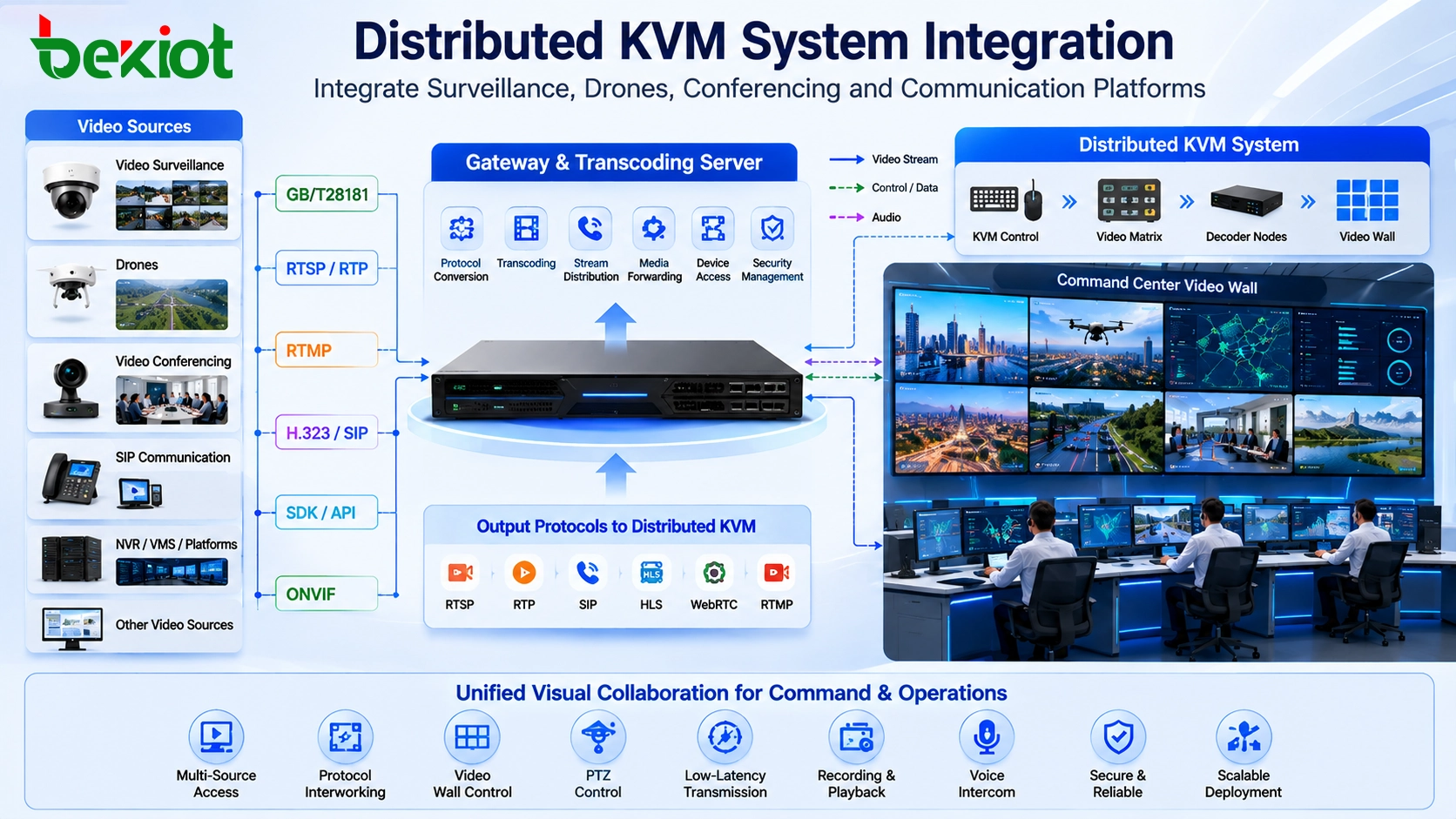
In real command center projects, a distributed KVM system rarely works alone. It may need to connect video surveillance platforms, video conferencing systems, drone video, emergency communication systems, dispatch platforms, and other third-party applications.
These external systems often use different media formats and transmission protocols. For example, video surveillance and drone video may be delivered as RTSP or RTP streams. Communication platforms may use SIP. Some systems may use smaller or compressed video streams, while distributed display systems often require higher-quality streams for large-screen presentation.
A video gateway or transcoding server can help solve this problem. It can receive external video sources, convert stream formats, adapt bitrates, and provide protocol conversion such as SIP-to-RTSP or RTSP-to-SIP. This makes it easier for the distributed KVM system to display and control video from different platforms.
Why Transcoding Matters in Command Environments
Video transcoding is useful when different systems have different video stream requirements. A communication or dispatch system may use a lower-bitrate stream for real-time communication, while a distributed video wall may need a higher-quality stream for clear display on a large screen.
By using a transcoding layer, the project can reduce compatibility problems between systems. External video can be converted into a format that the distributed KVM system can decode and display. At the same time, video from the distributed system can be adapted for communication platforms, remote users, or other business applications.
This is important for command centers that combine local visualization, remote collaboration, video conferencing, surveillance, and dispatch communication. The goal is not only to display video, but to make video resources usable across different operational workflows.
Where This Architecture Is Most Useful
Distributed KVM systems are suitable for command centers, dispatch centers, control rooms, data centers, video conference rooms, emergency operation centers, traffic control rooms, energy operation centers, industrial monitoring rooms, and security management centers.
These environments usually share several common needs. They require many computer sources, multiple operator seats, large-screen visualization, fast switching, secure control, and integration with other audio and video systems. A distributed architecture can meet these needs better than traditional local signal wiring.
The system is also useful when operators need flexible access to different workstations. A user can sit at one console and call up different computers or video sources according to permission. This improves space utilization, reduces cable complexity, and supports centralized management.
Planning Points Before Deployment
Before designing a distributed KVM system, the project team should confirm the number of signal sources, display terminals, operator seats, video wall scale, control requirements, network conditions, resolution requirements, and latency expectations.
Network planning is especially important. High-resolution video transmission may require large bandwidth and stable switching performance. If the system uses IP networks, the switches, VLAN planning, multicast strategy, and network security policies should be evaluated carefully.
Integration requirements should also be clarified early. If the system needs to connect surveillance, video conferencing, drones, SIP communication, or dispatch platforms, the required protocols, stream formats, and transcoding methods should be confirmed before construction.
Benefits of a Distributed Design
The first benefit is flexibility. Video sources and displays can be placed in different locations and connected through the network. This makes the system easier to expand and modify.
The second benefit is centralized control. Operators can manage many sources and displays through software, matrix control, and permission settings instead of relying only on fixed physical wiring.
The third benefit is stronger visual collaboration. Large-screen processing, window layouts, source copying, and multi-screen display help command teams share information more effectively.
The fourth benefit is better system integration. Through gateways and transcoding servers, external video surveillance, conferencing, drone video, SIP communication, and RTSP/RTP streams can be connected into the same visual operation environment.
Conclusion
A distributed KVM system combines keyboard, video, and mouse control with network-based audio and video transmission. Its core components include encoders, decoders, network infrastructure, video matrix control, video wall processing, control software, management servers, and integration gateways.
Compared with traditional KVM systems, a distributed architecture provides greater flexibility, longer transmission distance, more display options, and stronger integration capability. It is especially suitable for command centers, control rooms, meeting rooms, and other professional environments that need centralized operation and large-screen visualization.
A successful solution depends on more than device selection. It requires a clear understanding of video sources, display requirements, control workflows, network capacity, latency targets, external system integration, and future expansion. With proper planning, a distributed KVM system can become the visual and operational foundation of a modern command environment.
FAQ
Is a distributed KVM system the same as a normal video matrix?
No. A video matrix mainly routes video signals, while a distributed KVM system also includes keyboard and mouse control, network transmission, user permissions, source management, and operator workflow control.
Can the system work over an existing IP network?
Yes, but the network must be designed for video bandwidth, switching performance, latency, multicast or unicast strategy, and security isolation. Ordinary office networks may not be suitable without planning.
When should fiber transmission be considered?
Fiber is useful when the project needs higher bandwidth, lower latency, longer distance, or more stable high-resolution video transmission. It may also increase cabling and construction cost.
Can external camera or drone video be displayed on the KVM system?
Yes. External video can usually be connected through a gateway or transcoding server, then converted into a format that the distributed system can decode and display.
What should be prepared before system design?
The project team should prepare source quantities, display layouts, operator seat requirements, video wall design, resolution targets, control methods, network topology, integration protocols, and future expansion plans.