


Business communication has changed far beyond the days when companies depended only on desk phones, fixed copper lines, and hardware-heavy PBX cabinets in a back office. Today, many organizations want a phone system that can be managed more easily, expanded more quickly, and used across offices, homes, and mobile devices without losing control over call quality or business workflows. That is why web-based business phone systems have become an increasingly practical option for modern companies.
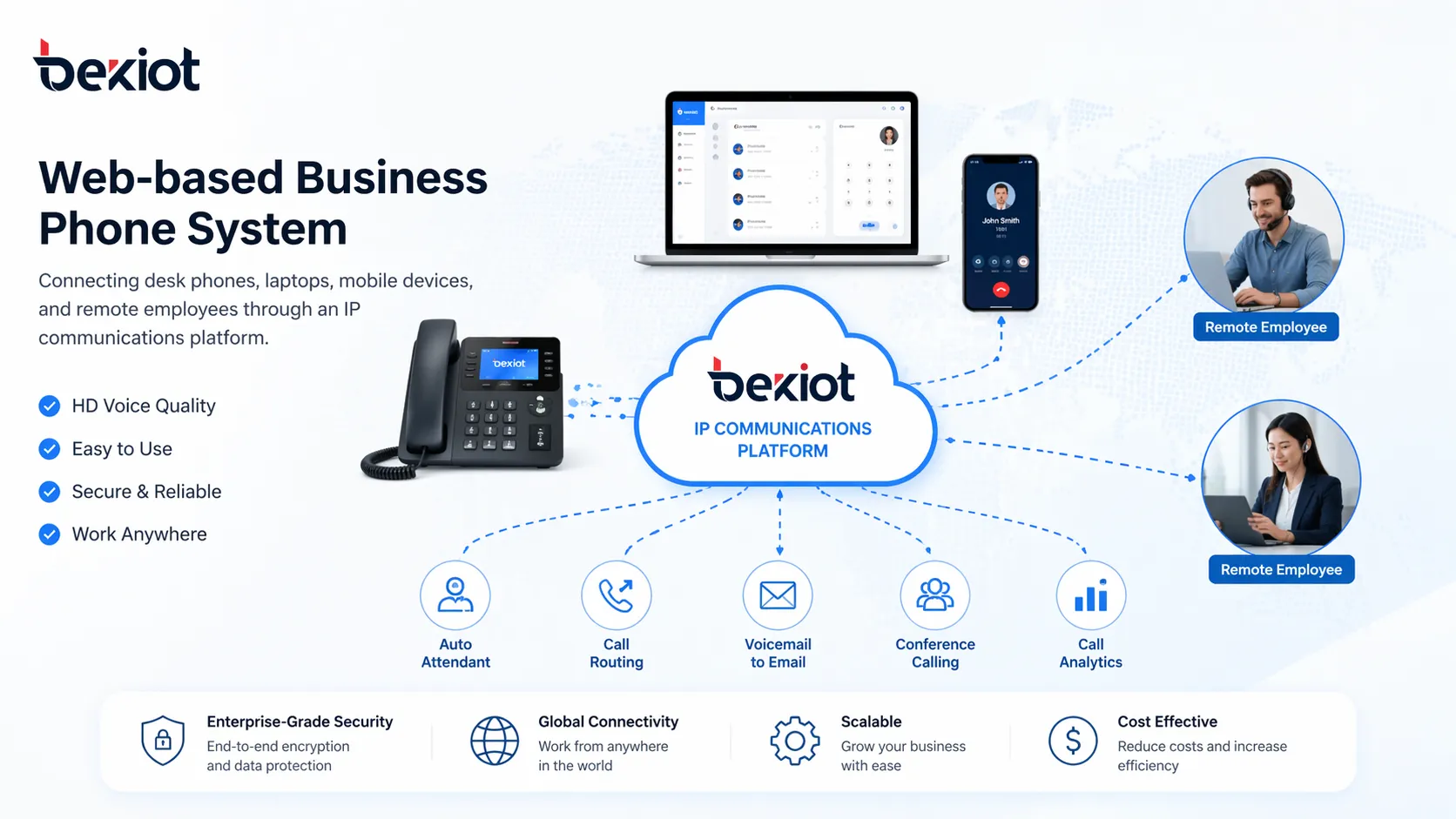
A web-based business phone system combines VoIP calling, browser-based administration, and multi-device access into a more flexible communications model. Instead of treating telephony as a standalone hardware island, businesses can manage users, call flows, numbers, voicemail, and routing policies through a web interface while employees answer calls from desk IP phones, laptops, or mobile apps. The result is a communications environment that is easier to adapt as teams grow, move, or work across multiple locations.
What Is a Web-Based Business Phone System?
A web-based business phone system is a business telephony solution that uses IP networks and browser-based management tools to handle calls, users, extensions, and communications features. In simple terms, it allows a company to operate its phone system through an internet-connected platform rather than relying entirely on traditional analog phone lines and locally managed PBX hardware.
In many cases, the system is built on VoIP technology, which means voice calls travel over data networks instead of legacy telephone circuits. What makes it “web-based” is not only that calls can run over IP, but also that administrators can configure and monitor the system from a browser-based control portal. This may include creating extensions, adjusting call routing, assigning numbers, reviewing call records, managing voicemail, or updating time-based rules without needing to be physically present at a specific office PBX cabinet.
Some web-based business phone systems are fully cloud-hosted, while others may be hybrid deployments that combine on-premises IP PBX resources with web-based management and remote access. This makes the model suitable for a wide range of organizations, from small businesses with a few staff members to larger enterprises that operate across multiple branches.
A web-based phone system is not just about making calls over the internet. It is about turning business telephony into a manageable, scalable, and accessible communications service.
How Does a Web-Based Business Phone System Work?
At a basic level, a web-based business phone system routes voice communications through an IP network. Employees use SIP desk phones, computer softphones, browser clients, or mobile applications to register with the communications platform. When a user places or receives a call, the system applies the company’s configured rules, such as auto attendant menus, extension mapping, ring groups, call queues, forwarding conditions, or voicemail handling.
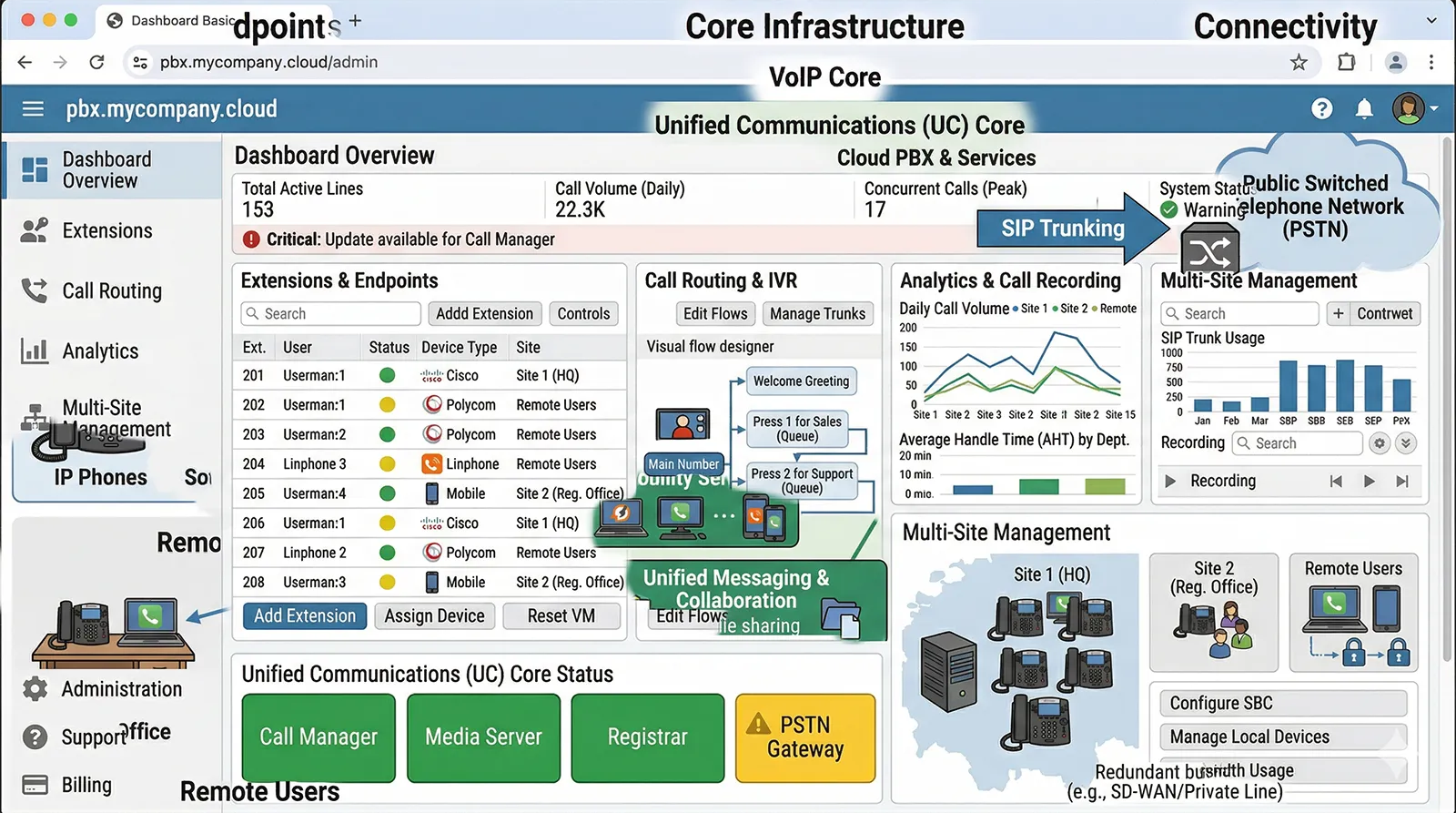
Administrators manage these rules through a browser-based interface. Instead of using only local hardware programming or manual telecom maintenance, the business can log in to a web portal to perform daily administration. This can include onboarding a new employee, changing department call flows, setting business hours, assigning a number to a remote worker, enabling voicemail-to-email, or viewing call activity reports.
The system can also connect with SIP trunks, traditional numbers, CRM platforms, help desk tools, collaboration software, or video communication services. In practice, this means a company can build a more connected communications environment where customer calls, internal calling, mobile staff communication, and service workflows are handled under a more unified framework.
Core Features of a Web-Based Business Phone System
Browser-Based Administration
One of the most important advantages of a web-based business phone system is that it can be managed through a browser. This reduces dependence on complex, site-bound maintenance processes and gives administrators a clearer view of extensions, users, trunks, call paths, voicemail settings, and routing strategies.
For growing businesses, this matters because communications changes are frequent. New staff need numbers, departments may require new ring groups, and business hours or call handling rules often change with operations. A web interface makes these adjustments faster and more practical, especially for organizations without a large in-house telecom team.
Support for Desk Phones, Softphones, and Mobile Apps
Modern business communication is no longer limited to a single desk phone. A web-based system typically supports SIP desk phones in offices, softphones on laptops, and mobile applications on smartphones or tablets. This allows employees to stay reachable on their business identity whether they are at headquarters, in a branch office, working from home, or traveling.
This multi-device flexibility is especially useful for sales teams, managers, customer support agents, field personnel, and hybrid workers. Instead of forcing the business to choose one device model for every employee, the system allows communication to follow the user more naturally.
Auto Attendant and Intelligent Call Routing
Professional call handling is a core requirement for most businesses. Web-based systems typically include auto attendants, IVR menus, hunt groups, ring groups, extension dialing, time-based rules, and call forwarding logic. These features help direct callers to the right team without creating confusion or missed opportunities.
For example, a company can route sales calls to one queue, support calls to another, and after-hours calls to voicemail or an emergency contact path. The same business can also change rules by day, office, or campaign. This creates a more consistent customer experience while reducing the burden on reception staff and internal teams.
Voicemail, Recording, and Call History
Most businesses need more than simple voice calling. They also need message handling, quality review, and communication records. A web-based business phone system usually includes voicemail, voicemail notification, call history, and optional call recording functions that support internal review and service improvement.
These features can be valuable in customer service, operations management, and regulated environments where businesses want a better record of who called, when the call occurred, and how interactions were handled. For managers, access to historical records also helps support training and performance improvement.
Scalability Across Teams and Locations
A traditional phone system often becomes harder to manage as a company grows. A web-based system is usually more adaptable because new users, extensions, devices, and routing policies can be added through centralized administration. This makes it easier to support branch expansion, seasonal staffing, mergers, or changing office structures.
Scalability is not only about adding more users. It is also about maintaining consistency as the business grows. A company can keep one communications policy framework while supporting multiple locations, departments, or remote teams under the same management logic.
Benefits of a Web-Based Business Phone System
Faster Deployment and Easier Expansion
One of the clearest benefits is deployment speed. Businesses can often activate users and numbers more quickly than with legacy systems that require heavier hardware planning and site-specific setup. This is especially important for startups, distributed teams, and organizations opening new branches.
When the company expands, the same platform can often support new users with far less disruption. Instead of redesigning the whole phone environment, the business extends an existing system structure.
Better Support for Remote and Hybrid Work
Remote and hybrid work have changed expectations for business communications. Employees no longer want to lose access to their business number just because they are outside the office. A web-based business phone system supports this shift by allowing calls to be answered on multiple authorized devices and locations.
This helps businesses maintain continuity, professionalism, and internal responsiveness. Customers still reach the company through the same business channels, while staff can remain productive without being tied to one desk.
Reduced Management Burden
Traditional telephony can place a heavy burden on internal IT or telecom staff, especially when multiple offices are involved. Web-based administration reduces that burden by providing centralized visibility and control. Many routine changes can be made without specialized field service or complex hardware intervention.
For management, that means less time spent on basic phone administration and more control over how communication policies are applied across the organization.
Improved Business Continuity
Business calls do not stop when one office closes early, a staff member travels, or a team shifts to temporary remote work. A web-based phone system improves continuity by making it easier to redirect calls, move answering responsibility, or keep critical departments reachable through alternate devices and locations.
That flexibility is important for customer-facing businesses, service operations, and companies that need to maintain responsiveness during office changes or unexpected disruptions.
A More Professional Customer Experience
Customers often judge a business by the quality and consistency of its communication. With auto attendants, department routing, voicemail, queue logic, and business-hour policies, a web-based system helps a company present a more organized and professional image.
Instead of calls being answered inconsistently across personal mobile numbers or unmanaged lines, the business creates a structured communication experience that is easier for customers to understand and easier for the company to control.
For many companies, the value of a web-based business phone system is not just lower complexity. It is the ability to keep communication consistent across offices, devices, and teams.
Common Uses of Web-Based Business Phone Systems
Small and Medium-Sized Businesses
SMBs often choose web-based systems because they want professional calling features without the cost and complexity of legacy phone infrastructure. Features such as business numbers, IVR, voicemail, and browser management help smaller businesses appear more organized while staying flexible.
This is particularly useful for companies that are growing quickly and want a communications model that can scale without frequent hardware redesign.
Multi-Site Offices and Branch Operations
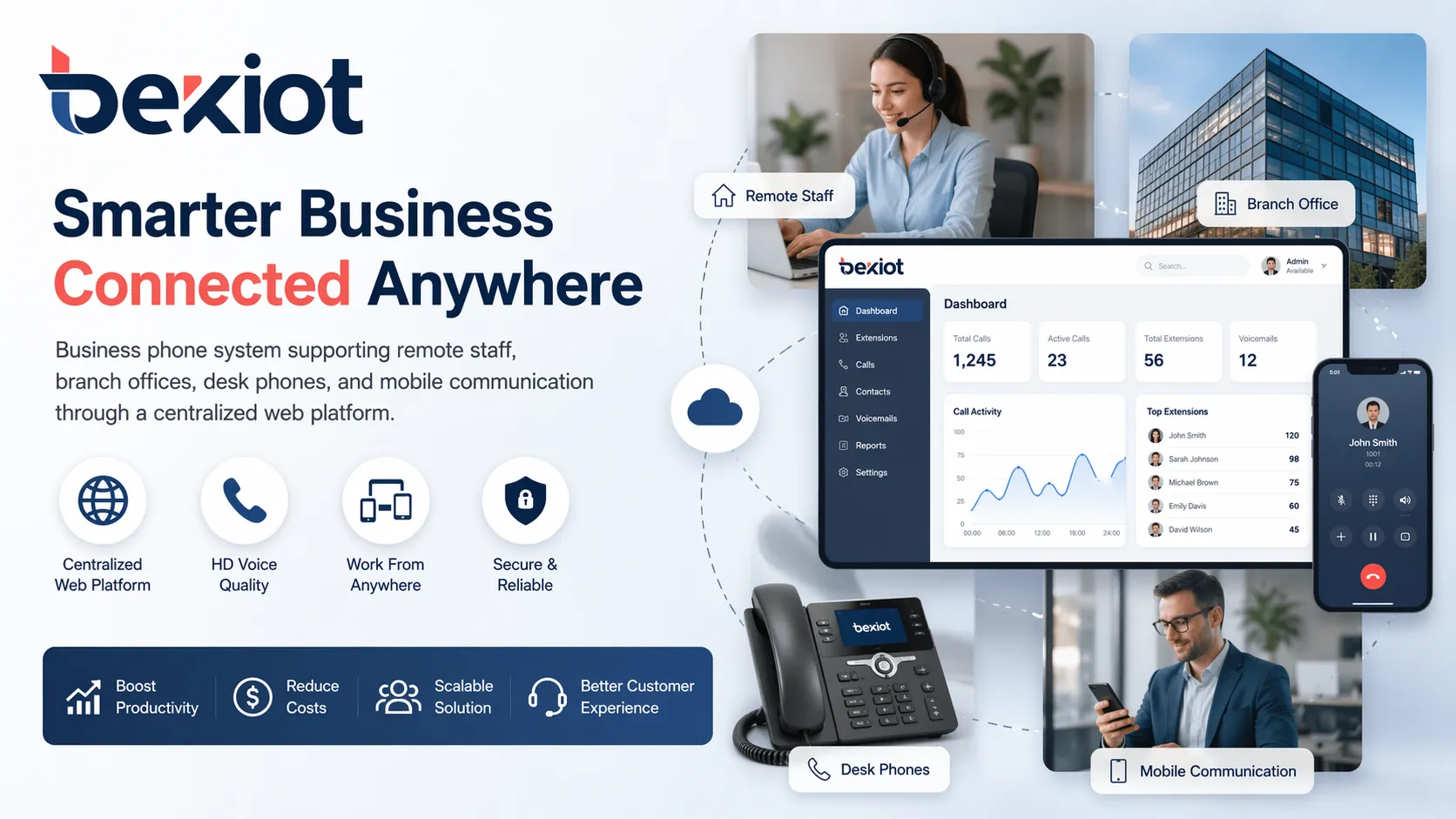
When a company operates from more than one location, maintaining a consistent phone experience becomes more difficult. A web-based system helps unify communications across headquarters, branch offices, and satellite teams by centralizing control over extensions, routing, and user management.
This can help the organization present one coordinated business identity even when staff are distributed across different sites.
Remote Teams and Mobile Staff
Businesses with remote employees, field service teams, traveling managers, or mobile sales staff often benefit from device flexibility and centralized administration. Employees can remain part of the business phone environment without having to rely on separate personal communication methods.
That improves both internal coordination and the external customer experience, since calls remain connected to the business rather than fragmented across unrelated channels.
Customer Service and Sales Operations
Departments that handle large volumes of customer calls need routing logic, queues, records, voicemail, and visibility into incoming communications. A web-based business phone system can support these workflows by providing more structured handling than basic office calling.
Sales teams also benefit because incoming calls can be directed quickly, call coverage can be maintained outside traditional office hours, and staff can stay reachable from different locations.
Organizations Moving Away from Legacy PBX
Many businesses adopt web-based systems when they are ready to move beyond analog or hardware-heavy PBX infrastructure. In these cases, the web-based model offers a path toward more flexible administration, broader device support, and easier expansion.
For organizations already using IP phones or SIP-based communications, a web-managed system can also be a practical step toward more unified voice operations.
Web-Based Business Phone System vs Traditional PBX
A traditional PBX is usually more dependent on fixed-site hardware, local maintenance, and physical office infrastructure. It can still serve some organizations well, but it is often less flexible when companies need remote access, fast expansion, or simpler administration across multiple locations.
An IP PBX improves on traditional PBX by using IP-based calling and supporting modern SIP devices, but it may still be managed largely on-premises depending on the deployment model. A web-based business phone system goes further by emphasizing browser-based control, flexible user access, and easier administration across distributed environments.
In practical terms, the difference is often about management style as much as call technology. Traditional PBX focuses on fixed telephony infrastructure. Web-based systems focus on accessible, adaptable communications management for modern business operations.
What to Consider Before Choosing a Web-Based Business Phone System
User Count, Office Structure, and Growth Plans
Before choosing a system, a business should think about how many users it has today, how many it may have in the near future, and whether those users are located in one office or many. A good phone system should support current needs without creating a barrier to growth.
It is also useful to consider whether the business expects to add remote staff, open branches, or change departments frequently. These factors affect the value of centralized web-based administration.
Device Compatibility and User Experience
Some businesses still prefer desk phones for many roles, while others rely more on laptops and mobile devices. The right system should support the communication habits of the organization rather than forcing one device approach on everyone.
Call quality, ease of login, user interface clarity, and handset or app compatibility all shape adoption. A technically capable platform still needs to be comfortable for everyday users.
Integration, Security, and Administration Control
Businesses should also review whether the system can connect to their SIP services, CRM tools, support workflows, recording policies, and reporting needs. Administration permissions matter as well, especially in larger organizations where multiple managers may need different levels of control.
Security should not be overlooked. Business communications systems need sound account management, controlled access, and stable deployment practices, especially when used across remote devices and multi-site networks.
Conclusion
A web-based business phone system gives companies a more flexible way to manage business calling, users, devices, and communication workflows. By combining IP voice services with browser-based administration, it helps organizations move beyond the limits of traditional office telephony and build a communications model that fits modern work patterns.
For businesses that want simpler management, better support for remote teams, smoother multi-site coordination, and a more professional customer calling experience, this approach is increasingly practical. And for companies already exploring VoIP, SIP, or IP PBX solutions, web-based management can be an important step toward a more unified and adaptable communications environment.
If your organization is evaluating a more flexible business calling solution for offices, branches, or distributed teams, Becke Telcom can help you explore the right IP communication architecture for your operational needs.
FAQ
What is a web-based business phone system?
A web-based business phone system is a phone solution that uses IP communication and browser-based administration to manage business calling, users, routing, voicemail, and related features.
Is a web-based business phone system the same as VoIP?
Not exactly. VoIP refers to voice over IP calling technology, while a web-based business phone system usually combines VoIP with browser-based management, multi-device access, and business communication features.
Can employees use a web-based phone system outside the office?
Yes. Many web-based systems allow staff to use desk phones, softphones, or mobile apps so they can make and receive business calls from different locations.
Is a web-based business phone system suitable for small businesses?
Yes. It can be a strong option for small businesses because it provides professional calling features, flexible administration, and room to grow without depending on a complex legacy phone setup.
How is it different from a traditional PBX?
A traditional PBX is more tied to on-site hardware and fixed office infrastructure, while a web-based business phone system emphasizes IP communication, browser-based control, and flexible access across devices and locations.







