


In many video integration and converged communication projects, engineers often see SIP-related parameters inside the GB/T28181 configuration page of an IP camera. At the same time, IP phones, SIP intercoms, dispatch consoles, and VoIP platforms also use SIP for voice and video communication. This raises a common question: can the SIP settings on a surveillance camera be registered directly to a normal SIP server in the same way as an IP phone?
The answer is: they are related, but they are not fully the same. Camera-side SIP in a GB/T28181 video surveillance system uses SIP-style signaling, but it is designed for security video networking, device management, stream control, directory query, playback, alarm reporting, and monitoring workflows. IP phone SIP is mainly designed for VoIP registration, call setup, session negotiation, and audio or video communication between communication terminals.
Why cameras also show SIP parameters
When you log in to many IP cameras and open the GB/T28181 configuration page, you may see parameters such as SIP server ID, SIP server domain, SIP server address, SIP server port, SIP username, authentication username, and authentication password. These fields look similar to the SIP account settings used by an IP phone or a video phone.
From the surface, this can easily create misunderstanding. A typical IP phone usually needs a SIP server address, server port, authentication ID, and password to complete registration. Because the camera also contains SIP-related fields, some users may assume that the camera can be used directly as a SIP video terminal.
In actual projects, a camera using GB/T28181 may sometimes register successfully to a VoIP SIP server after adjusting certain parameters. However, successful registration does not mean that normal video calling, stream pulling, or media interaction will work correctly. The signaling logic and media workflow are still different.
Different goals behind the same protocol family
Standard SIP is mainly used to establish, modify, and terminate multimedia sessions. In VoIP systems, SIP helps IP phones, softphones, SIP intercoms, video phones, gateways, and PBX platforms make calls, negotiate media, and manage communication sessions.
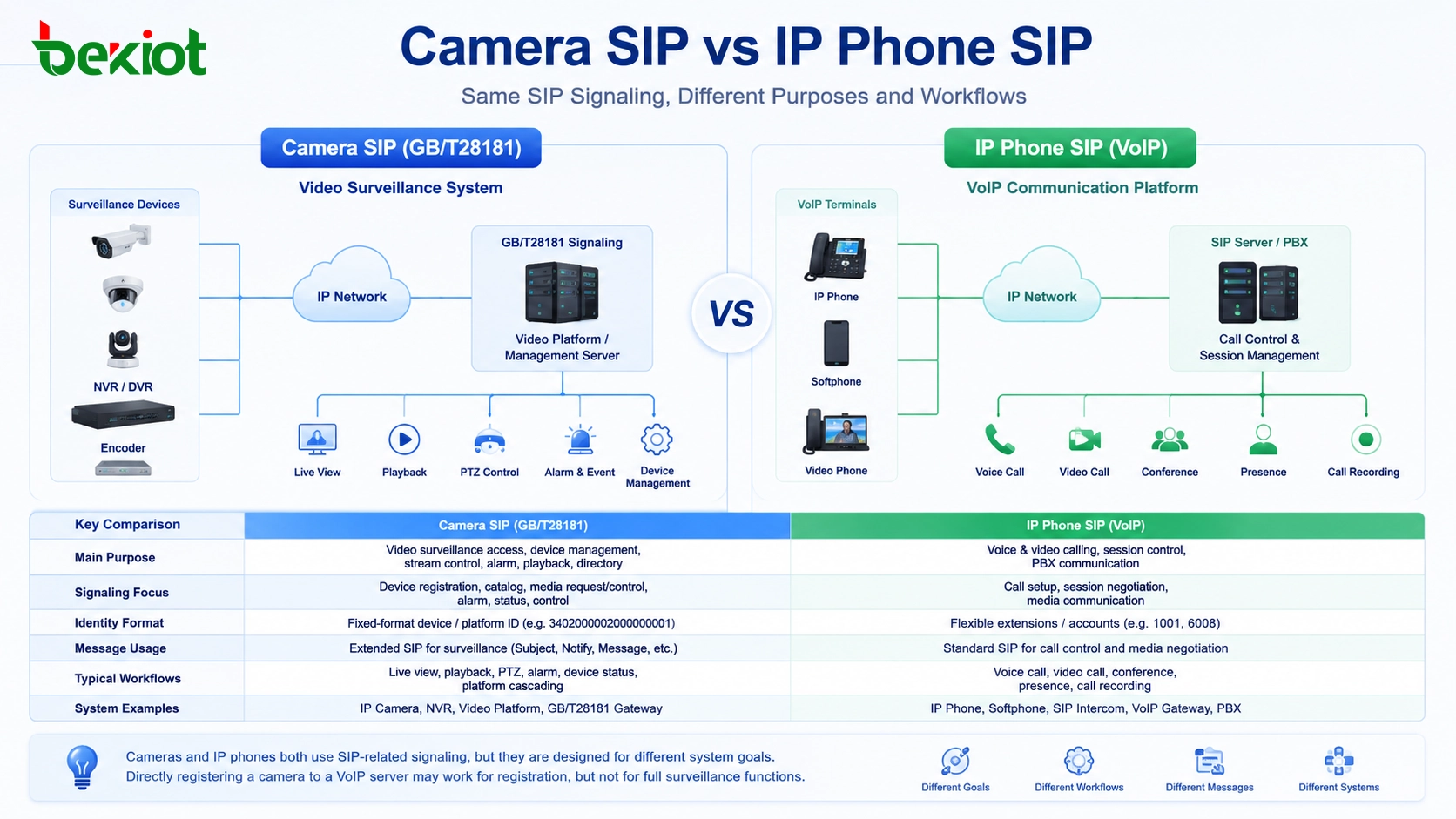
GB/T28181, however, is designed for public security video surveillance networking. It uses SIP-based signaling ideas, but its business goal is not the same as a normal phone call. It focuses on device registration, camera directory management, live video request, recording playback, PTZ control, alarm information, device status, and platform cascading.
This means the SIP in a camera is more like a surveillance control and media access mechanism, while SIP in an IP phone is a communication session mechanism. They may look similar in configuration, but the system behavior is different after registration.
Important parameter differences
One key difference appears in identity and field rules. In a VoIP SIP system, user IDs are usually flexible. A SIP extension can be 1001, 6008, room101, or another account format defined by the PBX. In GB/T28181 systems, device IDs and platform IDs usually follow stricter rules, often using long fixed-format numeric identifiers.
GB/T28181 also extends SIP message usage for surveillance scenarios. For example, the Subject field may carry device ID, channel number, operation type, real-time preview information, or playback control information. These extended fields are meaningful to a video surveillance platform, but a general VoIP SIP server may not understand or process them correctly.
Because of these differences, camera registration to a normal SIP server can be misleading. The server may accept registration at the SIP signaling layer, but it may not understand how to request the camera stream, how to control playback, how to manage the device directory, or how to process monitoring-specific messages.
| Item | Camera GB/T28181 SIP | IP Phone VoIP SIP |
|---|---|---|
| Main purpose | Video surveillance access, device management, stream control | Voice and video calling, session control, PBX communication |
| Typical device | IP camera, NVR, video platform, surveillance gateway | IP phone, softphone, SIP intercom, VoIP gateway |
| Identity rule | Often uses fixed-format device or platform IDs | Usually uses flexible extension or account numbers |
| Core functions | Live view, playback, PTZ, alarm, directory, status | Registration, calling, ringing, media negotiation, DTMF |
| Direct compatibility | Requires adaptation or gateway conversion | Works with standard SIP servers and IP PBX platforms |
Why registration does not mean video can be called
In some integration tests, a GB/T28181 camera may appear online on a SIP server after the authentication ID, password, server address, and port are adjusted. This can make the project team think that the camera is already integrated. But when the platform tries to start a SIP video call or pull the stream, the video may fail to appear.
The reason is that media negotiation and stream control are not the same. A VoIP SIP call expects both sides to negotiate media using standard call behavior. A GB/T28181 camera expects a surveillance platform to send monitoring-specific control messages, request live video, manage channels, and handle streaming according to the national standard workflow.
In addition, many surveillance cameras output high-resolution video streams such as 4K and commonly use H.265 encoding. Many IP phones, video phones, dispatch clients, and communication terminals mainly support H.264 decoding and may be designed for 720P or 1080P video communication. Even if signaling is adapted, the media codec may still be incompatible.
The role of a video access gateway
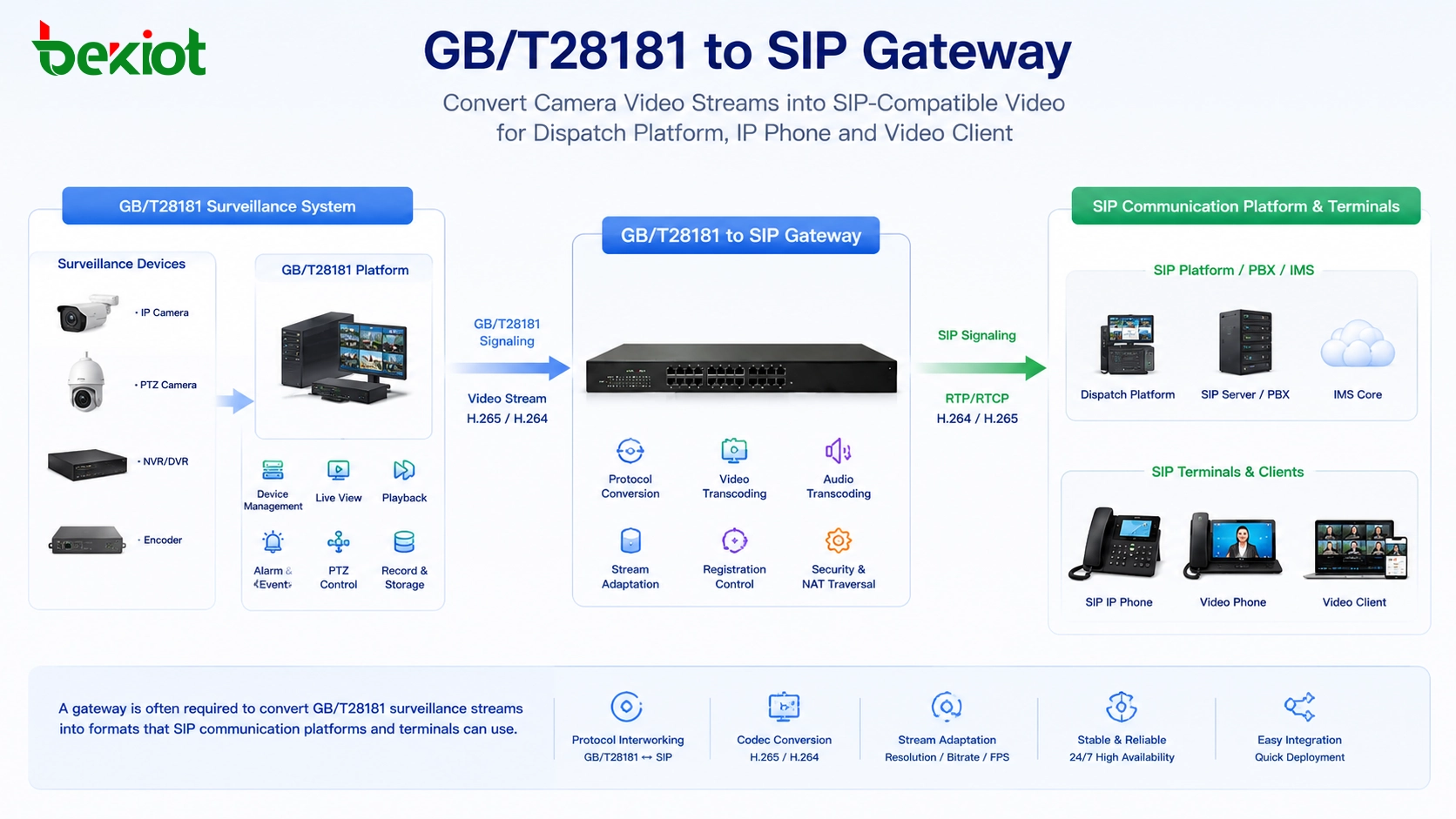
For heterogeneous video and communication integration, a protocol conversion gateway is usually required. This type of device may be called a video access gateway, GB/T28181-to-SIP gateway, or surveillance video integration gateway. Its purpose is to bridge the gap between video surveillance systems and SIP-based communication systems.
On the surveillance side, the gateway should support GB/T28181 functions such as upper-level and lower-level platform connection, camera registration, directory query, live viewing, playback control, PTZ operation, location information, alarm reporting, and device status management. These functions allow the gateway to communicate with cameras and video platforms in a way that matches the surveillance system.
On the communication side, the gateway should support SIP networking, SIP calling, video dispatch, stream forwarding, and terminal adaptation. This allows the dispatch platform, SIP video phone, command console, or unified communication system to call or view camera resources through a communication-friendly method.
Transcoding is often just as important as signaling
Protocol conversion solves only part of the problem. In many projects, codec and resolution conversion are equally important. A surveillance camera may provide 4K H.265 video, while a dispatch terminal or SIP video phone may only support H.264 and 1080P. Without transcoding, the stream may be connected but still cannot be displayed.
A practical gateway should therefore support media adaptation. It may need to convert H.265 to H.264, reduce resolution, adjust bitrate, change frame rate, or package the stream into a format suitable for SIP video communication or web preview. This is especially important in emergency command, industrial dispatch, security operations, and mobile command systems.
When designing a converged communication platform, Becke Telcom / 贝克通信 can be lightly considered for projects that need SIP dispatch, video linkage, field communication terminals, and command center collaboration. In such systems, the video access gateway works as the bridge between surveillance resources and communication workflows.
Where this integration is useful
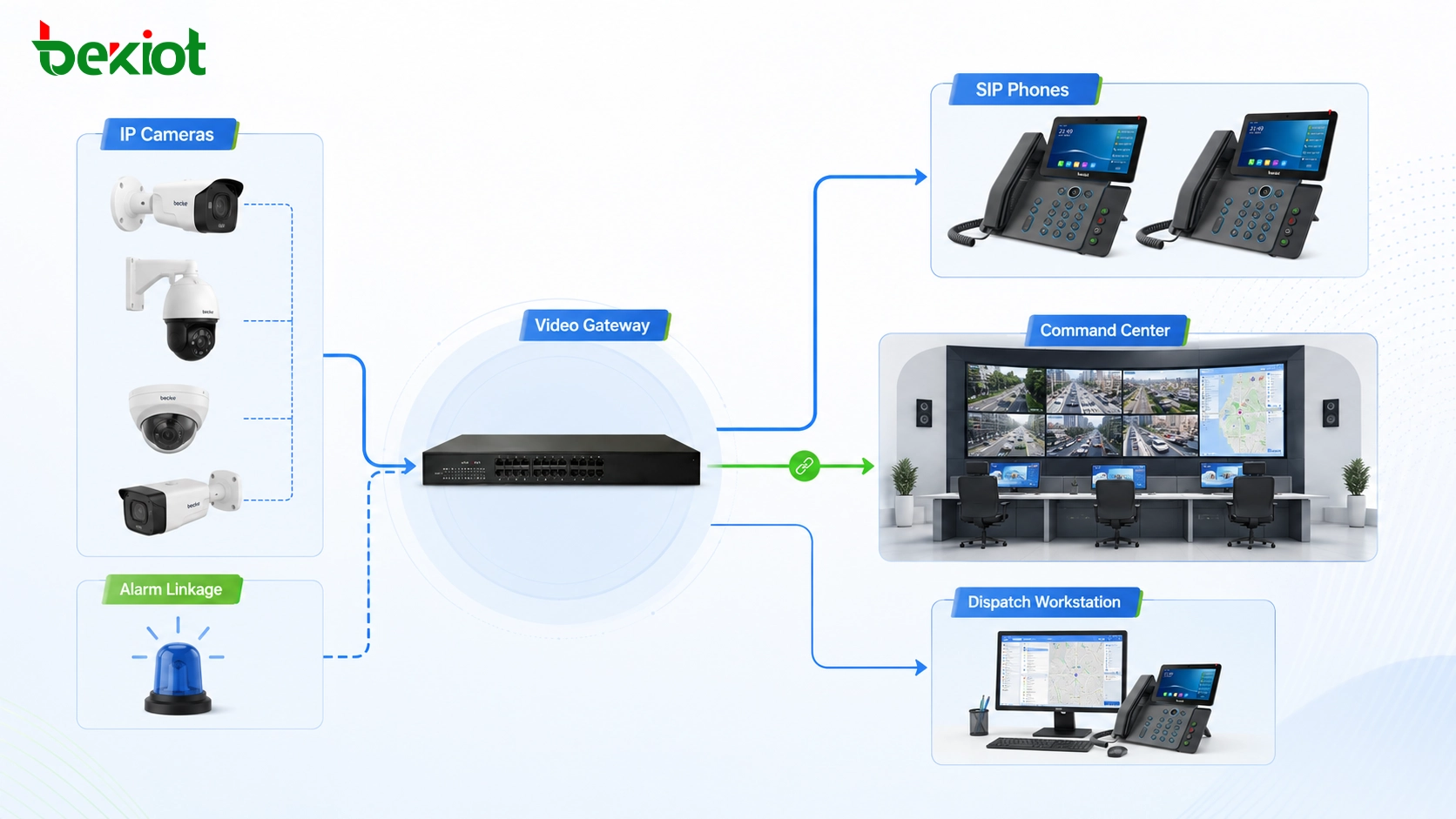
The difference between camera SIP and IP phone SIP matters most in projects where video surveillance must work together with voice dispatch. For example, a command center may need to call an IP phone while also opening a nearby camera image. An industrial control room may need to link an alarm event with live video and voice communication. An emergency vehicle may need to receive field camera video and share it with a remote command platform.
In transportation, energy, chemical plants, campuses, public safety, and industrial parks, video is no longer only a monitoring resource. It is part of the decision-making process. Operators need to combine video images, voice calls, map location, alarms, and dispatch records into one workflow.
A properly designed gateway layer allows cameras, surveillance platforms, SIP terminals, and dispatch systems to work together without forcing one protocol to behave like another. This reduces integration risk and makes the project easier to deliver and maintain.
Project design checklist
Before connecting a camera system to a SIP communication platform, the project team should confirm whether the camera uses GB/T28181, RTSP, ONVIF, proprietary SDK, or another access method. It should also check whether the required function is simple viewing, SIP video calling, alarm linkage, playback, PTZ control, or platform cascading.
The team should also verify the camera codec, resolution, bitrate, frame rate, audio support, channel structure, and authentication method. If the terminal side includes IP phones or video dispatch clients, their decoding capability should be checked before deployment.
For reliable project delivery, do not treat a successful SIP registration result as final compatibility proof. Real testing should include live video call, stream pulling, playback if required, PTZ control, alarm linkage, terminal decoding, network delay, and long-duration stability.
Camera SIP and IP phone SIP are related at the signaling level, but they are designed for different systems. Direct registration may work in some cases, while real service compatibility still requires gateway conversion and media adaptation.
Conclusion
Camera SIP and IP phone SIP are not completely the same. GB/T28181 uses SIP-based signaling for video surveillance networking, while IP phone SIP is designed for VoIP communication and multimedia session control. Their configuration pages may look similar, but their identity rules, message fields, control logic, media negotiation, and application goals are different.
For real projects, the safest approach is to use a video access gateway or GB/T28181-to-SIP gateway when surveillance video needs to enter a SIP dispatch or unified communication system. With proper protocol conversion and transcoding, cameras can become usable video resources for command centers, dispatch platforms, SIP terminals, and emergency communication workflows.
FAQ
Can an IP phone dial a camera directly like another SIP extension?
Usually not. Even if the camera has SIP-related configuration, it may not behave like a standard SIP video phone. A gateway or platform adaptation layer is usually needed to make the camera video available to communication terminals.
Why does the camera show online but no video appears?
The camera may have completed basic signaling registration, but the platform may not support the required GB/T28181 control messages, stream request process, codec, or media transport method.
Should RTSP be used instead of GB/T28181?
It depends on the project. RTSP can be useful for simple stream pulling, while GB/T28181 is more suitable when the project needs device registration, directory management, platform cascading, alarm reporting, playback, or monitoring system integration.
What should be tested before final project acceptance?
Test camera registration, live viewing, terminal playback, codec compatibility, delay, reconnection, PTZ control if required, alarm linkage, recording playback, and whether the dispatch platform can call or push video reliably.
Is transcoding always required?
Not always. If the camera stream format is already supported by the receiving terminal or platform, transcoding may not be necessary. It becomes important when H.265, 4K, high bitrate, or incompatible media formats are involved.







