A call center is often described as a place where agents answer customer calls, but that definition is too narrow for modern business operations. Today, a call center system is a communication, customer management, workflow, supervision, reporting, and service optimization platform.
From a small team using a few phones and spreadsheets to an enterprise environment with hundreds of agents, the core goal remains the same: make customer communication faster, more traceable, and easier to manage. The difference is that modern systems now combine telephony, CRM data, call recording, quality inspection, outbound campaigns, and AI assistance into one operational center.
From Answering Phones to Operating a Service Hub
The role has changed
Traditional customer service teams mainly depended on phone lines, notebooks, and manual records. When call volume increased, this approach quickly created repeated questions, missing records, long waiting times, and inconsistent service quality.
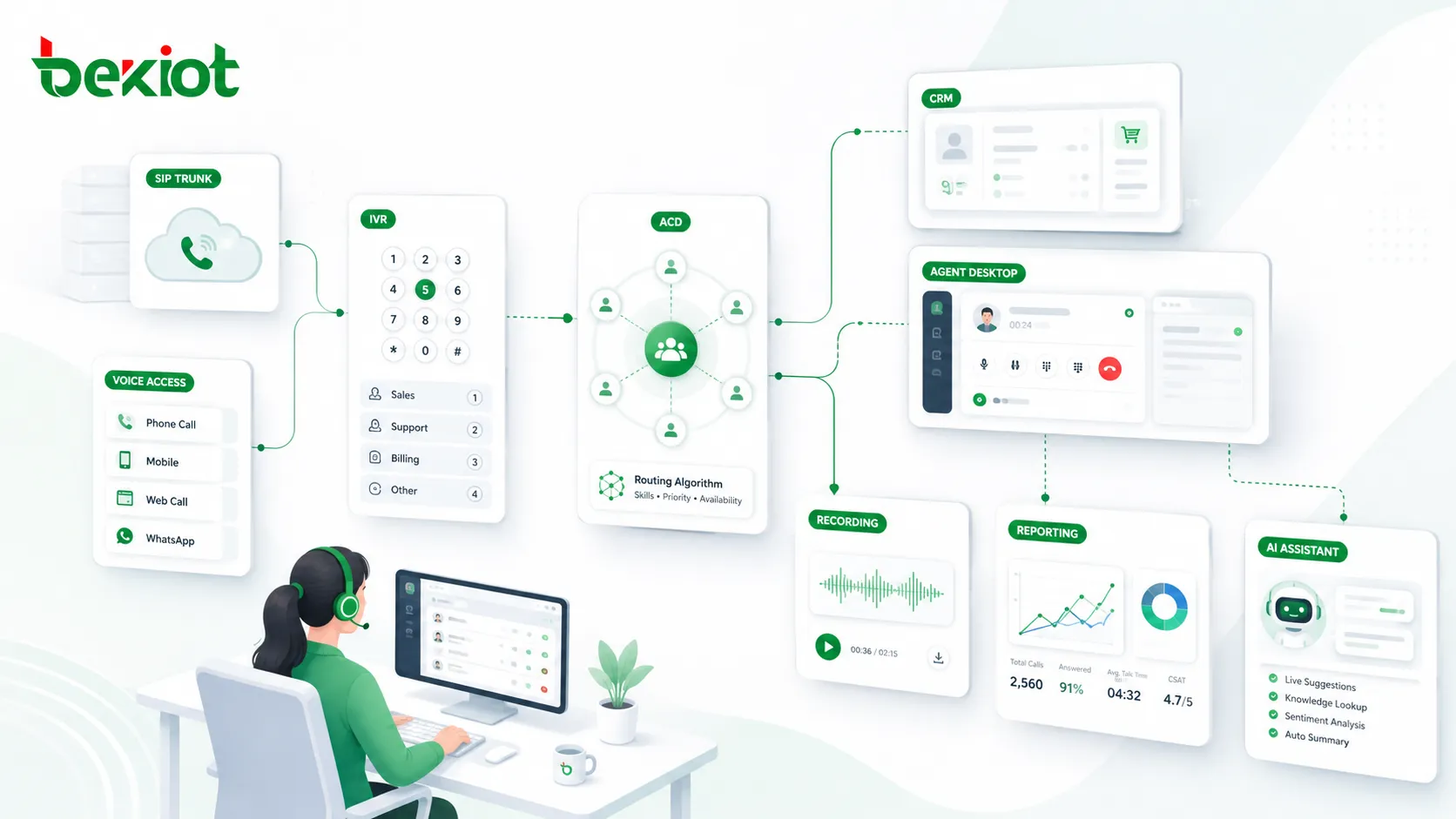
A modern call center system turns phone communication into a structured service process. Every incoming call, outgoing call, customer record, agent action, supervisor intervention, recording file, quality score, and follow-up task can be connected to the same operational workflow.
Why the system matters
The value of a call center is not only in connecting a customer to an agent. Its real value is in preparing the agent before the conversation starts, guiding the agent during the conversation, recording what happened after the conversation ends, and helping managers understand service performance.
For customer-facing businesses, this creates a more reliable service experience. Customers do not need to repeat the same personal information every time they call, agents do not need to search blindly, and managers can see where service problems are happening.
The central logic of a call center system is simple: reduce repetitive work, lower communication costs, and make every service interaction traceable.
Core Voice Controls That Keep Conversations Moving
Agent login and device binding
In a professional call center, an agent does not simply pick up a random desk phone. The agent logs in to the system, selects an extension or device, and becomes part of the routing and monitoring environment.
Depending on the deployment model, agents may answer calls through a softphone with a headset, a desk phone, a mobile phone, or another bound device. This makes remote work, branch-office service, and flexible staffing easier to support.
Call handling during live conversations
Basic call control is still important. Agents need hold, consultation, transfer, and three-party conference capabilities. These functions help agents handle real service situations instead of forcing customers to call again or wait without explanation.
For example, an agent can place a customer on hold while checking an order, consult a senior colleague without the customer hearing the internal discussion, transfer the call to a specialist, or invite another expert into a three-party conversation.
After-call work and wrap-up time
When a call ends, the system should not immediately push another call to the same agent if the previous case still needs documentation. After-call work gives the agent time to write a service record, update a ticket, choose a result code, or schedule a follow-up.
This short wrap-up period prevents incomplete records and improves service continuity. Without it, agents may handle more calls on paper, but service quality and traceability often become weaker.
Customer Context Appears Before the Agent Speaks
Screen pop and CRM integration
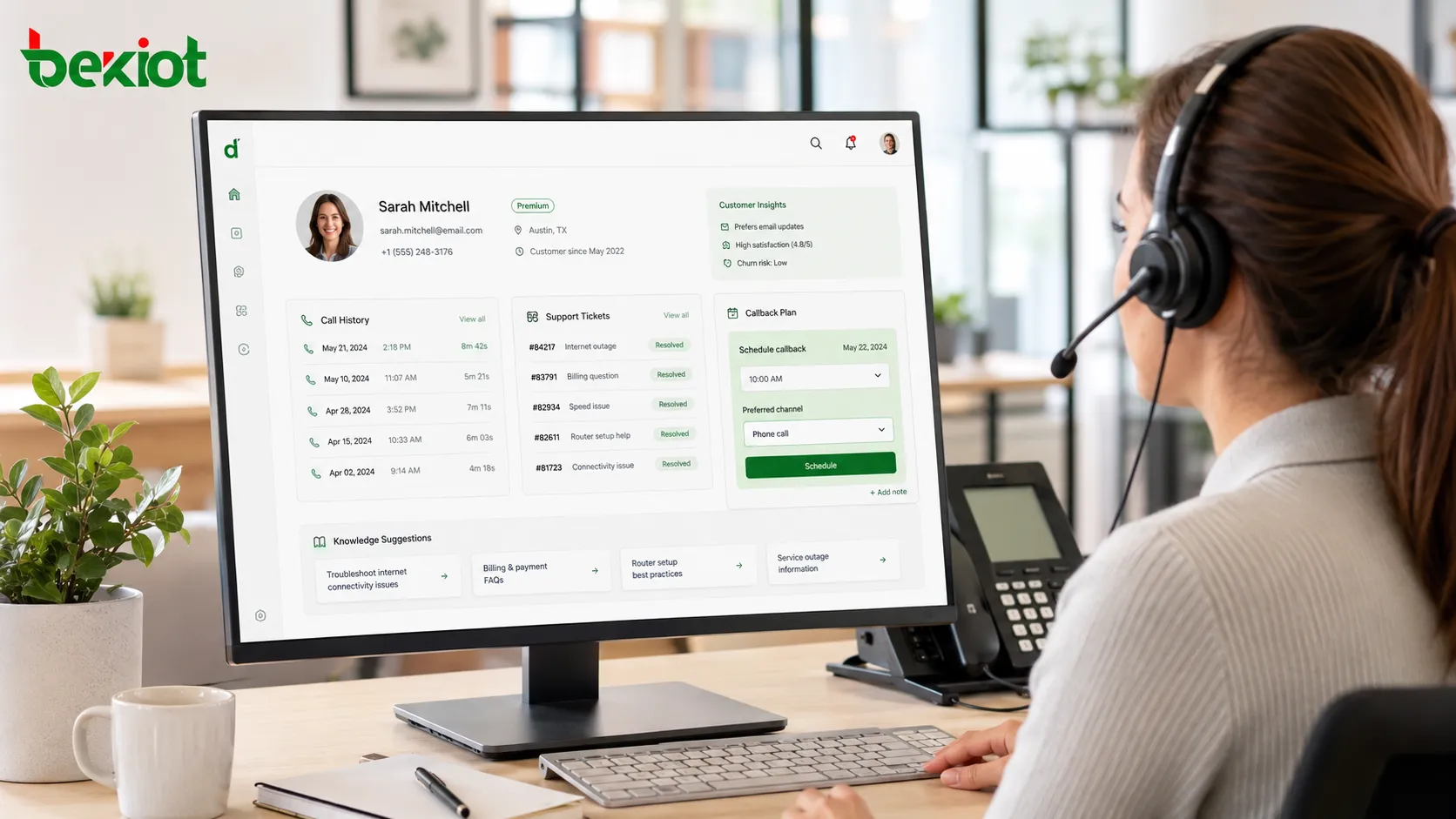
One of the most valuable features in a call center is the customer screen pop. When a customer calls in, the system can automatically display the customer profile, order history, complaint history, previous tickets, contact information, and related call records.
This means the agent can start the conversation with context instead of asking the customer to repeat everything from the beginning. In practical service operations, this may reduce a call that previously took five minutes to around two minutes while improving the customer experience.
What agents can do from the workspace
The agent desktop is not only a call control panel. It can also be a customer service workspace where agents update customer information, add call notes, create or modify tickets, check historical recordings, and schedule callback plans.
For example, if a customer reports damaged delivery packaging, the agent can record the issue, arrange reshipment, and create a follow-up reminder. If the customer changes a phone number, the agent can update the profile immediately during the call.
Supervisors Need Live Visibility, Not After-the-Fact Guesswork
Real-time queue and agent monitoring
A supervisor needs to know what is happening while the service operation is running. Real-time monitoring can show how many customers are waiting, how long they have waited, which agents are idle, which agents are on calls, and which agents are in break or wrap-up status.
This visibility is useful for daily management. If the queue suddenly grows, the supervisor can adjust staffing. If a call lasts unusually long, the supervisor can check whether the agent needs help.
Intervention tools for difficult calls
Advanced supervisor functions include silent monitoring, whisper coaching, barge-in, and forced disconnect. Silent monitoring allows the supervisor to listen without interrupting the conversation. Whisper coaching allows the supervisor to guide the agent while the customer cannot hear the supervisor.
Barge-in lets the supervisor join the conversation directly when a case becomes difficult or sensitive. Forced disconnect may be used in situations such as malicious harassment calls. These tools are not designed for supervision alone; they are designed for timely support when service risk appears.
Evidence, Metrics, and Quality Management After the Call
Recording as service evidence
Call recording is one of the most important parts of a call center system. It provides evidence when a customer disputes what was said, when a complaint needs review, or when a service process must be checked.
Recordings also support training. New agents can review successful conversations and understand how experienced agents handle objections, emotional customers, product questions, and complex service requests.
Reports for management decisions
Call center reporting turns daily operations into measurable data. Managers can review how many inbound calls each agent answered, how many outbound calls were made, total talk time, average handling time, queue pressure, missed calls, and service workload by time period.
This data supports decisions such as whether more training is needed, which agents perform well, which time periods need more staffing, and which customer issues occur most frequently.
Quality inspection and scoring
Quality inspection changes service quality from a subjective impression into a measurable process. A quality inspector can review recordings and score calls according to standards such as greeting, verification, politeness, problem resolution, compliance wording, and closing confirmation.
Instead of saying that one agent “seems good” or another agent “may need improvement,” the business can use structured scores and review records to support coaching and process optimization.
Outbound Workflows for Proactive Service
Task-based outbound calling
A call center is not limited to receiving calls. It can also support outbound campaigns, customer follow-up, satisfaction surveys, payment reminders, service notifications, appointment confirmation, and membership care.
Managers can import a customer list, create an outbound task, and assign it to agents. The system can dial automatically, mark completed contacts, avoid repeated dialing, and record the result of each call.
Scheduled follow-up and callback appointments
Follow-up planning is important for after-sales service. An agent can create a reminder such as “call the customer in three days to confirm whether the replacement product has arrived.” When the time arrives, the system reminds the agent to call.
Callback appointment is another useful workflow. If a customer says, “Call me back at 3 p.m.,” the agent can set a scheduled callback. At the scheduled time, the system can connect the agent and customer without relying on manual reminders.
Where AI Changes Daily Operations
Real-time assistance during the call
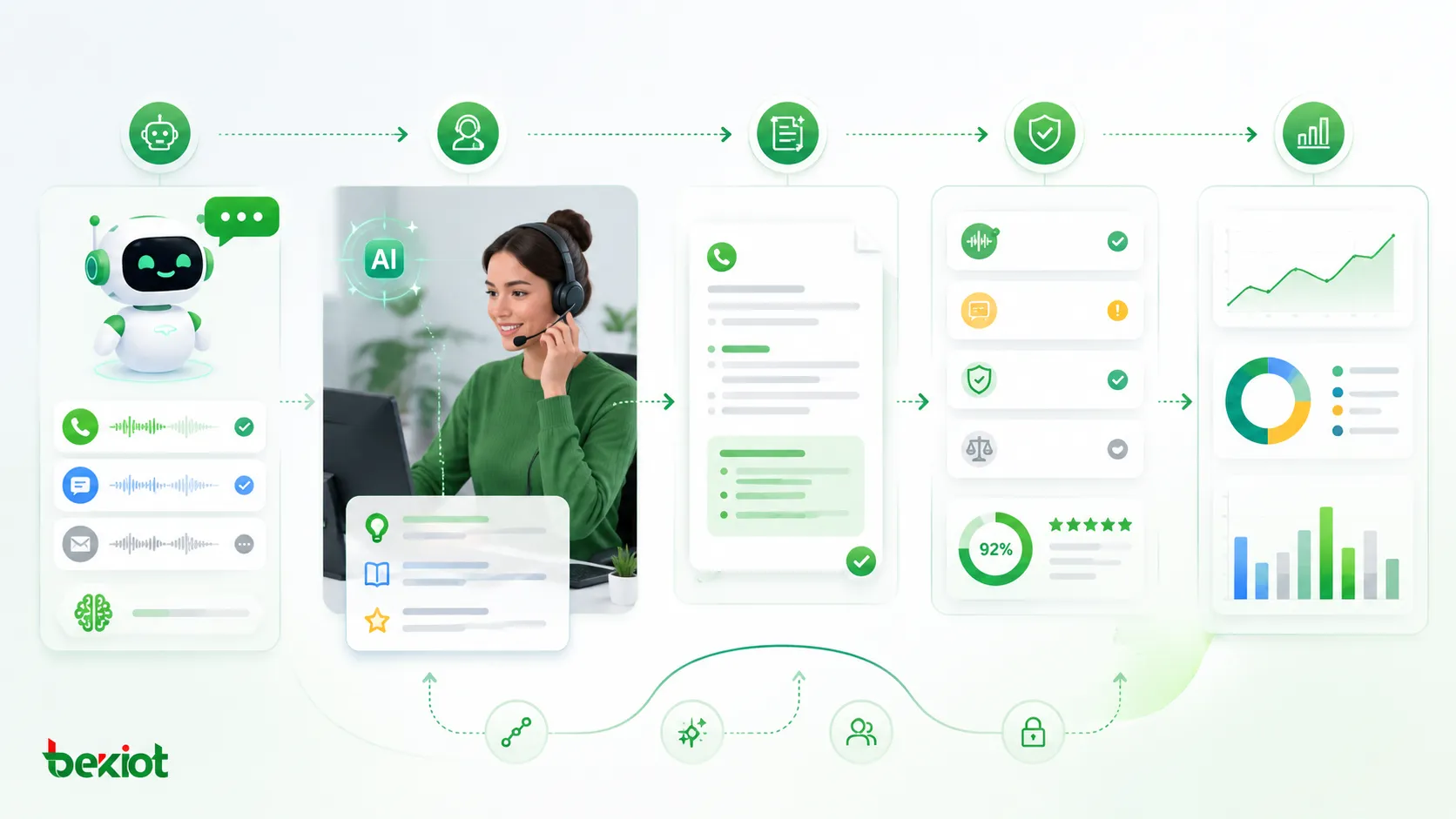
AI is becoming practical in call center operations because it supports agents at the moment they need help. When a customer says, “I want to return this product,” the system can identify the intent and display the return policy, required steps, and recommended response.
If the customer becomes emotional, AI can analyze tone, speaking speed, and wording, then remind the agent to slow down, acknowledge the issue, and use a more calming response. This gives every agent a form of real-time expert support.
Automatic summaries and smarter knowledge access
After a call, AI can generate a service summary and fill key information into the ticket. Instead of spending several minutes writing a complete record, the agent may only need to review and adjust the generated summary. In many cases, wrap-up work can be reduced from minutes to tens of seconds.
AI also improves knowledge management. Traditional knowledge bases depend on keyword search and often return several long articles. An AI knowledge base can answer direct questions, such as warranty period, return conditions, or configuration steps, and provide the agent with a more precise response.
Bot pre-processing and intelligent quality inspection
When a customer calls in, a voice bot or chatbot can collect basic information, identify the problem, handle simple requests, and transfer complex cases to a human agent. When the human agent receives the call, the bot can pass the customer issue and context to the agent.
AI quality inspection can also review every call instead of only a small sample. It can detect prohibited words, missing verification steps, whether an agent introduced required information, and whether service rules were followed. Calls with potential problems can then be sent to human reviewers. This moves quality control closer to 100% coverage.
Business Value by Role
For business owners and managers
A call center system helps managers understand what agents are doing, why customers are calling, which problems appear most often, and where service resources are under pressure. It also provides recordings and records when disputes need to be reviewed.
More importantly, it standardizes service. A business should not depend only on one experienced employee who remembers all procedures. The system helps turn service knowledge, workflows, follow-up rules, and performance measurement into repeatable operations.
For agents
Agents benefit from customer context, integrated call controls, knowledge suggestions, AI summaries, and supervisor support. They can see who the customer is, what happened before, what action should be taken, and when they need to escalate the case.
This reduces repetitive typing and unnecessary questioning. It also helps new agents become productive faster because the system gives them guidance instead of leaving them to rely only on memory.
For customers
Customers benefit from shorter conversations, fewer repeated questions, faster problem resolution, and more consistent answers. When records are complete, the customer does not need to explain the same situation again during the next contact.
This is why a call center system is not only an internal management tool. It directly affects customer trust, service speed, and brand perception.
Deployment Notes for Modern Communication Environments
Integration with SIP, CRM, and enterprise systems
A practical deployment usually connects telephony access, SIP trunks, PBX or IP-PBX platforms, IVR, ACD routing, CRM, ticketing, recording storage, reporting dashboards, and sometimes video or dispatch systems. The exact architecture depends on business size, compliance needs, and whether agents work on-site or remotely.
For organizations that also need SIP endpoints, voice gateways, dispatch communication, or hybrid telephony access, Becke Telcom can be considered as a lightweight integration option within broader communication projects. The key is to design the call center as part of the complete service and communication network, not as an isolated phone tool.
Security and operational reliability
Because call center systems handle customer data, recordings, tickets, and service history, security must be considered from the beginning. User permissions, recording access control, data retention rules, encrypted transmission, audit logs, and backup strategy should be planned before the system goes live.
Reliability is equally important. If customer service depends on the platform, businesses should evaluate redundancy, failover, network quality, SIP trunk stability, storage capacity, and disaster recovery requirements.
Implementation Checklist
Start with the service process
Before selecting features, the business should define how calls enter the system, how they are routed, how agents identify customers, how tickets are created, how follow-ups are scheduled, and how supervisors handle exceptions.
A strong call center project starts from workflow design, not from buying a long list of functions. The system should match the business process and then improve it.
Measure what matters
The most useful metrics are not always the largest numbers on a dashboard. Businesses should focus on the indicators that reflect service quality and operational pressure, such as waiting time, first contact resolution, missed calls, average handling time, after-call work time, customer issue categories, and quality inspection results.
When these metrics are connected with recordings, tickets, and customer outcomes, managers can improve service with evidence instead of assumptions.
Conclusion
The function of a call center has expanded far beyond answering phones. It now combines customer data, call routing, agent desktops, supervisor tools, recording, reporting, outbound tasks, workflow automation, and AI assistance.
The technology keeps changing, but the business logic remains stable: make communication more efficient, make service traceable, reduce repetitive work, and let people focus on the parts of service that still require judgment, empathy, and problem-solving.
AI will not simply replace customer service agents. However, agents and organizations that know how to use AI-assisted tools will work faster, respond better, and manage service quality more consistently than those that do not.
FAQ
How should a company choose between cloud and on-premises deployment?
Cloud deployment is often suitable for fast rollout, remote agents, and lower maintenance workload. On-premises deployment may be preferred when the business has strict data control, private network requirements, local recording storage rules, or integration with internal PBX and security systems.
What should be prepared before launching a call center project?
The business should prepare call flow rules, agent groups, customer data fields, CRM or ticketing integration requirements, recording retention policy, supervisor permission levels, reporting needs, and training materials. Clear process design reduces later rework.
Can an existing PBX system be connected to a new call center platform?
In many cases, yes. Existing PBX systems can often be connected through SIP trunks, gateways, or CTI integration. The final method depends on the PBX model, available interfaces, routing requirements, and whether the business wants to keep legacy phones during migration.
How can businesses avoid poor AI results in customer service?
AI should be connected to reliable knowledge sources, reviewed by service managers, and tested with real customer scenarios. It should assist agents, not replace process control. Human review is still important for sensitive cases, complaints, compliance issues, and high-value customers.
What is the biggest mistake in call center implementation?
The biggest mistake is treating the system as only a phone platform. A successful call center project should connect communication, customer data, workflow, quality management, reporting, and continuous service improvement.