


ONVIF integration refers to the process of connecting IP-based physical security devices and software through standardized ONVIF interfaces so that they can discover each other, exchange capabilities, stream media, report events, and work together in a more predictable way. In practical terms, it is the bridge that helps an IP camera, NVR, VMS, access control system, analytics service, or cloud platform communicate without relying entirely on one vendor’s private protocol.
That matters because modern security and operational systems rarely stay single-brand for long. A project may begin with one camera vendor, then later add video management software from another supplier, analytics from a third party, and access control or intercom functions from somewhere else. ONVIF integration reduces the friction in these mixed environments by giving devices and clients a common language for the most important tasks.
What Does ONVIF Integration Mean?
At a basic level, ONVIF is not a camera model, recorder type, or software platform. It is a family of network interface specifications and profiles for IP-based physical security products. Integration, therefore, means implementing and using those interfaces correctly so that devices and clients can interoperate in the field.
In a typical project, ONVIF integration may involve a camera exposing standardized services, a client discovering that camera on the network, authenticating to it, reading its capabilities, pulling or subscribing to events, requesting stream URLs, configuring media profiles, and optionally controlling PTZ, digital I/O, recording, metadata, or analytics functions. When everything works well, the installer sees faster onboarding, simpler replacement workflows, and less dependence on proprietary SDKs.

ONVIF integration usually begins with discovery, capability matching, authentication, and service negotiation across devices and client platforms.
How ONVIF Integration Works
Discovery and Initial Connection
One of the first practical benefits of ONVIF integration is device discovery. Instead of manually entering every detail from scratch, a client can search the local network for compatible devices, identify reachable services, and start the onboarding process with less guesswork. This is especially useful in projects with dozens or hundreds of endpoints.
Discovery alone, however, is not the whole story. After a device is found, the client still needs to connect to the proper service endpoints, understand what the device supports, and determine how it should authenticate. A smooth ONVIF integration therefore depends on more than a checkbox on a product brochure. It depends on how completely and correctly the device and client implement the relevant services.
Capability Exchange and Profile Matching
After discovery, the client typically reads service and capability information to learn what the device can actually do. This is where ONVIF profiles become especially useful. Profiles package selected features into defined conformance sets so that buyers and integrators can better predict interoperability between devices and clients that claim the same profile.
For example, a project focused on video streaming and PTZ control may care most about video-oriented profiles, while a deployment centered on analytics metadata, license plate recognition, or event-driven workflows may care more about metadata-related profiles. In real projects, profile matching is often what determines whether an integration will feel straightforward or frustrating.
Streaming, Events, Metadata, and Control
Once a client knows what the device supports, ONVIF integration moves into operational use. A VMS may request live streams, an NVR may manage recordings, a control room client may subscribe to motion or tampering alarms, and an analytics service may receive metadata describing people, vehicles, faces, or other classified objects. In more advanced deployments, the system may also coordinate PTZ movement, audio, relay outputs, or access-control events.
This is why ONVIF integration is more than “getting video.” A mature integration can involve live video, recorded video, event handling, status monitoring, metadata exchange, rule-based triggers, and security-related settings. The richer the workflow, the more important it becomes to choose the right profile support on both the device side and the client side.
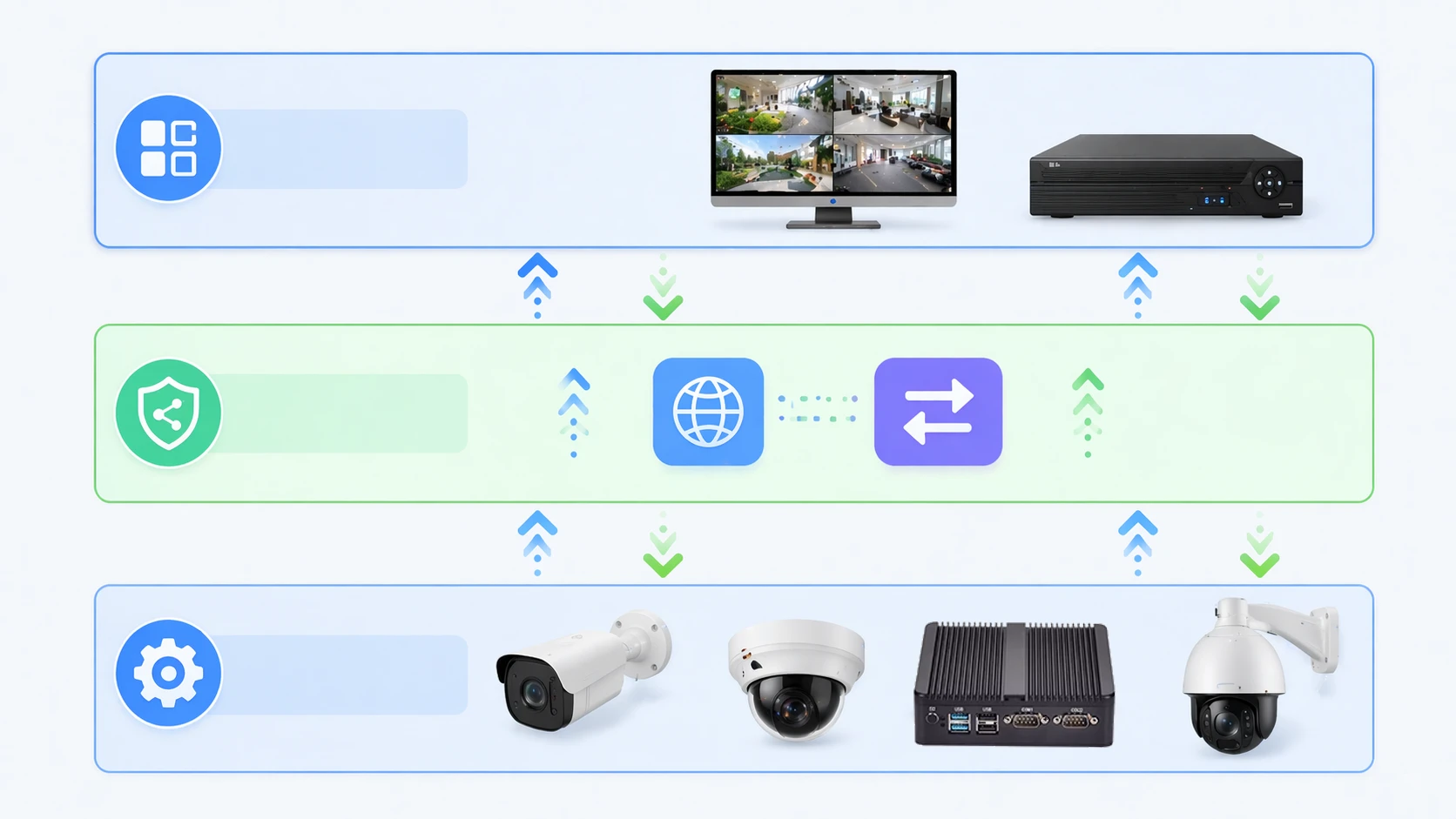
In real deployments, ONVIF integration often combines live video, event notifications, metadata, PTZ control, and system management instead of handling only one function.
Key Features of ONVIF Integration
Multi-Vendor Interoperability
The most widely recognized benefit of ONVIF integration is interoperability. It allows integrators to combine cameras, software, recorders, and related systems from different manufacturers with a lower risk of complete lock-in. This does not mean every feature from every product will behave identically, but it does make integration planning far more predictable than relying only on proprietary interfaces.
For end users, this can translate into more freedom during expansion, migration, or replacement. If one device line is discontinued, if a VMS changes, or if a project must scale into another building or site, ONVIF conformance can make those transitions less disruptive.
Standardized Video and Audio Workflows
ONVIF integration is often associated first with video because streaming is the most visible function in many deployments. But the practical value comes from standardized control around that stream as well: media setup, imaging-related options, PTZ behavior, and in some cases audio-related functions. In a well-planned system, these shared interfaces reduce the amount of vendor-specific tuning needed during commissioning.
This standardization is especially important in central monitoring environments where one operator console may need to manage many device types at once. Without common interfaces, every manufacturer tends to introduce its own assumptions about stream setup, naming, authentication, and event behavior.
Event and Metadata Integration
Another major feature is the ability to move beyond passive viewing. ONVIF integration can carry event notifications such as motion, tampering, digital input changes, or rule-based alerts. In newer and more analytics-driven environments, it can also support metadata workflows that describe what the system sees rather than just showing the image itself.
This makes a big difference in modern operations. Metadata can improve search, automation, alarm validation, people counting, vehicle tracking, queue monitoring, and integration with higher-level software. Instead of asking an operator to watch every scene continuously, the system can surface relevant information in a structured way.
Scalable Device and Platform Integration
A strong ONVIF integration strategy also supports growth. Projects may begin with a few cameras and a small recorder, then expand into multi-site management, hybrid cloud architecture, access control linkage, smart building workflows, or industrial monitoring. Standardized interfaces help those expansions happen with less redesign.
This scalability is one reason ONVIF remains relevant in both security and adjacent operational environments. Even when a deployment eventually uses custom APIs for advanced business logic, ONVIF often remains the practical baseline for onboarding and core interoperability.
Important ONVIF Profiles in Real Projects
Profiles are central to understanding ONVIF integration because they turn broad specifications into more concrete interoperability expectations. For video projects, Profile T is commonly associated with advanced video streaming features such as H.264 or H.265, metadata streaming, and related controls. Profile S has long been associated with basic video streaming and PTZ-oriented workflows, although many new projects now pay closer attention to Profile T.
For analytics and metadata-heavy use cases, Profile M matters because it standardizes metadata handling, object-related information, filtering, and event workflows that can feed VMS platforms, cloud services, or IoT-style applications. In broader solutions, additional profiles may matter for edge recording, access control, or easier installation and configuration.
The key lesson is simple: when planning ONVIF integration, do not stop at the phrase “supports ONVIF.” Check which ONVIF profile or profiles are actually supported, and whether support exists on both the device side and the client side for the workflow you need.
Common Applications of ONVIF Integration
Video Management and Recording Systems
The most common application is the connection between cameras and a VMS or NVR. Here, ONVIF integration helps with discovering devices, onboarding them faster, pulling live streams, managing some configurations, and receiving event notifications. In mixed-brand environments, this can significantly reduce deployment complexity.
It also helps operators keep systems maintainable over time. If a site changes camera vendors or expands gradually, an ONVIF-based approach can preserve more of the overall platform logic than a purely proprietary design would.
Access Control and Unified Security Platforms
Another major application is unifying video with access control. A door event can trigger camera actions, a client can correlate access events with nearby video, and a control platform can present more useful incident context. In these scenarios, ONVIF integration becomes part of a wider security workflow rather than a standalone video feature.
This matters in campuses, factories, logistics parks, transportation sites, and commercial buildings where operators want fewer isolated systems and more connected incident awareness.
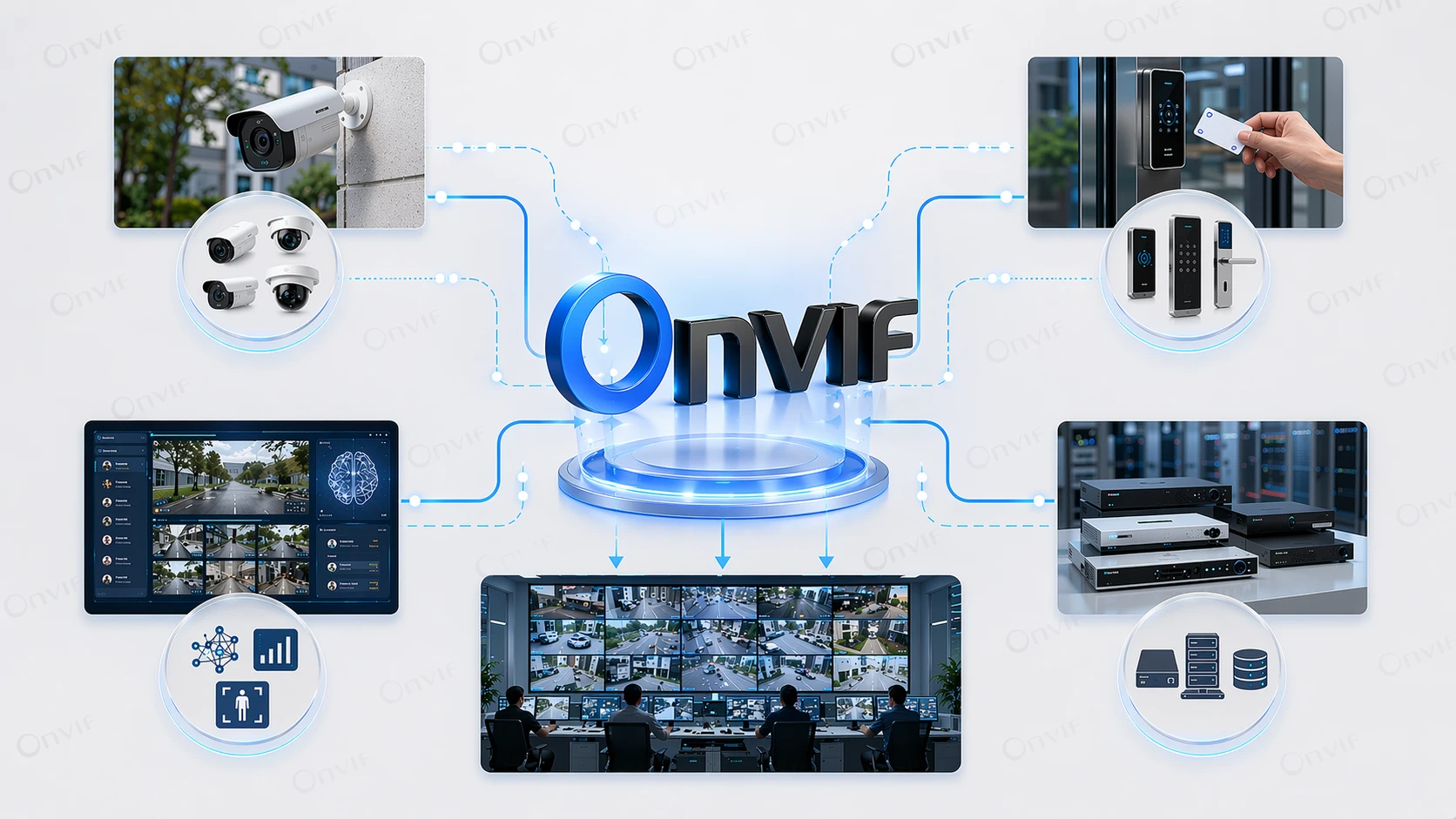
ONVIF integration is often used to connect video with access control, analytics, and unified monitoring platforms in multi-vendor environments.
Analytics, Smart Buildings, and Operational Visibility
As analytics have become more important, ONVIF integration has become valuable for more than security footage. Metadata-driven workflows can support visitor counting, queue observation, parking access logic, zone occupancy awareness, and event forwarding to broader operational systems. In this sense, ONVIF can serve as a practical link between imaging devices and higher-level applications.
That does not make ONVIF a full building management protocol, but it can help security devices participate in wider automation and monitoring ecosystems when supported correctly by both the devices and the consuming platforms.
Industrial, Transport, and City-Scale Environments
Large and distributed environments also benefit from ONVIF integration because they rarely remain technically uniform. A transport hub, utility site, industrial campus, or municipal deployment may combine legacy devices, new cameras, specialized analytics, recording servers, and command software over time. Standardized interoperability is valuable precisely because these environments evolve.
In such projects, ONVIF integration can reduce the burden of replacing one subsystem at a time. It does not eliminate commissioning work, but it can make phased upgrades more realistic.
Planning Considerations and Common Limits
ONVIF integration is powerful, but it should not be oversold. Conformance improves interoperability, yet not every proprietary feature of a device will automatically appear in every third-party platform. A camera might support vendor-specific analytics, deep imaging controls, or custom AI functions that fall outside the profile used by the client.
That is why good planning still matters. Integrators should verify exact profile support, test the real workflow, confirm authentication behavior, check stream and event handling, and review whether needed features are mandatory, conditional, or proprietary. The phrase “ONVIF supported” is a starting point, not a complete integration checklist.
Security design also matters. ONVIF supports modern cybersecurity-oriented work, but integrators remain responsible for choosing secure credentials, network segmentation, patching policy, and the right deployment architecture. Standardized interfaces improve interoperability, not immunity from poor system design.
FAQ
Is ONVIF integration only for IP cameras?
No. Cameras are the most familiar example, but ONVIF also covers broader IP-based physical security products and services, including video clients, recorders, analytics services, and access-control-related components depending on the relevant profile.
Does ONVIF guarantee that every feature will work between any two products?
Not necessarily. ONVIF greatly improves interoperability, but results depend on which profiles and features both sides support. Matching profile support is much more meaningful than a vague claim of ONVIF support.
What is the difference between ONVIF Profile S, T, and M?
In simplified terms, Profile S is associated with basic video streaming workflows, Profile T with more advanced video streaming features, and Profile M with metadata and analytics-related workflows. Real project planning should still verify the exact device and client capabilities.
Why is ONVIF integration useful in multi-vendor systems?
Because it reduces dependence on proprietary interfaces and makes it easier to connect devices and software from different suppliers. That can lower integration risk, improve future replacement flexibility, and simplify phased expansion.
Does ONVIF replace all proprietary APIs?
No. ONVIF often covers the shared baseline needed for interoperability. Proprietary APIs may still be used for advanced vendor-specific functions that go beyond the selected ONVIF profile or standard service set.
Conclusion
ONVIF integration is best understood as a practical interoperability layer for IP-based physical security systems. It helps devices and software discover one another, exchange capabilities, stream media, report events, and participate in broader workflows with less dependency on closed vendor ecosystems.
When chosen carefully and verified against the right ONVIF profiles, it can make security and operational systems more flexible, more scalable, and easier to evolve over time. The strongest results usually come from treating ONVIF not as a marketing label, but as a concrete design tool for building cleaner multi-vendor integrations.







