


A conference bridge is a conferencing resource that connects multiple participants into one shared call or meeting session. In practical terms, it acts as the central media point that receives audio or video streams from individual participants, processes those streams, and sends each participant a usable output stream for the conference. Instead of every participant being connected directly to every other participant in a mesh pattern, the conference bridge becomes the central point where the conference is combined and controlled.
This concept is widely used in business telephony, PBX systems, SIP communications, unified communications platforms, and cloud meeting services. It is especially important in environments where several people need to join the same call while using different device types, different networks, or different access methods. A conference bridge makes that possible by turning many separate call legs into one managed conference session.
Although the term is often associated with audio conferencing, conference bridges can also support video conferencing or mixed-media collaboration depending on the platform. In traditional telephony, a conference bridge may be a hardware or software media resource inside the PBX environment. In cloud communications, the bridge may be a hosted dial-in or meeting service that answers calls and places participants into a conference room automatically. In both cases, the underlying purpose is the same: create a single multi-party communication space from separate incoming connections.
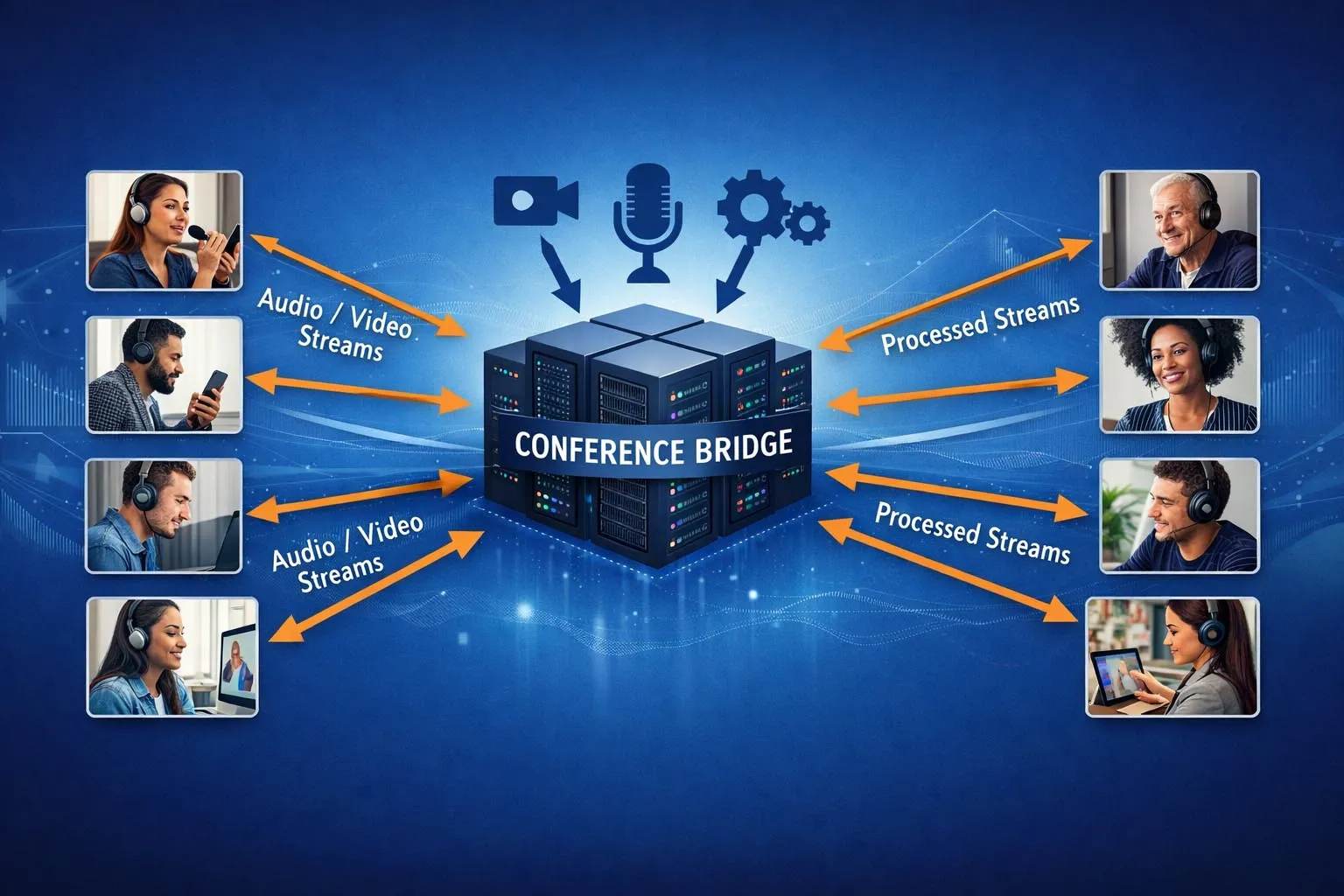
A conference bridge joins multiple participants into one shared audio or video session instead of relying on many direct point-to-point call paths.
What Conference Bridge Means in Telephony
A Shared Media Resource for Multi-Party Calls
At its core, a conference bridge is a media resource that hosts the conference itself. When several users join the same conference, they are not simply placed on independent calls that happen to be related. They are connected to a centralized conference resource that manages the conference media. This resource receives each participant’s stream, combines or processes the streams, and delivers a conference output back to the participants.
This media-bridging role is what makes the term conference bridge different from general call signaling alone. The signaling system may set up who joins and when, but the conference bridge is the resource that makes the shared media session actually work. In Cisco’s design guidance, for example, a conference bridge is described as a resource that joins multiple participants into a single call and creates a unique output stream for each connected party.
This is why conference bridges are a foundational part of multiparty telephony architecture. Without them, ad hoc conferencing, meet-me conferencing, and dial-in audio conferencing would be much harder to implement in a controlled, scalable way.
Different from Simple Call Transfer or Call Pickup
A conference bridge should not be confused with other common call-control features. Call transfer moves an active call from one destination to another. Call pickup allows a user to answer a ringing extension on behalf of someone else. A conference bridge, by contrast, supports a shared session in which multiple users remain connected at the same time.
The distinction matters because a conference bridge does not merely move call legs around. It creates a persistent media environment where several call legs coexist as one multi-party conversation. This is why a phone system may support transfer and call pickup even when dedicated conferencing resources are limited, while larger or higher-quality conferencing usually requires specific conference bridge capacity.
A conference bridge is not simply a call-control shortcut. It is the media engine that turns multiple separate call connections into one managed conference.
How a Conference Bridge Works
Separate Call Legs Join One Conference Space
A conference usually begins when one participant creates or joins a conference session and other participants are added to that same session. Each participant reaches the conference bridge through a separate call leg. Those call legs may come from desk phones, softphones, mobile clients, SIP trunks, PSTN dial-in numbers, or integrated video endpoints.
Once the participants are connected, the conference bridge treats those separate legs as part of one common conference. This is what allows users on different devices and even different networks to share the same conversation without having to establish direct pairwise sessions with everyone else.
In Microsoft Teams Audio Conferencing, for example, the bridge answers callers who dial in to a meeting by phone, plays voice prompts, and then places them into the meeting session. That is a clear example of the bridge acting as the joining point for multiple incoming participants.
Media Mixing and Per-Participant Output
One of the most important tasks of a conference bridge is media mixing. Each participant sends audio into the bridge. The bridge then creates an output stream for each participant that contains the conference audio from the other participants. Cisco’s documentation explains that the output stream for a given party is the composite of the streams from all connected parties minus that party’s own input stream.
This is why the bridge must have real media-processing capacity. It is not enough to keep track of who is connected. The bridge must also process codecs, timing, packet handling, and stream composition so the conference remains intelligible and stable. In video conferences, that task can become more complex because layout, video streams, bandwidth adaptation, and transcoding may also be involved.
Because conference bridges perform active media work, their size and capabilities matter. Different bridge types support different numbers of streams, different codecs, and different conferencing modes.
Conference Control and Resource Allocation
Beyond media handling, the conference bridge also works with the wider call-control platform. The PBX, SIP server, or cloud service decides when a conference should be created, which users may join, and what permissions or policies apply. The bridge then provides the underlying media resource required for that conference to function.
In Cisco Unified Communications Manager, for example, software and hardware conference bridges can both be configured, and they differ in the number of streams and codec types they support. Cisco also documents that both hardware and software conference bridges can be active at the same time.
This relationship between call control and media resource is one of the most important design ideas in conferencing architecture. The signaling platform determines the conference logic, while the conference bridge provides the actual conferencing resource.
Main Features of a Conference Bridge
Multiparty Audio or Video Support
The most recognizable feature of a conference bridge is support for multiple participants in a single call. Depending on the bridge type, this may be a small ad hoc audio conference for a few participants, a larger meet-me conference, or a more advanced audio-video session with many endpoints.
Different systems define capacity differently. Some conference bridges are optimized for modest business telephony conferencing, while others are designed for larger enterprise or platform-scale conferencing. The supported participant count depends on media resources, codec requirements, and platform design.
Ad Hoc and Meet-Me Conferencing
Conference bridges commonly support two classic conferencing models: ad hoc conferencing and meet-me conferencing. In ad hoc conferencing, a user starts with an ordinary call and then adds more participants, merging them into the same conference. In meet-me conferencing, users dial a designated conference number or URI to join a shared conference room.
Cisco documentation has long described conference bridges as the resource used for ad hoc and meet-me voice conferencing. That distinction remains useful because it reflects two different user workflows: building a conference dynamically versus joining a pre-established bridge access point.
Codec and Stream Management
Conference bridges also manage codec compatibility and media streams. Different bridges may support different codec sets, stream counts, and transcoding behavior. This matters because participants may join from varied device types and network conditions, and the conference bridge must handle the resulting media complexity.
In practical deployment, codec support can influence whether a bridge is appropriate for narrowband telephony, wideband voice, mixed audio-video conferencing, or heterogeneous endpoint environments. This is one reason administrators need to evaluate media support rather than only participant count.
Security and Encrypted Media Handling
Another important feature is conference security. In secure telephony environments, the conference bridge may handle encrypted device connections and maintain conference security according to the security posture of the connected participants. Cisco’s security documentation notes that when an encrypted phone connects to a secure conference bridge, media between the device and the bridge is encrypted, while the overall conference security status depends on the security levels of all connected parties.
This makes conference bridges relevant not only to convenience and scale, but also to secure collaboration design.
A strong conference bridge is not defined only by how many people it can host. It is also defined by what codecs, security levels, and conferencing modes it can support reliably.
Network Architecture of a Conference Bridge
Conference Bridge Inside PBX or UC Infrastructure
In traditional enterprise telephony, the conference bridge often sits inside the PBX or UC media-resource environment. Phones and trunks register to the call-control platform, and when a conference is created, the platform allocates a conference bridge resource. The bridge may be software-based, hardware-based, or implemented through gateway DSP resources depending on the platform.
This architecture is common in IP PBX systems and SIP-based enterprise UC environments because it separates signaling and media resources in a manageable way. Administrators can control conferencing policies centrally while still scaling media resources according to business needs.
In this model, the conference bridge becomes part of the internal media services layer of the enterprise communications stack.
Hosted or Cloud Audio Conferencing Bridge
In cloud environments, the conference bridge is often a hosted service rather than a local media resource. Users join from apps, phones, or dial-in numbers, while the cloud platform hosts the actual bridge. Microsoft Teams Audio Conferencing is a clear example: organizations receive an Audio Conferencing bridge, and callers can dial in using phone numbers assigned to that bridge.
This architecture reduces the need for on-premises bridge provisioning and is particularly useful for distributed teams, remote workers, hybrid workforces, and organizations that want dial-in meeting access without maintaining local conferencing hardware.
SIP Conferencing and Conference Focus
In SIP conferencing architecture, the conference bridge is often associated with the broader concept of a conference focus. RFC 4579 describes tightly coupled SIP conferencing and explains how conference-aware or conference-unaware user agents interact with a conferencing entity. The bridge may be part of the same physical or logical conferencing system that manages conference state, participant control, and media resources.
This SIP-centered architecture is important because it shows that a conference bridge is not only a piece of telephony hardware. It can also be part of a standards-based conferencing framework where signaling, conference control, and media resources are coordinated together.

Conference bridges can be deployed as on-premises PBX media resources, SIP conferencing components, or hosted cloud audio bridges.
Common Types of Conference Bridges
Software Conference Bridge
A software conference bridge runs as a software resource within the communications platform or associated server environment. It is often easier to deploy and manage than dedicated conferencing hardware, especially in small and mid-sized systems. It is well suited to organizations that want integrated audio conferencing without adding separate bridge appliances for every use case.
However, software conference bridges may have different codec and scaling characteristics than hardware-based bridges. Their capacity depends on platform design and allocated processing resources.
Hardware Conference Bridge
A hardware conference bridge uses dedicated hardware or DSP resources to host conference sessions. This model has historically been important in larger enterprise and service-provider telephony environments where codec diversity, stream count, or conferencing scale demanded specialized media resources.
Hardware bridges can be valuable when predictable conferencing performance is important or when the conferencing workload is substantial enough to justify dedicated media capacity.
Cloud Audio Conference Bridge
A cloud audio conference bridge is a hosted conferencing resource that allows users to join by dial-in phone number or app-based meeting workflow. It is especially useful in hybrid and distributed business environments because it gives internal and external users a shared access point without requiring local conference bridge infrastructure.
In modern collaboration environments, this is one of the most visible conference bridge models because it supports PSTN dial-in access to scheduled or ad hoc cloud meetings.
Applications of Conference Bridges
Enterprise PBX and Office Conferencing
One of the most common applications is business telephony conferencing within an enterprise PBX or IP PBX environment. Employees can launch ad hoc conference calls, join meet-me conferences, and coordinate across departments without leaving the phone system environment.
This is useful for management coordination, internal collaboration, customer support escalation, and branch-to-headquarters communication where several people need to join the same voice session quickly.
SIP and Unified Communications Platforms
Conference bridges are also widely used in SIP and UC environments where desk phones, soft clients, mobile apps, and external participants need to be combined into one conference. In these settings, the bridge supports both traditional telephony conferencing and broader collaboration workflows.
This makes conference bridges relevant in modern enterprise communication stacks even when messaging and video tools are also present.
Cloud Meetings and Dial-In Access
Hosted conference bridges are commonly used to allow users to dial in to cloud meetings by phone. This is especially valuable for external participants, users in low-bandwidth situations, field workers, and scenarios where app-based participation is not practical.
The bridge provides the connection point that turns ordinary phone calls into meeting participation.
Contact Centers and Escalation Workflows
Contact centers and service operations often use conference bridges for supervisor assistance, expert join-in, customer escalation, and multi-party service resolution. An agent can bring in a supervisor or specialist while keeping the customer on the same session, and the bridge handles the shared media path.
This improves service continuity and avoids the need for repeated transfers or disconnected conversations.
Multi-Site and Distributed Communications
Conference bridges are also useful in organizations with multiple locations, remote teams, or distributed operations. They allow users from different branches, networks, and access methods to enter the same conversation space through a centralized conferencing resource.
This is particularly valuable in global businesses, operational command environments, healthcare networks, and industrial organizations where collaboration must work across site boundaries.
Conference bridges create value wherever several participants need to collaborate in one voice or media session without depending on direct point-to-point calling alone.
Deployment Considerations and Best Practices
Match Bridge Type to Real Workload
The first design question is what kind of conferencing the organization actually needs. A small office that only requires occasional ad hoc audio conferences may be well served by integrated software resources. A larger enterprise or mixed-media environment may require more scalable hardware or cloud-based conferencing services. The right choice depends on conference size, concurrency, codec needs, and user access methods.
Capacity planning should focus on real conference behavior rather than only theoretical participant limits. Concurrent conferences, dial-in demand, and peak-hour usage all matter.
Consider Codec, Security, and Endpoint Diversity
Conference bridges must work with the endpoints and trunks in the real environment. That means administrators should verify codec support, encryption behavior, device compatibility, and any need for transcoding or mixed-media support. A bridge that looks sufficient on paper may not match the actual endpoint population or security policy of the business.
Testing should therefore include not only participant count but also realistic combinations of internal phones, external callers, and soft clients.
Separate Signaling Design from Media Capacity
It is also good practice to distinguish between conference control features and conference media capacity. A platform may offer conference features in the user interface, but the actual conference success rate still depends on available bridge resources. This is why administrators should verify how the platform allocates conference bridge resources and what happens when those resources are exhausted.
That separation between signaling and media is central to sound conferencing design.
FAQ
What is a conference bridge in simple terms?
A conference bridge is a conferencing resource that joins multiple participants into one shared audio or video session by receiving and processing separate call legs centrally.
What is the difference between a conference bridge and a normal call?
A normal call usually connects two endpoints directly through the call platform, while a conference bridge hosts a shared session that multiple participants join at the same time.
Can a conference bridge be software or hardware?
Yes. Conference bridges may be software-based, hardware-based, or hosted in the cloud depending on the communications platform and deployment model.
What is a cloud audio conferencing bridge?
It is a hosted conferencing resource that allows participants to join a meeting by phone or app through a cloud communications platform instead of relying on local on-premises bridge hardware.
Where are conference bridges commonly used?
They are commonly used in PBX systems, SIP and UC platforms, cloud meetings, contact centers, escalation workflows, and multi-site business communications environments.







