


User Datagram Protocol, commonly abbreviated as UDP, is a transport layer protocol used to send data across IP networks with minimal overhead. It allows applications to transmit small units of data called datagrams without first establishing a formal connection between sender and receiver.
Unlike TCP, which focuses on reliable delivery, sequencing, retransmission, and flow control, UDP is designed for speed, simplicity, and low latency. It is widely used in real-time communication, online gaming, video streaming, DNS queries, VoIP media, IoT telemetry, network discovery, VPN tunneling, and applications where delayed data may be less useful than fast data.
A Lightweight Way to Move Data
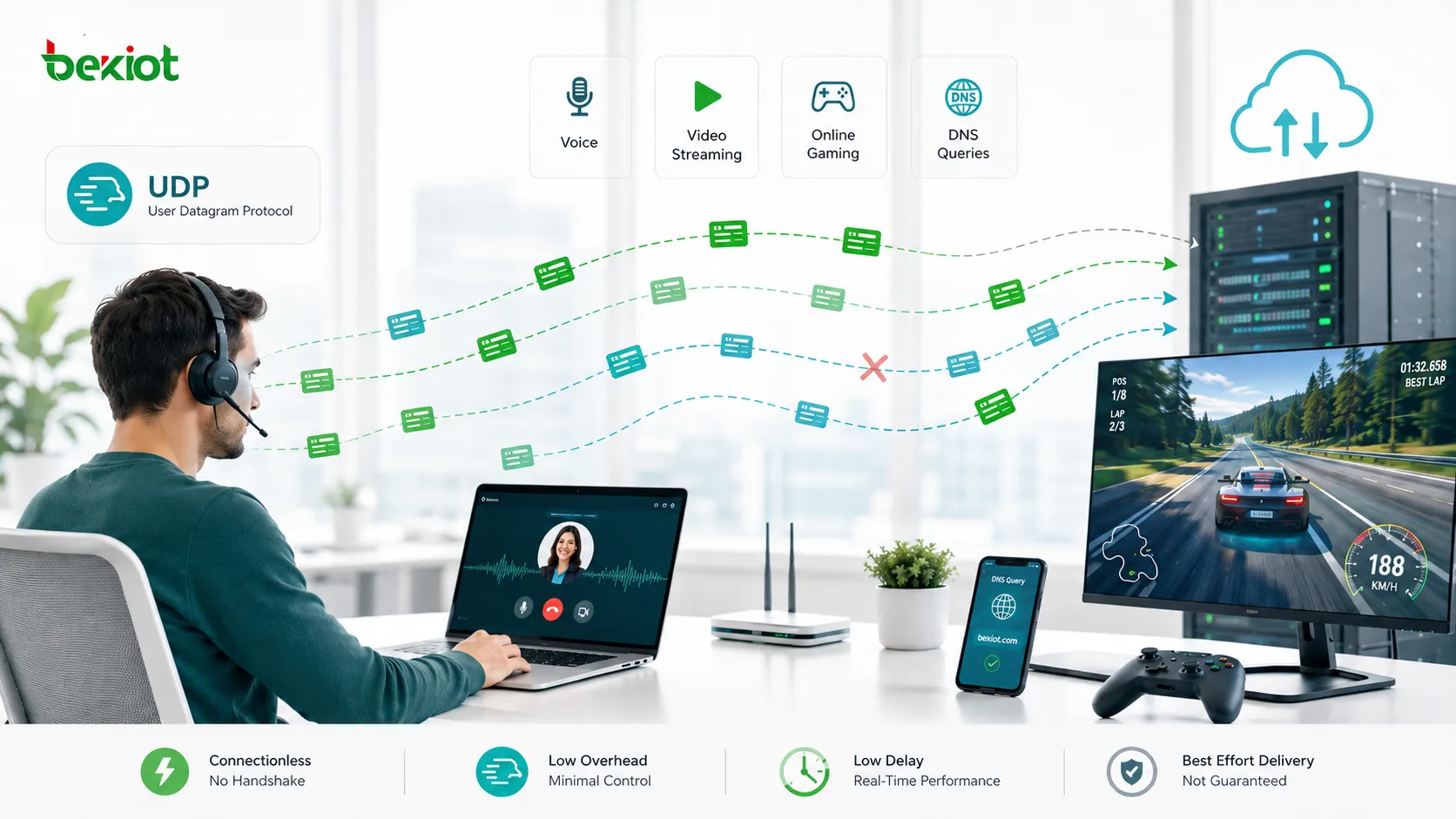
UDP works like sending a message without asking the receiver to confirm every step before transmission. The sender prepares a datagram, adds source and destination port information, and passes it to IP for delivery. The network then attempts to deliver the packet to the destination host.
This lightweight design makes UDP fast. There is no connection handshake before data transfer, no built-in retransmission when a packet is lost, and no strict requirement for packets to arrive in order. This reduces delay and processing overhead, which is useful for applications that must react quickly.
The trade-off is that UDP itself does not guarantee delivery. Packets may be lost, duplicated, delayed, or delivered out of order. If an application needs reliability, it must add its own error handling, retransmission, sequencing, or recovery logic above UDP.
How the Datagram Flow Works
Application Creates the Payload
The process begins when an application needs to send data. This may be a DNS lookup, a voice packet, a game movement update, a video stream segment, a sensor reading, or a discovery message. The application gives this data to the operating system’s UDP layer.
Because the protocol does not manage long sessions in the same way TCP does, applications can send messages quickly and repeatedly. This is helpful when the next update matters more than recovering an older one.
Ports Identify the Service
UDP uses port numbers to identify which application or service should receive the datagram. The source port identifies the sending application, while the destination port identifies the service on the receiving host.
For example, DNS commonly uses UDP port 53, while many voice, video, gaming, and custom application protocols use their own defined port ranges. Without ports, the receiving device would not know which application should process the incoming data.
Header Is Added
The UDP header is small. It contains the source port, destination port, length, and checksum. This compact header is one reason the protocol has low overhead compared with more complex transport mechanisms.
The checksum helps detect corruption in transit. If a datagram is damaged, the receiver may discard it rather than pass bad data to the application. However, checksum validation does not provide retransmission by itself.
IP Handles Network Delivery
After the UDP header is added, the datagram is passed to IP for delivery across the network. Routers forward the packet according to destination address and routing tables. UDP does not know or manage the full path between sender and receiver.
If congestion, firewall rules, routing issues, packet loss, or network failure occurs, UDP does not automatically recover. The application must decide whether to ignore the missing data, request another copy, adjust quality, or change behavior.
Why Some Applications Prefer Speed
In many real-time systems, late data is less useful than missing data. During a voice call, a packet containing a sound fragment from two seconds ago should not suddenly be replayed after the conversation has moved on. In an online game, an old movement update may no longer matter because the player has already moved again.
This is where UDP is valuable. It allows applications to keep moving forward without waiting for retransmission at the transport layer. The application can use jitter buffers, prediction, packet loss concealment, forward error correction, or adaptive bitrate to handle imperfect delivery.
For applications that require every byte to arrive exactly and in order, TCP is often more suitable. For applications that prioritize real-time behavior, UDP gives developers more direct control over timing and recovery strategy.
Core Characteristics
Connectionless Operation
UDP does not require a connection setup handshake before sending data. The sender can transmit a datagram immediately as long as it knows the destination IP address and port.
This makes it useful for quick request-response services, broadcast-style discovery, and real-time applications where connection setup delay should be minimized.
No Built-In Delivery Guarantee
The protocol does not guarantee that a datagram will arrive. It also does not guarantee packet order or prevent duplication. This can sound like a weakness, but it is part of the design that keeps the protocol simple and fast.
Applications that need reliability can add acknowledgments, sequence numbers, retransmission, or state tracking in their own protocol logic.
Low Overhead
The header is small and the behavior is simple. This reduces bandwidth overhead and processing load. For high-volume small messages, this can be an important advantage.
Low overhead is especially useful for DNS, telemetry, real-time media, and lightweight device communication.
Supports Broadcast and Multicast
UDP can support broadcast and multicast communication, depending on network configuration. This allows one sender to reach multiple receivers more efficiently than creating many separate one-to-one sessions.
Multicast is often used in IPTV, service discovery, routing protocols, industrial systems, and some media distribution designs. However, multicast must be supported by switches, routers, and network policy.
Flexible Application Control
Because the protocol provides only basic delivery, applications can build their own behavior on top. A streaming system may prioritize smooth playback. A game server may prioritize fresh state updates. A sensor network may prioritize battery efficiency. A VPN may create its own reliability and encryption layer.
This flexibility is one reason UDP remains important in modern networking despite its simple structure.
UDP is not designed to be unreliable by accident. It is designed to be minimal so that applications can choose their own balance between speed, recovery, and control.
Where It Is Commonly Used
DNS Queries
Domain Name System queries often use UDP because many requests are small and need quick responses. A client asks a DNS server for an address, and the server replies without requiring a full transport connection setup.
If the response is too large or specific conditions require it, DNS can also use TCP. This shows that protocols may choose UDP for speed while still using other methods when reliability or size requirements change.
Voice and Video Communication
VoIP calls, video meetings, SIP media streams, RTP audio, WebRTC sessions, and real-time conferencing commonly rely on UDP for media transport. The reason is simple: live audio and video need low delay.
If a few packets are lost, the application may conceal the loss or slightly reduce quality. Waiting too long to recover old packets would make the conversation feel delayed and unnatural.
Online Gaming
Games often send frequent position, movement, action, and state updates. A game server may care more about the latest player position than an old update that arrived late.
Game developers often add their own reliability layer for important events such as login, inventory, match state, or purchases, while using fast datagrams for real-time gameplay movement.
Streaming and Live Media
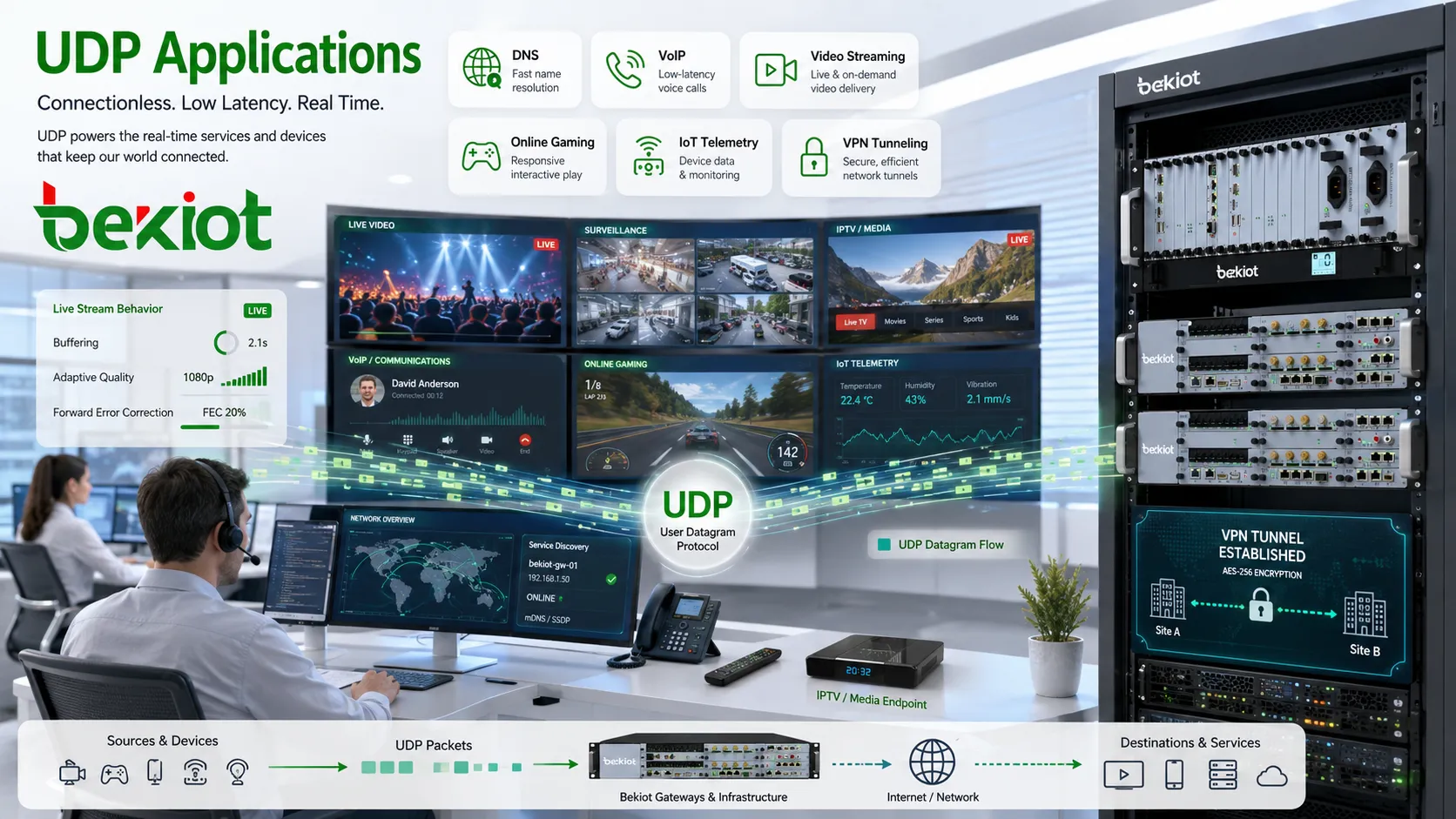
Live video, IPTV, surveillance streams, and real-time broadcasting may use UDP-based transport methods where timing is critical. The system may use buffering, adaptive quality, or forward error correction to handle network variation.
For on-demand video where buffering is acceptable, TCP-based delivery may also be common. The best transport depends on whether the stream is live, interactive, or pre-recorded.
IoT and Sensor Data
Many IoT devices send small status reports, sensor readings, heartbeat messages, or control signals. UDP can be useful when devices need lightweight communication and do not want the overhead of maintaining many connections.
However, IoT systems should still consider reliability, security, and network loss. Critical alarms, firmware updates, and control commands may require stronger confirmation than ordinary telemetry.
VPN and Tunneling Protocols
Some VPN technologies use UDP because it performs well under variable network conditions and avoids certain delays that can occur when reliable protocols are nested inside each other.
When a VPN carries TCP traffic inside a TCP tunnel, retransmission behavior can sometimes interact poorly. UDP-based tunneling gives the VPN software more control over reliability, encryption, and timing.
Network Discovery
Device discovery and service discovery protocols often use UDP because they need to send simple messages to find devices or services on a local network. Broadcast or multicast behavior can help one message reach multiple potential responders.
This is common in printers, smart devices, media devices, industrial equipment, and local service discovery systems. Network segmentation and firewall rules may affect whether discovery works across subnets.
Design Benefits for Developers and Networks
The main benefit is low latency. Because there is no connection handshake and no mandatory retransmission, applications can send data quickly and keep real-time communication moving. This is useful for voice, video, gaming, telemetry, and control signals where timing matters.
Another benefit is simplicity. UDP is easy to implement at the transport layer, and its lightweight design works well for small messages. This also makes it useful for embedded systems, constrained devices, and simple query-response services.
Scalability can also be an advantage. A server can receive datagrams from many clients without maintaining the same connection state model used by TCP. This can be useful for certain high-volume services, although application-level design and security still matter.
Finally, the protocol gives application developers flexibility. They can choose which messages need acknowledgment, which can be dropped, which should be repeated, and which should expire quickly. This lets the application match transport behavior to real business or technical needs.
Limitations and Risks
Packet Loss
Datagrams can be lost during congestion, routing changes, wireless interference, firewall filtering, or network failure. Since UDP does not retransmit automatically, the application may never receive the missing data unless it has its own recovery method.
For non-critical real-time updates, this may be acceptable. For important commands, transactions, or records, additional reliability is needed.
Out-of-Order Delivery
Packets may arrive in a different order than they were sent. This can happen when packets take different network paths or experience different delays.
Applications that need ordering must include sequence numbers or timestamps and decide how to reorder, discard, or process packets.
No Congestion Control by Default
TCP includes congestion control to reduce sending rate when the network becomes overloaded. UDP does not provide this automatically. If an application sends too aggressively, it may contribute to congestion and packet loss.
Responsible application design should include rate control, adaptive bitrate, pacing, or congestion-aware behavior where needed.
Firewall and NAT Challenges
Some networks restrict UDP traffic more aggressively than TCP. NAT devices may create temporary mappings for UDP flows and close them quickly if no traffic is seen. Firewalls may block unknown UDP ports.
Applications often use keepalive messages, STUN, TURN, ICE, or relay services to support communication across NAT and firewall environments.
Security Exposure
Because UDP is connectionless, attackers may spoof source addresses more easily in some scenarios. It is also used in certain reflection and amplification attacks when poorly protected services reply to forged requests.
Services using UDP should validate requests, limit response size, apply rate limits, restrict access where possible, and use encryption or authentication when needed.
Reliability Methods Built Above It
Although the protocol itself is minimal, many applications add reliability features at a higher layer. A real-time media system may use sequence numbers, timestamps, jitter buffers, packet loss concealment, and forward error correction. A gaming protocol may retransmit only important state changes while ignoring outdated movement updates.
Some modern transport technologies also build advanced behavior over UDP. They can provide encryption, stream multiplexing, congestion control, and faster connection setup while still using UDP as the underlying transport. This shows that the protocol can act as a flexible foundation for more advanced communication models.
The key design question is not whether UDP is reliable or unreliable in isolation. The real question is whether the application using it has the right reliability, security, and timing logic for its purpose.
Comparison with TCP in Practical Terms
TCP is usually preferred when complete and ordered delivery is required. File downloads, web pages, email transfer, database connections, and many business applications need data to arrive correctly and in sequence. TCP handles connection setup, acknowledgments, retransmission, ordering, and congestion control.
UDP is preferred when speed, timing, or application-specific control matters more. Real-time audio, live video, DNS lookups, gaming updates, and telemetry may not benefit from waiting for delayed retransmissions at the transport layer.
Neither protocol is universally better. They serve different design goals. A well-designed application chooses the transport behavior that matches its data type, user experience, network conditions, and security requirements.
Deployment and Troubleshooting Tips
When deploying services that use UDP, confirm the required ports and protocols. Opening a TCP port does not automatically allow UDP traffic, even if the port number is the same. Firewalls, routers, cloud security groups, and host firewalls must allow the correct protocol.
Test from both directions when needed. UDP does not establish a visible connection like TCP, so a silent result does not always prove that the service is reachable. Packet capture, application logs, server-side counters, and test tools can help confirm whether datagrams arrive.
For real-time services, monitor packet loss, jitter, latency, and out-of-order packets. A service may technically be reachable but still perform poorly if the network path is unstable.
For NAT environments, check mapping timeouts and keepalive behavior. If a session works briefly and then stops, the NAT device may be closing the UDP mapping too quickly.
UDP troubleshooting should focus on whether packets arrive, whether the application listens on the right port, whether firewall rules match the protocol, and whether network quality supports the application’s timing needs.
Security Best Practices
Do not expose unnecessary UDP services to the public internet. Unknown or unused services should be blocked by default. Public-facing services should be updated, monitored, and rate-limited.
Use authentication and encryption where the data is sensitive or where commands can affect systems. UDP does not provide confidentiality, identity verification, or replay protection by itself.
Limit amplification risk. Services should avoid sending large replies to unauthenticated small requests, especially on public networks. Rate limiting and source validation can reduce abuse.
Log abnormal traffic. Sudden spikes in datagrams, repeated requests from unusual sources, or unexpected destination ports may indicate scanning, misconfiguration, or attack activity.
FAQ
Can UDP be encrypted?
Yes. Encryption can be added above UDP by protocols or applications. The transport itself does not encrypt data, so security must be provided by another layer.
Why do UDP port tests sometimes show no response?
Many UDP services do not reply unless the request format is correct. A lack of response may mean the port is filtered, the service is not listening, or the test packet did not contain valid application data.
Does UDP work with IPv6?
Yes. UDP can run over IPv4 and IPv6. The transport behavior is similar, but addressing, firewall rules, and network configuration may differ.
Can UDP packets be larger than the network MTU?
They can be fragmented at the IP layer, but fragmentation can increase loss risk. Many applications keep datagrams small enough to avoid fragmentation.
Why do real-time apps often tolerate some packet loss?
Because waiting for old data can create delay. Real-time apps often prefer to continue with the latest data and use concealment, prediction, buffering, or adaptive quality to reduce the impact of loss.







