


All-Call Paging, often called All Call, is a communication function that allows an operator, dispatcher, receptionist, supervisor, or automated system to send one announcement to all configured paging endpoints at the same time. These endpoints may include IP speakers, analog speakers, paging amplifiers, SIP phones, intercom terminals, ceiling speakers, horn speakers, wall speakers, dispatch consoles, and public address zones. Instead of calling one person or one area, All-Call Paging sends the message across the entire selected communication scope.
The value of All Call becomes clear when information must reach everyone quickly. A fire drill notice, evacuation instruction, severe weather alert, shift change reminder, emergency lockdown message, facility closure notice, production warning, or public service announcement may need to cover the whole building, campus, plant, station, warehouse, or operating area. All-Call Paging turns one voice input into a wide-area announcement, helping organizations reduce delay, avoid repeated manual calls, and maintain a unified communication channel for urgent or site-wide information.
How All-Call Paging works
One source to many endpoints
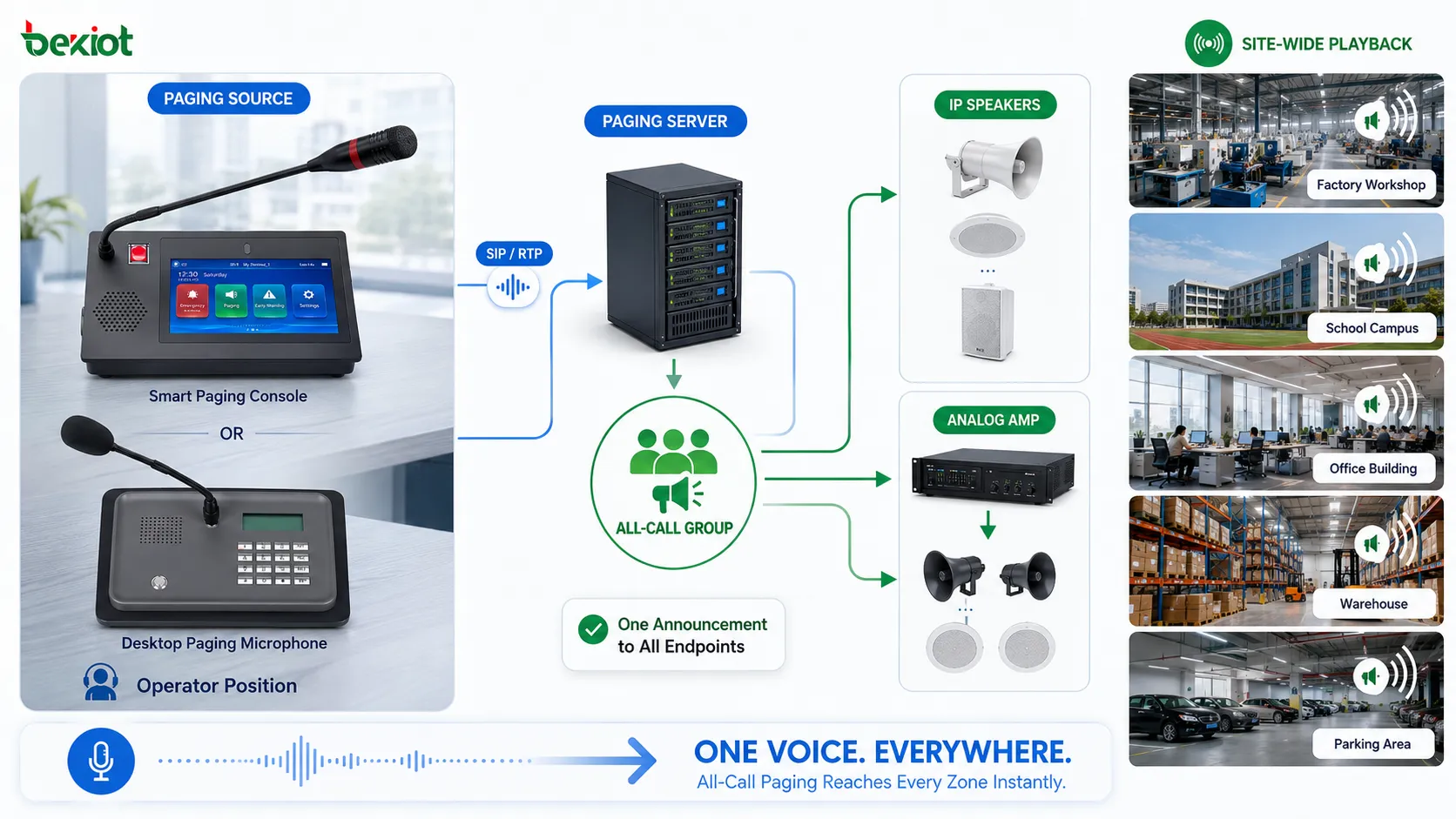
The basic working principle of All-Call Paging is one-to-many audio distribution. A user speaks from a microphone, SIP phone, dispatch console, paging station, soft client, or control platform. The system captures the audio and sends it to all configured paging endpoints. These endpoints then play the announcement through speakers, phones, amplifiers, or other output devices.
The important point is that All Call is not a normal two-way phone call. It is usually a broadcast-style communication function. The sender talks, while all target endpoints receive. This makes it suitable for announcements, instructions, alerts, and public guidance rather than long conversations.
All-call group definition
Although the name suggests “everyone,” All Call depends on system configuration. The administrator defines which endpoints belong to the all-call group. In a small building, this may mean every speaker and paging phone. In a large campus, it may mean all public zones but not private offices. In an industrial plant, it may include workshops, yards, warehouses, gates, and control areas.
This definition is important because a careless all-call group may create unnecessary disturbance or miss critical areas. The system should clearly define whether All Call covers the entire site, one building, one facility group, one emergency area, or all online endpoints under a specific platform.
Paging initiation methods
All-Call Paging can be initiated in several ways. A user may dial a paging code from a phone, press an all-call key on a paging microphone, select the all-call group from a dispatch console, trigger it from a software platform, or activate it through an emergency workflow. Some systems also allow scheduled or automatic all-call announcements.
Different initiation methods serve different users. Receptionists may use phone codes for routine announcements. Security operators may use dispatch panels. Emergency staff may use dedicated buttons. Automated systems may trigger All Call when a verified alarm occurs. The design should match the user’s role and response procedure.
Audio distribution and playback
After the paging source is accepted, the system distributes audio to target endpoints. In IP systems, this may use unicast, multicast, SIP paging, RTP streaming, or server-based audio delivery. In analog public address systems, the audio may pass through amplifiers and speaker lines. In hybrid systems, gateways may connect IP paging with analog amplifiers.
Playback should be synchronized enough for the environment. In adjacent areas, large timing differences may create echo or confusion. In separated zones, small differences may not matter. For large deployments, audio distribution design should consider network bandwidth, endpoint capacity, multicast support, amplifier delay, and system topology.
Main functional features
Site-wide announcement
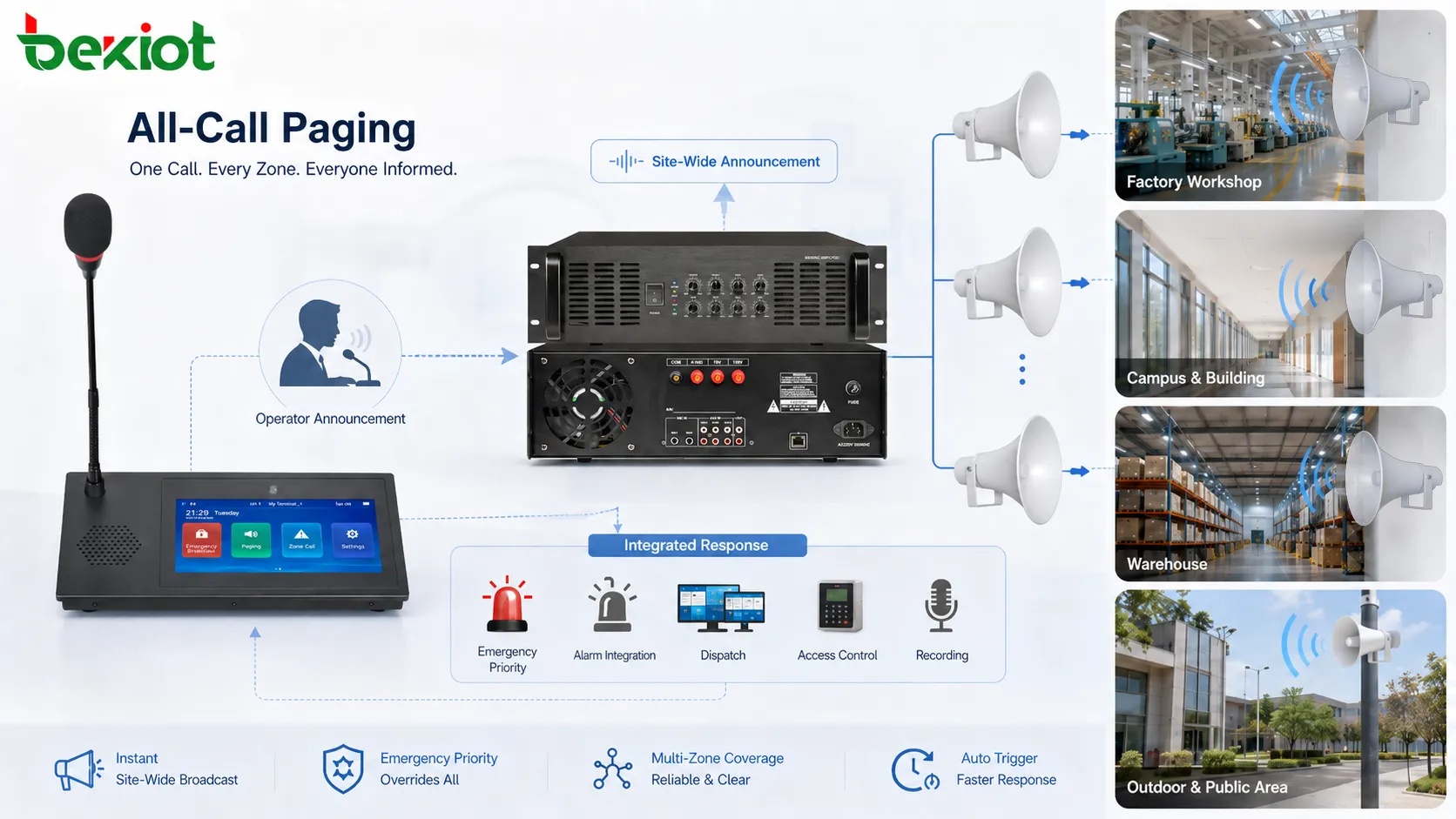
The most direct function of All-Call Paging is site-wide announcement. One message can be delivered to all selected areas without calling individual users or manually selecting many zones. This is useful when the content is relevant to everyone, such as emergency instructions, opening or closing notices, facility-wide reminders, or operational changes.
Site-wide announcement reduces communication repetition. Instead of asking several departments to relay a message, the operator can send the same announcement across the whole system. This improves consistency and reduces the risk that different people receive different versions of the message.
Emergency priority broadcast
All Call is often linked with emergency priority. During serious events, emergency announcements may need to interrupt background music, routine paging, low-priority broadcasts, or normal audio playback. Priority broadcast ensures that critical information is not blocked by daily communication.
Emergency priority should be configured carefully. The system should define who can start emergency All Call, which zones are included, whether local volume controls are bypassed, whether recordings are created, and whether the message repeats. Priority gives All Call strong value, but it must be protected from misuse.
Multi-endpoint coverage
All-Call Paging can cover different endpoint types. A modern system may include IP speakers, ceiling speakers, horn speakers, wall speakers, SIP phones, intercom terminals, paging adapters, analog amplifiers, and software clients. The All Call function can coordinate these endpoints so they act as one announcement network.
This mixed endpoint coverage is useful in facilities with different spaces. Offices may use ceiling speakers. Outdoor areas may use horn speakers. Security rooms may use SIP phones. Industrial workshops may use high-power loudspeakers. All Call allows these different devices to receive the same message through one operation.
Manual and automatic triggering
All Call can be started manually or automatically. Manual triggering is used when an operator decides that a site-wide announcement is needed. Automatic triggering is used when a system event activates a predefined rule, such as a fire alarm, panic button, evacuation workflow, emergency plan, severe weather alert, or scheduled facility message.
Automatic triggering improves response speed, but it should not be used casually. A false trigger may disturb the whole site. Good design includes verification rules, permissions, priority levels, and test procedures. Manual confirmation may be required for some high-impact announcements.
Recording and event traceability
Professional paging systems may record All Call announcements or log their activation. The record can include who started the announcement, when it was sent, which zones or endpoints were included, whether it was emergency priority, and whether the playback completed. This is valuable for emergency review and operational accountability.
Traceability is especially important when All Call is used for safety instructions. Managers may need to review whether an evacuation message was sent, whether the correct group was selected, and how quickly the announcement was made after the alarm. Logs help convert a broadcast action into a documented response step.
Integration with other systems
All-Call Paging can integrate with fire alarm systems, emergency notification platforms, access control, video surveillance, intercom, dispatch systems, building management, industrial control, and security systems. When an event occurs, the paging platform can become the voice output layer of the response workflow.
Integration expands the value of All Call. Instead of being only a manual microphone function, it becomes part of a coordinated alarm, dispatch, and evacuation process. The system can connect detection, decision, announcement, response, and record into one chain.
System values
Faster information delivery
The first system value of All-Call Paging is speed. When a message must reach everyone, calling departments one by one is too slow. Sending messages through several separate tools may also create delay. All Call delivers the announcement through one direct operation.
This speed is valuable during emergencies and daily operations. A sudden safety risk, building closure, severe weather warning, production stop, service change, or public guidance message can be communicated immediately. The system reduces the time between decision and awareness.
Unified message consistency
All Call helps ensure that everyone hears the same message. In manual relay communication, each person may shorten, change, misunderstand, or delay the message. When the announcement is broadcast directly, the original instruction remains consistent across the site.
Message consistency matters in safety and coordination. If one zone hears “evacuate through the east exit” while another hears an incomplete instruction, confusion may occur. A unified All Call announcement reduces this risk.
Reduced operator workload
Without All Call, operators may need to call multiple extensions, notify group leaders, send repeated messages, or manually select many zones. This increases workload during already stressful moments. All Call reduces the number of steps.
The operator can focus on message content, confirmation, and follow-up rather than repetitive communication. This is especially helpful in control rooms, security centers, reception desks, campus management offices, and emergency command environments.
Improved emergency response
In emergency response, people need fast, clear, and authoritative instructions. All Call can support evacuation, lockdown, shelter-in-place, fire drill, hazardous area warning, medical emergency coordination, and incident notification. It gives the command center a direct voice path to the whole site.
Emergency response value depends on correct design. The system should cover the required areas, override routine audio where needed, maintain sufficient volume, and provide clear speech. All Call should be tested regularly so that it works when needed.
Better coordination across large areas
Large facilities often have multiple buildings, floors, zones, teams, and departments. All Call provides a common communication layer across these separated spaces. It helps align people during shift changes, drills, service interruptions, traffic control, public events, and facility-wide operations.
This coordination value is not limited to emergencies. A warehouse may use All Call for loading instructions. A school may use it for schedule changes. A factory may use it for shift announcements. A transport station may use it for passenger guidance. The function supports daily operational rhythm.
Support for system standardization
All-Call Paging also supports standardization. Organizations can define who is authorized to use All Call, which messages are allowed, what priority levels apply, and how announcements are recorded. This turns wide-area paging from an informal action into a controlled communication process.
Standardization helps avoid abuse. If anyone can broadcast to the whole facility at any time, the system may become disruptive. With proper rules, All Call remains available for important messages while daily noise is controlled.
Application scenarios
Emergency evacuation and safety alerts
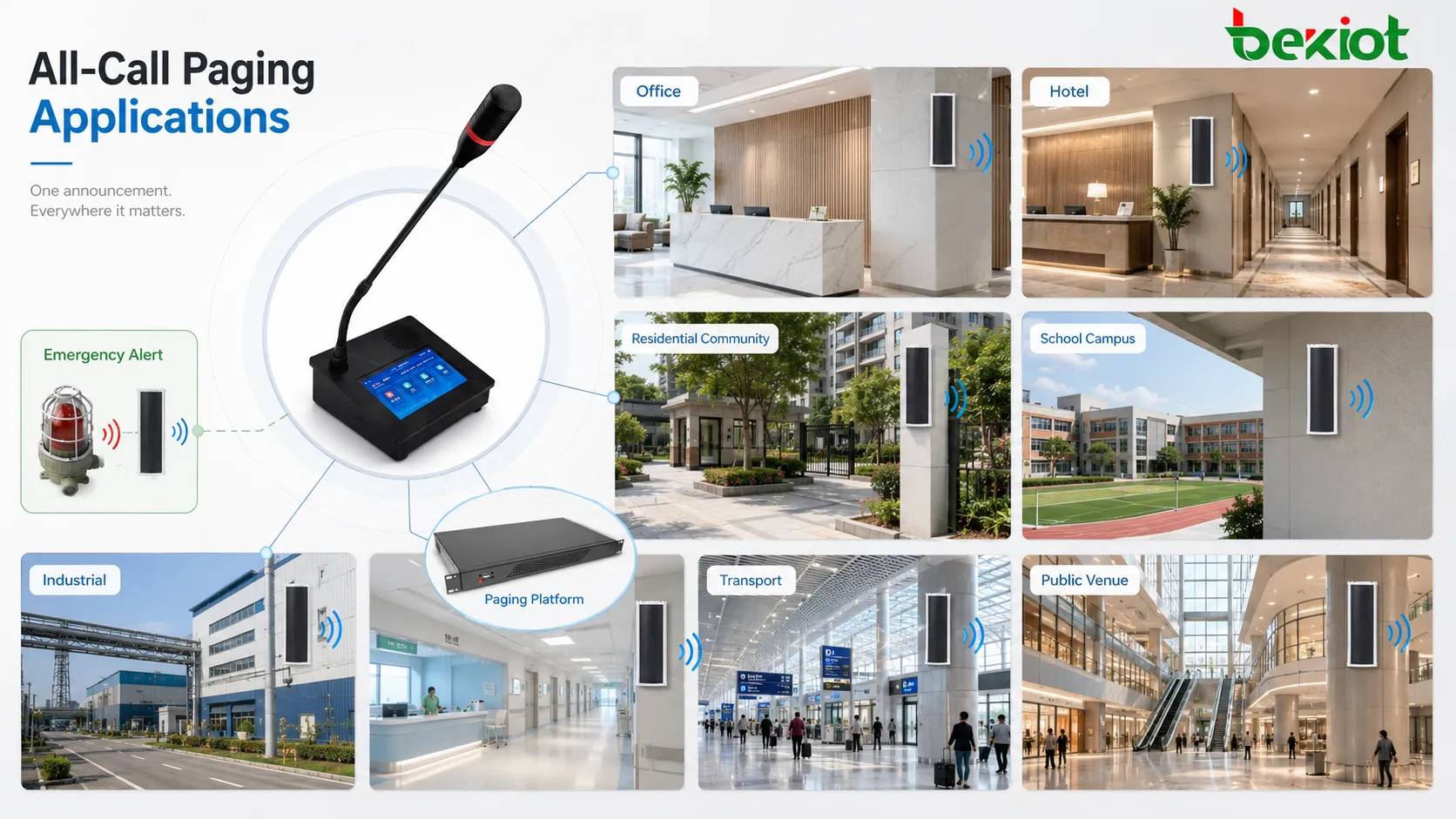
All-Call Paging is widely used for emergency evacuation and safety alerts. When a fire alarm, gas warning, security threat, severe weather event, or hazardous condition occurs, a site-wide announcement can instruct people what to do. The message may tell people to evacuate, avoid an area, wait for further notice, or follow a specific route.
In these scenarios, the announcement must be clear, concise, and authoritative. Long or vague messages may delay action. The paging system should provide sufficient coverage and priority so that people can hear the instruction even during noise, movement, or stress.
Industrial production and plant operation
Factories, power plants, warehouses, logistics centers, mines, and industrial parks may use All Call for shift notices, safety reminders, production coordination, equipment area warnings, emergency stop notifications, and maintenance instructions. These environments often include noise, large spaces, and distributed teams.
All Call helps supervisors and control rooms reach field workers quickly. It can also support planned operations such as drill announcements, shift handover, equipment testing, or temporary area restrictions. In industrial sites, rugged speakers and zone planning are important for real audibility.
Schools, campuses, and public institutions
Schools and campuses use All-Call Paging for bells, announcements, emergency drills, lockdown messages, event notices, schedule changes, and public guidance. A campus may include classrooms, corridors, outdoor areas, dormitories, offices, libraries, and sports areas, each with different acoustic needs.
All Call helps administrators communicate with the whole campus quickly. However, the system should support controlled access. Only authorized staff should send site-wide messages. Emergency messages should override routine audio, while daily announcements should avoid unnecessary disruption.
Hospitals and healthcare facilities
Hospitals use paging carefully because they must balance urgent communication with quiet patient environments. All Call may be used for emergency codes, evacuation instructions, facility-wide safety notices, disaster response, or critical operational announcements.
Healthcare use requires thoughtful volume and zone control. Not every routine message should be sent to all patient areas. Emergency All Call may still be necessary, but routine announcements should be more selective. The system value comes from having both wide-area emergency reach and controlled daily use.
Transportation and public venues
Railway stations, airports, bus terminals, metro stations, parking facilities, stadiums, exhibition centers, and shopping complexes use All Call for passenger guidance, emergency instructions, service interruptions, lost-person notices, crowd control, and public safety announcements.
These environments often have high background noise and large crowds. All Call must be intelligible, not merely loud. Speaker placement, delay, echo control, and zone design all affect whether people understand the message. Public venue announcements should also be professionally worded and easy to follow.
Commercial buildings and facility management
Office buildings, hotels, residential complexes, industrial campuses, and property-managed facilities may use All Call for fire drills, maintenance notices, building closure, security alerts, power outage guidance, parking instructions, and service announcements. It gives facility managers a direct communication channel to occupants.
For daily facility management, All Call should be used selectively. Too many site-wide announcements may disturb tenants or guests. The system should support both all-call and smaller zone paging so that the right message reaches the right audience.
Design and deployment considerations
Define the real all-call scope
The first design question is what “all” means. It may mean all endpoints in one building, all public areas, all emergency zones, all speakers in one campus, or all terminals under one dispatch platform. The scope should be defined according to operational need, not just system capability.
Overly broad All Call can create unnecessary disturbance. Overly narrow All Call can miss critical areas. The administrator should document which endpoints belong to the all-call group and review the list when the site layout changes.
Plan priority and permission carefully
All Call has strong impact because it reaches many people. Therefore, permission should be controlled. Not every user should be able to broadcast across the entire site. Roles such as security operator, emergency commander, facility manager, receptionist, or administrator may need different access levels.
Priority should also be planned. Emergency All Call should be able to override routine paging, music, or lower-priority messages. Routine All Call should not interrupt critical communication without reason. Priority design keeps the system orderly.
Ensure speech intelligibility
Speech intelligibility is more important than loudness. A message that is loud but distorted, echoing, or unclear may not help people act correctly. The system should be designed so that announcements can be understood from normal listener positions.
Testing should include real background noise. A factory during operation, a station during peak traffic, a school during class change, and a lobby during an event may all sound different from a quiet commissioning test. Field listening is necessary.
Coordinate all-call with zone paging
All Call should not replace zone paging. Many messages only need to reach one area, floor, department, or building. If All Call is used too often for local messages, users may become annoyed and less responsive to important announcements.
A good paging design provides multiple levels: individual endpoint paging, zone paging, group paging, building-wide paging, and All Call. Operators should choose the smallest effective scope for routine messages and reserve All Call for site-wide or emergency information.
Design backup and failover
If All Call is used for emergency communication, backup design matters. The paging server, amplifier, network switch, power supply, microphone, dispatch console, and speaker lines may all affect availability. A single failure should not silently disable critical announcements.
Depending on risk level, the system may need backup power, redundant servers, monitored amplifiers, speaker line supervision, alternate paging stations, or manual fallback procedures. Emergency communication should not depend on untested assumptions.
Operation and maintenance management
Routine test announcements
All Call should be tested periodically, especially if it is used for emergency purposes. Testing confirms that endpoints are online, speakers play correctly, amplifiers work, network paths are stable, and priority behavior is correct. A paging system that is never tested may fail during a real event.
Test announcements should be planned to avoid unnecessary disturbance. Some organizations perform scheduled tests during low-impact times and clearly state that the message is a test. Test records should be kept for maintenance review.
Endpoint and zone verification
When endpoints are added, removed, moved, or renamed, the all-call group should be updated. A speaker installed in a new area does not automatically become part of the correct paging group unless the system is configured. Similarly, a removed device should not remain in records as if it were still active.
Verification should include both software lists and physical locations. Operators should know that the displayed group matches the real site. This prevents missing areas during emergency announcements.
Audio level maintenance
Volume levels may drift over time due to amplifier changes, endpoint settings, local volume controls, speaker aging, wiring changes, or building modifications. All Call requires consistent audibility across the covered area. Maintenance should include listening tests and level adjustment where necessary.
Emergency All Call may need to override local volume reductions. If local attenuators or endpoint settings can silence the message, the system should be reviewed. Critical announcements must remain audible in required zones.
Log review and user feedback
System logs can show who used All Call, when it was used, what group was selected, and whether any endpoint failed. Reviewing logs helps detect misuse, repeated failures, or configuration errors. User feedback also matters because listeners can report areas where announcements are unclear or too loud.
Feedback should be treated as technical information. A complaint that “the announcement is hard to hear” may indicate speaker placement, volume, background noise, or endpoint failure. A complaint that “messages are too frequent” may indicate poor paging policy.
Common problems and optimization
All Call is overused
One common problem is overuse. If operators send every small notice through All Call, people may become irritated and ignore announcements. This weakens the impact of truly important messages.
The optimization is to use zone paging for local messages and reserve All Call for site-wide, urgent, or policy-approved announcements. Clear operating rules help maintain the authority of All Call.
Coverage is incomplete
Another problem is incomplete coverage. Some areas may have no speaker, offline endpoint, low volume, damaged cable, blocked horn, or wrong group assignment. People in these areas may not hear the All Call announcement.
Regular endpoint audits and field listening tests can identify missing coverage. The all-call group should be compared with the physical site plan. New areas should be added during expansion.
Audio is loud but unclear
Loudness does not guarantee clarity. Echo, reverberation, poor speaker direction, high background noise, distortion, or overlapping nearby speakers can make speech difficult to understand. In some environments, adding more volume may make clarity worse.
Optimization may require speaker repositioning, zoning, delay adjustment, volume balancing, message wording improvement, or different speaker types. The goal is intelligible speech, not maximum sound pressure.
Permission is too loose
If too many users can activate All Call, accidental or unnecessary broadcasts may occur. This can disturb operations and reduce trust in the system. Permission should be based on role and responsibility.
Administrators should review user rights regularly. Temporary permissions should be removed after events or projects. Emergency permissions should be protected carefully.
No record of important announcements
If All Call is used for safety communication but no record is kept, later review becomes difficult. Managers may not know whether the announcement was sent, who sent it, or which zones were included.
Recording and logging should be enabled where the system supports it. Important announcements should be linked with incident records, alarm events, or emergency procedures when possible.
Evaluation standards
Coverage completeness
The first evaluation standard is whether the All Call group covers every required area. This should be checked against floor plans, site maps, zone lists, and actual listening tests. Coverage should include new buildings, outdoor areas, service spaces, and high-risk zones where required.
Speech intelligibility
The second standard is whether listeners can understand the message. Testing should happen under realistic conditions, not only in a quiet environment. If people cannot understand the instruction, the system has not achieved its purpose.
Activation speed
All Call should be easy and fast for authorized users to activate. Emergency procedures should not require many complicated steps. However, accidental activation should also be prevented through role control and clear interface design.
Priority reliability
Emergency All Call should override lower-priority audio and local reductions where required. The priority function should be tested with background music, routine paging, low volume settings, and busy zones. Assumptions are not enough for emergency systems.
Traceability and maintainability
The system should provide logs, records, endpoint status, group configuration, and maintenance tools. Administrators should be able to confirm who used All Call, when it was used, whether endpoints were included, and whether failures occurred. Maintainability protects long-term reliability.
Closing Notes
All-Call Paging, or All Call, is a paging function that sends one announcement to all configured endpoints or zones at the same time. It is used when a message must reach a wide audience quickly, such as emergency evacuation, safety alerts, public guidance, facility-wide notices, shift announcements, and operational coordination.
Its main functions include site-wide announcement, emergency priority broadcast, multi-endpoint coverage, manual and automatic triggering, recording, event traceability, and integration with alarms, dispatch, public address, intercom, and facility systems. These functions make All Call more than a simple loudspeaker action; it becomes part of a managed communication workflow.
Its system values include faster information delivery, unified message consistency, reduced operator workload, improved emergency response, better coordination across large areas, and standardized communication control. To achieve these values, the system must define all-call scope, permissions, priority, intelligibility, zone strategy, backup planning, testing, and maintenance clearly.
A well-designed All-Call Paging system should be powerful but controlled. It should reach everyone when necessary, remain easy to activate during emergencies, avoid unnecessary disturbance during daily operation, and provide records for review. When used correctly, All Call becomes one of the most important wide-area communication functions in paging and public address systems.
FAQ
What does All-Call Paging mean?
All-Call Paging means sending one voice announcement to all configured paging endpoints or zones at the same time. It is commonly used for site-wide notices and emergency instructions.
Is All Call the same as zone paging?
No. Zone paging targets a specific area or group, while All Call targets the entire configured all-call scope. A good system usually supports both functions.
Who should be allowed to use All Call?
Only authorized users should be allowed to activate All Call, especially emergency All Call. Common authorized users include security operators, dispatchers, facility managers, emergency commanders, or administrators.
Can All Call be triggered automatically?
Yes. It can be triggered by alarm systems, emergency buttons, fire workflows, scheduled messages, or automated rules if the paging platform supports integration. Automatic triggering should be carefully controlled to avoid false broadcasts.
What is the most important design point for All Call?
The most important point is ensuring that the announcement reaches the correct scope with clear speech, proper priority, controlled permission, and reliable records. Coverage and intelligibility should be tested in real site conditions.







