


Field video backhaul is a core requirement in emergency response, mobile command, public safety, industrial inspection, traffic control, drone operation, and temporary event management. When a command center needs to receive live video from drones, portable cameras, body-worn devices, robot dogs, mobile encoders, visual intercoms, surveillance cameras, or field gateways, the choice of transmission protocol directly affects latency, bandwidth usage, device control, deployment cost, and operational reliability.
There is no single protocol that is best for every project. GB/T28181, RTSP, RTMP, and SIP can all be used for video transmission, but they were designed with different purposes. Some are better for video surveillance access, some are easier for local LAN pulling, some are convenient for live streaming, and some are more suitable for real-time two-way command communication. A reliable solution should select the protocol according to the field device, network condition, command platform, and real dispatch workflow.
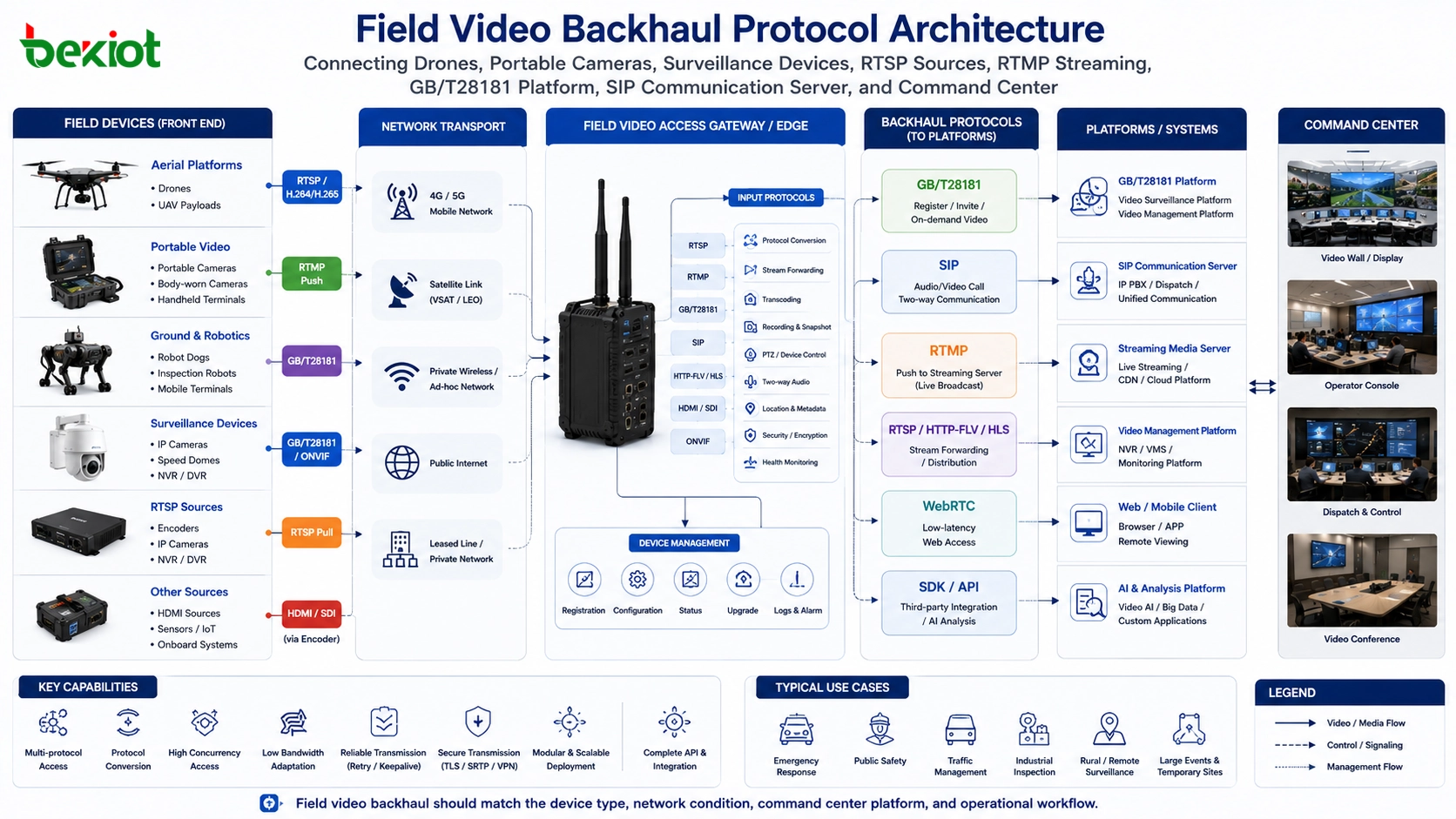
Why Protocol Selection Matters in the Field
In a fixed building, video access is relatively easy because cameras, servers, switches, and storage devices are usually located within a controlled network. Field operations are different. Emergency sites may rely on 4G, 5G, temporary broadband, satellite links, public Internet access, private wireless networks, or ad hoc networks. Many front-end devices do not have a public IP address, and the command center may not be able to directly reach the device through the network.
This is why protocol selection cannot be decided only by whether a device can “output video.” A protocol that works well inside a local network may fail across public networks. A protocol that is easy for live broadcasting may waste field bandwidth if it pushes video all the time. A protocol that supports video viewing may not support PTZ control, two-way audio, alarm reporting, location reporting, or remote recording retrieval.
For command center projects, another problem is platform compatibility. If every new device requires a separate software platform, the workflow becomes fragmented. Operators may need to switch between drone software, monitoring software, video conference software, streaming platforms, and local recording tools. A better design is to use a video access gateway or media platform that can accept multiple protocol types, process the streams, and forward them to the command center, surveillance platform, unified communication system, streaming media server, AI analysis system, or upper-level platform.
A Practical Gateway Layer Is Often Necessary
A field video gateway or video access gateway is useful because field devices are not always standardized. One drone may provide RTSP, another may support GB/T28181, a portable camera may push RTMP, and a command terminal may use SIP video calling. A gateway layer can receive these different input streams and then convert, forward, transcode, control, or distribute video according to project requirements.
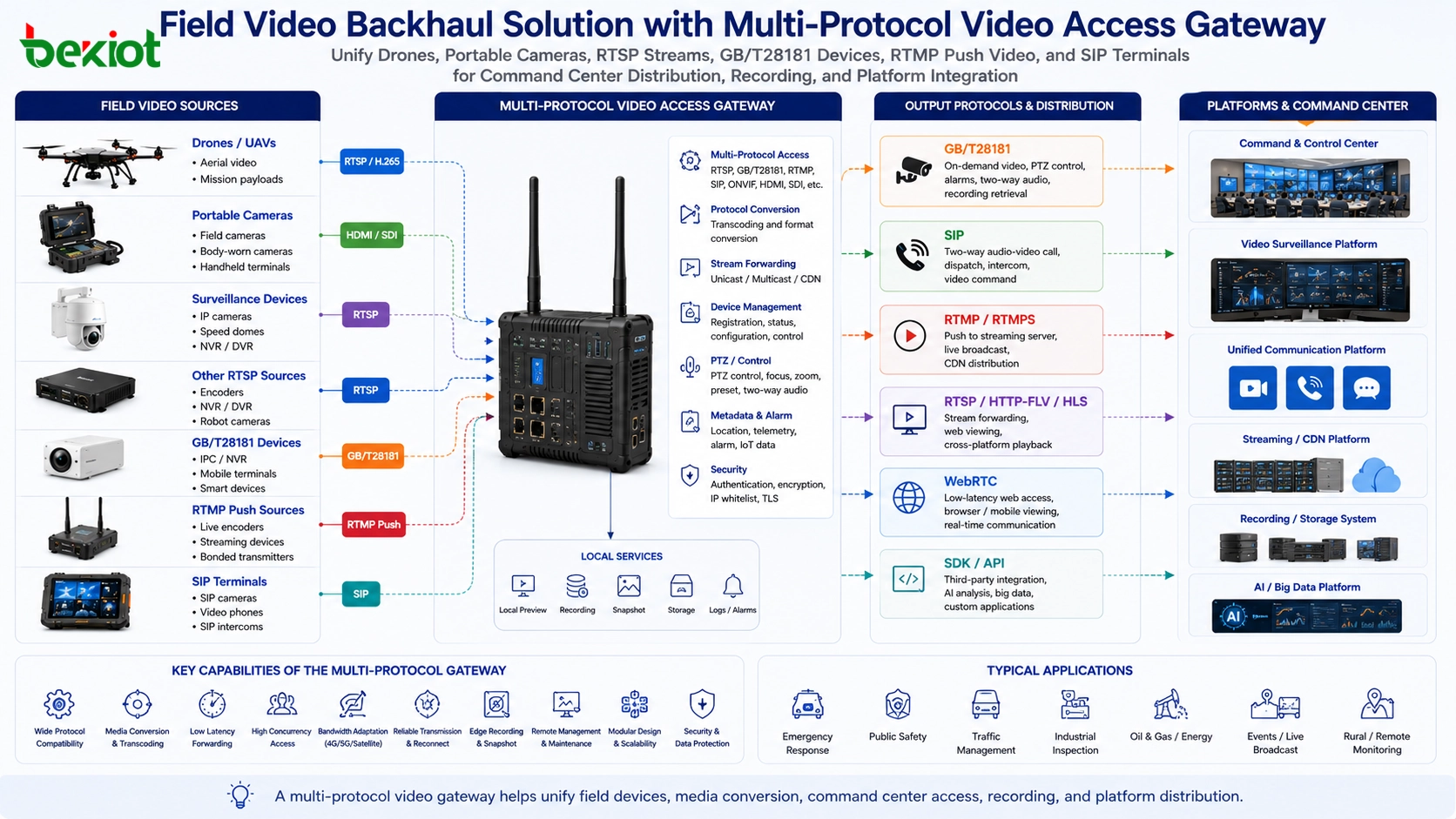
In practical system design, a capable gateway may need to support SIP, GB/T28181, RTSP, RTMP, HLS, FLV, MP4, WebRTC, and other media access or output methods. It should also support protocol conversion, stream forwarding, transcoding, preview, device control, platform docking, and media distribution. This prevents the command center from being locked into one type of device or one single software system.
Typical front-end sources may include fixed surveillance cameras, portable camera kits, mobile command terminals, visual phones, encoders, drones, drone platforms, robot dogs, vehicle-mounted cameras, and temporary video collection devices. Typical output platforms may include emergency command systems, unified communication systems, national-standard video platforms, video surveillance systems, streaming media platforms, video service platforms, and AI analysis platforms.
GB/T28181 for Surveillance-Oriented Field Access
GB/T28181 is often called the national-standard video protocol in China. It was designed for video surveillance networking and is based on SIP with additional surveillance functions. For field video backhaul, it is one of the most practical options when the front-end device and command platform both support it.
Many emergency field devices already support GB/T28181, including surveillance cameras, portable camera stations, industry drones, recorders, law enforcement devices, and some mobile video terminals. In a typical deployment, the command center side provides a GB/T28181 platform with a fixed public IP address. Field devices only need Internet access and correct server parameters, authentication information, and device registration settings. Even if the device itself is behind a 4G/5G router and only has a private IP address, it can still register to the platform and communicate with the command center.
One of the biggest advantages of GB/T28181 is on-demand video retrieval. When the platform does not request a video stream, the front-end device does not need to continuously send video. This can save bandwidth and data traffic, which is very important in emergency sites where network resources are limited.
GB/T28181 also provides stronger monitoring functions than a simple video stream. The command center can often control PTZ movement, adjust focus, start preview, use two-way audio, obtain device location information, receive alarm information, and pull local recording resources when supported by the device. For command platforms that need surveillance-style management, this makes GB/T28181 much more operationally useful than a basic stream URL.
RTSP for Local Pulling and Secondary Forwarding
RTSP is one of the most widely supported streaming protocols in video devices. Many cameras, drone payloads, robot systems, robot dogs, NVRs, and encoders can provide an RTSP stream. For manufacturers, RTSP is often easy to provide because many imaging devices already include RTSP output capability.
However, RTSP has a major limitation in field backhaul: it is usually a pull-based method. The platform must be able to reach the device IP address and pull the stream from the device. This works well inside a local area network, but it becomes difficult when the device is behind a mobile router, NAT network, temporary Internet connection, or private 4G/5G network.
In many emergency sites, the command center cannot directly obtain or access the real IP address of the front-end device. To make RTSP pulling work across networks, the project may need a mobile VPN, private network, port mapping, relay server, or additional gateway. These methods increase cost, maintenance complexity, and deployment time.
For this reason, RTSP is best used as a local acquisition protocol. A field gateway can pull RTSP video from drones, portable cameras, robot systems, or surveillance devices within the local field network, and then forward the stream to the command center through GB/T28181, SIP, RTMP, or another suitable transmission method. In this architecture, RTSP remains useful, but it is not responsible for the entire wide-area backhaul path.
RTMP for Simple Internet Push Streaming
RTMP is widely used in live streaming and online broadcasting. It is easy to understand and easy to deploy: the platform side provides a streaming server with a public IP address, and the field device pushes video to a configured streaming address. If the device can access the Internet, it can usually push video without the command center needing to know the device IP address.
This makes RTMP attractive for emergency field video return. A drone, encoder, or mobile video terminal can push the live stream to a media server, and the command center can open the stream for viewing. Compared with RTSP pulling, RTMP is often easier to use across public networks because the field side initiates the connection.
The weakness is that RTMP follows a live broadcast logic. Once the stream is started, the field device normally pushes video continuously whether anyone is watching or not. In emergency sites, bandwidth and data traffic may be expensive or unstable, so continuous pushing can waste valuable resources.
Another limitation is control. RTMP is mainly used for one-way live video and audio. It usually does not provide rich field device control, PTZ operation, focus adjustment, location reporting, alarm reporting, recording retrieval, or two-way command interaction. It is good for “send this live image to the platform,” but not ideal as a complete command and control protocol.
SIP for Real-Time Command Communication
SIP is not just a video streaming protocol. It is a communication protocol originally designed for real-time calling, and it is widely used in voice, video, video conferencing, and unified communication systems. For emergency command, this makes SIP especially valuable because it supports two-way interaction instead of only one-way video return.
Like GB/T28181, a SIP-based field video workflow can be built around a SIP server with a fixed public IP address. Field terminals with Internet access can register to the SIP server and establish audio or video sessions with the command center. Operators can call the field device, or the field device can call the command center, depending on the system design.
The user experience is intuitive because SIP uses a calling model. A dispatch operator can dial a field terminal, a video phone, a mobile gateway, or a video endpoint. Once the session is established, the command center can receive live video and send voice instructions back to the field. In some scenarios, the command center can also push its own video or screen content to the front end.
Another advantage is compatibility. If the command center already uses a SIP-based video conference system, unified communication platform, dispatch system, or IP PBX, SIP video can be integrated more naturally. This is useful for projects where video return, voice dispatch, emergency calls, video meetings, and field collaboration need to work together.
The main limitation is device support. Some drones, cameras, and specialized field devices do not support SIP directly. In these cases, a field video gateway can receive HDMI, RTSP, GB/T28181, or other video sources locally and then convert them into SIP-based audio-video communication for command system integration.
Protocol Comparison for Field Projects
| Protocol | Best Use | Main Advantage | Main Limitation | Recommended Role |
|---|---|---|---|---|
| GB/T28181 | Surveillance-style field access and command platform integration | On-demand viewing, PTZ control, focus control, two-way audio, alarms, location, recording retrieval | Requires compatible platform and device configuration | Primary choice for emergency video devices that support national-standard access |
| RTSP | Local LAN video pulling from cameras, drones, encoders, robots, and NVRs | Very widely supported by video devices | Hard to pull across NAT, 4G/5G routers, and public Internet without VPN or relay | Good as a local acquisition protocol before gateway forwarding |
| RTMP | Internet-based push streaming and live video return | Easy public-network push when a streaming server has a public IP | Pushes continuously, may waste bandwidth, limited device control | Useful for simple live backhaul where control is not required |
| SIP | Real-time audio-video command, video calls, dispatch, and UC integration | Low latency, two-way audio and video, intuitive calling, good compatibility with communication systems | Not all field devices support SIP directly | Best for interactive command communication and dispatch workflows |
Choosing by Network Condition
The network environment is one of the most important selection factors. If field devices and the command center are in the same private network, RTSP may be easy to use. If the field device is behind a mobile router and only has Internet access, GB/T28181, RTMP, or SIP will usually be more practical because the field side can register or push to a public platform.
For 4G and 5G emergency sites, GB/T28181 is often attractive because the platform can request video only when needed. RTMP can also work well, but continuous pushing should be controlled carefully to avoid unnecessary data usage. SIP is suitable when the command center needs real-time conversation, two-way video, voice instructions, or integration with video conferencing and dispatch systems.
For satellite links or weak wireless networks, bandwidth control becomes critical. Video resolution, frame rate, bitrate, stream priority, and whether the video is pushed continuously should all be evaluated. A gateway with transcoding and protocol conversion can help adapt the same video source to different networks and platforms.
Choosing by Device Type
Surveillance cameras and portable monitoring devices are often better suited to GB/T28181 when the project requires platform registration, on-demand preview, PTZ control, alarm linkage, and recording management. This is especially useful for command centers that already use surveillance-style platforms.
Drone payloads, robot dogs, and mobile inspection devices may expose RTSP streams because RTSP is common in camera modules and imaging systems. If the command center cannot directly pull the RTSP stream, a local field gateway can collect the stream and then forward it using another protocol.
Streaming encoders and live production devices may support RTMP because it is common in live broadcasting workflows. If the main requirement is to send a continuous live image to a remote server or audience, RTMP is convenient. If the requirement includes device control, on-demand access, two-way audio, or command center dispatch, another protocol should be added.
Visual intercoms, video phones, dispatch terminals, SIP cameras, and communication gateways are good candidates for SIP integration. SIP is more suitable when the operator thinks in terms of calling, answering, conferencing, dispatching, and talking back to the field.
A Better Architecture: Multi-Protocol Access and Unified Output
A professional field video backhaul system should not depend on only one protocol. In real emergency projects, one site may include cameras, drones, portable command devices, encoders, recorders, vehicle-mounted systems, visual phones, and external monitoring platforms. Each device may support different protocols.
The practical solution is to build a multi-protocol access layer. The front end can use RTSP, HDMI, GB/T28181, RTMP, or device-specific access methods. The gateway or platform then processes the stream and outputs it in the format required by the command center. This may include GB/T28181 for video surveillance platforms, SIP for command communication, RTMP for streaming servers, WebRTC for browser-based viewing, or other formats for AI analysis and video service platforms.
This architecture reduces system fragmentation. The command center does not need a separate platform for every device type. Operators can view, call, control, record, forward, and distribute video through a more consistent workflow.

Practical Selection Recommendations
If the field device supports GB/T28181 and the command center needs surveillance-style control, GB/T28181 should be prioritized. It is efficient for Internet-based emergency video access because the video can be called on demand and the platform can perform additional operations such as PTZ control, focus adjustment, two-way audio, location access, alarm reception, and recording retrieval.
If the device only provides RTSP, use RTSP inside the local field network and add a gateway for wide-area backhaul. Do not assume that a command center can pull RTSP from a 4G/5G field device across the public Internet without extra network design.
If the project only needs live video pushing and does not require device control, RTMP is simple and practical. However, it should be managed carefully because it may continuously occupy field bandwidth even when no operator is viewing the stream.
If the project requires real-time dispatch, two-way audio, video calls, video conferencing integration, or unified communication, SIP is often the best fit. When devices do not support SIP natively, a gateway can convert HDMI, RTSP, GB/T28181, or other sources into a SIP communication workflow.
FAQ
Can one field device use more than one video protocol?
Yes. Some devices support multiple outputs such as RTSP, RTMP, GB/T28181, or HDMI at the same time. The best choice depends on whether the project needs local preview, public-network backhaul, platform control, recording, or two-way command communication.
How should a project handle unstable 4G or 5G links?
The system should control bitrate, resolution, frame rate, and stream priority. It is also better to avoid unnecessary continuous streaming. On-demand access, transcoding, and adaptive forwarding can help reduce pressure on field networks.
Is a public IP always required at the command center?
For many Internet-based registration or push workflows, the command center platform or media server should have a reachable public IP address or a stable cloud access address. Otherwise, field devices may not know where to register or push streams.
Can RTSP be used for drone video return?
Yes, but usually inside a local network or through a field gateway. If the drone or payload is behind a mobile network, the command center may not be able to pull RTSP directly without VPN, relay, or gateway forwarding.
What should be checked before choosing a video access gateway?
Check supported input protocols, output protocols, transcoding capability, concurrent stream capacity, PTZ control support, SIP or GB/T28181 compatibility, recording options, network adaptation, and whether it can connect to the required command platform.
When should WebRTC be considered?
WebRTC is useful when browser-based low-latency viewing or lightweight web access is required. It is often used as an output or viewing method after the video has been collected and processed by a media server or gateway.







