


Organizations no longer need separate systems for office calls, paging announcements, intercom communication, and emergency contact workflows. A modern IP phone server can bring these functions together on one SIP-based platform, making communication easier to manage, easier to expand, and more effective in both daily operations and urgent situations.
At Becke Telcom, we view an IP phone server as more than a VoIP replacement for a legacy PBX. It is the communications engine that can connect desk phones, video phones, softphones, SIP speakers, paging gateways, intercom stations, emergency call points, and mobile users into one structured system. This unified approach helps businesses improve internal coordination, reduce fragmented infrastructure, and build a stronger response framework for security, operations, and site-wide communication.
For offices, commercial facilities, campuses, industrial environments, and distributed organizations, that matters. Routine calling, live paging, scheduled announcements, intercom response, and escalation to management or security teams all need to work together. When they do, communication becomes faster, clearer, and far more useful across the organization.
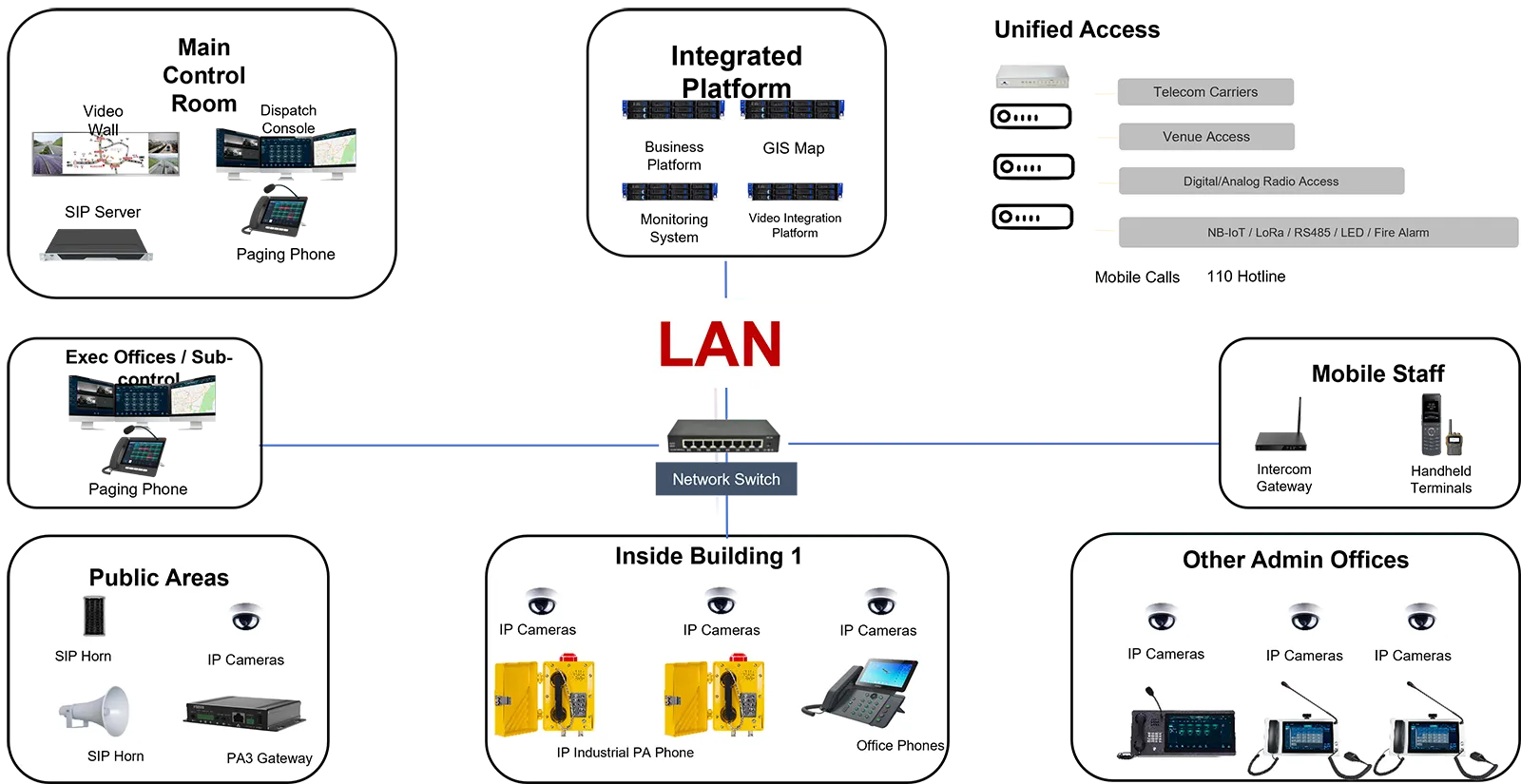
What Is an IP Phone Server?
A central platform for SIP-based communications
An IP phone server is the core control platform behind a modern business communication system. It manages SIP registration, extension dialing, call routing, voicemail, transfer, conferencing, auto attendants, group communication, and related voice services across an IP network. Instead of relying on legacy circuit-based telephony, it uses network infrastructure to connect communication endpoints more flexibly.
In a standard office environment, this means staff can place and receive calls through IP phones, softphones, or video phones while administrators manage extensions and routing through a centralized server. In a broader deployment, the same server can also support SIP paging, intercom communication, and emergency communication paths. That is where the value becomes much greater than a simple business phone system.
More than a traditional office PBX
Many businesses start by looking for an IP PBX or VoIP server only to replace an aging phone system. But the stronger long-term opportunity is to build a unified communication environment. An IP phone server can connect business telephony with site-wide announcements, security communication, operational intercoms, and urgent help-point calls. This creates one communications backbone instead of multiple isolated subsystems.
Becke Telcom solutions are especially relevant for projects that need more than standard office calling. Our communication approach is designed for real operating environments where paging, response speed, operator coordination, and multi-endpoint communication all matter alongside everyday telephony.
A strong IP phone server is not just a call controller. It is the foundation for integrated business communication, paging coordination, and emergency response across the site.
How an IP Phone Server Supports Business Calling
Professional internal and external call handling
At the business level, an IP phone server provides the core functions organizations expect from a professional communication platform. It supports extension management, inbound and outbound routing, call transfer, voicemail, ring groups, queues, business-hour rules, and structured call handling for teams such as reception, sales, support, administration, and management.
This improves efficiency in several ways. Employees can reach the right person faster. External callers can be routed more cleanly. Managers can receive escalations when needed. Departments can operate with tailored routing logic while still belonging to one overall system. The result is a communication experience that feels more organized to staff and more professional to customers.
Multi-site communication under one system
Modern businesses often operate across headquarters, branch offices, remote users, warehouses, stores, and temporary project sites. An IP phone server allows these locations to function as one extension environment instead of separate communication islands. Staff at different sites can dial each other by extension, remain under the same management framework, and follow the same call logic where appropriate.
This matters for growth. As organizations expand, their communication system should not become harder to manage. A scalable IP phone server supports structured growth by making it easier to add users, devices, and locations without redesigning everything from the start.
Better fit for hybrid and mobile work
Remote and mobile users are now part of normal business operations. A well-designed IP phone server helps them stay within the organization’s communication structure rather than relying only on personal mobile numbers or uncoordinated consumer tools. That improves continuity, preserves business identity, and keeps routing and escalation logic intact even when users are not physically on-site.
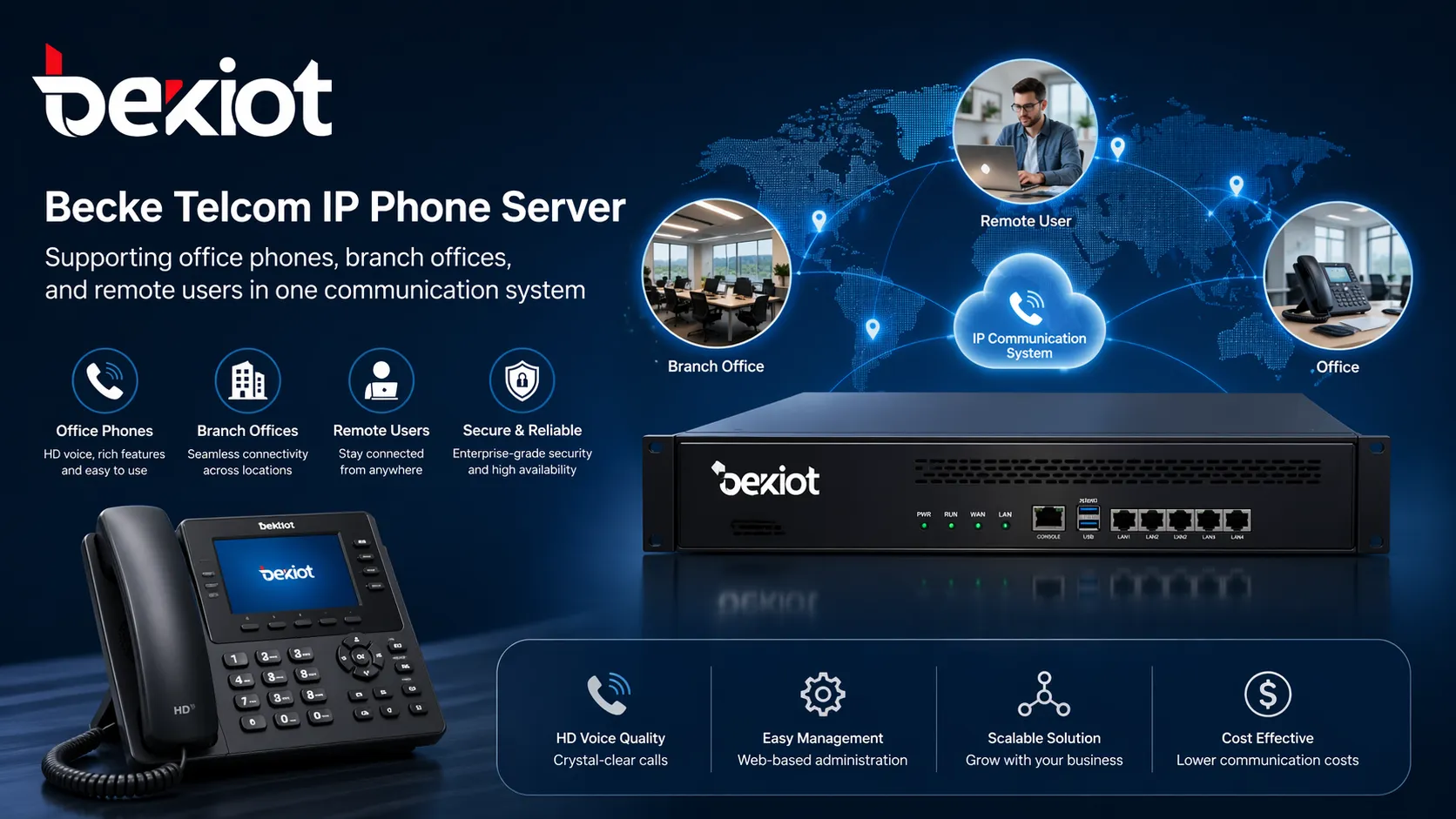
How an IP Phone Server Supports SIP Paging
Turning paging into part of the communication workflow
Paging is still essential across many industries. Offices use it for general notices. Warehouses use it for operational messaging. Campuses use it for zone announcements. Industrial sites use it for process communication and urgent instructions. Yet paging is often deployed as a separate system with limited linkage to telephony or intercom workflows.
An IP phone server changes that by helping bring SIP paging into the same communications core. When connected to SIP speakers, SIP amplifiers, or paging gateways, the server can support live announcements, area-based paging, scheduled playback, and emergency broadcasting. Instead of managing telephony and paging separately, organizations can coordinate both through a more unified platform.
Zone-based announcements for practical use
One of the biggest advantages of SIP paging is precision. Not every message should go everywhere. Some announcements are relevant only to a warehouse area, a front entrance, a production line, an office floor, or one building in a campus. An IP phone server can work with grouped paging endpoints to support targeted communication by zone.
This improves communication quality because messages remain relevant. It also reduces unnecessary noise, which helps people pay more attention when paging is actually important. In practical deployments, better zone control usually means better operator control as well.
Routine paging and priority broadcast logic
Paging is not only for emergencies. Many sites use it every day for shift notices, visitor calls, service information, operational reminders, or background announcements. A capable IP phone server can support these routine functions while also allowing high-priority pages to interrupt lower-priority audio when urgent communication is required.
That balance is important because a real communication system must support both normal operations and abnormal events. A platform that only works well under one condition is rarely enough for modern sites.
SIP paging becomes much more valuable when it is connected to the same server logic as business calling, user groups, and emergency communication workflows.
How an IP Phone Server Supports Emergency Communications
Fast communication from incident point to response team
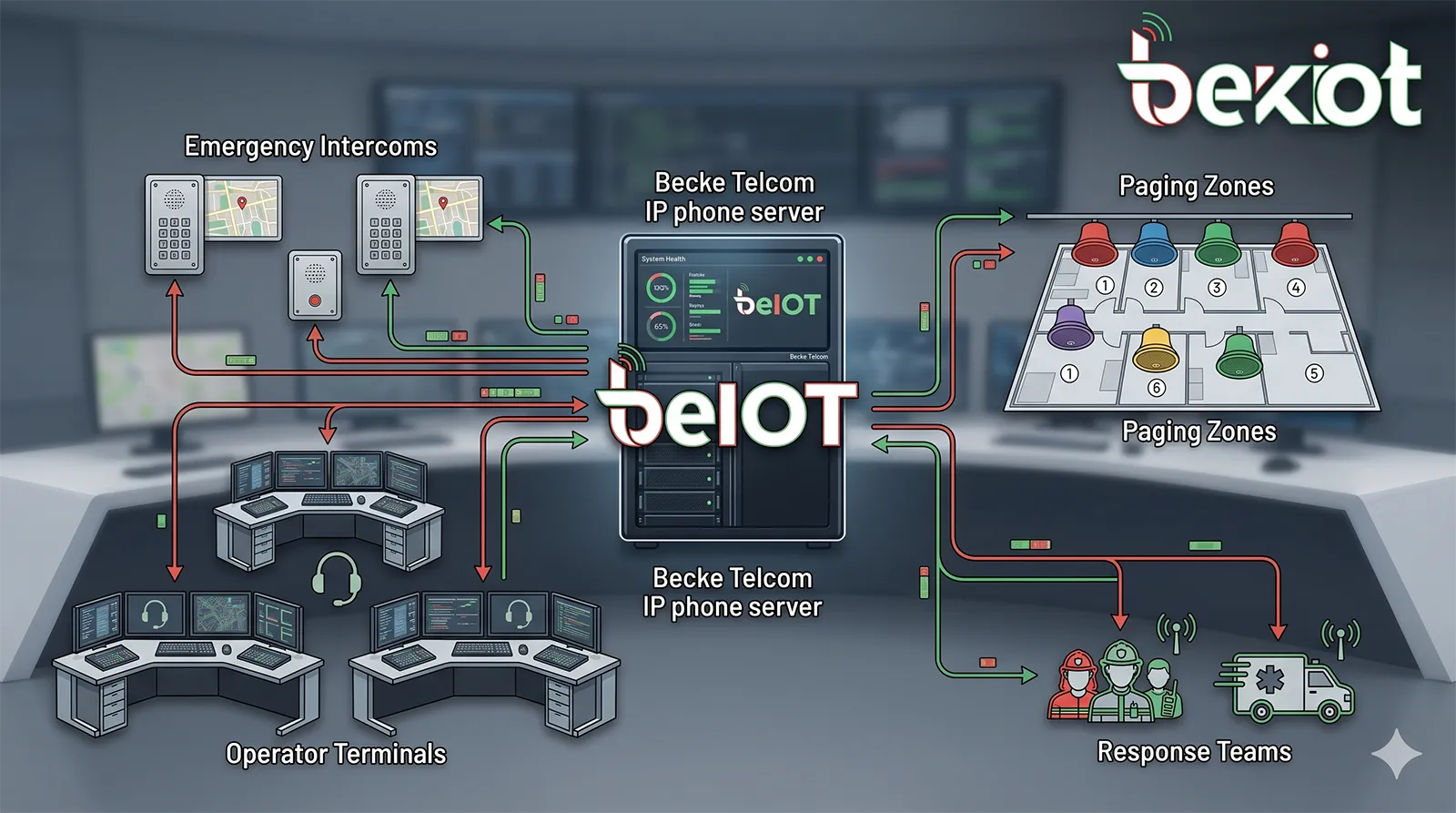
During an emergency, people should not have to guess which system to use or which number to dial. An IP phone server helps solve this by defining clear communication paths in advance. Emergency intercoms, help points, call stations, or critical SIP endpoints can be configured to reach a security desk, operator console, supervisor group, or other designated response point immediately.
If the first destination does not answer, the server can escalate according to predefined rules. Calls can roll to another extension, another team, or a mobile contact. This greatly improves the likelihood that urgent communication will be answered and handled quickly.
Broadcasting urgent instructions across the site
Emergency response often requires more than one-to-one calling. Operators may need to deliver instructions to multiple areas at once. This is where the combination of IP telephony and SIP paging becomes especially powerful. Security staff or operators can issue live paging, trigger urgent announcements, or notify specific zones through the same communication framework that manages calls and users.
Evacuation guidance, restricted-area alerts, localized warnings, and emergency notices can all be delivered more effectively when endpoints, users, and paging zones are already part of one structured platform. This makes communication more disciplined and less dependent on improvised action during stressful events.
Supporting intercom and control room workflows
Many emergency communication projects involve more than phones alone. Intercom stations, help points, operator consoles, and linked response teams all play a role. An IP phone server helps connect these roles so communication can move quickly from incident report to operator handling, from operator handling to team escalation, and from escalation to site-wide announcement if required.
For control rooms and security desks, this means better visibility into communication flows and stronger operational control. Instead of managing one phone system, one paging system, and another emergency system, the site can work with a more consolidated framework.
Why Businesses Choose a Unified IP Phone Server Architecture
Less fragmentation, better operational control
Separate systems can create hidden inefficiencies. The office phone system may work, but it cannot page the site. The paging system may work, but it cannot escalate to operators cleanly. The emergency station may place a call, but it is not integrated with broader communication workflows. These gaps slow response and add administrative burden.
A unified IP phone server architecture reduces this fragmentation. It gives organizations one structured foundation for business communication, paging, intercom response, and escalation logic. That improves maintainability, simplifies expansion, and creates a more predictable communication environment for both IT teams and operational users.
Better scalability for future projects
Another major benefit is long-term flexibility. Many organizations begin with office telephony, then later add paging zones, intercom stations, branch offices, or emergency call points. With a SIP-based communication design, it becomes easier to expand without discarding the original investment.
This is especially useful for campuses, industrial projects, business parks, warehouses, and multi-building facilities where communication needs evolve over time. A scalable server platform helps the system grow with the site rather than forcing costly replacement later.
Why Becke Telcom for IP Phone Server Projects
Focused on integrated communication, not just office telephony
Becke Telcom is positioned around integrated communication environments where business calling must work alongside paging, intercom, and emergency communication. That makes our perspective different from a basic office-only VoIP vendor. We look at how the communication system will actually function across the site, how users will respond under pressure, and how different device types should work together.
For many projects, that is the difference between a standard phone deployment and a practical communication solution. The server platform is important, but so is the surrounding architecture, the endpoint design, the zoning logic, and the escalation workflow.
Suitable for business and operational environments
Becke Telcom solutions are relevant for office buildings, campuses, industrial sites, logistics facilities, control rooms, public-service environments, and other locations where communication needs extend beyond desk phone calling. We understand that many projects need telephony, paging, and emergency communication to coexist on one platform with more operational discipline and more flexible system expansion.
That is why an IP phone server project should be evaluated not only by telephony features, but also by how well it supports the full communication environment.
How to Choose the Right IP Phone Server
Look at interoperability, scalability, and workflow fit
The right IP phone server should match the site’s actual communication needs. Key considerations include SIP interoperability, support for mixed endpoints, extension capacity, multi-site deployment, paging compatibility, gateway integration, administrative control, and resilience planning. If the project includes intercoms, emergency points, or operational paging, the platform should also support structured escalation and flexible endpoint grouping.
Just as important, the communication design should fit how the site works. A warehouse is different from a headquarters office. A campus is different from a retail branch network. A control room is different from a standard front desk environment. The strongest deployment is the one that aligns the server, the endpoints, and the workflow into one coherent communication system.
Conclusion
An IP phone server can support far more than basic VoIP calling. It can serve as the communication core for business telephony, SIP paging, intercom coordination, and emergency response across one site or many. That helps organizations reduce fragmentation, improve daily communication, and respond faster when urgent situations occur.
For businesses and facilities that need a more capable communication foundation, the right IP phone server is not simply a replacement for an old PBX. It is a strategic platform for unified communication and stronger operational control.
Becke Telcom provides IP communication solutions for organizations that need business calling, paging, intercom, and emergency communication to work together in one practical architecture. If you are planning an IP phone server project, a stronger system design can deliver clearer day-to-day communication and more reliable site-wide response.
Talk to Becke Telcom about building an IP phone server solution that fits your business, your site layout, and your communication workflow.
FAQ
What does an IP phone server do?
An IP phone server manages SIP-based communication services such as extension calling, routing, voicemail, and user registration. In broader deployments, it can also support paging, intercom communication, emergency call handling, and multi-site connectivity.
Can an IP phone server support SIP paging?
Yes. With compatible SIP speakers, amplifiers, or paging gateways, an IP phone server can support live paging, zone announcements, scheduled audio, and urgent broadcast workflows.
Is an IP phone server suitable for emergency communication?
Yes. A properly designed IP phone server can support emergency call routing, escalation rules, operator handling, intercom communication, and broadcast coordination for faster response.
Why choose Becke Telcom for an IP phone server project?
Becke Telcom focuses on integrated communication solutions that bring together business telephony, paging, intercom, and emergency communication. This approach is especially valuable for sites that need more than a standard office phone system.







