


A hospital call system is a communication platform designed to help patients, nurses, doctors, and support staff contact each other quickly and reliably across clinical spaces. It is commonly used in inpatient wards, outpatient areas, nurse stations, treatment rooms, duty rooms, bathrooms, corridors, emergency observation areas, and specialist departments where response time and communication clarity directly affect service quality and operational safety. In practical terms, a hospital call system allows a patient or staff member to trigger a call request, route that request to the right location, and support a faster response through audio, visual, and in some cases integrated network communication workflows.
Modern hospital call system installation is no longer limited to a simple buzzer network. Many projects now involve IP-based communication, nurse station terminals, SIP intercom devices, emergency pull cords, corridor indicators, call logging, integration with paging systems, and coordination with security or duty-room operations. This broader architecture makes the call system a useful part of the hospital’s internal communication infrastructure rather than just a bedside alert mechanism.
For healthcare organizations planning upgrades or new deployments, the real question is not only what a hospital call system is, but how it should be installed, what functions it should support, and how to choose a design that matches clinical workflow. That is why installation planning matters just as much as product selection. A well-installed system helps staff respond faster, reduces missed calls, improves communication coverage, and supports a more organized care environment.
What Is a Hospital Call System?
Definition and Core Purpose
A hospital call system is a structured communication system that allows patients and staff to initiate assistance requests and route those requests to caregivers or support personnel. The most familiar form is a patient room call button that alerts a nurse station, but the concept is much wider than that. A full hospital call system may include patient call points, emergency buttons, bathroom pull cords, nurse station consoles, corridor lights, room terminals, mobile notification tools, and central management software.
Its core purpose is to create a dependable response path. When a patient needs help, the request should not depend on shouting, physical movement, or chance staff presence. The system should provide a defined signal path from the request point to the responsible team. In busy hospital environments, that structure supports both better patient experience and more efficient staff coordination.
The system also plays a role in operational control. Calls can be prioritized, acknowledged, escalated, logged, and in some designs linked with audio communication so staff can understand the need before physically arriving. This helps reduce uncertainty and supports more efficient resource use.
A hospital call system is not only a convenience feature. It is a response infrastructure that helps turn requests for help into organized action.
How It Differs From a Basic Nurse Call Button
Many people think of a hospital call system as a simple bedside button connected to a lamp outside the room. While that remains part of the design in some installations, modern systems usually go much further. They can distinguish between routine assistance calls, bathroom emergency calls, staff emergency alerts, duty-room notifications, and departmental routing needs. They may also support two-way voice, SIP intercom communication, call transfer, call grouping, reporting, and integration with hospital IP networks.
This means installation planning should reflect actual care workflows. A ward may require standard patient calls and bathroom emergency calls, while an emergency department may need faster escalation logic, clearer staff-room alerting, and stronger communication links with security or central duty teams. A surgical recovery area may prioritize immediate staff notification and clear status visibility.
In other words, the difference between a simple buzzer system and a modern hospital call system is not only technology. It is also the degree to which the system fits real clinical operations.
Main Functions of a Hospital Call System
Patient Call, Nurse Notification, and Emergency Alerting
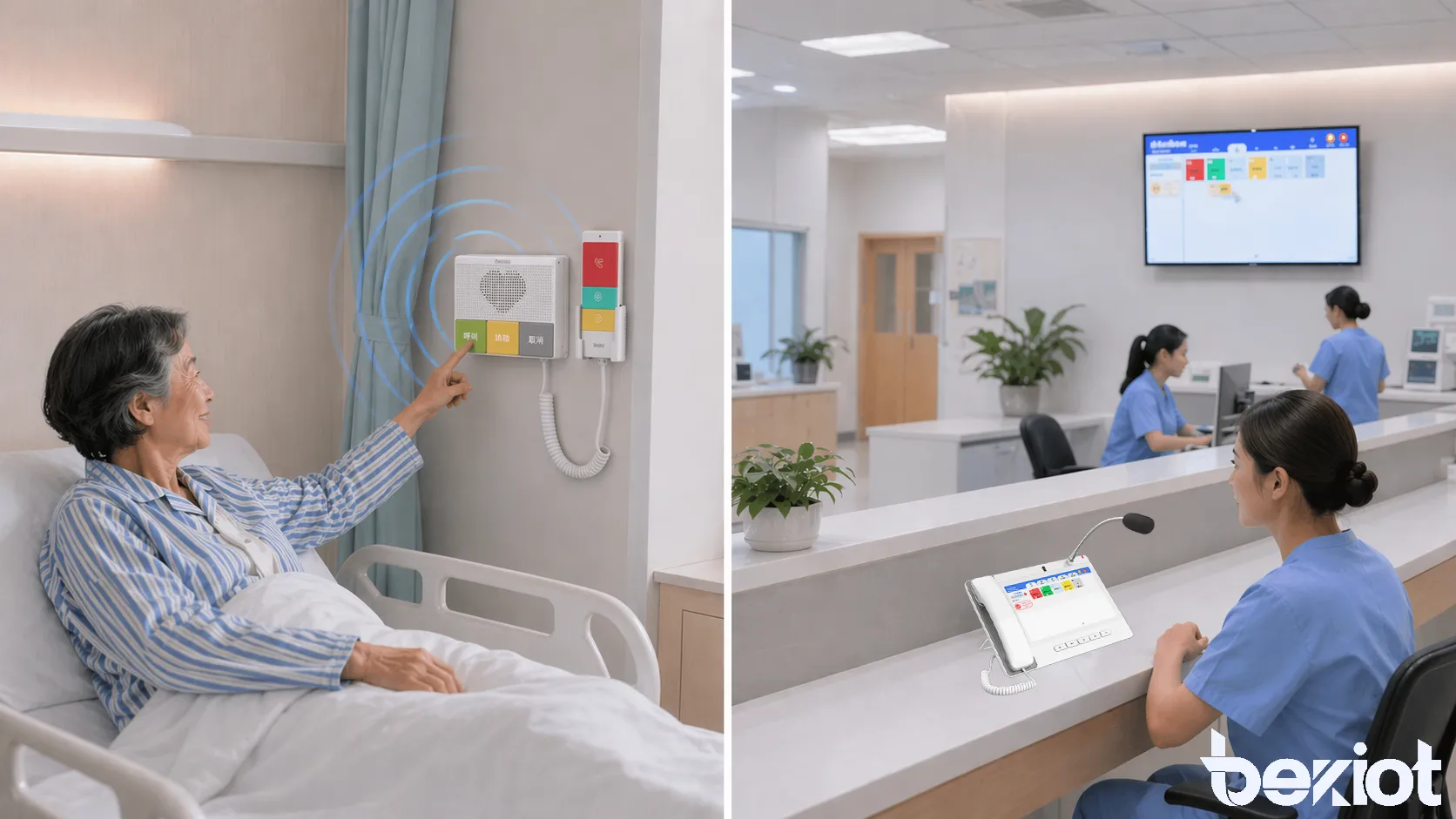
The most essential function of a hospital call system is patient-to-staff communication. A patient presses a call button or activates a bedside terminal, and the request is forwarded to the nurse station, duty desk, or relevant care team. The system may display the room number, bed number, ward name, or call type so staff can respond more accurately.
Emergency alerting is another critical function. Bathrooms, wash areas, and patient rooms often require emergency pull cords or emergency buttons because some incidents occur when the patient cannot easily reach a standard bedside unit. In these cases, the system should distinguish emergency calls from ordinary assistance requests and present them with higher urgency through lights, tones, or priority routing.
Some systems also support staff assistance requests, meaning a nurse or clinician can call for help from another team member without leaving the immediate patient area. This can be especially useful during lifting assistance, patient transfer, unexpected deterioration, or behavioral incidents. In a well-designed installation, these functions are separated clearly enough that staff can understand the level and source of each alert without confusion.
Two-Way Communication and Centralized Call Management
More advanced hospital call systems support two-way audio communication. Instead of only generating an alert, the system allows the nurse station or duty desk to speak with the patient or room before arriving. This helps staff verify the request, calm the patient, understand urgency, and decide which caregiver should respond first.
Centralized call management is equally important. In larger hospitals, a call should not disappear simply because one station is busy. A modern installation may include call forwarding, call acknowledgement, unanswered call escalation, group routing, and event logging. These functions help the system remain dependable during shift changes, high activity periods, or departmental coordination.
This is where IP-based communication and SIP-enabled system design become more valuable. Instead of a closed and isolated alert circuit, the hospital can build a more flexible internal communication platform that links room devices, nurse stations, call terminals, and operational endpoints across the network.
The strongest hospital call systems do more than generate alerts. They support recognition, prioritization, and coordinated response.
Benefits of Hospital Call System Installation
Faster Response and Better Patient Safety
One of the clearest benefits of hospital call system installation is faster response. When calls are routed directly to the correct staff location with clear identification, less time is lost in confusion or physical searching. In healthcare environments, even a modest reduction in response delay can improve patient comfort and operational confidence.
The system also contributes to patient safety. Patients who are elderly, post-operative, mobility-limited, or under observation may not be able to walk out to find help. A dependable bedside or bathroom call point gives them a direct path to assistance. This is especially important in wards, rehabilitation units, long-term care areas, and overnight monitoring zones.
Emergency call differentiation further strengthens safety. A system that clearly marks bathroom emergency calls, fall-risk situations, or urgent room calls helps staff recognize which incidents should be handled first. This supports safer triage within the internal communication process.
Improved Workflow and More Organized Care Coordination
Hospital call systems also improve workflow by reducing unnecessary movement and uncertainty. If staff can see where a call came from, what type of call it is, and whether it has already been acknowledged, they can respond more efficiently. This helps reduce duplicated effort, missed requests, and the confusion that can arise in busy wards.
In larger care environments, centralized call handling creates more consistent communication across shifts and departments. Calls can be logged, transferred, escalated, and reviewed later if needed. That supports better supervision and can also help administrators understand response patterns and installation gaps.
For hospitals moving toward network-based communication infrastructure, installation can also create long-term value by providing a platform that is easier to expand, integrate, and maintain than older isolated wiring schemes.
Key Components in a Hospital Call System Setup
Patient Room Units, Bathroom Emergency Points, and Corridor Indicators
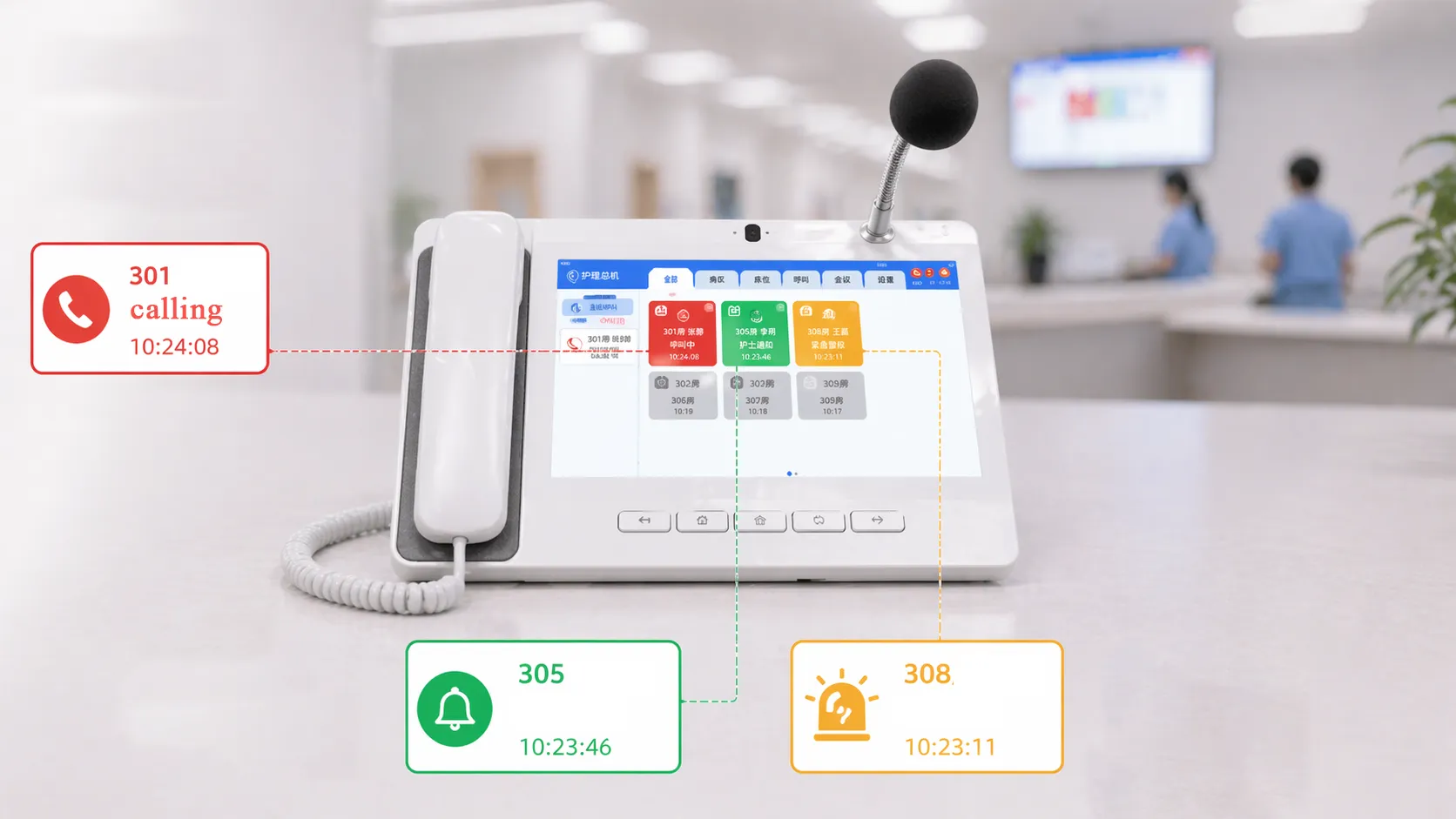
A typical hospital call system includes room-side equipment such as bedside call buttons, wall-mounted room terminals, emergency assistance buttons, or integrated patient communication panels. Bathroom areas often use pull-cord emergency devices because a patient may fall or become unstable while standing or transferring. These emergency points should be placed within reachable zones and clearly distinguished from ordinary call functions.
Corridor indicators are also important because they give staff visual confirmation outside the room. In many installations, a light outside the room changes color or flashing pattern depending on call type. This helps staff moving through the ward recognize where attention is needed even before reaching the nurse station display.
Depending on the hospital layout, room identification panels and bed numbering logic may also be included to make alerts more precise. This becomes more important in multi-bed rooms or departments with high patient turnover.
Nurse Station Consoles, Duty Phones, and SIP Intercom Devices
At the staff side, the system typically includes a nurse station console, desk terminal, or duty-room communication device that displays and manages calls. In IP-based systems, this may be a touchscreen nurse console, SIP desk phone, intercom terminal, or a software-based management client. The choice depends on how the hospital wants calls to be acknowledged and how audio communication should be handled.
Becke Telcom products can be written naturally into this type of deployment. For example, the Becke Telcom GP320i can serve as a practical duty desk or nurse station communication endpoint in projects that need SIP-based internal voice coordination, while the Becke Telcom BHP-SOS10 SIP mini intercom can be relevant for compact emergency or help-point applications in treatment support spaces, service counters, or controlled access care areas. In larger IP communication designs, Becke Telcom SIP gateways, server platforms, or intercom-related devices can also support integration with the wider hospital voice environment.
The value of using such products is not simply brand placement. It is that hospital call installation increasingly overlaps with SIP communication, internal intercom, paging, and security coordination, so communication equipment should be chosen with that broader system context in mind.
How a Hospital Call System Works
Call Trigger, Routing, and Acknowledgement
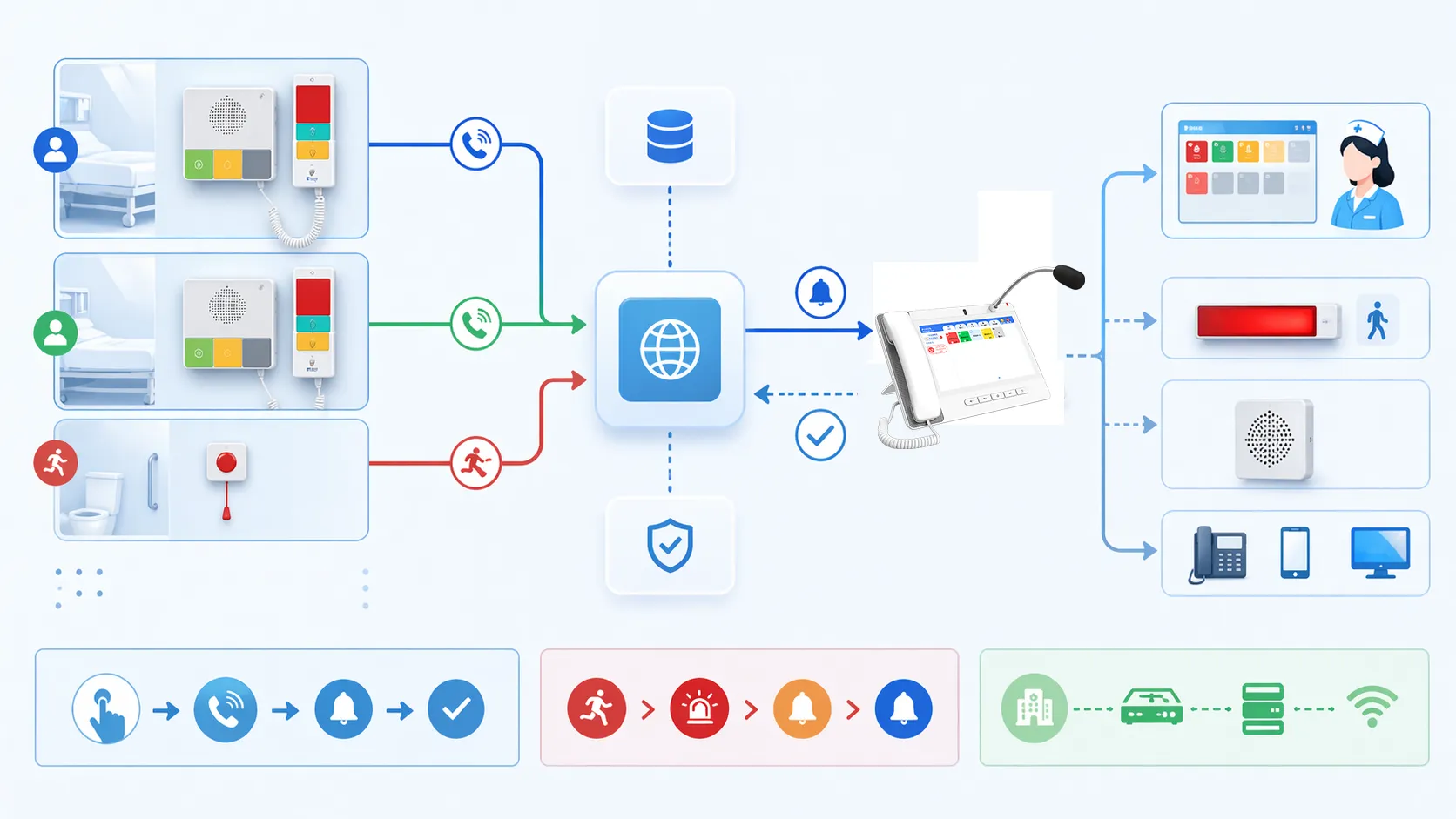
The operating process usually begins when a patient or staff member activates a call point. The signal is sent to the control logic of the system, which then routes the request to the assigned nurse station, duty desk, or relevant communication endpoint. The alert may appear as a light, audible tone, screen message, or voice communication session depending on the system design.
Once staff acknowledge the call, the system may update its status so others know the request is being handled. If the call is not answered within a defined time, some systems escalate the alert to another station, mobile terminal, or supervisory point. This helps reduce the risk of missed requests.
In more advanced installations, the call may also open a voice path. The nurse station can speak to the room, verify the issue, and dispatch the appropriate staff member more efficiently. This is especially useful in large wards or during times when caregivers are serving multiple rooms simultaneously.
Priority Logic and Integration Possibilities
Priority logic is a major part of how the system works well in practice. Not every request has the same urgency, so the system should differentiate between standard calls, emergency calls, staff assist calls, and operational alerts. The way those priorities are presented at the nurse station or duty desk affects how quickly the correct team responds.
Integration can extend the system further. Some hospital installations connect nurse call events with IP telephony, PA paging, security desk alerts, corridor displays, or duty-room communication terminals. In IP-oriented environments, SIP can make this easier because it allows call events and voice endpoints to work within a more unified communication framework.
This is where suppliers such as Becke Telcom can fit naturally, especially when the project is not limited to a local nurse buzzer loop but instead needs voice-enabled intercom, duty-room coordination, or IP-based call handling across hospital departments.
Hospital Call System Installation Guide
Site Planning and Workflow Assessment
Good installation starts with workflow assessment rather than cable pulling. The project team should identify where calls originate, who needs to receive them, what types of alerts are required, and how quickly escalation should happen if the first response point is busy. Patient wards, ICU support zones, bathrooms, treatment bays, observation rooms, and nurse stations may all have different priorities.
This planning phase should also consider patient demographics and care style. A rehabilitation area may require more bathroom emergency coverage, while a general ward may focus more on bedside calling and station visibility. Emergency departments may need stronger duty-room coordination and fast staff assist routing.
By mapping workflow before installation, the hospital avoids designing a technically functional system that still feels awkward in daily use. In healthcare environments, usability and placement are often just as important as system features.
Wiring, Network Design, and Equipment Placement
The next stage is physical and network design. Traditional systems may rely more heavily on dedicated wiring, while modern IP-based installations use structured network cabling and PoE-capable infrastructure where supported. Equipment placement should be practical and clinically appropriate. Bedside controls must be reachable. Bathroom emergency pull cords must be accessible from both upright and fallen positions. Corridor indicators should be visible from normal staff movement paths.
Nurse station terminals and duty devices should be installed where they can be monitored without obstructing care work. Audio devices must be placed with attention to clarity, privacy expectations, and ambient noise. If the system uses SIP communication devices or IP desk phones, VLAN, QoS, addressing, and switch capacity should be considered early in the design.
In hospitals planning broader internal communications, it is often helpful to choose equipment that can grow with the network. Becke Telcom’s communication-oriented product direction can be relevant here when the installation needs to support voice coordination, emergency help points, intercom, or future integration with wider hospital communication systems.
Testing, Staff Training, and Ongoing Maintenance
Installation is not complete when the hardware is mounted. Every call point, station terminal, emergency trigger, indicator light, and escalation path should be tested under real workflow conditions. Staff should confirm that room labels are correct, priorities display properly, and calls can be acknowledged and cleared without confusion.
Training is also essential. A system can fail operationally even when it works technically if staff do not understand how to use it. Nurses, support staff, supervisors, and maintenance teams should know how to recognize call types, handle emergency alerts, and report device issues. This is especially important during shift rotation and in multi-department deployments.
Ongoing maintenance should include routine function checks, device cleaning review, cable and power inspection, software or firmware management where applicable, and periodic confirmation that routing logic still matches the hospital’s workflow. A hospital call system should be treated as a live operational platform, not a one-time installation item.
In healthcare environments, a call system is only successful when installation quality, response logic, and staff familiarity all work together.
Where Becke Telcom Products Fit in Hospital Call Projects
Role in Nurse Station and Internal Communication Scenarios
Becke Telcom can be positioned naturally in hospital call projects that need more than basic alert indication. In installations where nurse stations, duty rooms, service counters, ward entrances, or supervisory offices require clear SIP-based voice coordination, Becke Telcom communication terminals and desk endpoints can help form part of the response chain.
For example, the GP320i can be used where staff require a practical desk communication endpoint for internal coordination, while SIP-enabled intercom or emergency devices can support help-point communication in controlled areas, entrances, or support rooms. This becomes more relevant when hospitals want voice confirmation, internal transfer, or coordination across departments rather than only light-and-buzzer notification.
Because many modern healthcare communication projects are moving toward unified IP infrastructure, vendors with SIP and intercom experience can be useful when the hospital wants the call system to coexist with broader voice and paging architecture.
Value in IP-Based Expansion and System Integration
A hospital may begin with a ward-level call system and later want broader functions such as centralized duty handling, paging linkage, security desk coordination, or support for multiple buildings. In that context, communication-oriented platforms become more valuable than isolated single-purpose devices.
Becke Telcom products can be considered when the project requires internal intercom, SIP terminal deployment, help-point devices, gateway connectivity, or integration with a larger IP communication network. This does not mean every hospital call project needs the same architecture. It means hospitals that want better expandability should think beyond the most basic alarm-only model.
A light Becke Telcom presence in the design therefore makes sense when the installation goal includes practical internal communications, future expansion, and better alignment between nurse call functions and the hospital’s wider communication system.
Conclusion
Hospital call system installation is about much more than placing buttons beside patient beds. It is a structured communication project that affects patient safety, staff response, workflow efficiency, and the overall quality of care coordination. A strong system should support clear call initiation, reliable routing, priority recognition, visible status indication, and practical response handling across the clinical environment.
The best installations begin with workflow analysis, continue through careful equipment placement and network planning, and finish with real operational testing and staff training. In modern healthcare environments, IP-based design, SIP communication, and integration with internal voice systems are making hospital call systems more capable and more flexible than older isolated solutions.
For projects that need a broader communication perspective, Becke Telcom products can be considered as part of the design, especially where nurse stations, help points, SIP intercom, duty-room communication, and future IP integration are important. That makes the hospital call system not only a patient alert platform, but part of a more coordinated healthcare communication infrastructure.
FAQ
What is the main function of a hospital call system?
The main function of a hospital call system is to allow patients or staff to request assistance and route that request to the correct caregiver or duty point quickly and reliably. It provides a structured communication path that supports faster response and better internal coordination.
In more advanced systems, this can also include emergency call differentiation, two-way audio, logging, escalation, and integration with wider hospital communication networks.
What devices are usually included in a hospital call system installation?
Typical devices include bedside call buttons, bathroom emergency pull cords, room terminals, corridor indicator lights, nurse station consoles, duty-room endpoints, and in some systems SIP communication devices or software-based management clients.
The exact device set depends on ward layout, care workflow, and whether the hospital wants a basic alert system or a more integrated IP communication platform.
Can a hospital call system be integrated with SIP and internal voice communication?
Yes. Many modern hospital call systems can be integrated with SIP and internal voice communication, especially when the hospital wants two-way audio, nurse station voice handling, duty-room routing, or broader IP-based communication across departments.
This is where communication-oriented vendors such as Becke Telcom may be useful, particularly in projects that want the system to support both call alerting and wider internal communication functions.







