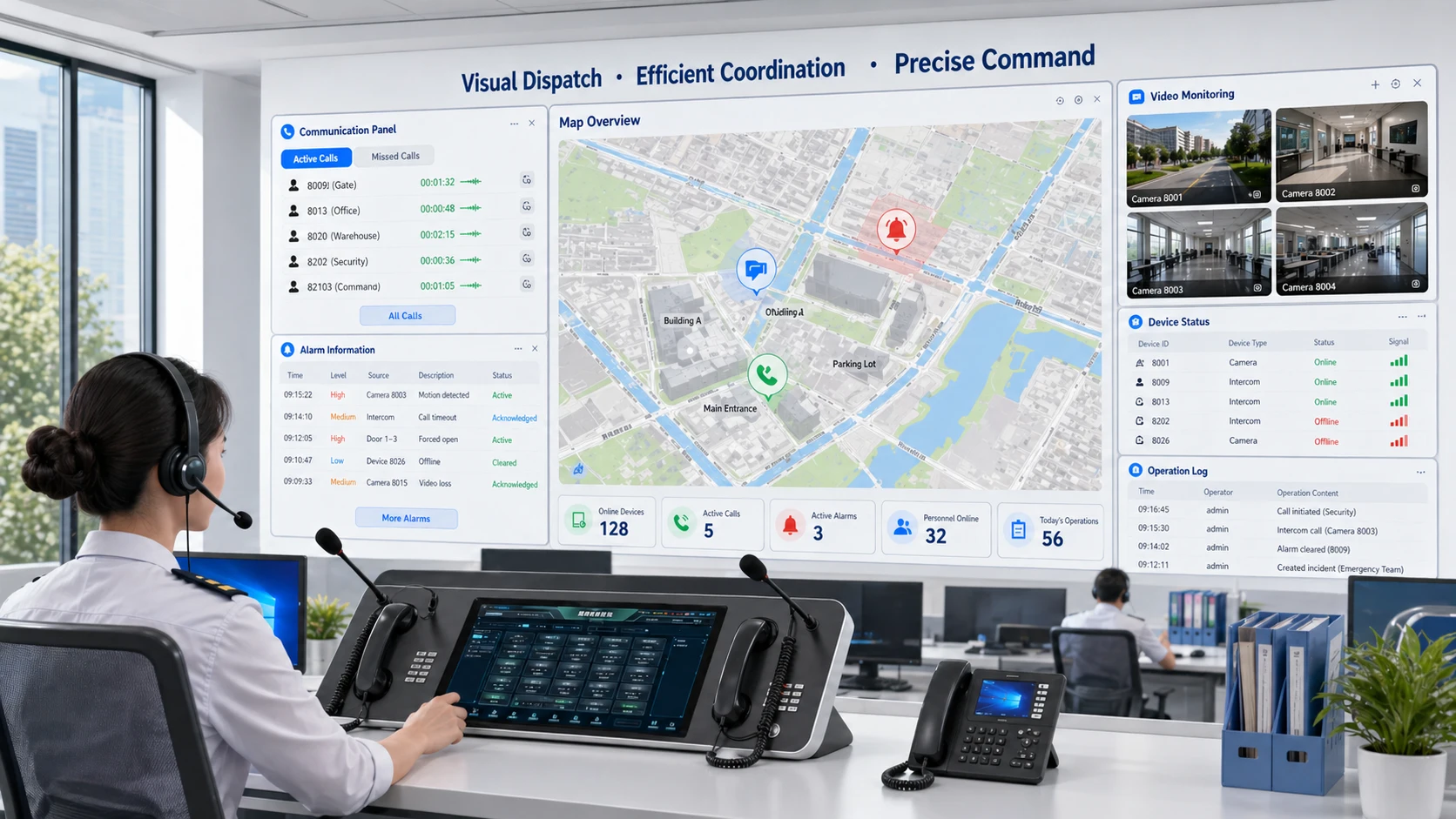
Visual dispatching is a command and coordination method that combines voice communication, video resources, alarms, maps, device status, and operational data into one visible control interface. Instead of relying only on audio calls or text-based records, the dispatcher can see the communication environment in real time and make decisions with more context. In simple terms, visual dispatching turns dispatch work from a voice-only process into a more integrated and visible coordination process.
This concept is widely used in emergency communication systems, transport operations, industrial facilities, utility networks, campuses, hospitals, public safety environments, and integrated command centers. In these settings, the dispatcher often needs more than a phone connection. The operator may need to see the caller location, identify which terminal initiated the request, check live camera images, view alarm conditions, understand device status, and coordinate multiple teams at the same time. Visual dispatching helps bring these elements together on one platform.
In modern enterprise and industrial communications, this is especially important because communication events rarely happen in isolation. A help-point call may be linked to CCTV, an alarm event may require paging and intercom coordination, and an incident at one site may need response from both local staff and a remote control room. Visual dispatching helps operators understand the situation faster and respond with more precision.
What Is Visual Dispatching?
Definition and Core Meaning
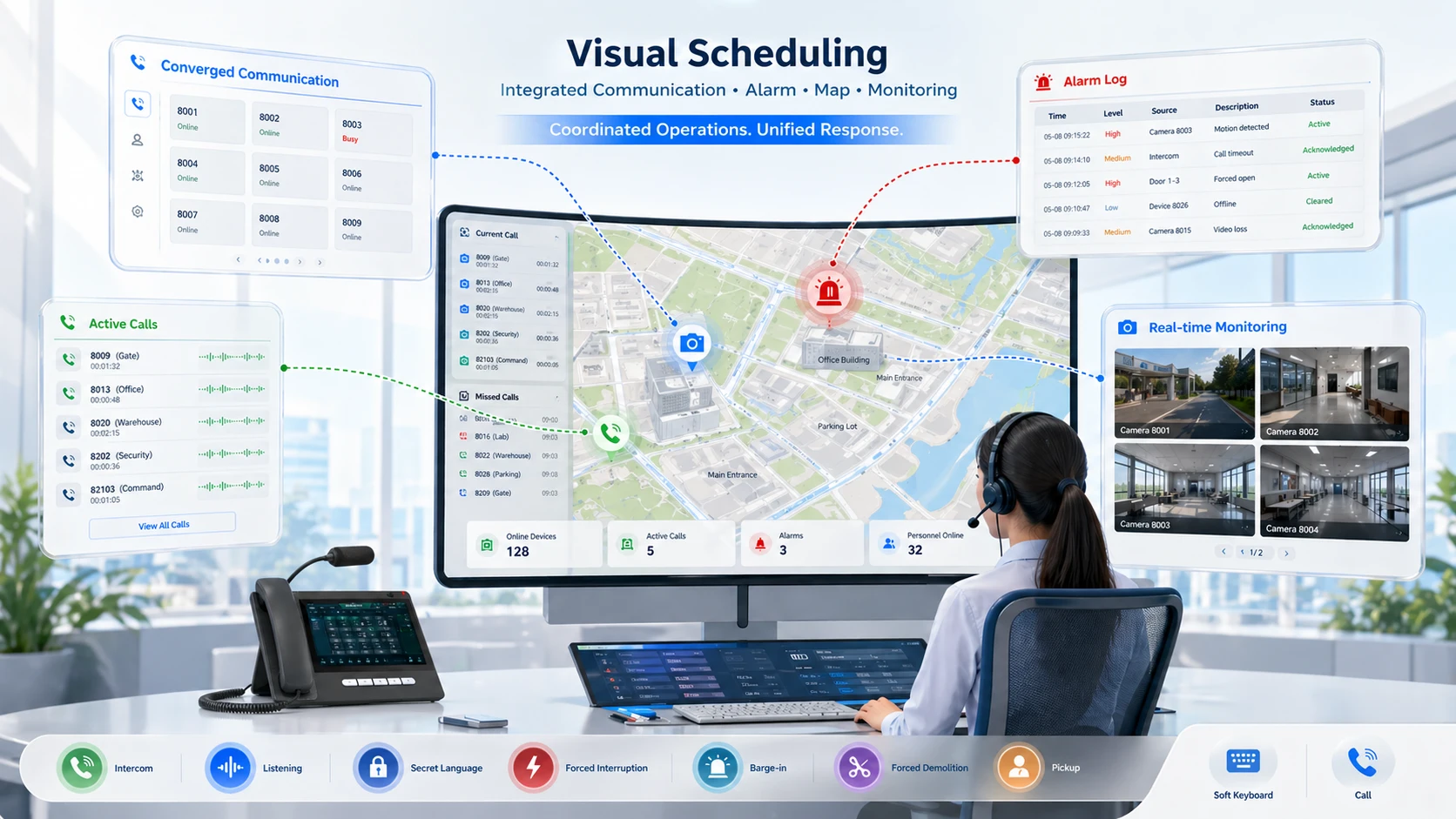
Visual dispatching is a dispatching approach in which the operator uses a graphical or visualized control system to manage communications, incidents, devices, and response workflows. The platform typically presents information through dashboards, map interfaces, device lists, alarm windows, video panels, communication controls, and event records. Rather than processing each event through separate systems, the dispatcher can view and act on multiple layers of information from one operating interface.
The core meaning of visual dispatching is visible coordination. It allows the dispatcher to understand who is calling, where the event is happening, what surrounding devices are involved, and which response resources are available. This helps reduce the delay between receiving an event and making a practical decision.
In communication-heavy environments, that visibility can be as important as the communication channel itself. A call may carry voice, but the platform adds context that supports better judgment.
Visual dispatching is not only about seeing more screens. It is about giving the dispatcher enough context to coordinate the right response faster.
Why Visual Dispatching Matters
Dispatching becomes more difficult when operators must move between disconnected tools. If calls appear on one interface, alarms on another, maps on a third, and video on a fourth, the response process becomes slower and more fragmented. The operator may still manage the task, but the burden is higher and the risk of delay or oversight increases.
Visual dispatching matters because it reduces that fragmentation. It helps unify communication handling, operational awareness, and response control into one environment. This is particularly important in emergency and industrial scenarios where the operator may need to coordinate multiple devices, users, or departments under time pressure.
In practice, the value lies in speed, clarity, and control. A visible dispatch environment often improves not just what the operator knows, but how quickly that knowledge becomes useful action.
How Visual Dispatching Works
Event Input and Interface Integration
Visual dispatching usually begins with an event entering the system. That event may be a SIP intercom call, an emergency help-point request, a paging trigger, a device alarm, a control-room task, or an operator-generated command. Once the event is received, the platform displays related information on the dispatch console instead of limiting the operator to a simple call record.
The system may automatically show terminal identity, site location, device group, map position, alarm linkage, camera feeds, previous event history, or status of nearby communication endpoints. In more advanced deployments, the interface may also show workflow suggestions, escalation rules, zone groupings, or response templates.
This means the operator does not have to build the operational picture manually from separate sources. The platform assembles the picture and places it within reach of the dispatcher’s immediate decision-making process.
Action, Coordination, and Response Output
Once the event is visible, the dispatcher can take action directly from the interface. That action may include answering the call, opening live video, initiating group communication, broadcasting a message, calling specific departments, triggering escalation, or sending instructions to field personnel. The interface is therefore not only for viewing; it is also the working center of response execution.
In many systems, visual dispatching also records the response process. The event may be logged with timestamps, operator actions, linked devices, and resolution history. This helps with traceability, after-action review, and service management.
In other words, visual dispatching works by linking awareness and action together in one environment. The dispatcher sees the event, understands the context, and responds through the same operational platform.
A strong visual dispatching platform does not stop at visualization. It gives the operator the ability to act from the same screen where the situation is understood.
Main Features of Visual Dispatching
Unified Voice, Video, and Device Awareness
One of the most important features of visual dispatching is unified awareness. The platform can bring together voice calls, intercom requests, video streams, alarm notifications, endpoint status, and user or group information in one interface. This helps reduce the gap between communication and situational understanding.
In a traditional audio-only dispatch workflow, the operator may know that a call has arrived but still need time to determine where it came from and what surrounding resources are available. In a visual dispatching system, the operator may immediately see the source terminal, related camera view, alarm condition, and mapped location. That faster awareness often improves the quality of the response.
This feature is especially useful in large or distributed environments where many endpoints and zones are involved.
Map-Based Control and Graphical Operation
Another defining feature is graphical control. Many visual dispatching platforms include map-based displays, floor plans, area diagrams, or site topologies so the dispatcher can understand where devices and events are located. This is particularly important for campuses, transport systems, tunnels, factories, industrial parks, and multi-building facilities.
Graphical operation can also improve usability. Instead of searching through abstract IDs or long lists, the operator can click on zones, terminals, cameras, or icons directly on the visual interface. This helps reduce decision time and makes the platform more intuitive in urgent conditions.
In practical terms, map-based dispatching turns the control platform into a working operational view instead of a purely textual communications console.
Core Functions in a Visual Dispatching System
Communication Control and Event Linkage
Visual dispatching systems commonly support communication control functions such as answering intercom calls, managing group calls, connecting extensions, triggering paging, initiating emergency broadcast, and routing operator communication to the correct teams. These functions are often linked directly with visual information so the dispatcher can act with more accuracy.
Event linkage is another important function. A help-point call may automatically open the nearby camera. A device alarm may highlight the affected area on the map. A missed call may trigger escalation to another operator or duty group. This linkage helps reduce manual steps and supports faster coordination across systems.
In advanced deployments, visual dispatching becomes not only a communications interface, but a cross-system event response center.
Recording, Logs, and Supervisory Visibility
Recording and event history are also important features. Dispatch actions, call records, alarm responses, operator notes, and event timelines can often be stored for later review. This improves accountability and helps organizations analyze how incidents were handled.
Supervisory visibility also becomes stronger in this model. Managers and administrators can review workloads, response timing, device activity, and operator actions from the same environment. This supports training, optimization, incident review, and service improvement.
As a result, visual dispatching can serve both frontline operations and management-level analysis at the same time.
Benefits of Visual Dispatching
Faster Response and Better Situational Awareness
One of the clearest benefits of visual dispatching is faster response. When the dispatcher can immediately see the source of an event, related media, device context, and location, the time required to understand the situation is reduced. This is especially important in urgent communication scenarios where each step between event and response matters.
Better situational awareness is equally important. Voice alone may provide only partial information. A visual dispatching interface helps the operator understand the wider picture, including who is involved, where the issue is happening, and what connected devices or teams may be relevant. This can improve judgment, prioritization, and coordination quality.
In practice, these two benefits often work together. Faster awareness leads to faster and more accurate operational action.
Improved Coordination Across Teams and Systems
Visual dispatching also improves coordination because it helps multiple functions work from the same operational picture. Security staff, facility teams, control-room personnel, transport coordinators, maintenance teams, and communication operators may all depend on related event data. A visible and integrated dispatch platform helps reduce the confusion that comes from fragmented tools.
This is especially valuable when an event crosses departmental boundaries. A call may require security follow-up, maintenance response, paging action, and management notification at the same time. Visual dispatching supports that kind of coordinated handling more effectively than isolated communication tools.
For organizations running complex sites, this coordination benefit can be just as valuable as the communication features themselves.
Visual dispatching adds value not only by making operators faster, but by making teams more coordinated around the same event.
Additional Operational Benefits
Better Traceability and Incident Review
Another major benefit is stronger traceability. Because the platform often records event history, call actions, linked resources, and operator response steps, organizations can review what happened after the event is over. This helps with service analysis, training, compliance reporting, and process improvement.
In operational environments, this is highly useful because communication incidents often need to be reviewed later. A visual dispatching platform can provide clearer evidence of the event sequence than a voice-only model where much of the context is scattered across different systems.
This makes visual dispatching useful not only in the moment of response, but also in long-term operational management.
More Scalable Management for Complex Sites
Visual dispatching also helps larger environments scale more effectively. As sites add more terminals, more buildings, more zones, more cameras, and more communication workflows, a plain audio dispatch model becomes harder to manage. A visual platform helps organize this growth through structured views, zone groupings, map layers, and linked device management.
This is especially important in campuses, industrial plants, transport infrastructure, utilities, and multi-building enterprises. The bigger the environment becomes, the more valuable it is to have a dispatch interface that reflects the physical and operational structure of the site.
In that sense, visual dispatching supports scalability as well as immediate incident response.
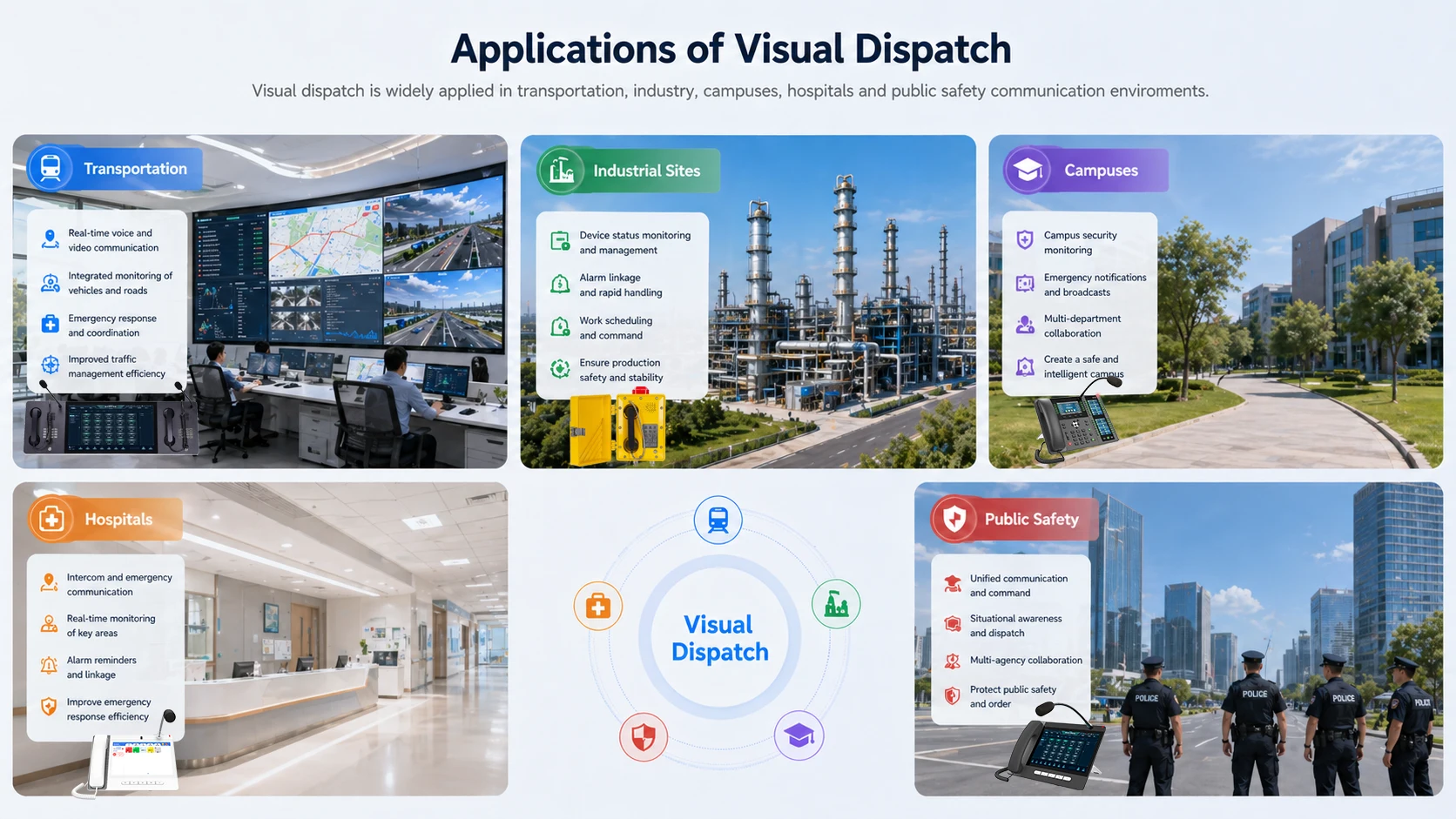
Applications of Visual Dispatching
Transportation, Utilities, and Industrial Sites
Visual dispatching is widely used in transportation systems, utilities, and industrial environments because these sites often require centralized coordination across large physical areas. Metro stations, tunnels, highways, ports, power facilities, industrial parks, substations, and manufacturing plants may all use multiple communication endpoints, alarm devices, and monitoring resources that benefit from one visible control interface.
In these environments, the dispatcher often needs to know exactly where an event originated and how it relates to surrounding infrastructure. A visual dispatching platform makes it easier to understand whether the event involves one terminal, one zone, one production area, or a wider site-level condition.
This is one reason visual dispatching is strongly associated with critical infrastructure and harsh-environment communication projects rather than only with standard office telephony.
Campuses, Hospitals, and Public Safety Environments
Campuses, hospitals, and public safety environments also benefit from visual dispatching because communication events are often linked to location, access, and urgency. A campus help-point request, a nurse call related communication event, a gate intercom request, or a security incident may all require fast understanding of where the event occurred and which staff should respond.
In these settings, visual dispatching supports better coordination between communication devices, operational teams, and monitoring resources. The dispatcher can often move from event awareness to action more smoothly when the system already provides a visual operational picture.
That makes the platform valuable not only for emergency situations, but also for routine daily coordination across active service environments.
The Significance of Visual Scheduling in Communication Projects and Brand Analysis
Role in SIP, Intercom, and Paging Systems
In modern communication projects, visual dispatching is especially relevant where SIP communication, intercom systems, paging terminals, help points, and alarm-linked workflows are integrated into one platform. The dispatcher may need to manage not only calls, but also device groups, zones, announcements, camera views, and escalation rules.
This makes visual dispatching much more than a user interface improvement. It becomes a practical operating layer for systems where voice and events are connected to real locations, real devices, and real response procedures. In those scenarios, visual coordination is often more effective than a simple call-answering console.
For enterprise and industrial projects, this is increasingly important because communication systems are now expected to connect with wider operational tools rather than stay isolated as standalone voice platforms.
Becke Telcom Visual Dispatch System
In the Becke Telcom communication system project, when SIP walkie-talkies, industrial phones, IP paging, emergency assistance terminals need to interact and collaborate with the unified communication platform through a unified visual operation interface, visual dispatching becomes particularly crucial.
In industrial and critical communication scenarios, it is not just about simple call control requirements; it also needs to achieve equipment status perception, regional zoning management, event trigger Cooperation, and emergency rapid response handling.
In communication projects where voice communication, event handling, and on-site level perception need deep collaboration and coordination, visual dispatching has become an indispensable core component. Such requirements are particularly prominent in scenarios such as tunnels, campuses, transportation hubs, production factories, municipal public areas, and industrial parks. The on-site terminal equipment and control room platform must achieve efficient collaborative operation. By introducing the visual dispatching level, Becke Telcom enables the entire communication solution to operate more transparently, be easier to maintain and manage, and be more efficient in management in deployment scenarios where the project scale expands and the architecture becomes increasingly complex.
Maintenance Tips for Visual Dispatching Systems
Keep Device Data, Maps, and Linkage Rules Updated
One of the most important maintenance tasks is keeping the visual environment accurate. If map points are outdated, device names are inconsistent, camera linkage is broken, or alarm relationships are no longer correct, the platform may still look impressive while actually slowing down the operator. Visual dispatching only works well when the displayed context matches the real deployment.
This means administrators should maintain device inventories, site maps, terminal associations, zone structures, and linkage rules carefully. Changes in field equipment, department names, network layout, or response procedure should be reflected in the dispatch interface promptly.
A visual system depends on reliable context. If the context becomes stale, the speed advantage of visual dispatching can quickly weaken.
Monitor Performance and Operator Workflow Quality
Performance monitoring also matters. Visual dispatching platforms often handle communications, media windows, logs, maps, and integrations at the same time. If the interface becomes slow, overloaded, or visually cluttered, operator efficiency may drop even if the core system remains technically online.
Maintenance teams should review not only server and network health, but also how the operator experience performs in real use. Are call windows opening correctly? Are linked cameras loading fast enough? Are alarms displayed clearly? Are event histories easy to find? These workflow questions are part of maintaining dispatch quality.
Good visual dispatching maintenance means keeping the platform operationally usable, not only technically installed.
A visual dispatching platform is only as good as the accuracy, speed, and clarity of the information it presents under real operating pressure.
Best Practices for Building Visual Dispatching
Design Around Real Response Workflows
One of the best practices is to design the platform around actual response workflows instead of simply collecting as many visual elements as possible. Operators should see the information that helps them act, not just a crowded screen filled with data. The interface should match the way incidents are handled in the real environment.
This means communication controls, maps, alarms, video panels, and status areas should be arranged according to operational need. A transport dispatch center may prioritize line or station views. A campus security room may prioritize help points, gates, and CCTV. An industrial facility may prioritize zones, alarm sources, and plant communication terminals.
Visual dispatching is most effective when the interface reflects the operational logic of the site.
Build for Scalability and Clear Administration
Another best practice is to build the platform so it can grow. Many dispatch systems begin at one site and later expand to more buildings, more zones, more users, more devices, or more linked systems. If the visual dispatching structure is not designed for that growth, the interface can become difficult to manage.
Clear naming, role-based administration, modular integration, layered maps, and structured zone planning all help the platform stay usable as it expands. This is especially important in enterprise and industrial communication projects where more than one department or site may eventually depend on the same dispatch framework.
A good visual dispatching system should remain clear as the deployment becomes larger, not only while it is still small.
Conclusion
Visual dispatching is a communication and coordination method that combines voice, video, maps, alarms, device status, and operational controls into one visible interface. Its purpose is to help dispatchers understand events faster and respond with greater accuracy than a voice-only or fragmented control model can usually provide.
Its main strengths include better situational awareness, faster event handling, stronger cross-system coordination, and improved scalability for complex environments. It is widely used in transportation, industrial facilities, campuses, hospitals, utilities, and public safety communication projects where communication events are closely tied to location, devices, and operational workflow.
For organizations building modern command and communication systems, visual dispatching is not simply a display upgrade. It is a practical operating model that helps turn communication events into clearer, faster, and more coordinated action.
FAQ
What is visual dispatching in simple terms?
In simple terms, visual dispatching means dispatchers use a graphical control platform that shows calls, maps, video, alarms, and device information together instead of relying only on voice or text records.
This helps operators understand situations faster and respond more accurately.
What are the main benefits of visual dispatching?
The main benefits include faster response, better situational awareness, improved coordination between systems and teams, stronger event traceability, and more manageable operations in large or complex sites.
It is especially useful where communication events are linked to locations, alarms, and monitoring resources.
Where is visual dispatching commonly used?
Visual dispatching is commonly used in transport systems, industrial facilities, campuses, hospitals, utilities, security operations, public safety environments, and integrated communication control rooms.
It is most valuable where dispatchers need both communication control and real-time operational context.