Two-factor authentication, commonly called 2FA, is a security method that requires a user to verify identity with two different factors before access is granted. Instead of relying only on a password, the system asks for a second proof of identity, such as a one-time code, a push approval, a hardware token response, or a biometric confirmation. The purpose is straightforward: even if one factor is exposed, stolen, or guessed, the account is still harder to compromise because a second verification step stands in the way.
In modern digital environments, this extra step has become increasingly important. Businesses rely on cloud services, remote access, admin consoles, collaboration tools, VPNs, email platforms, and mobile apps that can be reached from many devices and locations. A password-only model is often too fragile for that reality. Reused credentials, phishing attempts, brute-force activity, social engineering, and endpoint compromise all make single-factor login more vulnerable than many organizations can tolerate.
This is why two-factor authentication is now widely used across enterprise IT, finance, healthcare, government platforms, e-commerce, communications infrastructure, and industrial control environments. It is not a complete security strategy by itself, but it is one of the most practical and widely adopted ways to improve account protection without completely changing how people access systems.
What Is Two-Factor Authentication?
Definition and Core Idea
Two-factor authentication is an identity verification process that requires two separate categories of proof before a login or transaction is accepted. The first factor is often something the user knows, such as a password or PIN. The second factor is usually something the user has, such as a phone, authenticator app, hardware token, or smart card, or something the user is, such as a fingerprint or face scan.
The core idea is layered verification. A password can be stolen, reused, or guessed. A second factor raises the barrier because the attacker now needs more than one kind of access. In practice, that means a compromised password alone is often no longer enough to take over the account.
This layered model is especially valuable in environments where identity is the gateway to sensitive systems. If a user account controls email, cloud storage, VPN access, admin configuration, or business applications, stronger login assurance becomes important very quickly.
Two-factor authentication does not replace passwords in every case. It strengthens them by making one stolen secret less decisive.
How It Differs From Password-Only Login
A password-only login depends on one piece of information. If that information is exposed, the account may be immediately vulnerable. Two-factor authentication changes that equation by introducing a separate requirement. Even when the password is known, the system still expects a second signal that confirms the user is the legitimate account holder.
This makes 2FA more resilient against common attack paths. Credential reuse becomes less effective. Simple phishing becomes harder to convert into direct account access. Opportunistic attackers who buy leaked passwords often fail if they cannot satisfy the second factor. This does not make the account impossible to attack, but it does reduce the chance that one compromised secret will be enough.
In this sense, 2FA is a practical control for reducing the consequences of password weakness rather than pretending passwords are no longer part of the login process.
How Two-Factor Authentication Works
The Basic Authentication Flow
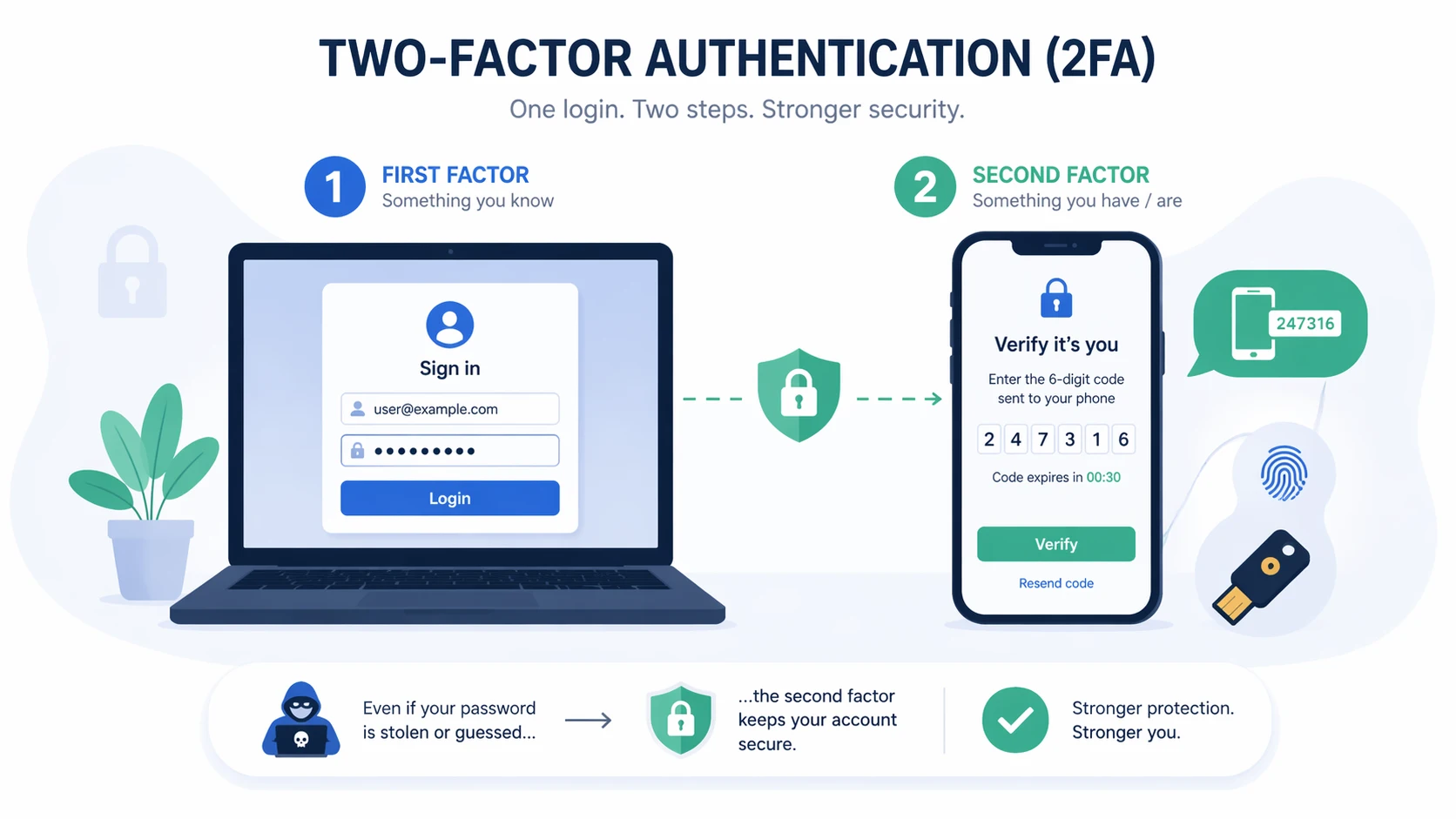
The typical 2FA process begins when a user enters a username and password. If those credentials are correct, the system does not immediately complete the login. Instead, it prompts for a second factor. That second factor may be a temporary code generated by an authenticator app, a push notification sent to a registered device, a hardware token response, a smart card action, or a biometric check depending on the platform design.
The system validates the second factor and then completes access if both checks succeed. If the second factor is missing, incorrect, or unavailable, the login is denied or held for additional review. This sequence means the account is protected by more than one proof type rather than by knowledge alone.
Although the user experience can vary by platform, the underlying logic remains the same: first identify, then verify again through a separate factor category before access is allowed.
Common Second-Factor Methods
Common second-factor methods include SMS codes, email codes, time-based authenticator app codes, push approvals, hardware security keys, physical tokens, smart cards, and biometric confirmation. Not all methods offer the same security level, usability, or maintenance profile, so organizations often choose based on risk level, device availability, and deployment scale.
Authenticator apps are widely used because they are relatively convenient and do not depend on continuous cellular delivery. Push-based approval can be user friendly because it reduces manual code entry. Hardware tokens and security keys are often preferred in higher-security environments because they provide stronger resistance to some forms of phishing and credential theft.
The right second factor therefore depends on context. A small internal business app may choose one method, while a privileged administrative platform or sensitive infrastructure environment may require something stronger and more controlled.
Two-factor authentication is not one fixed technology. It is a framework that can be implemented through different second-factor methods depending on security and operational needs.
Main Types of Authentication Factors
Something You Know, Something You Have, and Something You Are
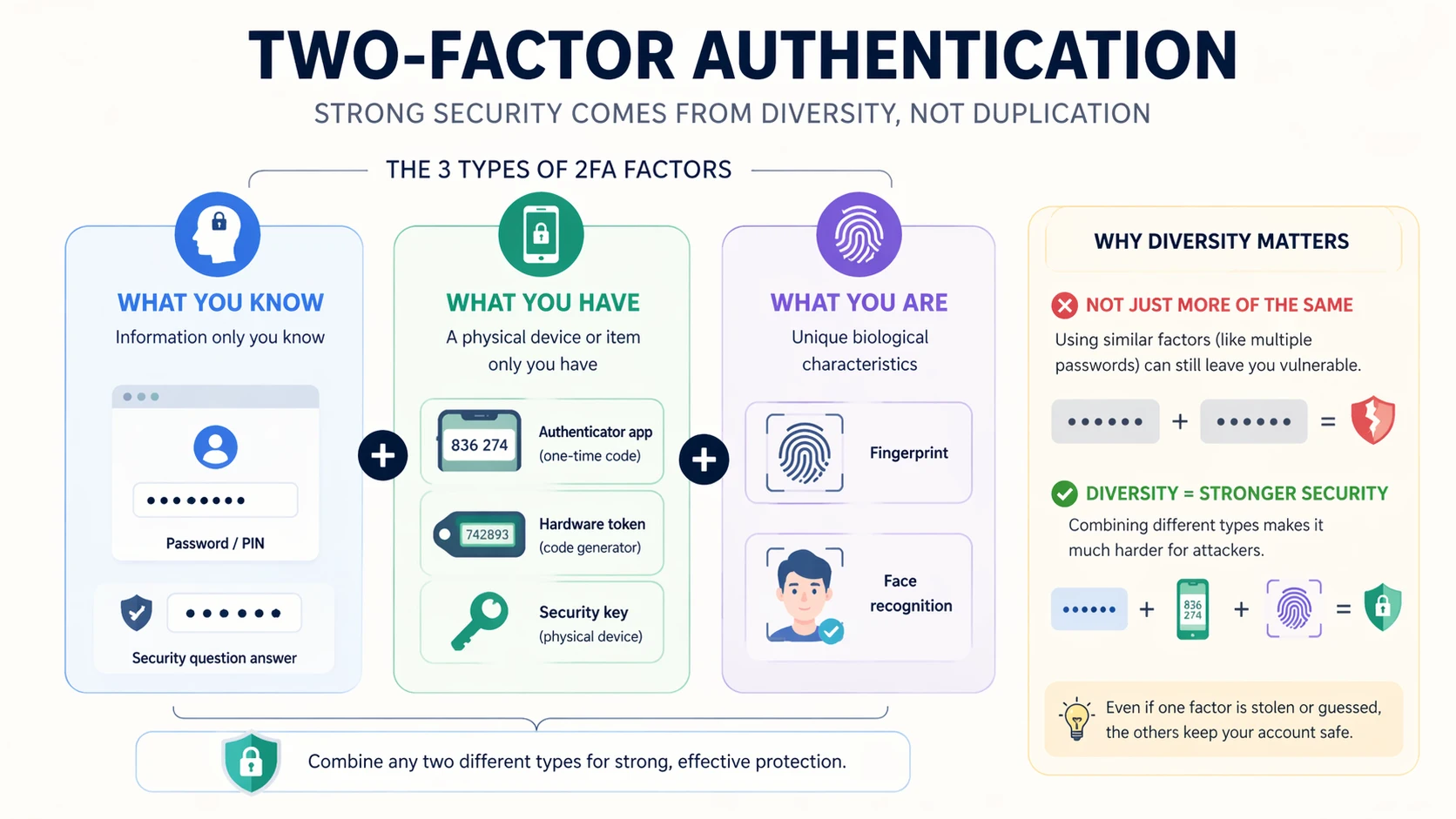
Authentication factors are commonly grouped into three broad categories. The first is something you know, such as a password or PIN. The second is something you have, such as a registered mobile device, hardware token, security key, or smart card. The third is something you are, such as a fingerprint, facial pattern, or other biometric trait.
Two-factor authentication works by combining two different categories rather than two secrets from the same category. For example, a password plus a temporary authenticator code from a device is 2FA because one factor is knowledge-based and the other is possession-based. A password plus a second password would not truly provide the same model of protection because both belong to the same factor family.
This distinction is important because the security value of 2FA depends on independence between the factors, not just on the number of steps in the login flow.
Why Factor Diversity Matters
Factor diversity matters because different attack methods target different weaknesses. Password theft attacks focus on secrets users know. Device theft or token interception targets what the user has. Spoofing or biometric bypass attempts target who the user is. Combining factor types makes it less likely that one successful technique will defeat the entire login process.
This is one reason why organizations should think carefully about which second factor they deploy. A method that is convenient but too easily redirected or intercepted may not provide enough protection for high-risk environments. A method that is extremely secure but too difficult to manage may create operational friction that undermines adoption.
Good two-factor design therefore balances security strength, user practicality, and administrative control rather than choosing on convenience alone.
Deployment Benefits of Two-Factor Authentication
Reduced Risk of Account Compromise
One of the most important deployment benefits of 2FA is the reduction in account compromise risk. When a password alone is no longer enough, many common attack paths become less effective. A leaked credential pair, a guessed password, or a reused login often fails to produce direct access if the attacker cannot complete the second verification step.
This benefit is especially significant for email systems, VPN services, admin consoles, cloud platforms, finance tools, and other systems where a single compromised account can create broad operational or data exposure. Even when 2FA does not block every attack, it often changes a fast account takeover into a failed attempt or at least a more difficult intrusion path.
From a deployment perspective, this makes 2FA one of the most cost-effective access protection upgrades available to many organizations.
Stronger Security for Remote and Cloud Access
Two-factor authentication is particularly valuable in remote and cloud-based environments because access is no longer limited to one office network or one physical location. Employees, contractors, administrators, and mobile users often connect from laptops, personal devices, home networks, or public internet paths. In that context, a password-only model becomes harder to defend reliably.
2FA improves trust in remote access by requiring an extra proof of control. This is useful for VPN connections, cloud dashboards, collaboration suites, managed service platforms, communication servers, and browser-based business tools. The extra step reduces the chance that exposed credentials alone will open the door.
As organizations become more distributed, this benefit becomes less optional and more foundational to secure access design.
In a cloud and remote-work world, two-factor authentication helps restore confidence that a valid password still belongs to a valid user.
Additional Operational Benefits
Better Security Posture Without Replacing Existing Systems
Another major benefit of two-factor authentication is that it can strengthen security without requiring a complete redesign of the existing environment. Many organizations can add 2FA to current identity systems, cloud services, remote access tools, and admin portals instead of replacing the entire login architecture.
This makes deployment more achievable. The organization can improve account protection in practical stages rather than waiting for a full identity transformation project. It also helps security teams create measurable gains relatively quickly, especially when they begin with privileged accounts, remote access points, and high-value business services.
Because 2FA layers onto many existing platforms, it is often one of the most realistic upgrades for organizations that need better access control but must still work within current infrastructure constraints.
Support for Compliance and Internal Security Policy
Two-factor authentication can also support internal governance and external compliance expectations. Many industries expect stronger identity protection for sensitive systems, regulated data, or administrative access. While compliance requirements vary by sector and jurisdiction, 2FA often helps organizations demonstrate that they are not relying on passwords alone for important accounts.
Internal policy also benefits from 2FA because it gives security leaders a clearer access standard. Instead of debating whether passwords are “strong enough,” the organization can define a more mature rule for privileged, remote, and sensitive system access. This supports consistency across departments and reduces the reliance on individual user behavior as the only defensive line.
In this sense, 2FA is not just a technical control. It is also part of broader access governance and security discipline.
Maintenance Tips for Two-Factor Authentication
Protect Recovery Paths and Enrollment Processes
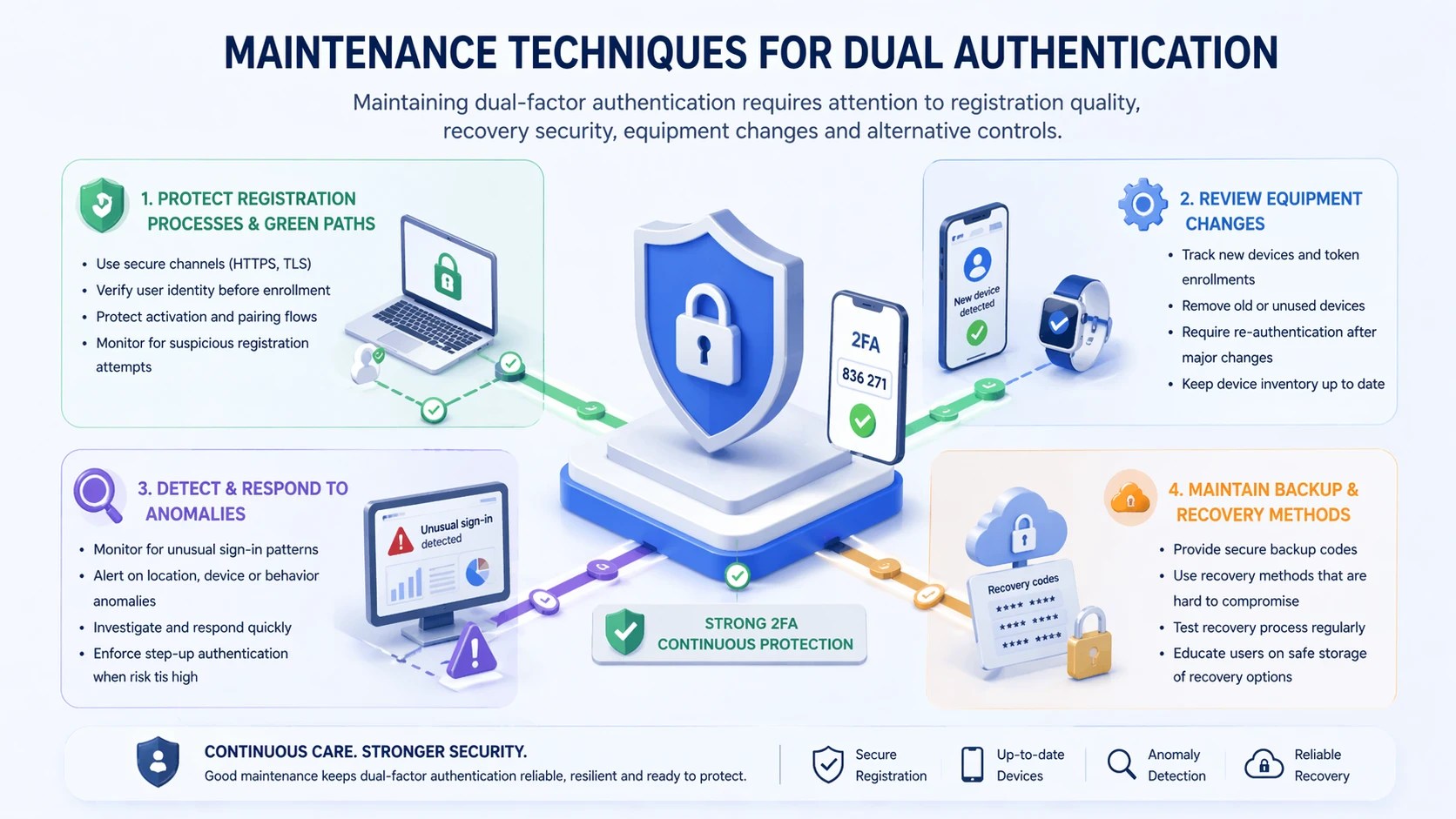
One of the most important maintenance tasks in a 2FA deployment is securing the recovery process. If the password reset flow, backup code process, or device re-enrollment path is weak, attackers may bypass the protection of the second factor entirely. A strong 2FA rollout must therefore include strong recovery controls, identity checks, and help-desk procedures.
Enrollment processes also matter. Users should be onboarded carefully, devices should be associated accurately, and administrative overrides should be limited and auditable. If the wrong device is enrolled or if recovery is too informal, operational convenience can become a security weakness.
For this reason, maintaining 2FA is not only about the verification code itself. It is also about managing the lifecycle around factor issuance, recovery, replacement, and revocation.
Review Device Changes, Exceptions, and Fallback Methods
Maintenance teams should also review device changes, user exceptions, and fallback methods on a regular basis. Employees change phones, contractors leave projects, admins rotate roles, and service accounts evolve over time. If old devices remain trusted or temporary exceptions are left in place indefinitely, the 2FA environment can slowly weaken.
Fallback methods deserve special attention. If the organization uses SMS backup, email fallback, or help-desk bypass for convenience, those paths should be documented and controlled carefully. Weak fallback logic can quietly become the easiest attack path even when the primary second factor is strong.
Good maintenance therefore means treating 2FA as a living control, not a one-time setup completed during onboarding.
Best Practices for Long-Term Management
Prioritize High-Risk Accounts First
In many environments, the most effective deployment approach is to prioritize high-risk accounts first. Privileged administrators, remote access users, finance roles, identity administrators, cloud console users, and communication system operators often represent the highest-value access targets. Protecting these groups early can produce meaningful risk reduction even before organization-wide rollout is complete.
This phased approach also makes management easier. Security teams can refine enrollment, support, and recovery processes with a smaller critical group before scaling across the whole organization. Lessons from early deployment can then improve the broader rollout.
The goal is not to delay full adoption forever. It is to improve the quality of adoption by starting where the risk is greatest.
Train Users and Keep Policies Clear
User training is also essential for long-term success. People need to understand why 2FA exists, how to use it correctly, what phishing attempts may look like, and what to do if a device is lost or replaced. Without this understanding, even a strong technical control can be undermined by confusion or unsafe workarounds.
Clear policy helps reduce that confusion. Users should know which accounts require 2FA, which second factors are approved, how recovery works, and who to contact when access problems occur. Administrators should also know how exceptions are handled and how auditability is preserved.
Well-managed 2FA depends on people and process as much as on the authentication technology itself.
Two-factor authentication works best when users understand it, admins control it, and recovery processes do not quietly weaken it.
Applications of Two-Factor Authentication
Business Platforms, Cloud Services, and Remote Access
Two-factor authentication is widely used across business applications, cloud services, email systems, remote work tools, and VPN environments. Any system that stores sensitive business data or provides a path into internal infrastructure can benefit from a stronger login model. This includes CRM systems, HR platforms, admin portals, collaboration suites, finance tools, and identity management consoles.
Remote access is one of the most common and important application areas. A VPN or browser-based admin interface that can be reached from anywhere on the internet should not depend only on a password if the account has meaningful business value. 2FA provides an additional checkpoint that improves confidence in the identity of the person requesting access.
Because these systems often support distributed users and exposed access paths, the value of 2FA in this area is both practical and immediate.
Industrial, Communication, and Operational Environments
Two-factor authentication is also relevant in industrial and operational environments where administrative access to communication platforms, monitoring systems, dispatch software, or control-related applications must be protected carefully. These environments may include remote device management, server configuration, alarm platforms, maintenance dashboards, and operational support portals.
In projects involving Becke Telcom communication systems, SIP platforms, intercom deployments, IP PBX administration, or networked operational devices, two-factor authentication can be a practical security layer for web management interfaces, remote maintenance access, and administrative control accounts. This is especially important when the system is reachable across enterprise or internet-connected infrastructure.
In such environments, 2FA helps reduce the risk that one compromised password could expose a broader communication or operational system.
Challenges and Practical Considerations
Usability, Support Load, and Device Dependence
Two-factor authentication improves security, but it also introduces operational considerations. Users may lose phones, forget backup codes, replace devices unexpectedly, or experience delays when traveling or working in low-connectivity environments. If support processes are not prepared, these situations can create frustration or downtime.
This is why deployment should balance security with usability. The organization needs a second factor that users can realistically maintain, especially if the platform is accessed daily. A theoretically strong method that creates constant access issues may drive unsafe workarounds or policy resistance.
Good planning therefore includes support readiness, backup methods, approved device guidance, and help-desk training rather than focusing only on the login prompt itself.
2FA Is Stronger, But Not Absolute
Another practical point is that 2FA is highly valuable, but it is not absolute protection. Some attacks specifically target the second-factor process through phishing, adversary-in-the-middle tactics, push fatigue, session theft, or recovery-path abuse. The presence of 2FA reduces risk significantly, but it does not eliminate the need for user awareness, endpoint security, access review, and broader identity controls.
This is important because organizations should not treat 2FA as permission to ignore every other access risk. It works best as part of layered security, especially for high-value accounts and exposed services.
In other words, 2FA is one of the strongest practical access controls available, but its real value is greatest when supported by good identity hygiene around it.
Conclusion
Two-factor authentication is a practical access control method that strengthens login security by requiring two separate forms of identity verification instead of only one. Its main value lies in reducing the chance that a stolen or guessed password will immediately lead to account compromise.
For organizations, the deployment benefits are clear: better protection for remote and cloud access, stronger defense for privileged accounts, improved policy maturity, and a more resilient identity model across business and operational systems. At the same time, effective 2FA depends on good maintenance, careful recovery design, user training, and regular review of devices and exceptions.
In modern enterprise, communication, and industrial environments, two-factor authentication is no longer just an optional extra. It is an increasingly important part of responsible access design for systems that matter.
FAQ
What is two-factor authentication in simple terms?
In simple terms, two-factor authentication means a user must prove identity in two different ways before access is granted. This usually means a password plus a second factor such as a code, push approval, hardware token, or biometric check.
The purpose is to make account access harder to compromise if one factor is exposed.
What are the main benefits of deploying 2FA?
The main benefits include reduced risk of account takeover, stronger protection for remote and cloud access, better security for high-value accounts, and a more mature access control posture without completely replacing existing login systems.
It is especially valuable for admin accounts, VPN access, email, cloud dashboards, and other sensitive services.
What should be maintained in a 2FA system?
A 2FA system should be maintained through secure recovery procedures, controlled enrollment, device lifecycle review, exception management, fallback method review, user training, and periodic policy checks.
Strong maintenance matters because weak recovery or outdated trusted devices can undermine the protection that 2FA is meant to provide.