SNMP monitoring is a widely used method for observing the status, performance, and availability of network-connected devices. It helps administrators collect data from switches, routers, firewalls, servers, printers, wireless controllers, UPS systems, and many other endpoints through a standardized management protocol. In practical terms, SNMP monitoring turns raw device information into visible operational insight, making it easier to detect faults, track usage, and maintain service continuity.
Although modern observability platforms now combine logs, metrics, traces, APIs, and cloud-native telemetry, SNMP remains highly relevant because so many physical and virtual infrastructure devices still support it. For organizations that manage distributed networks, industrial facilities, campuses, data centers, and critical service environments, SNMP monitoring continues to be one of the most efficient ways to build a broad infrastructure monitoring foundation.
Understanding SNMP Monitoring
What SNMP Monitoring Means
SNMP stands for Simple Network Management Protocol. It is an application-layer protocol designed to exchange management information between a monitoring system and managed devices on an IP network. SNMP monitoring refers to the process of using this protocol to read device statistics, watch operating conditions, and receive event notifications when something important changes.
In day-to-day operations, SNMP monitoring is not limited to checking whether a device is online. It can also reveal interface traffic, CPU utilization, memory usage, temperature, fan status, power supply health, link state changes, packet errors, and many other parameters. This deeper visibility makes SNMP useful for both routine maintenance and rapid incident response.
Core Components of an SNMP Monitoring System
An SNMP monitoring environment typically includes three main elements: managed devices, SNMP agents, and an SNMP manager. Managed devices are the endpoints being observed, such as switches or servers. The SNMP agent is software on the device that exposes management data. The SNMP manager is the monitoring platform that queries devices, stores collected values, and presents dashboards, alarms, and reports.
The data exposed by an SNMP-enabled device is usually organized in a Management Information Base, or MIB. A MIB defines the structure and meaning of measurable objects, such as interface counters or environmental readings. Each measurable point is identified by an Object Identifier, commonly called an OID. The monitoring system uses these OIDs to request or interpret specific values from the device.
This standardized model is one of the main reasons SNMP remains practical. Even when equipment comes from different manufacturers, a monitoring platform can often collect common metrics in a unified way, while also supporting vendor-specific OIDs for deeper hardware insight.
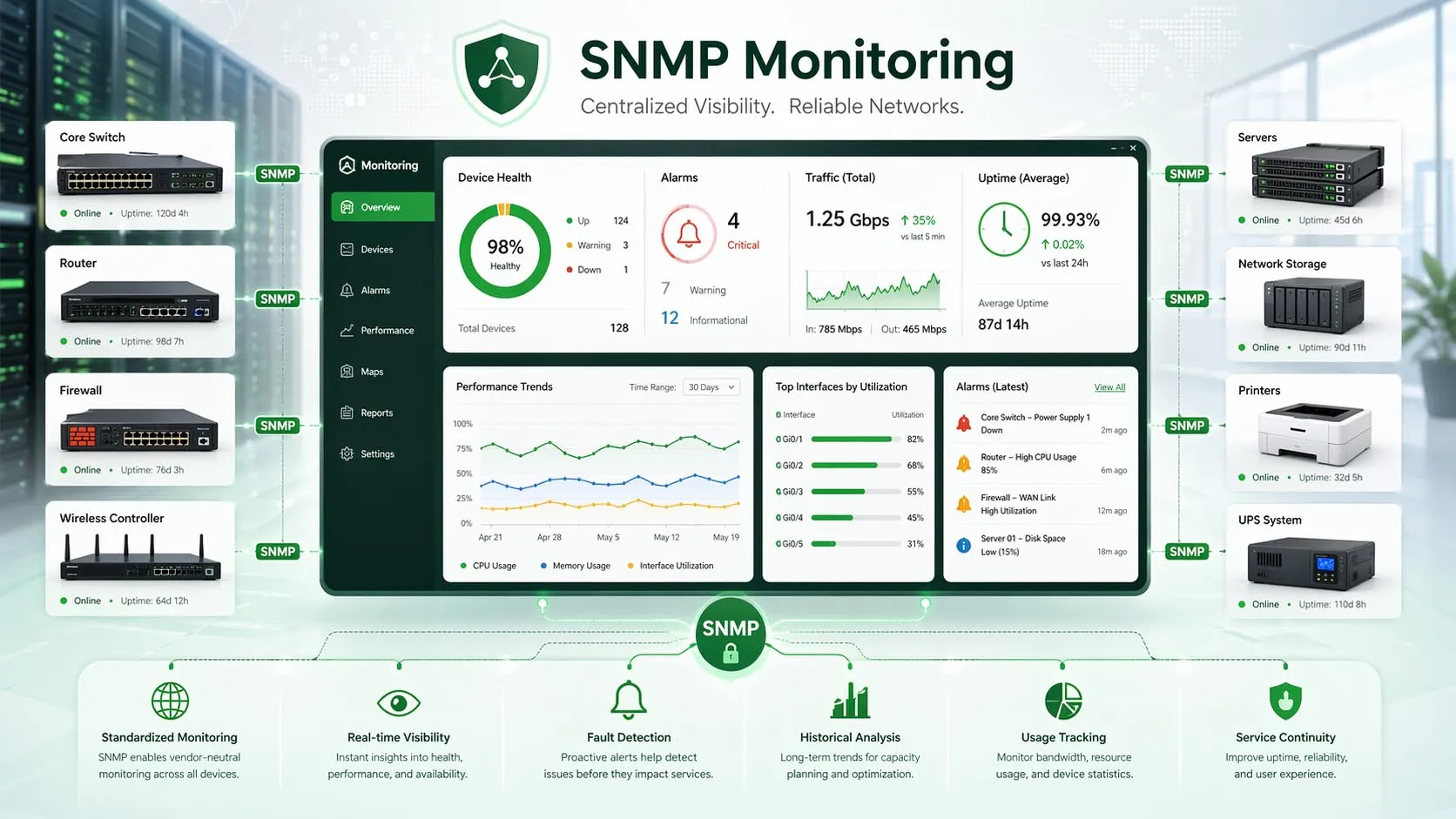
SNMP monitoring provides centralized visibility into device health, traffic status, alarms, and long-term performance trends.
How SNMP Monitoring Works
Polling, Traps, and Metrics Collection
The most common SNMP monitoring workflow is polling. In this model, the SNMP manager periodically sends requests to a device and retrieves selected values such as bandwidth usage, interface state, or processor load. Because this happens on a schedule, administrators can build historical records and trend graphs over time.
SNMP also supports asynchronous notifications, often called traps or informs. Instead of waiting for the monitoring platform to ask for an update, the device can actively send a message when a meaningful event occurs, such as a port going down, a power condition changing, or a temperature threshold being exceeded. This improves responsiveness for fault detection.
In a well-designed deployment, polling and event-driven notifications complement each other. Polling supports continuous measurement and reporting, while traps or informs help shorten the time between an incident and an alert. Together they create a more complete monitoring model than reachability testing alone.
What Kind of Data Can Be Monitored
SNMP monitoring can cover both basic and advanced operational data. Common metrics include interface throughput, packet discards, device uptime, memory use, processor load, wireless client counts, power status, storage capacity, temperature, voltage, and hardware alarms. The exact depth depends on the device type and the MIB objects it exposes.
For example, on a switch, SNMP may be used to watch port utilization, duplex mismatches, CRC errors, and link flaps. On a UPS, it may expose battery state, input conditions, and remaining runtime. On an industrial network appliance, it may provide environmental readings and equipment status that are important for maintaining resilient operation in harsh sites.
SNMP monitoring is valuable because it turns infrastructure from a black box into a measurable operating environment. When devices can report their own status, teams can move from reactive repair to proactive maintenance.
Key Features of SNMP Monitoring
Centralized Visibility Across Many Device Types
One of the strongest features of SNMP monitoring is centralized infrastructure visibility. A single monitoring platform can observe hundreds or thousands of distributed endpoints from multiple vendors. Instead of checking each device manually, teams can use one interface to view status, alarms, maps, dashboards, and historical performance records.
This becomes especially important in environments with branch offices, campuses, transport facilities, industrial plants, or geographically dispersed sites. Centralization reduces operational blind spots and allows maintenance personnel to compare conditions across locations in a consistent way.
Threshold Alarms, Trends, and Capacity Insight
SNMP monitoring platforms can define thresholds for key metrics and generate alerts when those thresholds are crossed. This may include high CPU usage, low storage availability, abnormal interface errors, power supply failures, or overheating conditions. Timely alarms allow operations teams to intervene before service degradation becomes an outage.
Historical polling data is also useful for trend analysis. Administrators can identify recurring congestion periods, rising resource consumption, or patterns that suggest hardware stress. These insights support capacity planning, maintenance scheduling, and investment decisions based on actual operational evidence instead of guesswork.
In many organizations, this feature is essential for proving whether an issue is transient, chronic, or still developing. The ability to review historical charts often saves time during troubleshooting because teams can see when a deviation started and whether it aligns with a change, failure, or external event.
Standards-Based Interoperability
SNMP is widely supported across network infrastructure and facility-related equipment, which gives it strong interoperability value. Routers, switches, firewalls, access points, servers, printers, storage systems, UPS devices, and environmental appliances often expose at least a basic SNMP data set. This broad support makes SNMP an efficient monitoring layer in mixed-vendor environments.
Even when deeper vendor-specific customization is required, the protocol still provides a common framework. As a result, organizations can extend monitoring coverage without replacing their core platform each time they add a new device family or expand into a new site.
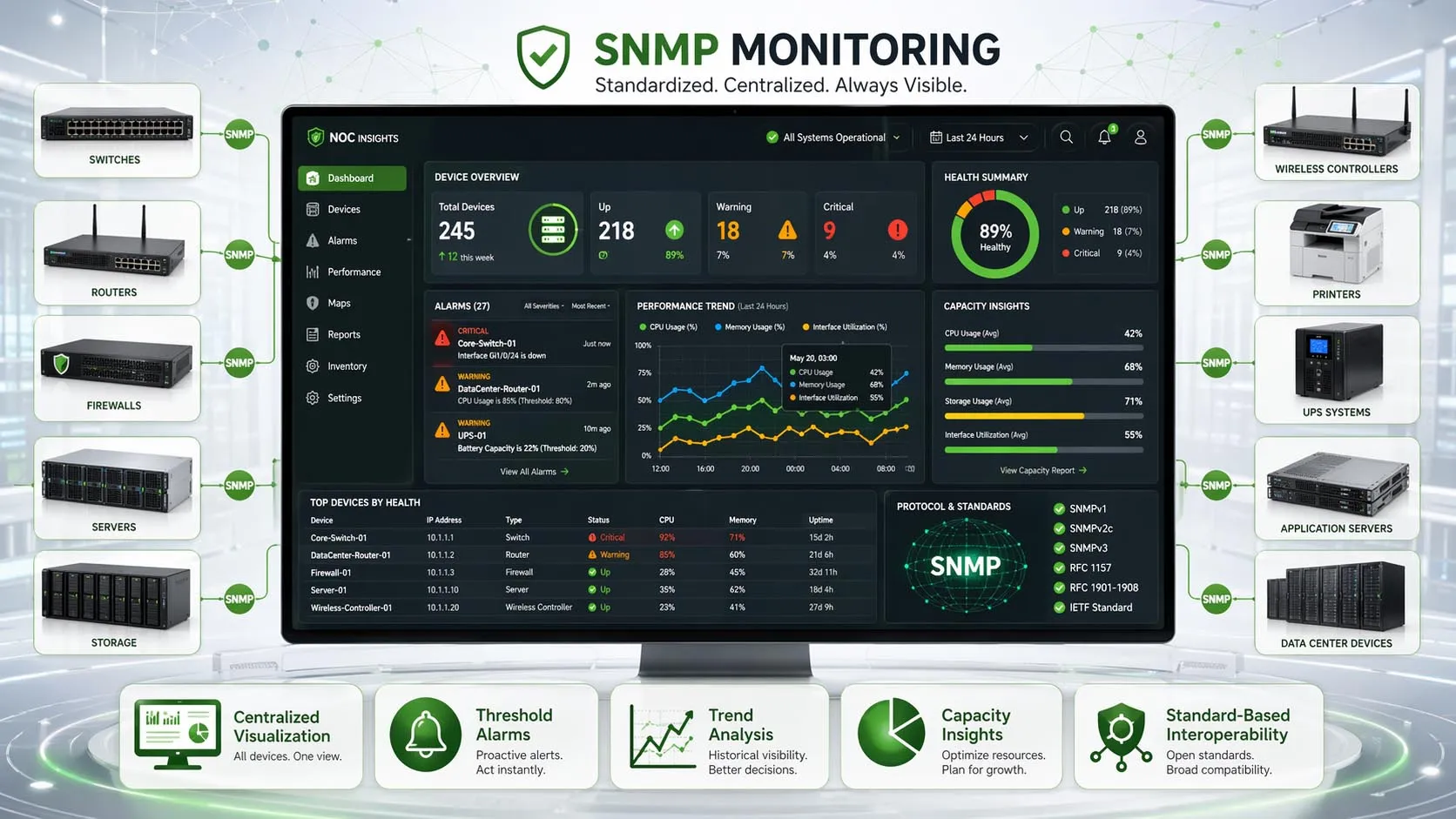
SNMP monitoring supports threshold-based alerting and long-term trend analysis for more proactive operations.
Benefits for Operations and Maintenance
Faster Fault Detection and Troubleshooting
SNMP monitoring helps teams detect abnormal conditions quickly, often before end users report a problem. Instead of relying only on manual checks or complaints from the field, administrators receive visible warning signs such as interface down events, rising error rates, overloaded processors, or failing power modules.
This shortens troubleshooting time because the monitoring system can point directly to the affected device, metric, or event category. In large environments, reducing the time needed to isolate a fault is often just as important as fixing the fault itself, because faster diagnosis limits business disruption and operational uncertainty.
Better Uptime, Planning, and Asset Awareness
Continuous monitoring improves uptime by making infrastructure conditions easier to understand over time. Teams can identify devices that are regularly overloaded, links that are persistently congested, or equipment that shows signs of environmental stress. These patterns support preventive action before serious failures occur.
SNMP monitoring also strengthens asset awareness. Because devices can be inventoried and observed centrally, organizations gain better visibility into what is deployed, where it is installed, and how it is behaving. This is useful not only for operations, but also for audits, lifecycle planning, and future expansion.
Good monitoring does not only answer the question “Is the device alive?” It answers the more important questions: “Is it healthy, is it stable, and is it moving toward a risk condition?”
Typical Applications of SNMP Monitoring
Enterprise IT Networks and Data Centers
In enterprise environments, SNMP monitoring is commonly used to supervise core switches, distribution switches, routers, firewalls, wireless infrastructure, servers, storage systems, and backup power equipment. It supports daily network operations by providing visibility into availability, traffic load, port conditions, and hardware health.
In data centers, the same approach can extend to rack-level power devices, environmental systems, and supporting infrastructure. This helps operations teams correlate service issues with underlying conditions such as overheating, power instability, or uplink congestion.
Industrial Sites and Critical Infrastructure
Industrial sites, transport systems, utilities, and other critical facilities often rely on SNMP monitoring to observe communication devices and supporting infrastructure in dispersed or demanding environments. Industrial switches, hardened gateways, wireless bridges, power systems, and environmental devices may all expose SNMP data for centralized monitoring.
In these scenarios, SNMP monitoring can contribute to operational safety and continuity by highlighting equipment degradation, communication link instability, or cabinet-level environmental issues before they escalate. When combined with alarms and maintenance workflows, it supports more reliable service in locations where downtime can be costly or hazardous.
ISPs, Managed Services, and Distributed Branch Networks
Internet service providers, managed service providers, and organizations with many branches often use SNMP monitoring to maintain a large number of remote devices from centralized operations centers. The protocol makes it practical to monitor WAN routers, access switches, CPE devices, wireless endpoints, and UPS units at scale.
This is particularly useful when field access is limited or travel between sites is expensive. Remote visibility reduces the need for manual inspection and helps support teams prioritize interventions based on actual operational data, not assumptions.
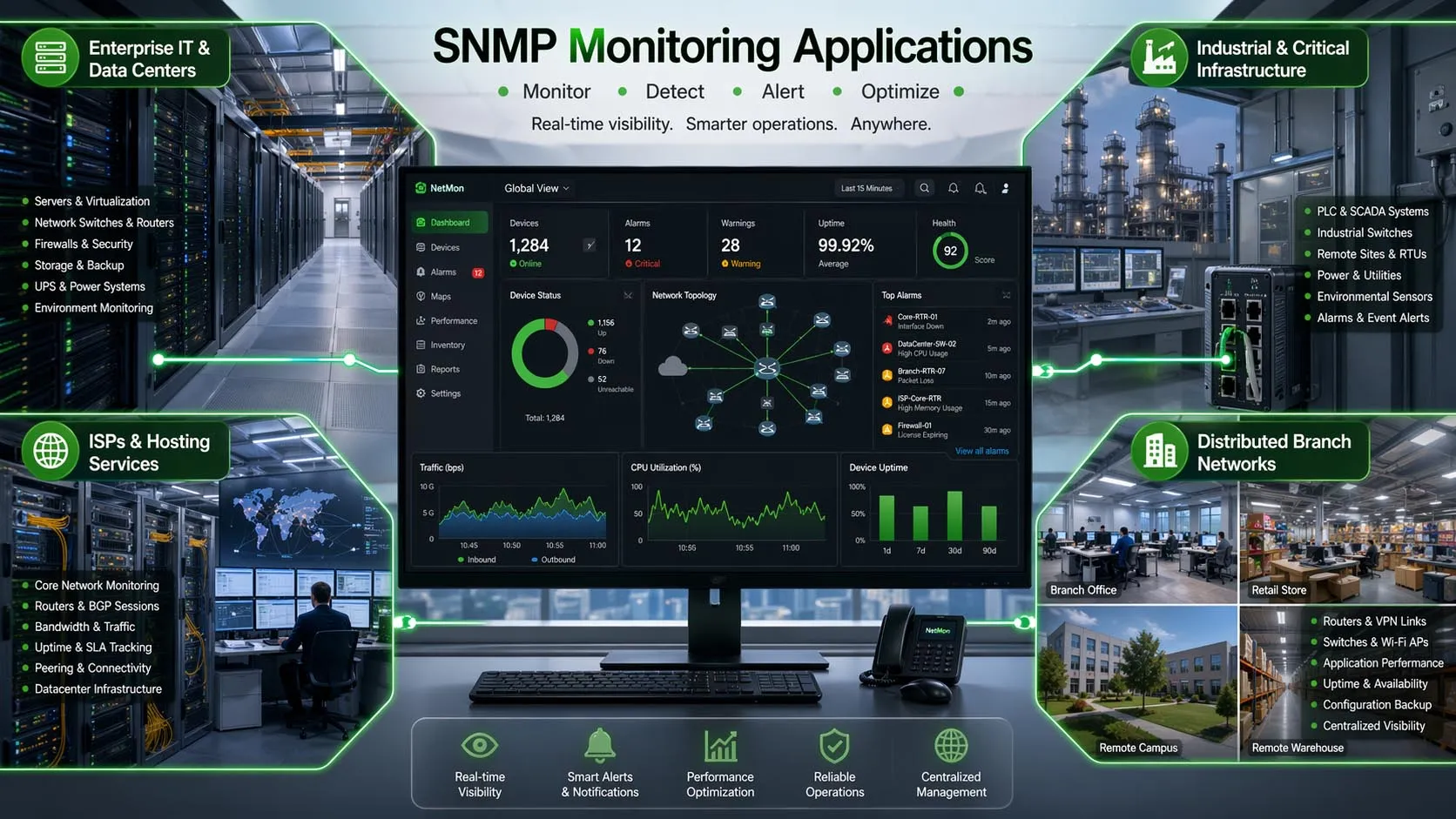
SNMP monitoring is widely applied in enterprise, industrial, service provider, and multi-site network environments.
Best Practices for Deployment
Device Preparation, Polling Design, and Security
Effective SNMP monitoring starts with proper device preparation. Teams should enable SNMP only where needed, confirm the correct MIB support, standardize naming and inventory fields, and choose the right polling intervals for each metric. Polling too frequently can add unnecessary load, while polling too slowly may delay visibility into important changes.
It is also helpful to classify devices by role and criticality. Core network infrastructure, power systems, and high-risk environmental points may require more careful alarm design than less critical peripherals. Good monitoring is not just about collecting more data; it is about collecting the right data with meaningful thresholds and response logic.
Security is equally important. Earlier SNMP versions are simple and widely supported, but stronger security practices are available with SNMPv3, which supports authentication and encryption. In most modern deployments, access control, credential hygiene, network segmentation, and careful exposure policies should be part of the monitoring design from the beginning.
Integrating SNMP with Modern Monitoring Platforms
SNMP works best when it is part of a broader monitoring strategy. Many organizations combine SNMP metrics with syslog, flow analysis, API data, configuration backup, and application monitoring to create more complete operational visibility. This layered approach helps teams understand not only that a device is under stress, but also how that condition affects services and users.
Modern platforms can also correlate SNMP alerts with topology maps, dashboards, ticketing workflows, and notification systems. As a result, SNMP remains relevant not because it does everything, but because it continues to provide reliable infrastructure telemetry that integrates well with other operational tools.
SNMP is most effective when it is used as a structured telemetry layer inside a broader monitoring architecture, not as an isolated check box feature.
SNMP Monitoring vs. Basic Device Checking
Why Simple Reachability Monitoring Is Not Enough
A ping test can confirm whether a device responds on the network, but it says very little about real operating condition. A switch can still answer ping requests while experiencing high error rates, overheating, power supply degradation, or near-saturated uplinks. Basic reachability is useful, but it is not sufficient for serious operations management.
SNMP monitoring adds operational context. It reveals what the device is doing, how stressed it is, and whether specific components are drifting toward failure. That extra layer of measurement is what makes it valuable for professional network maintenance, service assurance, and infrastructure planning.
Conclusion
Why SNMP Monitoring Still Matters
SNMP monitoring remains an important part of infrastructure management because it provides a practical, standardized, and scalable way to observe connected devices. It helps teams collect meaningful metrics, detect faults earlier, analyze trends, and manage mixed-vendor environments with greater confidence.
Whether the environment is an office network, a campus, a distributed enterprise, a data center, or an industrial facility, SNMP monitoring supports better visibility and stronger operational control. While it is often combined with newer monitoring methods, it still plays a foundational role wherever networked equipment needs to be measured, maintained, and kept available.
FAQ
Is SNMP monitoring only for network switches and routers?
No. While switches and routers are among the most common SNMP-monitored devices, the protocol is also widely used for firewalls, wireless access points, servers, printers, UPS systems, storage devices, environmental sensors, and many industrial or facility-related network appliances.
The practical scope depends on whether the device includes an SNMP agent and what data its MIB exposes. In many real deployments, SNMP becomes a cross-domain monitoring method rather than something limited to traditional network hardware.
What is the difference between SNMP polling and SNMP traps?
Polling means the monitoring system regularly asks a device for selected values, such as bandwidth usage or CPU load. This is useful for trend analysis, dashboards, and historical reporting because data is collected on a defined schedule.
Traps are event-driven messages sent by the device when something happens, such as a link failure or hardware alarm. Polling and traps are usually used together, because one supports continuous measurement while the other improves real-time alerting.
Is SNMP monitoring still relevant in modern networks?
Yes. Even though modern observability platforms use many different data sources, SNMP is still widely supported and remains highly useful for physical and virtual infrastructure visibility. It is especially valuable in mixed-vendor environments and in sites where network equipment, power devices, and industrial communication devices must be monitored together.
Its role today is often complementary rather than exclusive. In other words, SNMP may not be the only telemetry source in a monitoring system, but it is still one of the most practical and broadly compatible ones.
Which SNMP version is better for secure deployment?
For modern secure deployments, SNMPv3 is generally the preferred choice because it supports authentication and encryption. This helps protect management traffic and reduces the risk associated with exposing monitoring credentials on the network.
Earlier versions may still appear in legacy environments because of compatibility, but stronger security policies, controlled network access, and version selection should be part of any serious SNMP monitoring design.