


What Is 802.1X Port-Based Network Access Control? Uses, How It Works, and Applications
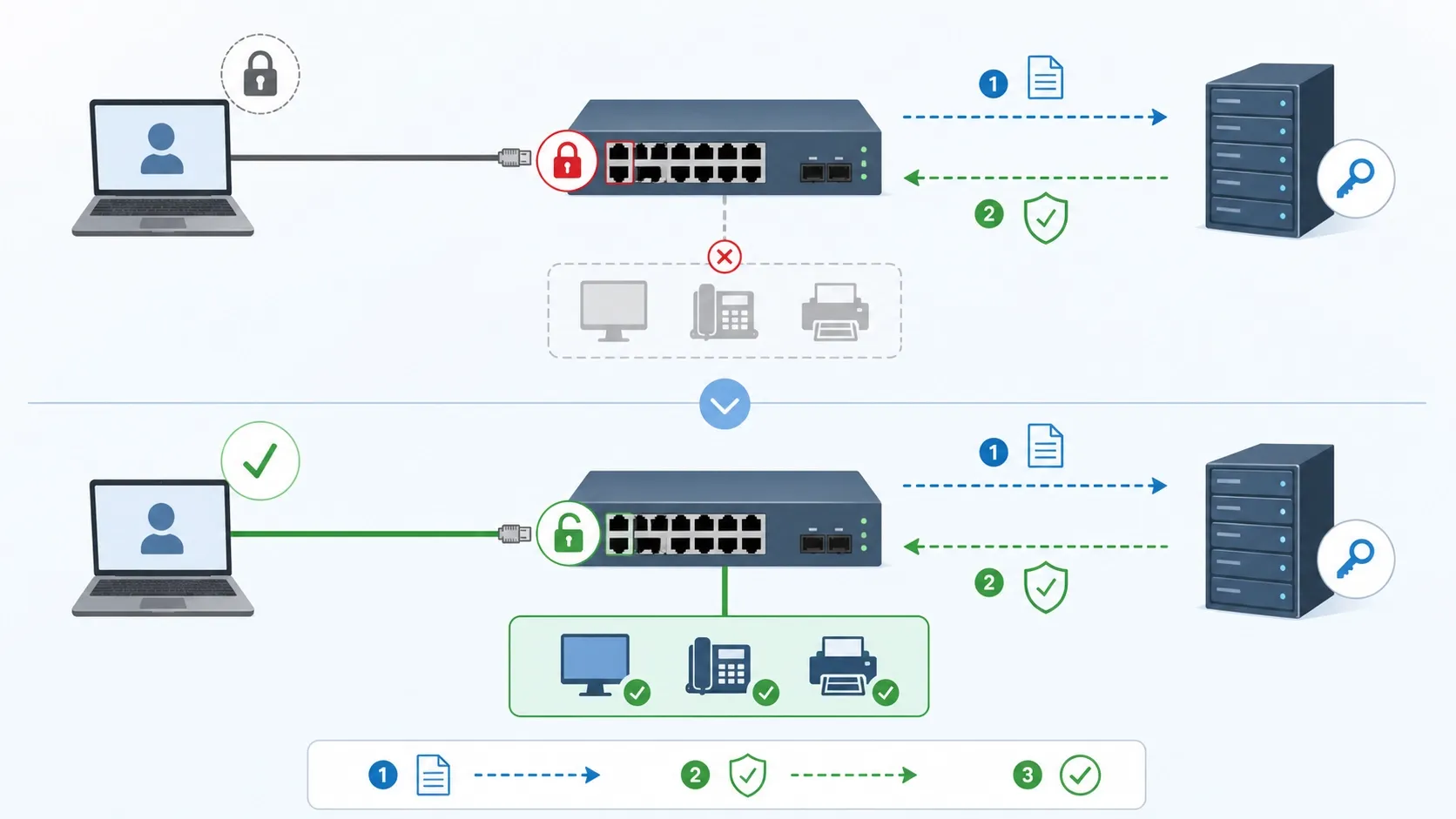
802.1X port-based network access control is a network security method that authenticates a user or device before allowing it to use a wired or wireless network. In a wired LAN, it is commonly applied on Ethernet switch ports. When a device connects to the port, the switch does not immediately allow normal network access. Instead, the device must first complete an authentication process. If authentication succeeds, the port is opened according to the assigned policy. If authentication fails, the port may remain blocked or be placed into a restricted network.
The purpose of 802.1X is to make network access controlled rather than automatic. Without access control, any device that plugs into an available wall jack, desk port, cabinet switch, or access point may be able to reach internal network resources. This can create security risks in offices, campuses, factories, public facilities, hotels, hospitals, transport stations, and other environments where physical ports or wireless access may be reachable by many users.
802.1X is widely used in enterprise LANs, campus networks, wireless networks, IP telephony networks, data centers, industrial networks, public infrastructure, and secure facility environments. It helps organizations verify who or what is connecting, assign the correct network policy, reduce unauthorized access, and improve network segmentation. In modern network design, 802.1X is often part of a broader access control strategy that includes RADIUS, certificates, VLAN assignment, endpoint profiling, monitoring, and security policy enforcement.
What Is 802.1X Port-Based Network Access Control?
Definition and Core Meaning
802.1X port-based network access control is an authentication framework that controls access at the point where an endpoint connects to the network. The port may be a physical Ethernet switch port in a wired network or a logical access point association in a wireless network. The central idea is the same: before the endpoint can communicate normally, it must prove its identity.
The core meaning is network admission control. A switch port or wireless access point is no longer treated as a simple open connection. It becomes a controlled entry point that checks identity and policy before granting access. This is especially useful for organizations that need to protect internal systems from unknown laptops, rogue devices, unmanaged equipment, or unauthorized users.
In practical deployments, 802.1X may authenticate a person, a device, or both. It may use usernames and passwords, digital certificates, machine credentials, domain identity, or other supported authentication methods. After successful authentication, the network may assign the endpoint to a suitable VLAN, apply access rules, or allow only specific services.
802.1X turns the network access port from a passive connection point into an active security checkpoint.
Why It Is Called Port-Based Access Control
It is called port-based access control because the switch port is the enforcement point. The connected endpoint may send traffic, but the switch decides whether that traffic is allowed to pass. Before authentication, the port is usually in an unauthorized state and only allows the limited traffic needed for authentication.
Once authentication succeeds, the switch changes the port state and permits normal traffic based on the policy returned by the authentication server. This approach is powerful because it blocks unauthorized access close to the edge of the network. Instead of waiting for a firewall deeper in the network to stop unwanted traffic, 802.1X controls access at the first connection point.
This design is useful in both user access networks and device access networks. It can protect desks, meeting rooms, classrooms, public spaces, equipment rooms, field cabinets, industrial control rooms, and other places where Ethernet connectivity is available.
Why 802.1X Is Used
Preventing Unauthorized Network Access
One of the main uses of 802.1X is to prevent unauthorized devices from joining the internal network. In many buildings, Ethernet ports are installed in offices, meeting rooms, corridors, classrooms, equipment rooms, and public-facing spaces. If these ports are open, a person may connect an unmanaged device and attempt to access internal systems.
802.1X reduces this risk by requiring authentication first. If the device or user cannot provide valid credentials, the network can deny access or place the connection into a restricted environment. This is especially valuable for organizations with sensitive data, regulated operations, large numbers of users, or shared physical spaces.
The result is better control over who and what can use the network. Physical access to a cable port no longer automatically means logical access to internal resources.
Supporting Identity-Based Network Policy
802.1X is also used to apply network policy based on identity. Different users and devices often need different access rights. A corporate laptop, guest device, IP phone, printer, camera, administrator workstation, and maintenance terminal should not necessarily receive the same network access.
By authenticating the endpoint first, the network can make more intelligent decisions. A trusted employee device may enter an internal VLAN. A guest may enter a guest VLAN. A phone may enter a voice VLAN. A device that fails authentication may be sent to a remediation VLAN or denied access entirely.
This identity-based approach helps organizations move away from static port-by-port assumptions and toward more flexible, policy-driven network access.
Key Components of 802.1X
Supplicant
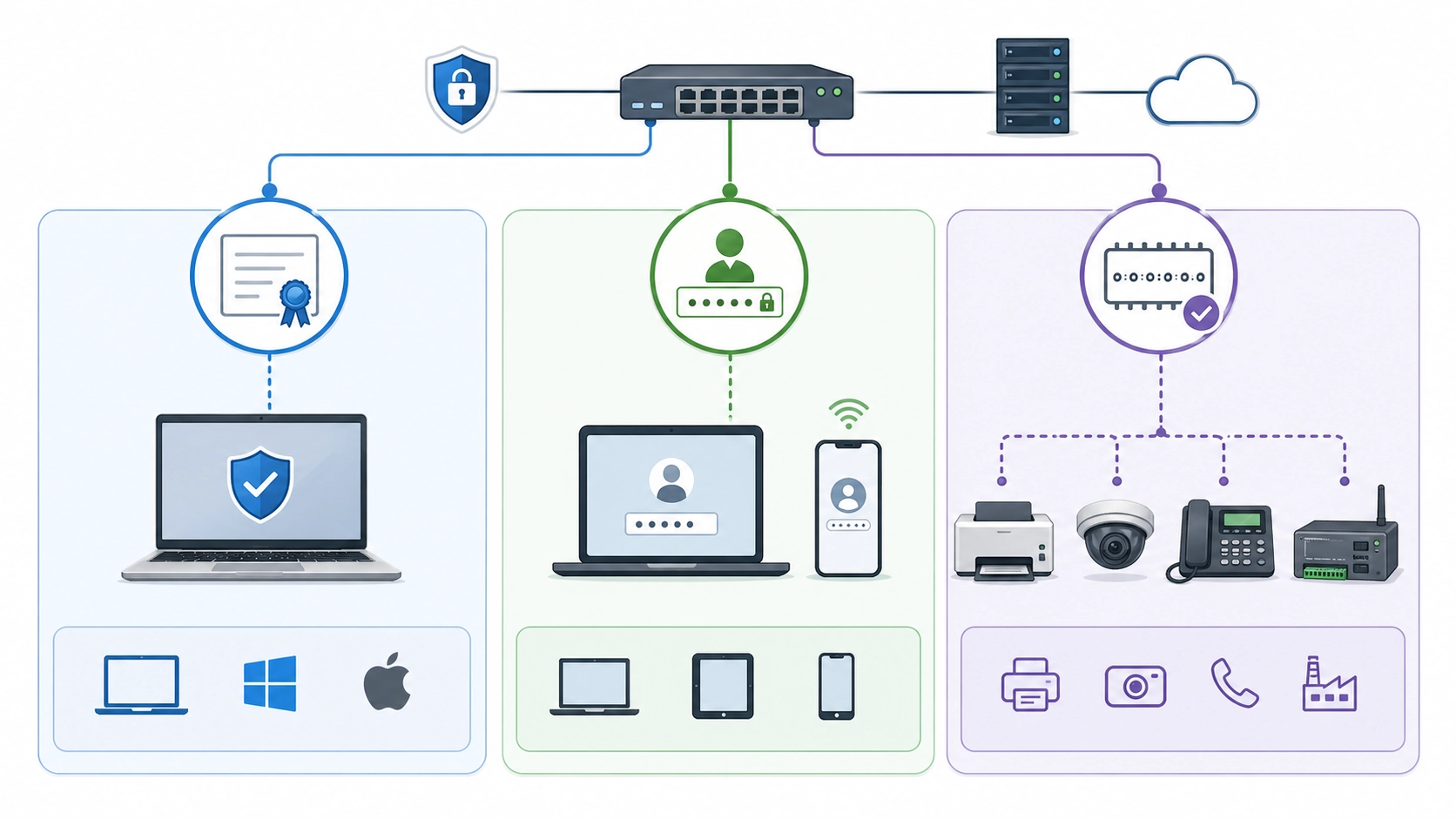
The supplicant is the endpoint that requests network access. It may be a laptop, desktop computer, tablet, IP phone, wireless client, industrial terminal, camera, gateway, or other network device. The supplicant runs software or firmware capable of participating in the 802.1X authentication process.
In user devices, the supplicant may be built into the operating system. In managed devices, it may use certificates or stored credentials. In some specialized endpoints, support may depend on device firmware and configuration options. If a device does not support 802.1X, an alternative such as MAC Authentication Bypass may be considered, but that approach is weaker than full 802.1X authentication.
The supplicant’s role is to present identity information and respond to the authentication exchange required by the network.
Authenticator
The authenticator is the network device that controls access to the port. In wired networks, this is usually an Ethernet switch. In wireless networks, it is often a wireless access point or wireless controller. The authenticator acts as the gatekeeper between the endpoint and the network.
The authenticator does not usually validate the identity by itself. Instead, it relays authentication messages between the supplicant and the authentication server. Before authentication succeeds, the authenticator blocks normal traffic and allows only the authentication exchange.
This role is essential because the authenticator enforces the access decision. It is the device that opens the port, blocks the port, assigns policy, or places the endpoint into a restricted network.
Authentication Server
The authentication server is the system that verifies identity and returns an access decision. In most enterprise deployments, this is a RADIUS server. The server checks credentials, certificates, machine identity, directory membership, device records, or other policy conditions.
If authentication is successful, the server sends an accept response to the authenticator. It may also send policy instructions such as VLAN assignment, access control attributes, or session parameters. If authentication fails, the server sends a reject response or triggers a fallback policy depending on configuration.
Centralizing this decision in an authentication server makes 802.1X easier to manage across many switches, access points, users, and devices.
How 802.1X Works
Step 1: Endpoint Connects to the Port
The process begins when an endpoint connects to an 802.1X-enabled port. In a wired network, this usually means plugging a cable into a switch port. In a wireless network, it may mean joining a secure SSID. At this stage, the endpoint does not yet have full network access.
The switch or access point keeps the connection in a controlled state. It may allow only authentication traffic while blocking normal data traffic. This ensures that an unverified endpoint cannot immediately communicate with internal servers, applications, or other devices.
This initial state is one of the main security advantages of 802.1X. The network treats a new connection as untrusted until authentication proves otherwise.
Step 2: Authentication Exchange Begins
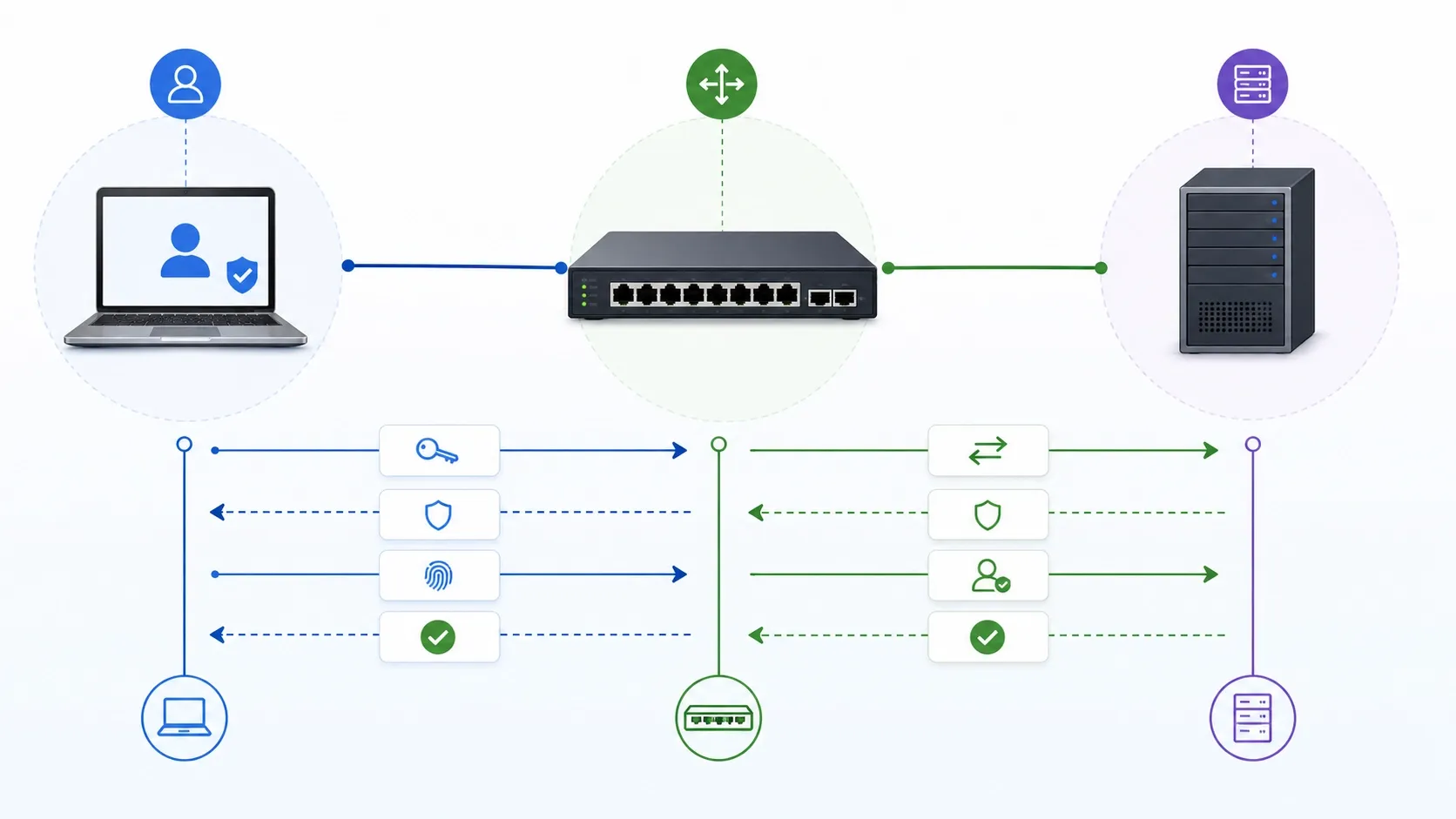
After the endpoint connects, the supplicant and authenticator begin the authentication exchange. In Ethernet networks, this exchange uses EAP over LAN, commonly called EAPOL. The supplicant sends identity and authentication information to the switch, and the switch forwards it to the authentication server through RADIUS.
The exact authentication method depends on the configured EAP type. Some environments use certificate-based methods, while others use password-based or tunneled authentication methods. The key point is that the endpoint must present acceptable identity proof before the network grants access.
During this stage, the switch acts as a relay and enforcement point. It does not open the port for normal traffic until the authentication server returns a positive decision.
Step 3: RADIUS Server Makes the Access Decision
The RADIUS server evaluates the authentication request. It may check a user directory, device certificate, machine account, identity database, group policy, time condition, device type, or other policy rules. The server decides whether the endpoint is trusted and what access it should receive.
If the request is approved, the server sends an access-accept message. If the request is denied, it sends an access-reject message. In some cases, the server may also return instructions for VLAN assignment, downloadable access control lists, session timeout, reauthentication behavior, or other policy settings.
This decision allows access control to be both centralized and flexible. Administrators can update policy on the authentication server rather than manually configuring every individual switch port.
Step 4: Port Is Authorized or Restricted
If authentication succeeds, the switch authorizes the port and allows normal network traffic according to the assigned policy. The endpoint can then communicate with permitted resources. If authentication fails, the switch may keep the port blocked, place the device into a guest VLAN, move it to a remediation network, or apply another restricted policy.
This final step turns authentication into enforcement. The endpoint does not simply pass or fail in theory; the port behavior changes based on the result. That is why 802.1X is effective as a practical network access control method.
In well-designed deployments, this process happens automatically and quickly, so legitimate users and devices can connect with little manual effort while unauthorized devices remain blocked or limited.
802.1X works by combining identity verification with port-level enforcement, so the network grants access only after policy allows it.
Authentication Methods Used With 802.1X
Certificate-Based Authentication
Certificate-based authentication is a strong method for managed devices. The endpoint presents a digital certificate issued by a trusted certificate authority. The authentication server validates the certificate and decides whether the device should be allowed onto the network.
This method is useful because certificates are difficult to guess or share compared with passwords. They can help confirm that a device is actually managed by the organization. Certificate-based authentication is common in environments that require strong device identity, such as enterprise networks, government facilities, healthcare systems, education networks, and secure industrial sites.
The main challenge is certificate lifecycle management. Certificates must be issued, renewed, revoked, protected, and monitored carefully. If certificate management is weak, the 802.1X environment can become difficult to maintain.
Password-Based and User-Based Authentication
Some 802.1X deployments use password-based or user-based authentication. In this model, users authenticate with enterprise credentials, often connected to a directory service. This may be suitable for laptops, desktops, or environments where user identity is more important than device identity.
Password-based methods are easier to understand for many organizations, but they depend on strong credential security. Weak passwords, shared accounts, phishing, or poor user practices can reduce protection. Secure EAP methods and proper identity policies are therefore important.
In many mature deployments, organizations combine device certificates with user identity so both the device and the user can be evaluated.
MAC Authentication Bypass
MAC Authentication Bypass, often called MAB, is used for devices that do not support full 802.1X supplicant functions. The switch uses the endpoint’s MAC address as an identity signal and checks it against a policy database. This is common for printers, cameras, legacy devices, industrial equipment, or special-purpose terminals.
MAB is useful for compatibility, but it is weaker than certificate-based 802.1X because MAC addresses can be spoofed. For that reason, MAB should be used carefully with restricted VLANs, device profiling, access control lists, and monitoring.
In practical deployments, MAB is often a bridge between ideal security and real-world device compatibility.
Policy Enforcement After Authentication
Dynamic VLAN Assignment
Dynamic VLAN assignment is one of the most useful 802.1X features. After authentication, the RADIUS server can tell the switch which VLAN should be assigned to the endpoint. This allows different devices or users to receive different network segments even when they connect to similar physical ports.
For example, an employee laptop may be assigned to an internal data VLAN, a guest device to a guest VLAN, an IP phone to a voice VLAN, a camera to a video VLAN, and an unknown device to a restricted VLAN. This makes network access more flexible and reduces the need for manual port-by-port VLAN configuration.
Dynamic VLAN assignment is especially valuable in environments with many users, shared desks, mobile workstations, mixed endpoint types, or frequent device movement.
Access Control and Segmentation
Authentication answers the question of whether the endpoint is allowed to connect. Authorization answers the question of what the endpoint is allowed to reach after it connects. 802.1X can support this through VLANs, access control lists, security groups, downloadable policies, and network segmentation.
This matters because different devices need different access. A guest laptop should not reach internal servers. A printer does not need access to sensitive databases. A voice device may only need access to call control services. A maintenance device may require temporary access to a limited management network.
Good 802.1X design combines authentication with least-privilege access. The endpoint receives enough connectivity to perform its function, but not unnecessary access to the rest of the network.
Uses of 802.1X
Enterprise Wired LAN Security
Enterprise wired LAN security is one of the most common uses of 802.1X. Large organizations often have many switch ports across offices, meeting rooms, lobbies, classrooms, equipment rooms, and shared workspaces. Without authentication, any available port may become a possible entry point into the internal network.
802.1X helps secure these ports by requiring identity verification before access is granted. It also allows network teams to apply different access policies based on user role, device type, department, or compliance requirement.
This makes 802.1X a practical tool for reducing unauthorized access risk at the physical edge of the network.
Wireless Network Access Control
802.1X is also widely used in enterprise Wi-Fi through WPA-Enterprise security. Instead of sharing one common Wi-Fi password, users or devices authenticate through an identity-based process. This is more secure and easier to manage in professional environments.
If an employee leaves the organization, the account or certificate can be disabled without changing a shared password for everyone. If different user groups need different access, policy can be applied dynamically. This makes 802.1X especially useful in offices, campuses, hospitals, hotels, government buildings, and large public facilities.
In wireless networks, 802.1X provides stronger identity control than simple pre-shared-key access.
Voice, Video, and Device Network Protection
802.1X can also protect networks that support IP phones, SIP endpoints, cameras, access control devices, gateways, and other connected equipment. These devices may be distributed across many locations and may connect through access switches or PoE ports.
By using 802.1X or carefully controlled fallback methods, administrators can ensure that approved devices receive the right VLAN and access policy while unknown devices are blocked or restricted. This helps protect voice, video, security, and operational networks from unmanaged access.
In communication and facility networks, this is important because endpoint security and network access control directly affect service reliability.
Applications of 802.1X Port-Based Access Control
Corporate Offices and Campuses
Corporate offices and campuses use 802.1X to control employee devices, guest access, meeting room ports, shared desk areas, wireless access, and managed endpoints. In these environments, many users move between locations, and static port assumptions may not be reliable.
With 802.1X, access can follow the user or device identity rather than the physical port alone. This supports flexible working, hot desking, multi-building campuses, and centralized access management. It also helps reduce the risk that visitors or unauthorized devices can use internal network ports.
For large organizations, 802.1X becomes part of daily network governance.
Education, Healthcare, and Public Facilities
Schools, universities, hospitals, libraries, and public facilities often have a mixture of staff devices, student devices, visitor devices, medical equipment, kiosks, cameras, phones, and administrative systems. These networks need both accessibility and security.
802.1X helps separate users and devices into suitable access zones. Staff devices can receive internal access, guests can receive internet-only access, and special-purpose devices can be restricted to the systems they need. This helps reduce security risk without completely preventing network use.
In environments with many people and many endpoint types, identity-based access control is much safer than open network ports.
Industrial Sites and Transportation Systems
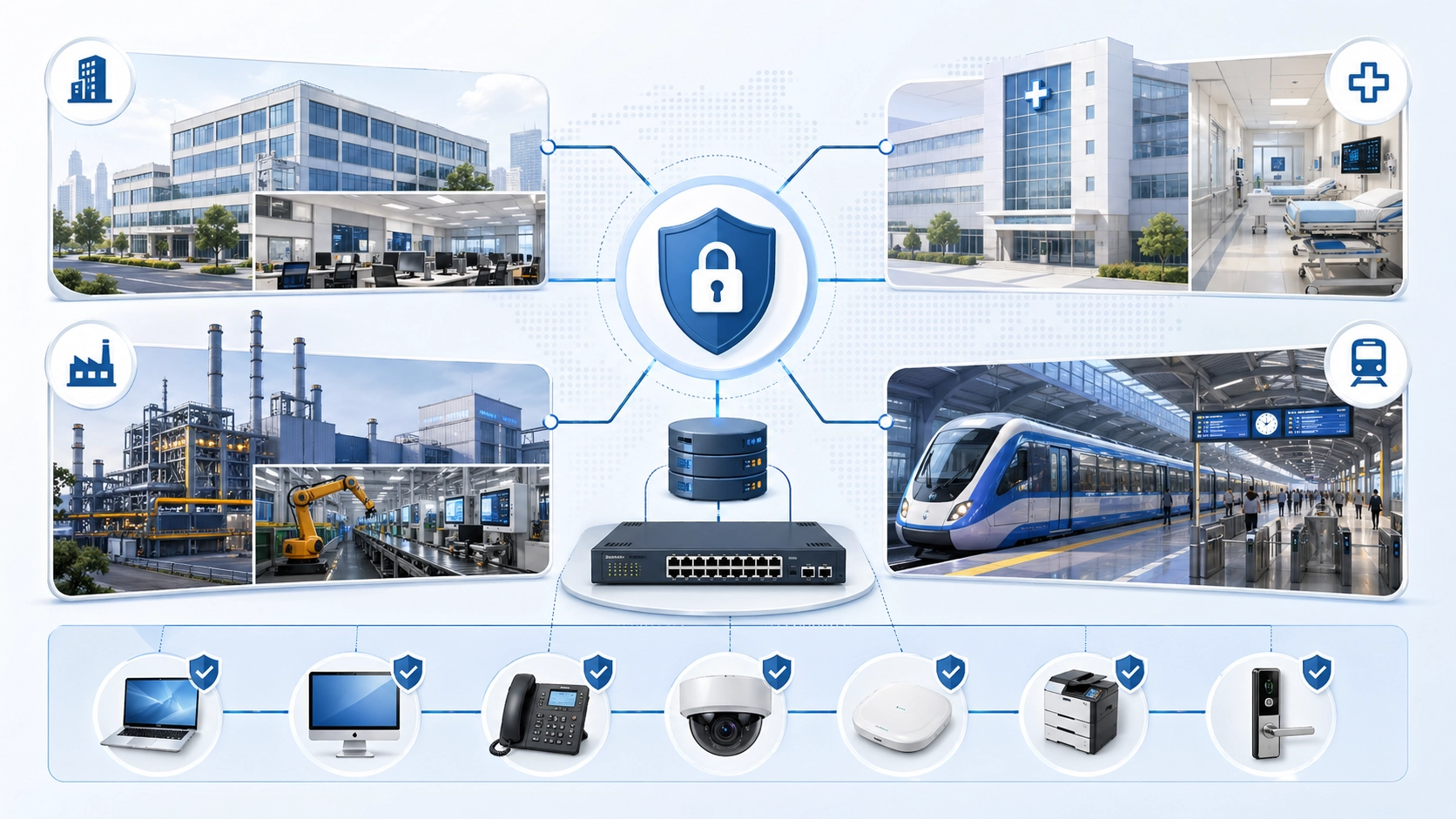
Industrial sites and transportation systems often include distributed network devices such as operator stations, communication terminals, cameras, sensors, controllers, gateways, access points, and field cabinets. These endpoints may be located in workshops, tunnels, platforms, substations, ports, airports, or outdoor facilities.
802.1X can help ensure that only approved devices connect to sensitive network segments. It can also support segmentation between operational technology, voice communication, security systems, maintenance access, and general data traffic. Where some legacy devices do not support 802.1X, controlled exceptions and restricted policies may be required.
In these environments, 802.1X supports both cybersecurity and operational discipline by reducing uncontrolled access at the network edge.
Benefits of 802.1X Port-Based Network Access Control
Stronger Access Security
The most direct benefit of 802.1X is stronger access security. The network verifies identity before allowing normal traffic. This reduces the risk of unknown devices connecting to internal systems simply because they have physical access to a port.
This is especially valuable in shared spaces, public areas, multi-tenant buildings, campuses, and field environments where network ports may not always be physically protected. 802.1X adds a logical security layer to the physical access point.
Stronger access security helps organizations reduce exposure and improve control at the network edge.
Better Network Segmentation
802.1X improves segmentation by allowing different endpoints to receive different network policies. This can separate employee traffic, guest traffic, voice traffic, video traffic, management traffic, and restricted device traffic. Segmentation limits unnecessary access and reduces the impact of compromised or misused devices.
A well-segmented network is easier to secure and easier to troubleshoot. Devices can be grouped by purpose and policy rather than simply by where they are plugged in. This is especially useful in large organizations with many endpoint types.
By combining authentication with segmentation, 802.1X supports a more structured and secure network design.
Centralized Policy Management
802.1X usually works with centralized authentication servers such as RADIUS. This allows administrators to define access rules in one policy system rather than manually managing each switch port. Centralized management is especially valuable in large networks with many switches, access points, users, and devices.
Policy changes can be applied more consistently. User roles can be updated. Certificates can be revoked. Device groups can be assigned to different VLANs. Failed devices can be placed into remediation networks. This improves both security and operational control.
Centralized policy is one of the reasons 802.1X remains a key feature in enterprise access networks.
Deployment Considerations
Prepare Device Inventory
Before deploying 802.1X, organizations should prepare an accurate device inventory. They need to know which devices support 802.1X, which devices require certificates, which devices need user authentication, and which devices may need MAB or another fallback method.
Inventory is especially important for printers, cameras, IP phones, access control devices, industrial equipment, gateways, and other special-purpose endpoints. If these devices are overlooked, they may lose network access when 802.1X is enforced.
A good inventory reduces deployment risk and helps create realistic access policies.
Use a Phased Rollout
A phased rollout is safer than enabling 802.1X everywhere at once. Teams can start with monitoring mode, test ports, pilot groups, low-risk areas, or selected device categories. They can observe authentication results, fix policy errors, and confirm that legitimate devices receive the correct access.
After the pilot succeeds, the deployment can expand to more switches, buildings, departments, or networks. This staged approach reduces the risk of widespread access disruption. It also helps the network team build operational experience before full enforcement.
For critical networks, testing should include failure scenarios, certificate expiration, RADIUS unavailability, fallback behavior, and recovery procedures.
802.1X should be deployed gradually and verified carefully, because access control mistakes can interrupt legitimate network services.
Plan for Non-802.1X Devices
Many real networks include devices that do not support 802.1X. These may include older printers, cameras, embedded devices, sensors, controllers, intercom terminals, or specialized equipment. Blocking all of them may not be realistic, but allowing them unrestricted access may be risky.
Organizations should plan controlled alternatives such as MAB, static registration, restricted VLANs, device profiling, and tight access rules. These methods should be documented and monitored so exceptions do not become hidden security gaps.
The goal is to support necessary devices while limiting the risk created by weaker authentication methods.
Maintenance Tips
Monitor Authentication Logs
802.1X environments should be monitored continuously. Authentication logs can show successful logins, failed attempts, unknown devices, certificate problems, rejected users, wrong VLAN assignments, and policy mismatches. These logs are valuable for both troubleshooting and security monitoring.
Repeated authentication failures may indicate an expired certificate, misconfigured supplicant, unauthorized device, user credential problem, or RADIUS policy issue. Without log review, these problems may be difficult to diagnose.
Monitoring helps keep 802.1X reliable after deployment and not only during initial configuration.
Maintain Certificates and Policies
Certificate and policy maintenance is essential. Certificates expire, devices are replaced, employees leave, departments change, and network segmentation rules evolve. If these changes are not managed, valid devices may fail authentication or old devices may retain access longer than they should.
Administrators should maintain certificate lifecycles, device records, user groups, VLAN mappings, exception lists, and RADIUS policies. They should also review whether access rules still match current business and security requirements.
A healthy 802.1X deployment depends on ongoing identity and policy hygiene.
Document Recovery Procedures
Because 802.1X controls access at the network edge, recovery procedures are important. Teams should know how to troubleshoot a locked-out device, how to bypass authentication temporarily for emergency maintenance, how to recover if the RADIUS server is unavailable, and how to restore access after a certificate or policy failure.
Documentation reduces downtime and prevents panic during incidents. It also helps support teams respond consistently when users or devices cannot connect.
Access control is valuable only when it is secure and manageable. Clear recovery procedures make 802.1X more practical in daily operations.
Common Challenges
Endpoint Compatibility
Endpoint compatibility is one of the most common challenges. Not all devices support 802.1X in the same way, and some do not support it at all. Even when support exists, firmware, operating systems, certificate stores, and configuration options may vary.
This can make deployment more complex than expected. A laptop may authenticate easily, while a printer, camera, or industrial terminal may require special handling. A phone may support 802.1X, but its pass-through port for a computer may require additional switch configuration.
Compatibility testing is therefore essential before large-scale enforcement.
Operational Complexity
802.1X adds security, but it also adds operational complexity. Network teams must manage supplicant settings, switch configuration, RADIUS policy, certificates, VLANs, fallback methods, logs, and troubleshooting workflows. If these elements are poorly documented, day-to-day support may become difficult.
Training and process design are important. Administrators should understand how the authentication flow works and where failures may occur. Help desk teams should know basic symptoms and escalation paths. Security teams should understand how to use authentication logs for monitoring.
The goal is to make 802.1X a stable operational control, not a security feature that only a few specialists understand.
Conclusion
802.1X port-based network access control is a security framework that authenticates users or devices before allowing network access through a switch port or wireless access point. It uses a supplicant, an authenticator, and an authentication server, commonly with RADIUS, to verify identity and apply access policy.
Its main uses include preventing unauthorized network access, supporting identity-based policy, securing wired and wireless networks, protecting voice and device networks, and improving segmentation. It can assign VLANs, enforce access rules, support certificate-based authentication, and provide centralized access control across large environments.
802.1X is valuable in enterprise offices, campuses, healthcare facilities, education networks, industrial sites, transportation systems, public facilities, and communication networks. When deployed carefully with inventory, phased rollout, monitoring, certificate management, and fallback planning, it becomes a powerful foundation for secure and controlled network access.
FAQ
What is 802.1X port-based network access control?
802.1X port-based network access control is a method that authenticates a user or device before allowing normal network access through a switch port or wireless access point.
It helps prevent unauthorized devices from joining the internal network.
How does 802.1X work?
802.1X works through three main components: the supplicant, the authenticator, and the authentication server. The endpoint requests access, the switch or access point controls the port, and the authentication server verifies identity through RADIUS or a similar system.
If authentication succeeds, access is granted according to policy. If it fails, access may be blocked or restricted.
Where is 802.1X commonly used?
802.1X is commonly used in enterprise LANs, campus networks, secure Wi-Fi systems, offices, schools, hospitals, industrial sites, transport systems, data centers, and communication networks.
It is especially useful where many users and devices connect through shared or distributed network access points.







