


1. Introduction
Walkie-talkies remain a cornerstone of instant voice communication in security, factories, ports, airports, railways, tunnels, utilities, mining, oil and gas, and public safety. They give field workers, patrol teams, and emergency responders a fast push-to-talk channel that simply works. Yet most walkie-talkie networks are still isolated from the IP-based telephone systems used in offices, control rooms, and remote command centers. A maintenance technician on a radio cannot directly call an engineering IP phone; a dispatcher cannot bridge a radio talk group with a SIP extension without manual relay. This gap slows down decisions, fragments incident recording, and increases the risk of missed information.
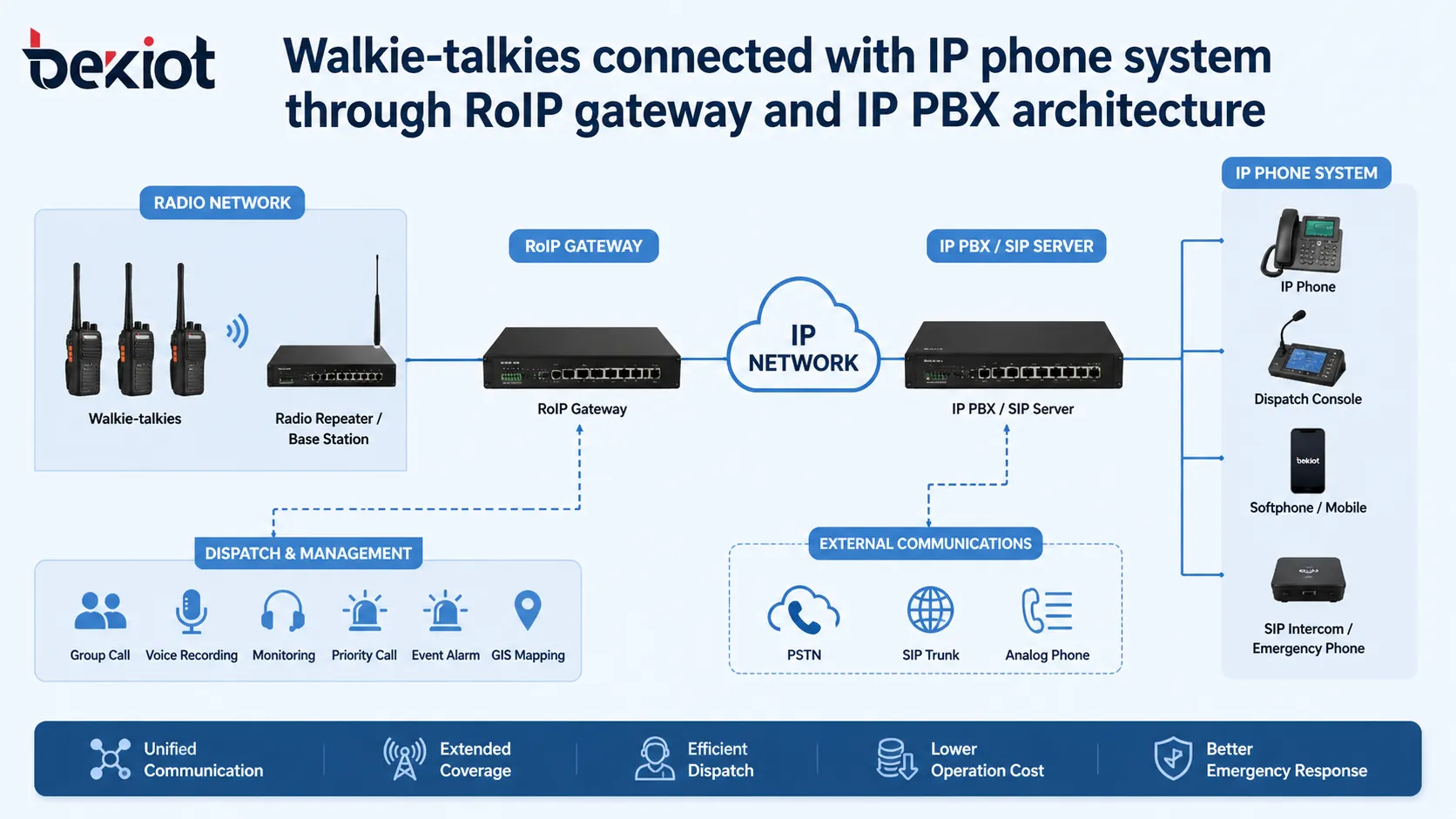
By combining a Radio over IP (RoIP) gateway, an IP PBX (SIP server), and a dispatch console, organizations can transform a radio channel into a routable, recordable extension on the corporate voice network. An IP phone can dial a radio talk group, a walkie-talkie key-up can ring a desk phone, and a dispatcher can manage both worlds from a single screen. This article explains the complete integration chain—from radio audio and PTT control to SIP registration and dispatch operations—and shows how industrial sites achieve truly unified voice communication.
2. Why Walkie-Talkies Need to Connect with IP Phone Systems
2.1 Limitations of Standalone Radio Networks
A standalone walkie-talkie system is fast for field teams but constrained by coverage boundaries, channel configuration, and its closed nature. Users outside the RF coverage area cannot join the conversation. Office personnel on SIP phones or softphones have no direct path to field radios. This creates a persistent communication gap between mobile teams and fixed control assets.
2.2 The Reality of Multi-System Industrial Sites
Factories, railway systems, airports, tunnels, mines, and energy facilities typically operate several voice systems simultaneously: walkie-talkies for mobile workers, IP phones in control rooms and offices, emergency telephones and intercoms at fixed locations, paging speakers for public address, and dispatch consoles for centralized command. When these systems remain separate, operators juggle multiple devices and screens, which delays response and fragments situational awareness.
2.3 Unified Voice Drives Faster, Safer Operations
Connecting walkie-talkies to an IP phone system lets a SIP phone user dial directly into a radio channel. A dispatcher can talk to radio and IP phone users from one console. A radio call can be patched to an external phone line. Emergency calls can be routed instantly to the correct response team. In environments where seconds matter—severe industrial processes, public safety, transport control—this cross-system reach directly improves safety, production continuity, and coordination.
3. What Is RoIP in Walkie-Talkie Communication?
3.1 Radio over IP Explained
RoIP (Radio over IP) transmits radio audio and control signals over an IP network. It does not replace the walkie-talkie; it extends the radio system into the Ethernet, LAN, WAN, or VPN environment. A RoIP gateway sits between a radio base station, mobile radio, or repeater and the IP network. It packetizes radio voice and converts push-to-talk (PTT) and carrier-detection signals into messages that SIP servers and IP PBXs understand.
3.2 How RoIP Converts Radio Voice into IP Traffic
When a walkie-talkie user presses PTT and speaks, the radio transmits over the air. The connected radio equipment sends audio to the RoIP gateway. The gateway captures that audio, encodes it (typically G.711), and streams it as RTP packets toward the IP PBX, dispatch server, or another RoIP device. For phone integration, the gateway usually acts as a SIP endpoint – it registers with the IP PBX just like an IP phone, giving the radio channel a directory number and making it callable.
3.3 RoIP, VoIP, and Radio Repeaters: Three Different Things
VoIP handles voice for telephones and SIP trunks. RoIP focuses on radio communication over IP. A radio repeater extends RF coverage by receiving and re-transmitting radio signals. In a walkie-talkie-to-IP-phone project, these technologies work together: repeaters handle wireless coverage; the RoIP gateway interfaces radio with the IP voice network; the IP PBX manages extension logic and routing.
4. Core Architecture of the Integrated System
4.1 Walkie-Talkies and Radio Infrastructure
Handheld walkie-talkies, vehicle-mounted radios, base stations, repeaters, and antennas form the radio side. Field users operate push-to-talk as usual. The integration approach adds a RoIP gateway without forcing every radio user to change their device or behaviour.
4.2 The RoIP Gateway as the Bridge
The RoIP gateway is the pivotal device. It connects to one or more radio channels on the audio/control side and to the IP network on the other. A professional gateway provides stable audio transmission, precise PTT control, radio interface compatibility, and SIP registration. A single channel can link one radio group; multi-channel gateways handle several talk groups or repeaters simultaneously and provide each with its own SIP identity.
4.3 IP PBX or SIP Server for Call Control
The IP PBX (or SIP server) acts as the communication brain. It manages extensions, dial plans, ring groups, call recording, SIP trunks, and routing policies. Once the RoIP gateway registers as a SIP extension, the connected radio channel becomes a callable resource—for example, extension 801 for security channel 1, 802 for logistics, and so on. The IP PBX can then route calls between these radio extensions and any other SIP device on the network.
4.4 Dispatch Console for Centralized Operation
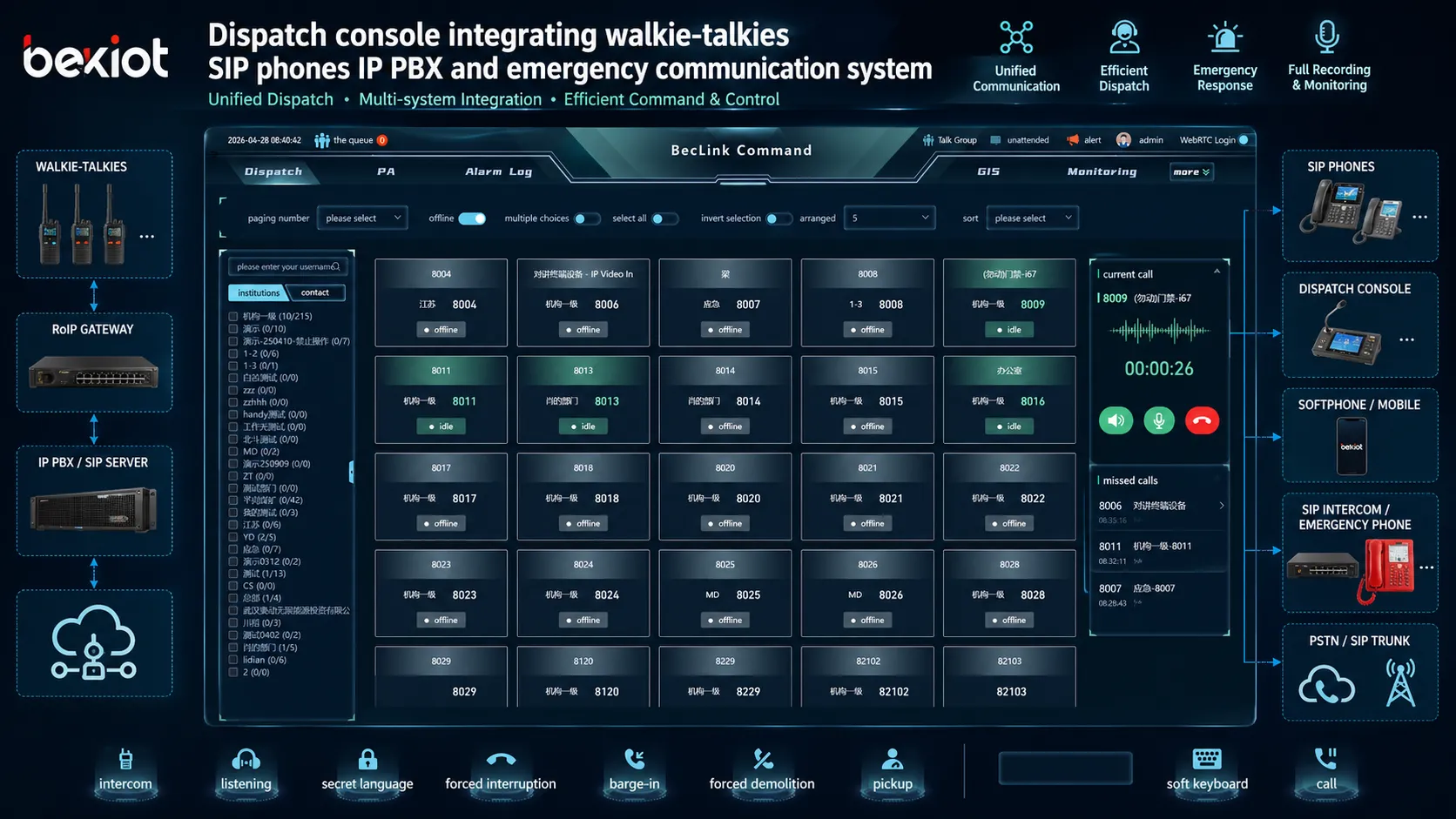
A dispatch console brings all resources—radio channels, IP phones, intercoms, emergency stations, paging zones—into one graphical interface. Operators see active calls, monitor multiple channels, handle emergency events, and coordinate field teams without switching physical devices. For mission-critical environments, this unified control layer often matters more than simple point-to-point calling.
5. How a RoIP Gateway Connects Walkie-Talkies to an IP PBX
5.1 Radio Audio Interface
The gateway receives and transmits audio through a radio interface—often an accessory port, 4-wire connection, or dedicated interface cable. Proper level matching, impedance alignment, and gain adjustment are essential to avoid distortion, low volume, or noise going into the IP phone system.
5.2 PTT Control and Carrier Detection
PTT control is the most critical signal in the integration. When a phone user wants to talk over the radio, the gateway must assert PTT at exactly the right moment and release it when the transmission ends. The gateway typically detects incoming radio traffic via COR (Carrier Operated Relay)—a hardware signal that fires the instant a carrier is received. Hardware COR is strongly preferred over VOX (voice-operated switch) because it avoids syllable clipping and false triggering on background noise. Reliable PTT timing prevents clipped words, transmission collisions, and missed messages.
5.3 SIP Registration
The RoIP gateway registers with the IP PBX as a SIP extension. The PBX assigns an extension number to the gateway channel. For instance, radio channel 1 becomes extension 801, channel 2 becomes 802. Any SIP phone, softphone, or dispatch console can now dial that extension and speak to the corresponding walkie-talkie group. The IP PBX handles the signalling; the gateway handles the radio-side PTT and audio conversion.
5.4 Call Routing Between Walkie-Talkie and IP Phone Users
The IP PBX defines routing logic. An incoming radio call (triggered by COR) can be directed to a control room phone, a ring group, a dispatch queue, or an external SIP trunk. Selected IP phone extensions can be permitted to dial out to radio channels. Security, maintenance, and emergency groups can each have their own routing policies, ensuring that the right people hear the right calls at the right priority.
6. Typical Communication Workflows
6.1 Walkie-Talkie User Calling an IP Phone
A field worker presses PTT and speaks. The radio base station captures the audio and sends it to the RoIP gateway. The gateway detects COR and initiates a SIP call to a preconfigured destination—for example, a ring group of security desk phones or a dispatch console operator. The IP PBX routes the audio, and the phone user can talk back by simply speaking; the gateway handles PTT on the radio side.
6.2 IP Phone Calling a Walkie-Talkie Channel
An office user dials the extension assigned to a RoIP gateway channel. The IP PBX routes the call to the gateway, which activates PTT on the connected radio and transmits the phone user’s voice over the air. Walkie-talkie users on that channel hear the message and can respond normally. This allows supervisors, control room operators, or remote experts to join field conversations without carrying a walkie-talkie.
6.3 Dispatcher Communicating with Multiple Radio Groups
A dispatch console connects to multiple RoIP channels and SIP extensions simultaneously. The dispatcher can select individual channels, create patches between a radio group and a phone line, or broadcast to several groups at once. For example, in a port operation center, a dispatcher coordinates crane operators, security patrols, maintenance workers, and vehicle drivers—each on different radio channels—all from one screen.
6.4 Remote Access to Walkie-Talkie Networks
RoIP transports radio traffic over IP, so a remote command center or an authorized supervisor can access radio channels through a secure VPN connection. This is valuable for multi-site operations and emergency management, extending the reach of existing walkie-talkie systems without duplicating RF infrastructure at every location.
7. Dispatch Integration for Unified Command and Control
7.1 Centralized Radio and IP Phone Operation
Dispatch integration pulls walkie-talkie users, SIP phones, emergency stations, IP intercoms, paging speakers, and external telephone lines into one operational interface. Radio channels appear as selectable tiles; phone extensions are displayed by department; emergency points map to locations. This visual approach reduces operator workload and eliminates the need to juggle separate physical devices.
7.2 Recording, Monitoring, and Group Calling
The dispatch platform typically records all voice traffic—radio and telephone—with timestamps and channel/exterion identifiers. This unified recording simplifies incident review, compliance, and training. Group calling allows a dispatcher to reach all security radios, all maintenance phones, or all emergency response members instantly, even though they use different device types.
7.3 Emergency Call Handling and Priority Communication
In mission-critical environments, emergency calls cannot be treated like routine traffic. A dispatch system can apply priority routing, visual alerts, alarm linkage, and predefined response flows. For example, an emergency phone activation in a tunnel can trigger a screen pop, open a voice path to the nearest radio team, display CCTV feeds, and automatically queue a paging announcement. When walkie-talkie channels are integrated into this environment, the whole response becomes faster and more coordinated.
8. Application Scenarios
Factories and Industrial Parks – Production coordination, security patrols, maintenance, and emergency response all benefit from direct radio-to-phone connectivity. Control rooms and office staff can reach field teams without relaying messages manually.
Oil & Gas, Mining, and Power Plants – Large, hazardous sites demand fast voice loops. Integrating walkie-talkies with the IP PBX lets control room operators talk directly to field personnel, escalate alarms, and coordinate multi-team responses while maintaining a complete voice record.
Transportation, Ports, Airports, and Railways – Distributed teams, moving vehicles, and public safety operations require tight coordination. RoIP gateways link on-board radios, trackside workers, and station offices with dispatch consoles and emergency phones, creating a seamless operational voice network.
Public Safety and Emergency Response – Command centers can access tactical radio nets, patch them to telephone lines, and record everything in one stream. During an incident, a dispatcher manages field responders, support agencies, and back-office coordinators from a single position.
9. Key Benefits of Walkie-Talkie and IP Phone Integration
-
Unified Voice Communication: Radio users, IP phone users, intercoms, and remote operators all operate on one connected network, eliminating device silos.
-
Extended Coverage: RoIP transports radio channels across IP networks, so a radio group can be reached from another building, another city, or a cloud-connected command center.
-
Lower Infrastructure Cost: Organizations reuse existing walkie-talkies and IP networks; they add gateways and routing instead of replacing all endpoints.
-
Better Dispatch Efficiency: One-screen control, click-to-patch, priority queuing, and unified recording drastically reduce manual coordination and response times.
-
Enhanced Safety and Compliance: Every radio and phone interaction can be recorded, time-stamped, and retrieved for audits, incident analysis, and regulatory requirements.
10. What to Consider When Selecting a RoIP Gateway Solution
10.1 Radio Compatibility
Confirm the gateway supports the radio model’s audio interface, accessory connector, PTT/COR signalling, and operating mode (base station, mobile, repeater). Real-world testing under site noise conditions is essential, not just lab-level compatibility.
10.2 SIP and IP PBX Compatibility
The gateway must register reliably with the target IP PBX or SIP server and support the required codecs (G.711 a-law / µ-law minimum), NAT traversal, DTMF relay (RFC 2833), and any proprietary extensions the PBX expects. Standard SIP compliance is a prerequisite; interoperability validation is a necessity.
10.3 PTT Control and Audio Quality
Look for configurable PTT timing, hardware COR detection, and echo cancellation on the phone-facing side. Audio gain should be adjustable to match the radio’s output and avoid clipping or excessive noise.
10.4 Network Reliability and Security
Place RoIP traffic on a dedicated VLAN with QoS for RTP. Use VPN tunnels for remote access, restrict SIP traffic to known IP PBX addresses, disable unused services on the gateway, and enforce strong authentication policies. A compromised gateway becomes an open microphone on your radio channel.
10.5 Dispatch Platform Integration
If a command center is part of the architecture, ensure the RoIP gateway can be monitored and controlled by the dispatch software—ideally through standard SIP or a documented API. Centralized channel selection, recording triggers, and emergency call handling should all work without custom middleware burdens.
11. Becke Telcom Walkie-Talkie and IP Phone Integration
Becke Telcom delivers industrial communication solutions that unite walkie-talkies, SIP phones, emergency terminals, paging systems, and dispatch centers on a single IP-based platform. In a typical integration, RoIP gateways bridge radio channels with an IP PBX or SIP-enabled dispatch server, giving field radio users direct access to office extensions and allowing control rooms to manage every voice endpoint from one screen. For factories, tunnels, ports, energy facilities, transportation systems, and public safety projects, Becke Telcom designs around SIP interoperability, industrial terminal ruggedness, emergency intercom linkage, and dispatch console operation—ensuring that the converged voice network supports both daily workflows and critical incident response.
A practical walkie-talkie and IP phone integration solution connects not just devices, but users, workflows, control rooms, emergency teams, and field operations into one coordinated communication environment.
12. Conclusion
Walkie-talkies connect to IP phone systems through a deliberate combination of RoIP gateways, an IP PBX, and dispatch integration. The gateway bridges RF and IP, translating audio and PTT/COR into SIP events. The IP PBX manages extension dialing, routing, and feature integration. The dispatch console provides centralized visibility, one-click patching, and emergency handling. The result is a unified voice network where a walkie-talkie channel is no longer an isolated group—it is a fully integrated extension of the enterprise communication system. For industrial sites, transport hubs, energy operations, and public safety agencies, this architecture improves response times, extends coverage, reduces cost, and makes every voice endpoint reachable from one place.
FAQ
Can walkie-talkies connect to an IP phone system?
Yes. A RoIP gateway links the radio channel to an IP network and enables communication with SIP phones, IP PBX extensions, and dispatch consoles.
What device connects walkie-talkies to an IP PBX?
A RoIP gateway is the core device. It converts radio audio and PTT/COR signals into IP voice traffic and typically registers as a SIP extension with the IP PBX.
Can an IP phone talk directly to a walkie-talkie user?
Yes. When the RoIP gateway registers the radio channel as an extension, an IP phone can dial that extension and speak; the gateway handles PTT activation so the voice goes out over the air.
Is RoIP the same as VoIP?
No. VoIP (Voice over IP) is for telephone traffic. RoIP (Radio over IP) transports radio communication across IP networks. In integration projects they work together: the RoIP gateway feeds radio voice into the VoIP/SIP environment.
Can dispatchers control both walkie-talkie users and IP phone users from one console?
Yes. A dispatch console consolidates radio channels, SIP phones, intercoms, emergency stations, and paging zones into a single graphical interface for monitoring, patching, recording, and priority handling.
Where is walkie-talkie and IP phone integration commonly deployed?
Factories, industrial parks, oil and gas facilities, mines, power plants, transportation systems (railways, airports, ports, tunnels), large campuses, public safety agencies, and emergency command centers are typical deployment environments.







