


Campus security is no longer about placing a few cameras, locking building doors, or installing emergency call points in isolated locations. Modern schools, universities, and large education campuses need a smarter layered safety ecosystem where communication, monitoring, alerting, dispatch, and emergency response work together as one coordinated system.
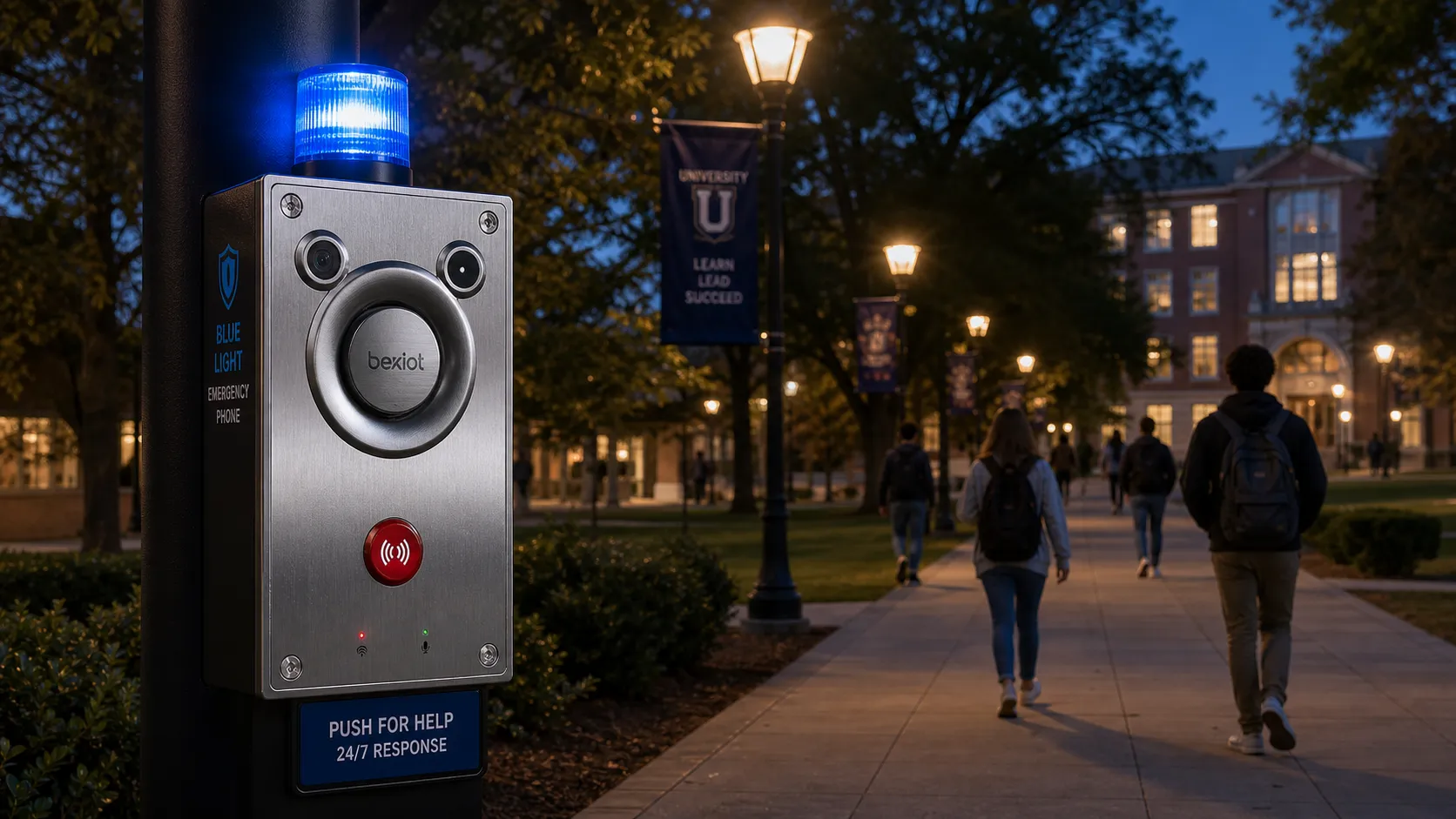
In this ecosystem, emergency phones still play an important role. They provide a visible, fixed, and direct communication point for students, teachers, visitors, contractors, and security staff when help is needed. Whether installed along campus walkways, in parking areas, near dormitories, at building entrances, or around sports facilities, emergency phones create a reliable safety layer that can support fast communication and accurate response.
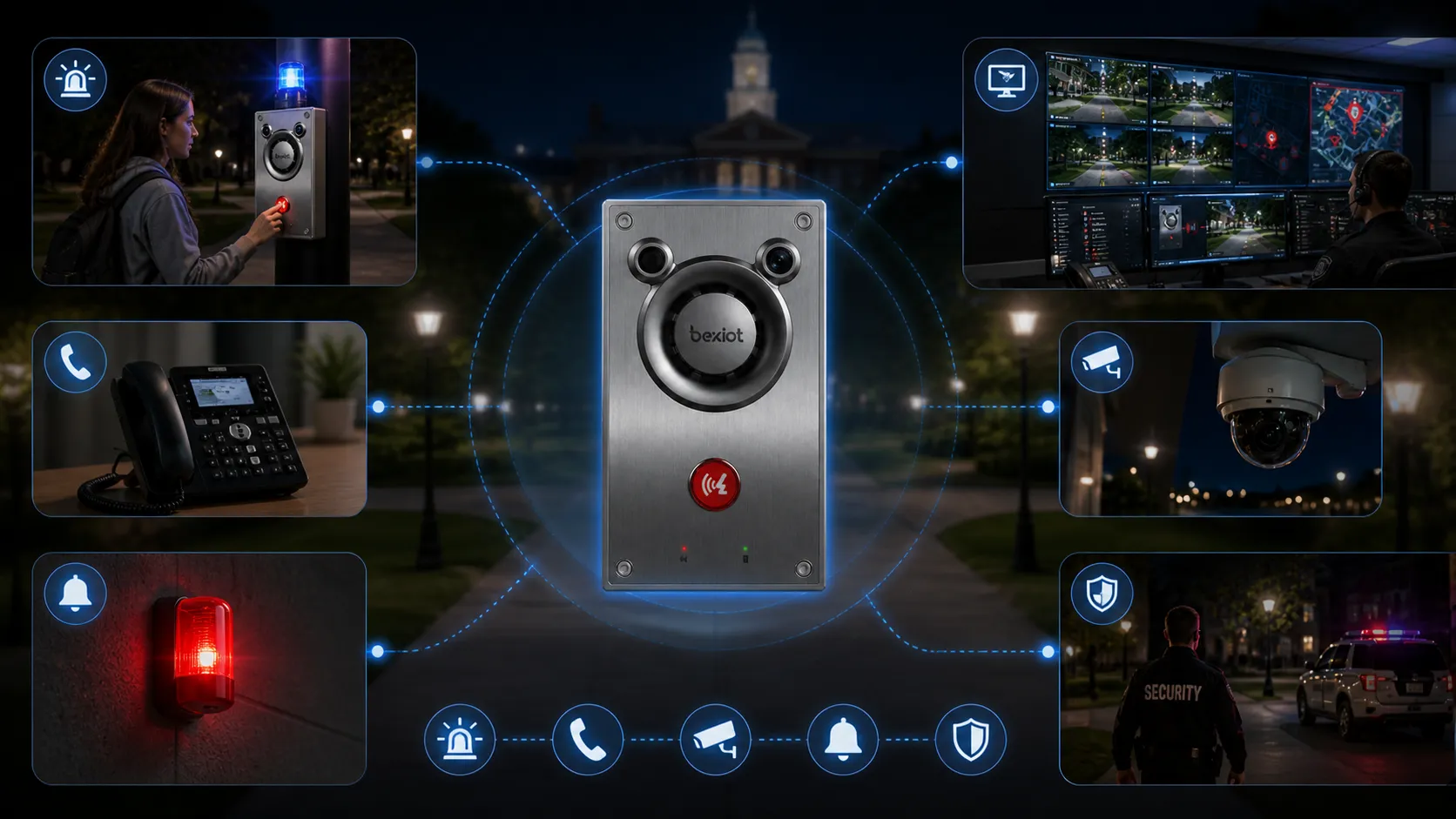
At the same time, emergency phones should not be treated as standalone devices. When connected with IP-based communication systems, public address broadcasting, video surveillance, alarm linkage, and dispatch workflows, they become part of a smarter campus safety architecture. This is where campus security moves from simple emergency calling to integrated emergency management.
Why Campus Security Needs a Layered Safety Ecosystem
Campus environments are open and complex
A campus is different from a single office building or a closed industrial site. It may include teaching buildings, dormitories, libraries, laboratories, parking lots, sports fields, outdoor walkways, visitor entrances, service areas, and public gathering spaces. People move across these areas at different times of day, and many spaces remain open to students, staff, visitors, delivery personnel, and contractors.
This open environment creates many safety challenges. A security camera may record an incident, but it cannot always allow a person in distress to ask for help. A mobile phone may be available, but the user may not know the campus security number or may not be able to describe the exact location. Access control can manage building entry, but it cannot cover every outdoor walkway or parking area. That is why campuses need layered security instead of relying on one single tool.
Layered safety connects multiple systems
A layered campus safety ecosystem combines different technologies and response methods. Emergency phones provide direct communication. CCTV systems support visual verification. Public address systems deliver area-wide announcements. Alarm systems trigger attention and escalation. Dispatch platforms help operators coordinate security teams. Together, these layers create a more complete safety environment.
Emergency phones are especially valuable because they connect people in distress with the security team responsible for response. They are not only communication devices. They are physical safety access points that show students, staff, and visitors where help can be reached quickly.
A campus emergency phone is not designed to replace mobile phones. It is designed to provide a reliable safety layer when mobile communication is unavailable, delayed, or impractical.
The Role of Emergency Phones in Campus Safety
Visible help points across the campus
Visibility is a key part of campus safety. A clearly marked emergency phone, blue light phone, wall-mounted call station, or outdoor intercom can reassure people that help is nearby. When these devices are placed in important areas, they become part of the safety infrastructure that people can recognize and trust.
This is especially important for new students, visitors, international students, temporary workers, and event guests who may not be familiar with campus emergency procedures. Instead of searching for a phone number or opening a mobile application, they can press a button and connect directly with the security center or emergency response team.
Fixed location improves emergency response
One major advantage of a campus emergency phone is location certainty. When someone calls from a personal mobile phone, the operator may need to ask where the caller is. On a large campus, this can be difficult, especially when the caller is under pressure, injured, afraid, or unfamiliar with building names.
A fixed emergency phone can be mapped to a known location. When a call is triggered, the security center can immediately identify where the device is installed, which cameras are nearby, which patrol route is closest, and which response team should be dispatched. This reduces confusion and helps operators make faster decisions during the first critical moments of an incident.
From Standalone Call Points to Connected Emergency Communication
The limitations of traditional emergency call points
Many older campus emergency phones were installed as standalone call boxes or connected through traditional analog telephone lines. These systems may still support basic voice communication, but they often have limitations in integration, monitoring, scalability, and maintenance. Aging copper lines can become expensive to maintain, and isolated call points may not easily connect with modern security systems.
As campuses upgrade their communication infrastructure, many institutions are moving toward SIP emergency phones, VoIP-based call stations, LTE backup options, and IP-based security platforms. The purpose is not simply to replace old phone lines. The real goal is to build a more connected and manageable emergency communication system.
IP-based emergency phones support system integration
Modern emergency phones can work with IP PBX systems, SIP servers, dispatch consoles, public address platforms, CCTV systems, and alarm management systems. This allows emergency calls to become part of a wider response workflow instead of remaining isolated voice events.
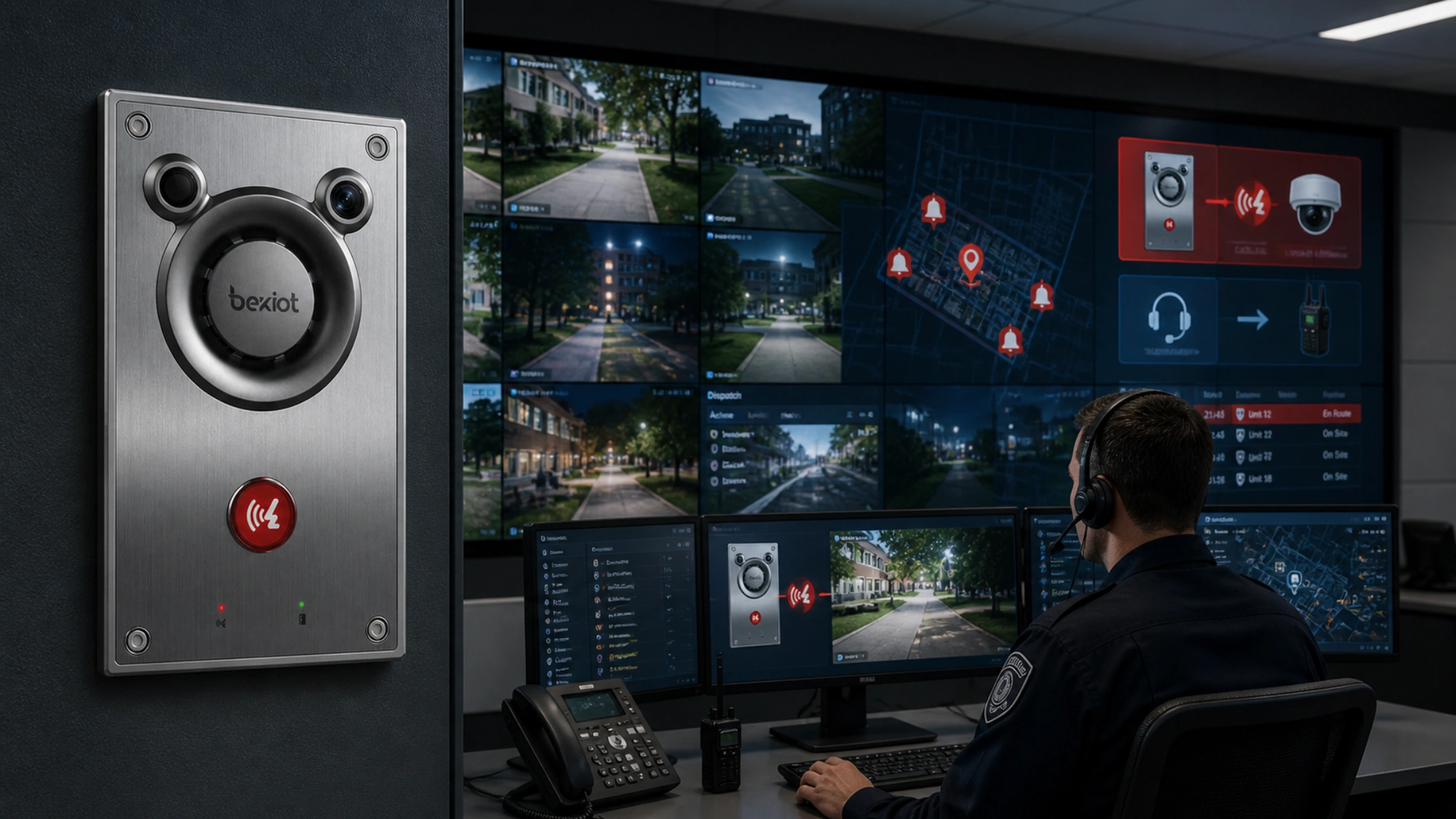
For example, when a campus emergency phone is activated, the system can route the call to the security control room, display the device location, notify operators, trigger nearby video monitoring, and support follow-up actions such as paging, patrol dispatch, or alarm escalation. This creates a more practical and coordinated response process.
How Emergency Phones Work with Broadcasting, Surveillance, and Alarms
Emergency calls and video surveillance
When emergency phones are integrated with video surveillance, operators can better understand what is happening around the caller. After a call is triggered, the control room can view nearby camera feeds, check the surrounding area, and provide more accurate instructions to security personnel.
This is useful in parking areas, dormitory entrances, campus walkways, libraries, sports facilities, and visitor zones. Video linkage helps the operator determine whether the event involves a medical issue, suspicious behavior, personal safety risk, access problem, or a wider security incident.
Broadcasting and public address for wider notification
Some incidents require more than a one-to-one phone call. If an emergency affects a building, an outdoor zone, or a larger group of people, the campus may need to broadcast instructions quickly. A public address broadcasting system can deliver voice announcements to specific areas or the entire campus.
When emergency phones work together with broadcasting systems, the security team can communicate with the caller and also notify nearby people when necessary. This is valuable for evacuation guidance, severe weather alerts, suspicious activity warnings, medical response support, and general emergency announcements.
Alarm linkage for faster attention and escalation
Alarm linkage helps convert an emergency phone event into a visible and manageable security workflow. When a call is triggered, the system can generate an alarm notification, mark the event location, alert the control room, and guide the operator through response steps.
This type of linkage is important because campus security teams may need to handle many systems at the same time. By combining emergency calls, alarms, video, broadcasting, and dispatch, the campus can reduce manual work and improve response consistency.
Where Emergency Phones Should Be Installed on Campus
High-risk and high-traffic locations
Emergency phone placement should be based on risk, pedestrian flow, night-time visibility, and response routes. Common locations include parking lots, garages, dormitory entrances, campus walkways, libraries, sports venues, transit stops, outdoor gathering areas, laboratory buildings, visitor entrances, and security checkpoints.
Remote or low-visibility areas also require careful planning. These may include paths between buildings, perimeter roads, service entrances, maintenance areas, and isolated outdoor spaces. The purpose is to make sure that people can reach help without walking a long distance during an emergency.
Visibility, accessibility, and long-term operation
A good emergency phone deployment is not only about choosing a device. It also requires clear signage, proper lighting, accessible installation height, reliable power supply, network connectivity, and regular maintenance. If an emergency phone is difficult to find, hard to operate, or not monitored properly, its practical value is reduced.
For outdoor installations, campuses should consider weather resistance, vandal resistance, corrosion protection, audio clarity, and stable long-term operation. Devices should also be tested regularly to confirm call quality, routing rules, device status, and alarm notifications.
Key Features of a Modern Campus Emergency Phone
Clear and reliable voice communication
The first requirement of any emergency phone is reliable two-way voice communication. In campus environments, the caller may be near traffic, crowds, rain, wind, construction noise, or sports activity. The device should support clear hands-free communication so the operator can understand the caller and provide instructions.
Emergency phones used in public areas should also have a durable design. Weatherproof housing, vandal-resistant buttons, stable electronic components, and easy-to-use operation are important for daily reliability and emergency readiness.
Network management and remote monitoring
Modern campus emergency phones may support SIP, VoIP, PoE, LTE backup, remote status monitoring, automatic test functions, and centralized management. These features help campus IT and security teams manage multiple devices across a large area more efficiently.
Remote monitoring is especially useful because it allows the team to know whether a device is online, whether a network connection has failed, whether a call has not been completed, or whether maintenance is required. This helps ensure that emergency phones remain ready for real use.
Why Mobile Phones Alone Are Not Enough
Mobile phones have practical limitations
Mobile phones are important for personal communication, but they are not a complete replacement for campus emergency phones. A mobile phone may be out of battery, locked, damaged, without signal, or difficult to use under pressure. The caller may not know the campus security number, may not speak the local language fluently, or may not be able to describe the location clearly.
In some situations, using a mobile phone may also be unsafe or impractical. A fixed emergency phone provides a direct and public safety-oriented communication method. The user can simply press a button and connect with the responsible team, while the system helps identify the location.
Emergency phones are public safety infrastructure
A campus emergency phone is available to anyone nearby, including students, teachers, visitors, parents, contractors, delivery workers, and event attendees. It does not depend on whether the person owns a phone, has a charged battery, has installed a campus app, or knows the correct number to call.
Because it is fixed, visible, and purpose-built, the emergency phone becomes a shared safety resource for the whole campus community.
Mobile phones are personal devices. Campus emergency phones are public safety infrastructure.
Building a Smarter Layered Safety Ecosystem
Connecting communication, monitoring, alerting, and response
A smarter campus safety ecosystem should connect communication, monitoring, alerting, and response into one process. Emergency phones support direct communication. Video surveillance supports visual confirmation. Broadcasting systems support public notification. Alarm systems support event escalation. Dispatch workflows support coordinated response.
When these systems work together, campus security can move from passive monitoring to active response. Instead of simply receiving an emergency call, the control room can identify the location, check video, notify patrol teams, trigger announcements, record the event, and follow a defined response procedure.
Creating a closed-loop emergency workflow
A strong emergency workflow should include call initiation, operator answer, location display, video verification, alarm notification, dispatch action, public announcement when needed, and incident recording. Emergency phones can serve as the first trigger in this workflow.
This closed-loop model helps campuses improve response speed, reduce communication gaps, and support better post-incident review. It also helps align security teams, IT departments, facility managers, and emergency response personnel around a shared safety process.
How Becke Telcom Supports Campus Emergency Communication
Converged Communication System for campus safety projects
For campus safety projects, Becke Telcom provides the Converged Communication System to support integrated emergency communication and coordinated security response. Instead of treating emergency phones as isolated call points, the system helps connect emergency communication with campus-wide operation, monitoring, alerting, and dispatch workflows.
Introduction to Relevant Solutions:Emergency Phones
The Becke Telcom Converged Communication System integrates multiple campus communication and security functions into one unified platform, including public address broadcasting, telephone communication, video surveillance, alarm linkage, dispatch coordination, and emergency response management. For campus projects, this helps emergency phones work together with broadcasting systems, phone systems, monitoring systems, and alarm systems, creating a more coordinated safety architecture instead of disconnected emergency devices.
From isolated devices to unified emergency management
Every campus has different infrastructure. Some sites still use legacy analog lines, while others already operate IP-based networks and modern security systems. A practical upgrade strategy should consider current cabling, network coverage, device locations, power supply, monitoring needs, system integration, and long-term maintenance.
By using the Becke Telcom Converged Communication System as the core platform, campuses can bring emergency calls, public address broadcasting, telephone communication, video linkage, alarm events, and dispatch response into a more visible and manageable emergency communication layer. This helps schools and universities improve response efficiency, strengthen daily security operation, and build a smarter layered safety ecosystem.
Conclusion
Emergency phones remain important in campus security, but their role is changing. They are no longer only standalone call boxes placed along walkways or parking lots. In a modern campus safety strategy, they can become intelligent access points connected with communication systems, broadcasting systems, surveillance systems, alarm systems, dispatch teams, and emergency workflows.
A smarter layered safety ecosystem does not depend on one device or one communication channel. It combines fixed emergency phones, mobile communication, video monitoring, public address broadcasting, alarm linkage, dispatch coordination, and trained response teams into one coordinated safety architecture. For schools and universities, this approach helps improve visibility, shorten response times, and provide a stronger sense of safety for everyone on campus.
FAQ
What is the role of emergency phones in campus security?
Emergency phones provide fixed, visible, and direct communication points for people who need help on campus. They allow students, staff, visitors, contractors, and event guests to contact security teams quickly without searching for a phone number or relying only on a mobile device.
Are campus emergency phones still necessary if people have mobile phones?
Yes. Mobile phones are useful, but they depend on battery power, signal coverage, user operation, and accurate location sharing. Campus emergency phones provide a reliable public safety layer, especially in outdoor areas, parking lots, remote walkways, and locations where mobile communication may fail.
Can emergency phones integrate with campus security systems?
Yes. Modern emergency phones can work with IP-based communication systems, public address broadcasting, video surveillance, alarm linkage, dispatch platforms, and emergency response workflows. This allows a campus to manage emergency calls as part of a wider safety process.
Where should emergency phones be installed on a campus?
Common installation areas include parking lots, dormitory entrances, campus walkways, libraries, sports venues, transit stops, outdoor gathering spaces, laboratories, visitor entrances, and remote areas with lower visibility. Placement should be based on risk, accessibility, night-time use, and response planning.
What is the Becke Telcom Converged Communication System used for?
The Becke Telcom Converged Communication System is used to integrate campus communication and security functions such as broadcasting, telephone communication, video surveillance, alarm linkage, dispatch coordination, and emergency response management. It helps campuses move from isolated emergency call points to a more unified safety architecture.







