


Emergency response is built on clear information and fast coordination. When a call comes into a control room, the dispatcher needs to understand what happened, where it happened, who should respond, and how the incident should be followed up. If this process depends only on phone calls, paper notes, separate radio channels, and manual records, important details can easily be delayed or missed.
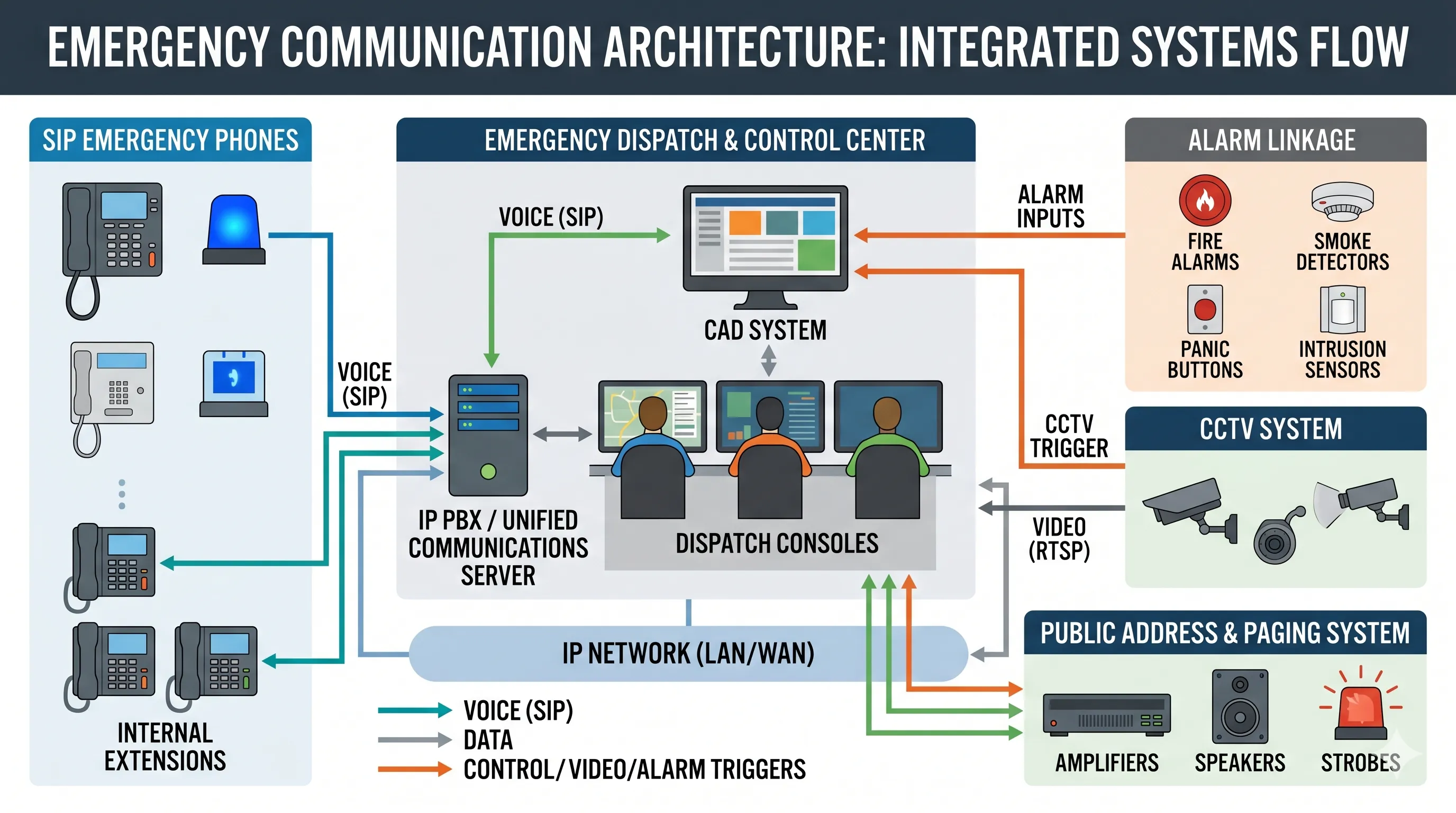
A computer-aided dispatch system, often called a CAD system, helps solve this problem. It gives dispatchers a structured way to receive incident information, create response records, assign resources, track field teams, and coordinate communication between different departments. For public safety agencies, transportation operators, campuses, industrial facilities, and emergency communication centers, CAD has become an important part of modern command room operations.
The value of CAD is not only that it makes dispatch work faster. More importantly, it helps people work with the same information at the same time. This makes emergency response more consistent, more visible, and easier to review after the event.
What Is a Computer-Aided Dispatch System?
A computer-aided dispatch system is a digital platform used to manage emergency calls, incidents, responders, resources, and response records. It is commonly used by police, fire departments, emergency medical services, campus security, industrial safety teams, transportation control rooms, and other organizations that need coordinated response.
Introduction to Relevant Solutions:Computer-Aided Command and Dispatch System
In a typical workflow, the dispatcher receives a call or alarm, enters the incident details, confirms the location, checks available units, assigns the right team, and tracks the status of the response. The system keeps these steps in one operational record, so the control room does not need to depend only on memory, handwritten notes, or disconnected tools.
When connected with maps, telephony systems, radio systems, emergency phones, CCTV, alarms, and public address systems, CAD can become the central layer of an emergency communication architecture. It links information with action and helps the control room move from call taking to real coordination.
Benefit 1: Faster Emergency Response
Less Time Lost in Manual Dispatch
One of the most important benefits of CAD is that it reduces the amount of manual work during dispatch. The system helps operators record incident information in a clear format, check resource availability, and assign responders without searching through separate lists or paper logs.
This is especially valuable when several incidents happen at the same time. Instead of relying on scattered notes, the dispatcher can see active incidents, available units, and response progress in one place. That makes it easier to act quickly and avoid unnecessary delays.
Clearer Steps Under Pressure
During an emergency, dispatchers work under pressure. A CAD system gives them a repeatable workflow, so important information is less likely to be skipped. The operator can follow the incident process, update the record, and keep the response moving even when the situation is tense.
For public safety and emergency communication projects, this structure is a practical advantage. It does not replace the dispatcher’s judgment, but it gives the dispatcher better tools for making timely decisions.
Benefit 2: Better Situational Awareness
Understanding What Is Happening
Situational awareness is the ability to understand the incident, the location, the people involved, and the resources available. CAD systems improve this by bringing key information into one view. Dispatchers can see incident records, unit status, location details, notes, and updates as the event develops.
For example, an emergency may begin from a campus call point, an industrial telephone, a tunnel emergency phone, a fire alarm, or a security report. With proper integration, the control room can connect the source of the incident with its location and the right response procedure.
Using Maps and Location Information
Many CAD systems are used together with GIS maps. This helps operators see where the incident is located and which responders or facilities are nearby. In large sites such as airports, ports, factories, campuses, utility facilities, and transportation networks, map-based dispatch can reduce confusion and improve coordination.
Location information also helps field teams. When responders receive clearer instructions, they can reach the right area faster and understand the site conditions before they arrive.
A good CAD system turns emergency information into an operational picture that dispatchers and response teams can act on.
Benefit 3: More Effective Resource Allocation
Sending the Right Resource
Emergency response is not only about sending someone quickly. It is about sending the right people, with the right equipment, to the right place. CAD helps dispatchers check which units are available, which are already busy, which are closest, and which are suitable for the incident type.
In a public safety environment, this may involve police, fire, EMS, traffic control, or specialized rescue units. In an industrial or campus environment, it may involve security staff, safety officers, maintenance teams, medical personnel, or emergency response teams.
Avoiding Conflicting Assignments
When dispatch is managed manually, it can be hard to track every active unit. A team may be assigned to two incidents at once, or an area may be left without coverage. CAD reduces this risk by keeping unit status and incident assignments visible.
This makes the control room more organized during both daily operations and major incidents. It also helps supervisors understand resource pressure and make better decisions when priorities change.
Benefit 4: Centralized Emergency Communication
Connecting Calls, Alarms, and Dispatch Records
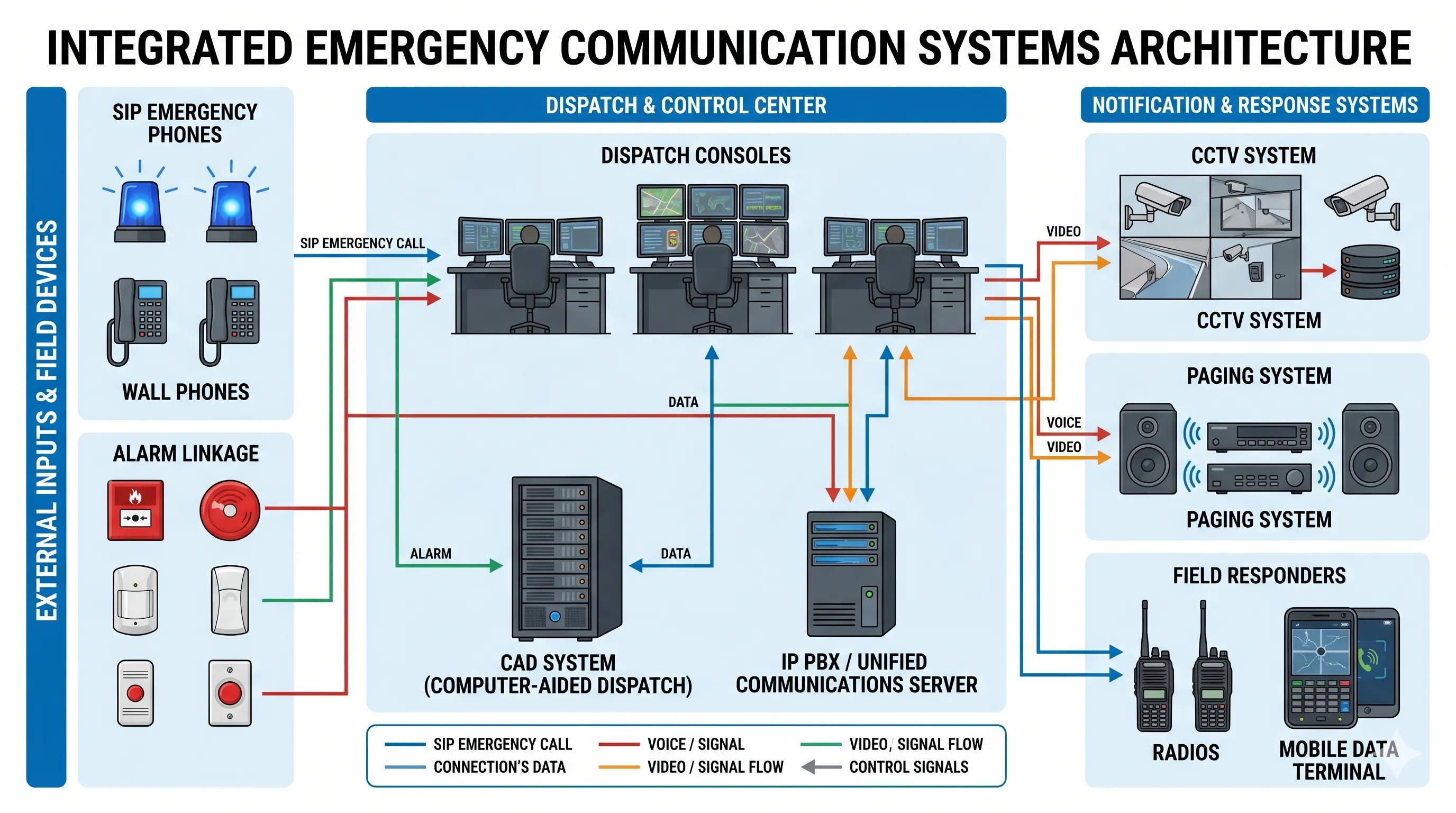
Emergency communication often comes from many different sources. A control room may receive calls from emergency phones, SIP intercoms, industrial telephones, radio users, alarm systems, security stations, or mobile teams. If these sources are handled separately, the dispatcher has to move information from one system to another by hand.
A CAD system helps centralize this process. It connects the call or alarm with an incident record, then links that record to the response action. This makes the workflow easier to manage and reduces the chance of losing important information.
Working with Communication Systems
CAD is more useful when it works with the wider communication system. In many projects, it may be connected with an IP PBX, SIP server, dispatch console, radio gateway, public address system, CCTV platform, alarm system, or access control system.
This allows the control room to receive an emergency call, identify the location, create an incident, contact responders, activate paging, and follow the response in a more connected process. The result is not just faster call handling, but better coordination from beginning to end.
Benefit 5: Accurate Incident Records and Reporting
Keeping a Complete Event Timeline
Every incident creates a timeline. The control room needs to know when the call arrived, who handled it, what information was collected, which unit was assigned, when the team responded, what actions were taken, and how the incident was closed.
CAD systems record these details in a structured way. This gives the organization a clearer history of what happened and helps reduce dependence on memory or incomplete notes.
Improving Review and Training
Incident records are useful after the event. Supervisors can review response time, call handling, resource use, recurring locations, and common incident types. These records can support training, reporting, compliance, and long-term improvement.
For public safety agencies and large organizations, this is an important part of accountability. Good records help teams understand what worked, what caused delays, and what should be improved in the next response.
Benefit 6: Stronger Multi-Department Coordination
Managing Incidents That Involve More Than One Team
Many emergencies require more than one department. A road accident may involve police, fire, medical teams, and traffic management. A campus incident may involve security, medical support, facility management, and public address notification. An industrial accident may involve the control room, safety team, maintenance staff, emergency response team, and outside rescue services.
CAD helps these groups work from a shared incident record. It keeps assignments, updates, and response status more organized, which is important when the situation changes quickly.
Reducing Gaps During Escalation
When an incident escalates, communication can become fragmented. New calls may arrive, more responders may be needed, alarms may be triggered, and supervisors may request updates. CAD gives the control room a structured way to manage these changes.
This is especially important for large sites and public safety environments where several teams must act at the same time. Clear coordination helps reduce duplicated work and keeps the response focused.
Benefit 7: Better Daily Efficiency and Future Scalability
Making Daily Work More Organized
CAD systems are not only valuable during major emergencies. They also improve daily dispatch work. Operators can manage routine incidents, service calls, patrol tasks, safety reports, and maintenance requests with a more consistent workflow.
When daily operations are organized, the team is better prepared for serious events. Dispatchers know where to find information, supervisors can review performance, and field teams can receive clearer instructions.
Preparing for More Devices and More Locations
As an organization grows, its emergency communication needs usually become more complex. There may be more buildings, more emergency phones, more cameras, more alarms, more responders, and more departments involved.
A scalable CAD system helps support this growth. It allows the organization to expand from a small dispatch center to a larger, integrated command platform. This is useful for smart campuses, transportation hubs, industrial parks, city facilities, utilities, and other environments where safety systems continue to develop over time.
The long-term value of CAD is that it gives emergency communication a stable structure, instead of leaving every response to manual coordination.
How CAD Fits into a Modern Emergency Communication System
From Standalone Tools to a Connected Workflow
Many organizations already have emergency phones, CCTV systems, alarms, PA systems, access control, and radio communication. The challenge is that these systems may not work together smoothly. CAD helps bring these separate tools into a more connected response workflow.
For example, when a SIP emergency phone is activated, the control room should be able to answer the call, identify the device location, check related video, create an incident record, notify responders, and activate area broadcasting when needed. CAD helps organize these steps so the response is easier to control.
Why Integration Should Be Planned Early
CAD should not be treated as a separate software purchase at the end of a project. It should be considered during the planning of the whole emergency communication system. Project teams should think about how calls are received, how alarms are linked, how responders are notified, how records are stored, and how the system will expand later.
This approach is especially important for facilities with high safety requirements, such as tunnels, ports, industrial plants, campuses, hospitals, airports, and public service centers.
Becke Telcom Perspective: Building Connected Emergency Communication
Communication Layer for Dispatch Environments
For emergency communication projects, Becke Telcom provides industrial communication terminals and integrated communication solutions for demanding environments. These may include SIP emergency phones, weatherproof telephones, industrial telephones, paging devices, gateways, and dispatch-related communication products.
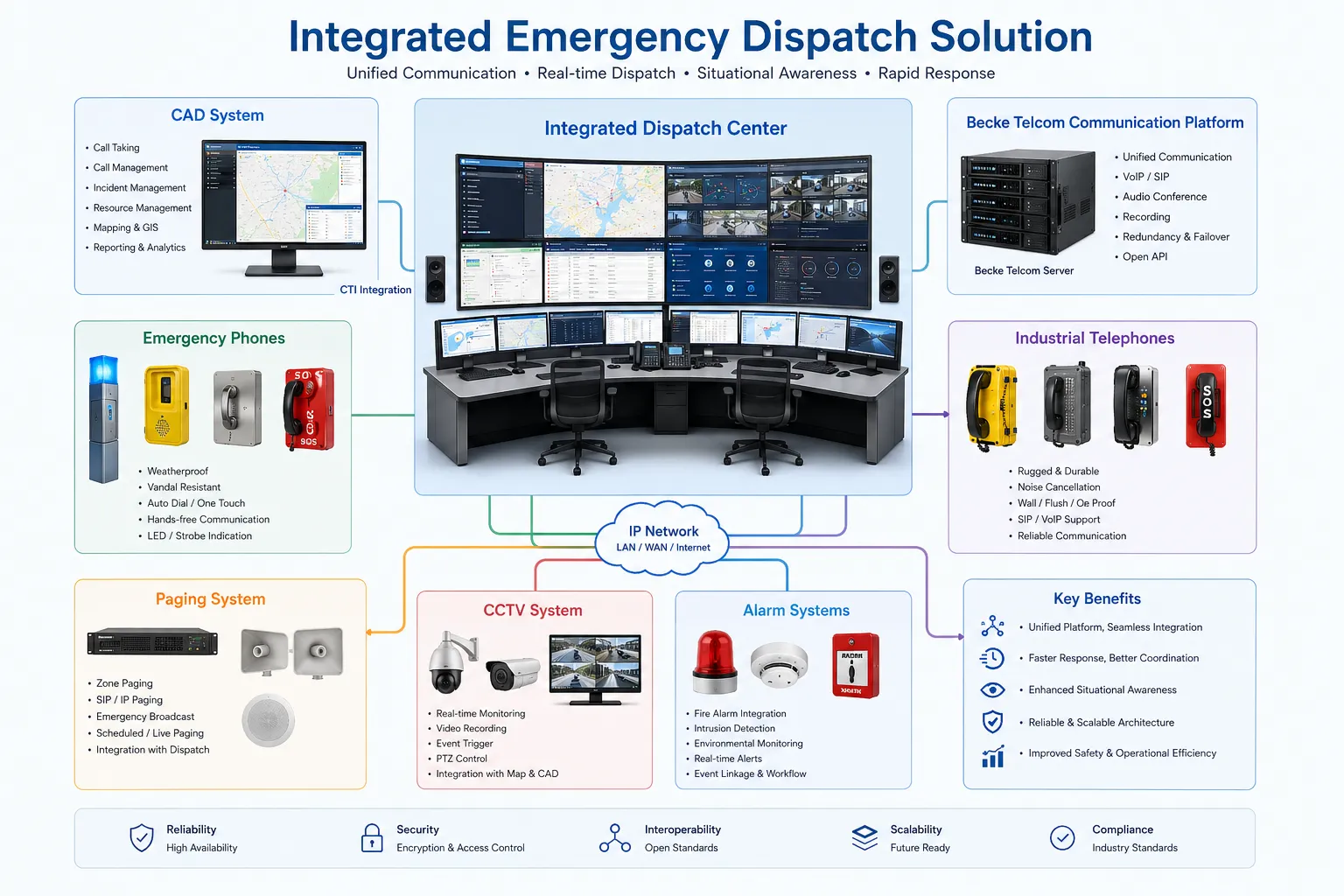
The Becke Telcom Converged Communication System is designed to integrate telephone communication, broadcasting, monitoring linkage, alarm linkage, dispatch coordination, and emergency response workflows. In a CAD-centered project, this communication layer can help connect field devices with the control room and support a more complete response process.
Designing the Full Response Chain
A practical emergency communication solution should not only focus on one device. It should define the full response chain: how the incident is reported, how the dispatcher receives it, how the location is confirmed, how responders are notified, how broadcast messages are sent, how cameras and alarms are linked, and how the event is reviewed afterward.
When CAD and the communication platform are planned together, the system becomes easier to operate and easier to expand. This is the real value for system integrators, project owners, and safety teams.
Key Points to Consider Before Choosing a CAD System
Operational Fit
A CAD system should match the organization’s real dispatch workflow. The interface should be clear, the incident process should be easy to follow, and operators should be able to use the system under pressure. A powerful system is not helpful if it is difficult for dispatchers to operate during an emergency.
Before selection, project teams should review the main incident types, user roles, response procedures, reporting needs, and training requirements. The system should support daily operations as well as emergency escalation.
Integration and Reliability
Integration is another key point. The CAD system should be able to work with communication systems, maps, alarms, cameras, access control, radio systems, paging systems, and third-party platforms where required.
Reliability also matters. Emergency communication systems need stable networks, proper backup, clear user permissions, data protection, maintenance planning, and room for future expansion. CAD should be treated as part of mission-critical infrastructure, not just a management tool.
Conclusion
Computer-aided dispatch systems bring practical value to public safety and emergency communication. They help dispatchers respond faster, understand incidents more clearly, assign resources more effectively, centralize communication, keep accurate records, coordinate multiple teams, and improve daily efficiency.
For organizations that manage safety and emergency response, CAD provides a stronger foundation for control room operations. When it is combined with emergency phones, industrial telephones, paging systems, CCTV, alarms, dispatch consoles, and a converged communication platform, it can support a more connected and reliable response architecture.
The purpose of CAD is simple: help the right people receive the right information at the right time. In emergency communication, that clarity can make the whole response process faster, safer, and easier to manage.
FAQ
What does CAD mean in emergency dispatch?
CAD means computer-aided dispatch. It is a digital system used to manage emergency calls, incident records, responder assignments, unit status, location information, and response workflows.
Who uses computer-aided dispatch systems?
CAD systems are commonly used by police departments, fire departments, emergency medical services, transportation operators, campus security teams, industrial control rooms, utilities, and public safety command centers.
How does CAD improve emergency response?
CAD improves emergency response by organizing incident information, showing available resources, supporting location-based dispatch, tracking response status, and helping dispatchers coordinate communication more clearly.
Can CAD systems connect with emergency phones and alarm systems?
Yes. In many projects, CAD systems can be integrated with SIP emergency phones, industrial telephones, IP PBX systems, paging systems, CCTV platforms, alarm systems, and dispatch consoles.
Is CAD only for police, fire, and EMS?
No. CAD is also useful for campuses, factories, tunnels, ports, airports, hospitals, industrial parks, utilities, and large facilities that need structured emergency communication and response coordination.







