


Choosing the best security alarm system for home use is not only about selecting the most popular brand or buying the most expensive package. A good home alarm system should match the property layout, family routine, security risk, budget, and the way users want to receive and respond to alerts.
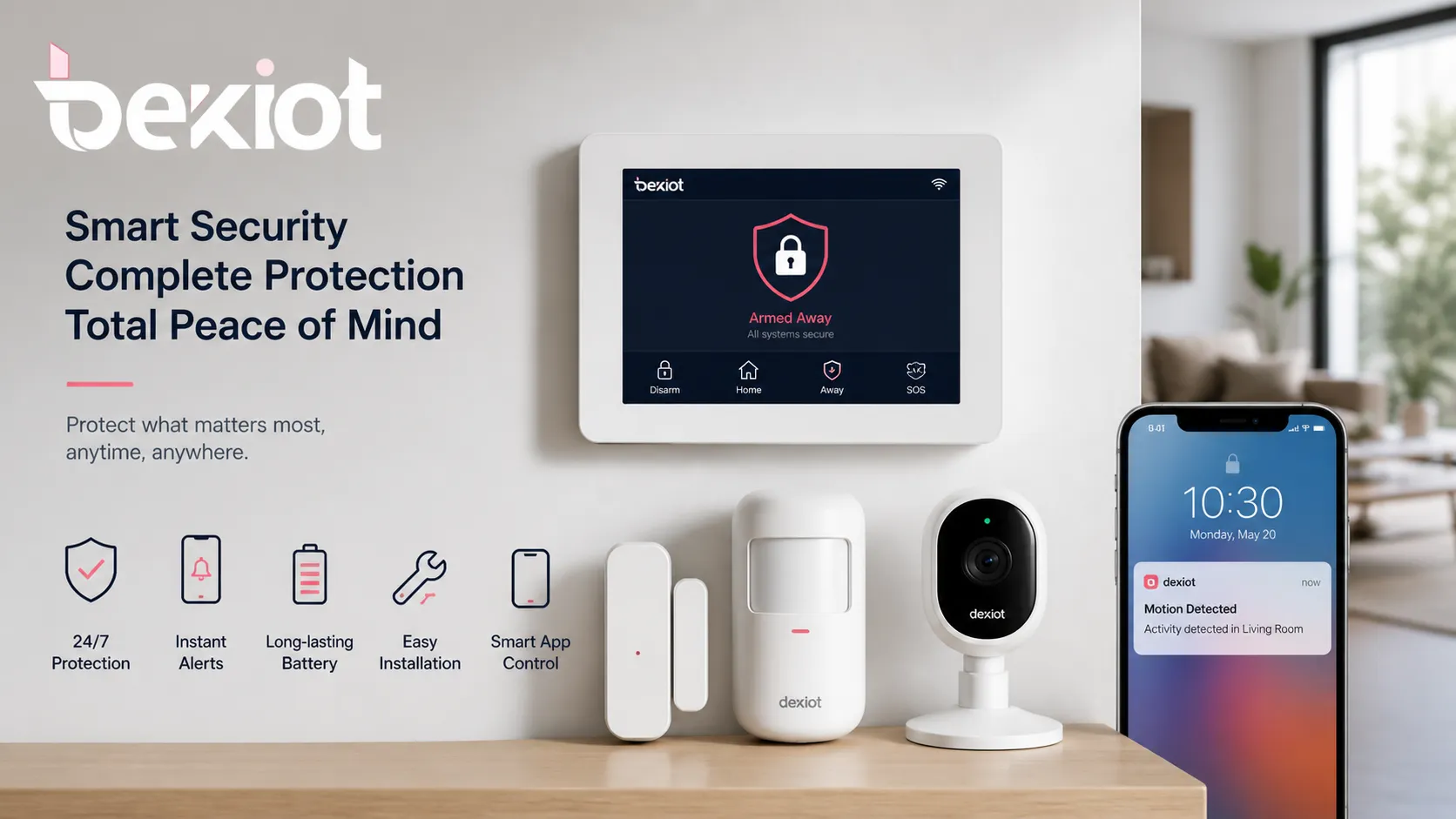
For many apartments and small homes, a wireless DIY alarm kit with door sensors, motion detectors, a siren, and mobile app notifications may be enough. For larger houses, villas, or properties that require stronger protection, a more complete system with cameras, backup communication, professional monitoring, and better installation planning may be more suitable.
The best home security alarm system should detect risks quickly, reduce false alarms, send clear notifications, and make daily operation simple. It should protect the home without making the user feel that security has become complicated.
What Makes a Security Alarm System Best for Home Use?
The word “best” should be understood as “most suitable.” A small apartment, a single-family house, a villa, and a residential community may all need different security designs. Some users need simple self-monitoring, while others prefer professional monitoring or a system that can connect with cameras, smart locks, and other devices.
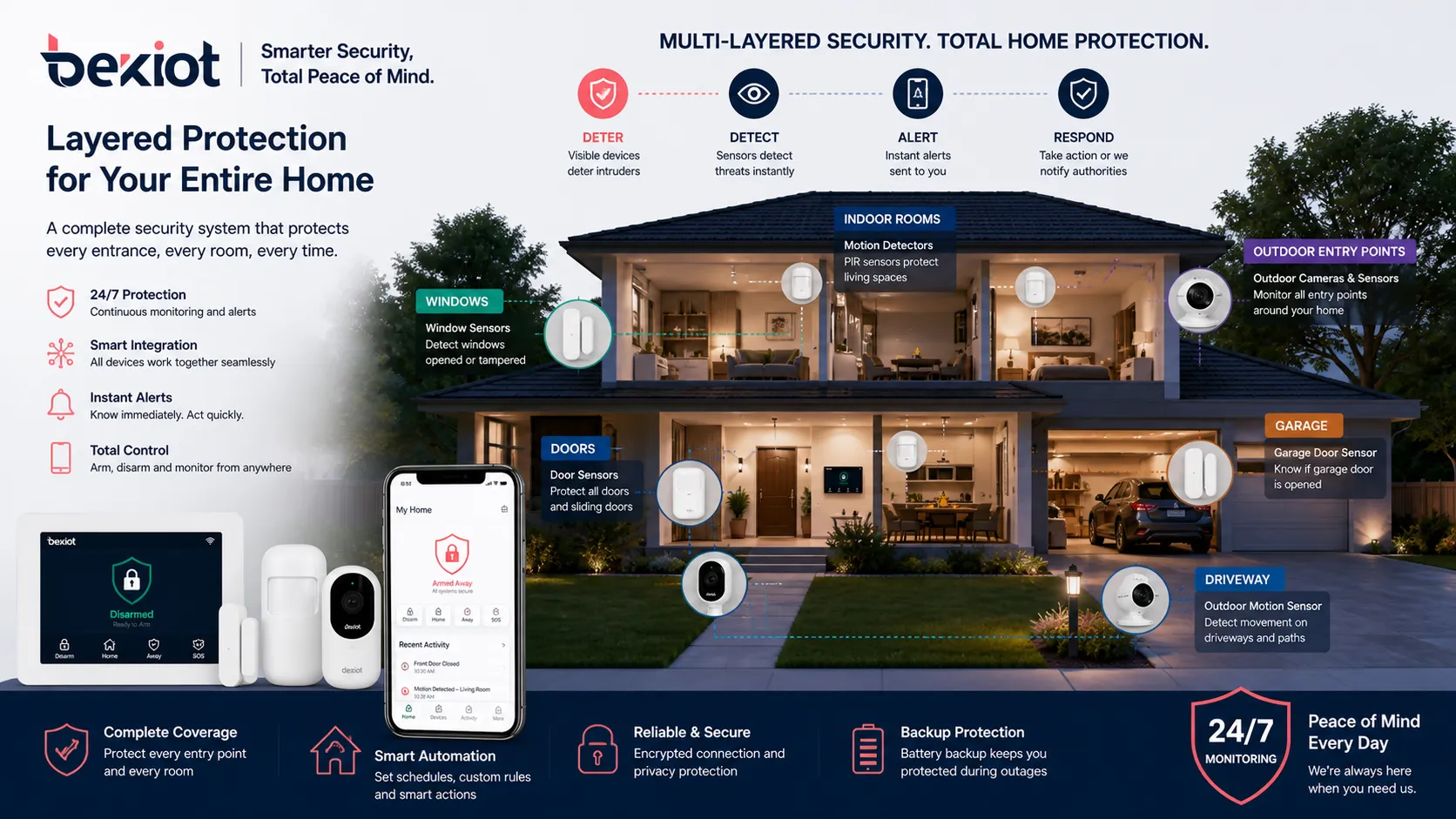
A reliable home security alarm system usually includes a control panel, door and window sensors, motion detectors, sirens, mobile app alerts, backup power, and optional camera integration. More advanced systems may also support professional monitoring, cellular backup, smoke detection, carbon monoxide detection, water leak detection, and smart home automation.
The best security alarm system is not always the one with the most devices. It is the one that provides reliable detection, fast alerts, simple control, and a clear response path.
Main Components of a Home Security Alarm System
Control Panel
The control panel is the central unit of the alarm system. It connects sensors, sirens, keypads, communication modules, and sometimes smart home devices. Users can usually arm or disarm the system through a keypad, touchscreen, mobile app, remote control, or voice assistant.
A good control panel should be stable, easy to use, and compatible with the sensors and accessories required for the home. For modern families, mobile app control and remote status checking are especially useful when users are away from the property.
Door and Window Sensors
Door and window sensors are the foundation of most home alarm systems. They detect when a protected door or window is opened while the system is armed. These sensors are commonly installed on front doors, back doors, balcony doors, garage doors, basement windows, and ground-floor windows.
For many homes, entry sensors provide the first layer of protection. Homeowners should not only protect the main door but also review all possible entry points based on the actual property layout.
Motion Detectors
Motion detectors detect movement inside the home. They are often installed in living rooms, hallways, staircases, corridors, and indoor areas that connect multiple rooms. When the system is armed and unexpected movement is detected, the alarm can be triggered.
For families with pets, pet-friendly motion detectors can help reduce false alarms. The installation height, detection angle, sensor sensitivity, and surrounding environment should be considered carefully.
Sirens and Alarm Sounders
A siren warns people inside the home and may also deter intruders. Some systems use indoor sirens, while others add outdoor sirens with flashing lights. A loud alarm can attract attention and make an intruder leave more quickly.
For larger houses, garages, villas, or properties with outdoor areas, multiple sirens may be used to improve alarm coverage. The siren should be installed in a place where it can be heard clearly but is not easy to damage.
Mobile App Alerts
Mobile app alerts are one of the most useful features of modern home alarm systems. When an alarm is triggered, the homeowner can receive a notification on a smartphone. Some systems can also show which sensor was triggered, helping users understand whether the event came from a door, window, garage, or indoor motion detector.
App-based control improves convenience, but users should also pay attention to account security. Strong passwords, two-factor authentication, app updates, and careful permission management are important when cameras and remote access are involved.
Wired vs. Wireless Home Alarm Systems
Wired Alarm Systems
Wired alarm systems use physical cables to connect the control panel, sensors, sirens, and other devices. They are usually stable and suitable for new houses, renovation projects, large properties, or buildings where structured cabling is already available.
The advantage of wired systems is reliable communication and less dependence on sensor batteries. The disadvantage is installation complexity. Running cables may require drilling, wall work, professional labor, and a higher initial installation cost.
Wireless Alarm Systems
Wireless alarm systems are easier to install and more flexible for existing homes, apartments, and rental properties. Sensors communicate with the control panel through wireless signals, so installation usually requires less construction work.
The main points to consider are battery life, wireless range, signal interference, and device compatibility. For larger homes or buildings with thick walls, users may need signal repeaters or a carefully planned sensor layout.
DIY vs. Professional Installation
DIY Alarm Systems
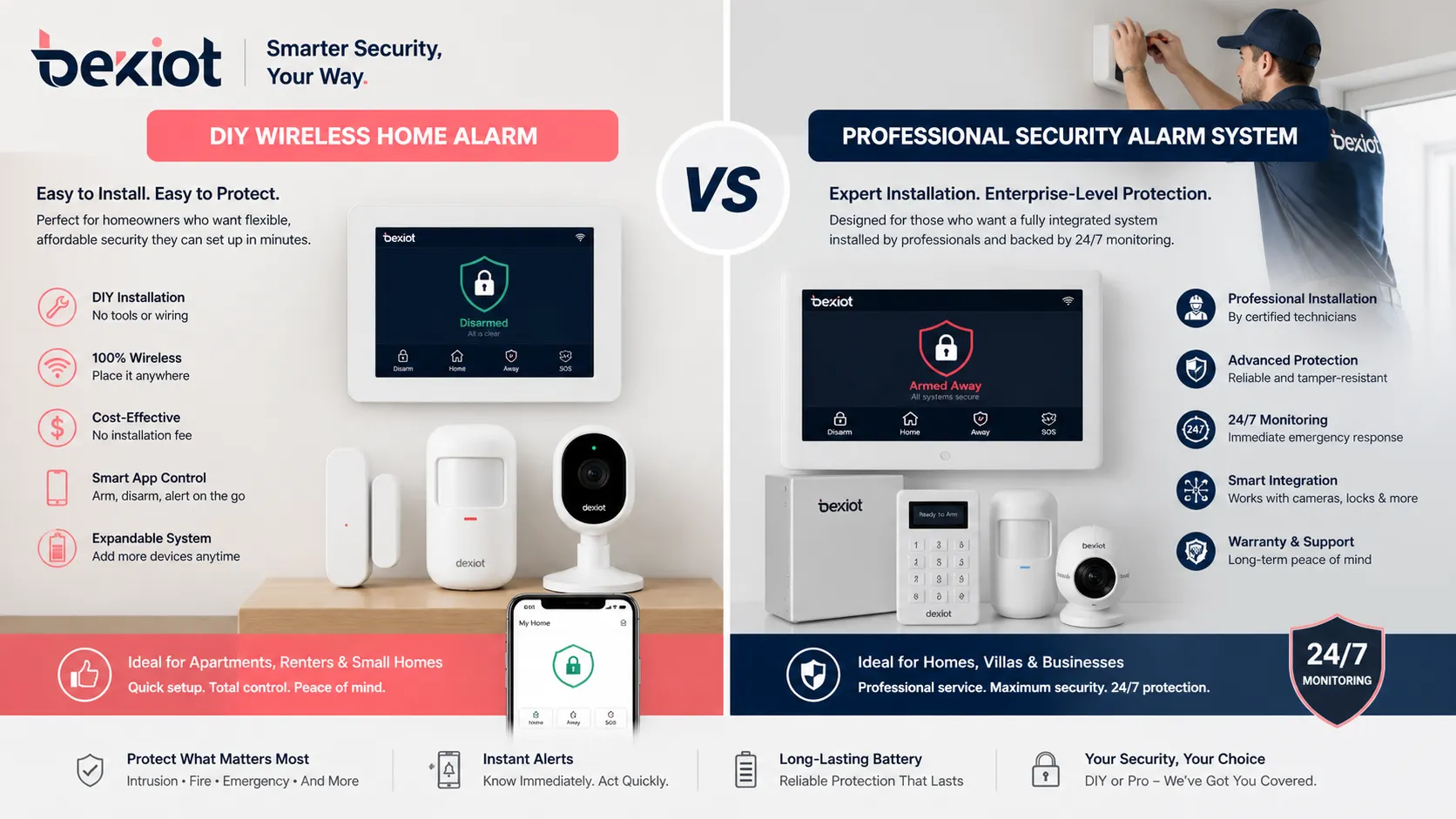
DIY alarm systems are popular because they are usually easier to install, more flexible, and more affordable at the beginning. Many DIY systems use wireless sensors, adhesive mounting, mobile apps, and optional subscription services.
They are suitable for apartments, renters, small homes, and users who want to manage the system themselves. However, the homeowner is responsible for sensor placement, system testing, battery replacement, and alarm response.
Professional Installation
Professional installation is more suitable for larger homes, villas, high-value properties, or users who prefer expert planning. A technician can evaluate entry points, sensor positions, camera angles, wireless coverage, siren placement, and monitoring requirements.
Professional systems may cost more, but they can provide better planning, more reliable installation, and stronger support. For homes that need professional monitoring or more complex integration, this option may be more appropriate.
Professional Monitoring vs. Self-Monitoring
Self-Monitoring
Self-monitoring means the homeowner receives alerts directly through a mobile app, SMS, phone call, or email. The user decides whether to check the camera, contact a family member, call a neighbor, or take further action.
This option can reduce monthly costs and gives users direct control. However, if the homeowner is asleep, in a meeting, traveling, or unable to check the phone, the response may be delayed.
Professional Monitoring
Professional monitoring connects the alarm system to a monitoring center. When an alarm is triggered, the monitoring service can follow a defined response process, such as contacting the homeowner, notifying emergency contacts, or coordinating with local response services depending on the service plan and local regulations.
This option is suitable for families that want stronger support when they are away from home. It usually requires a monthly fee, so homeowners should compare long-term cost instead of only looking at the equipment price.
Popular Home Security Alarm System Options
Many homeowners compare consumer security brands before choosing a system. Common choices may include DIY wireless systems, smart home alarm kits, professionally installed platforms, and traditional monitored security services. Brands such as SimpliSafe, Ring, Vivint, ADT, and Abode are often discussed because they represent different types of home security solutions.
However, product plans, subscription fees, app features, monitoring options, and smart home compatibility can change over time. Instead of choosing only from a ranking list, homeowners should compare the system type, total cost, installation method, monitoring model, and long-term usability.
| System Type | Best For | Main Advantages | Key Considerations |
|---|---|---|---|
| DIY Wireless Alarm System | Apartments, renters, small homes, budget-conscious users | Easy installation, flexible placement, lower starting cost, mobile app control | Users must manage setup, testing, battery replacement, and alarm response |
| Professionally Installed Alarm System | Large homes, villas, high-value properties | Better planning, expert installation, professional monitoring options | Higher initial cost and possible monthly or contract-based fees |
| Smart Home Security System | Users who want cameras, smart locks, lighting, and app-based automation | Convenient control, video verification, smart device linkage | Depends on internet connection, app security, and device compatibility |
| Project-Level Security Communication Solution | Villas, residential communities, campuses, property-managed buildings | Can connect alarm events with intercom, broadcasting, monitoring linkage, and security center communication | More suitable for project deployment than single-house DIY installation |
Where Becke Telcom May Fit
For most individual homes, a consumer alarm system is usually enough. Becke Telcom is more relevant when the security requirement goes beyond a single household, such as villa areas, residential communities, campuses, property management centers, or buildings that need emergency communication and centralized response.
Alarm System:Emergency Alert System
In these project-level environments, Becke Telcom can support security communication by connecting emergency intercom, telephone communication, public address broadcasting, monitoring linkage, and dispatch coordination. It is not a replacement for every home alarm kit, but it can be considered when a residential project needs a more integrated communication layer.
Important Features to Check Before Buying
Backup Power
A reliable security alarm system should continue working during a power outage. Battery backup allows the control panel and key devices to operate when main power is unavailable. This is especially important for homes in areas with unstable power, storms, or temporary electrical failures.
Backup Communication
Many modern alarm systems depend on Wi-Fi or broadband internet. If the internet connection fails, remote alerts may be affected. Systems with cellular backup can improve reliability by sending notifications through a mobile network when the primary connection is unavailable.
Camera Integration
Security cameras help users verify alarm events. When a sensor is triggered, a camera can help the homeowner check whether it is a real intrusion, a false alarm, a delivery, a pet, or another event.
Smart Home Compatibility
Some home alarm systems can work with smart locks, lights, thermostats, and voice assistants. For example, lights may turn on automatically when the alarm is triggered, or a smart lock may be checked remotely through an app.
Expansion Ability
The system should be able to expand as security needs change. A homeowner may start with door sensors and motion detectors, then add cameras, smoke sensors, water leak sensors, outdoor sirens, or smart locks later.
Best Security Alarm System for Different Home Types
For Apartments
For apartments, a wireless DIY alarm system is usually a practical choice. The system may include a control hub, door sensor, motion detector, indoor siren, and mobile app alerts. Easy installation and removable mounting are important for renters.
For Single-Family Homes
Single-family homes usually need wider protection because they may have more entry points. A suitable system may include front and back door sensors, window sensors, motion detectors, garage monitoring, cameras, sirens, and backup communication.
For Villas and Large Houses
Villas and large houses may require stronger planning. Security design may include indoor and outdoor sensors, access control, cameras, gate communication, garage protection, perimeter detection, and professional monitoring.
For Residential Communities
Residential communities usually need more than household alarm devices. They may also require guard room communication, public area emergency call points, gate communication, CCTV linkage, broadcasting, and centralized response coordination.
Common Mistakes When Choosing a Home Security Alarm System
Choosing Only by Price
A low-cost alarm kit may look attractive, but it may not include enough sensors, backup power, stable communication, or expansion options. Price is important, but the system must still cover the real security needs of the home.
Ignoring Monthly Costs
Some systems appear affordable at first, but important features may require a monthly subscription. Homeowners should check the total cost over one or two years, including monitoring, video storage, cloud services, cellular backup, and smart alert features.
Forgetting Backup Power and Communication
Some users focus on cameras and smart features but forget backup power and backup communication. If the system stops working during a power outage or internet failure, the protection value is reduced.
Buying Too Many Devices
More devices do not always mean better security. A system that is too complex may become difficult to operate and maintain. Homeowners should choose devices based on actual risks, property layout, and daily habits.
How to Choose the Right System
Before choosing a home security alarm system, users should first define the property type and security goal. A renter may need a wireless system that can be removed easily. A homeowner may need stronger door, window, garage, and camera protection. A villa owner may need perimeter protection and professional monitoring.
The right system should be easy to use, reliable in daily operation, and expandable for future needs. It should also provide a clear response path. Detection alone is not enough. A good security system should help people know what happened, where it happened, and how to respond quickly.
Conclusion
The best security alarm system for home use depends on property size, entry points, budget, monitoring needs, and response requirements. For small homes and apartments, a wireless DIY system may provide enough protection. For larger homes, a professionally installed and monitored system may be more reliable. For villas and residential projects, additional communication and centralized response functions may also be considered.
Instead of asking which system is best for everyone, homeowners should ask which system best fits their own property, lifestyle, and long-term security needs.
FAQ
What is the best security alarm system for home use?
The best security alarm system for home use is the one that fits the property layout, protects key entry points, sends fast alerts, supports reliable operation, and is easy for the family to use every day.
Is a wireless alarm system better than a wired alarm system?
A wireless alarm system is easier to install and suitable for apartments, rental homes, and existing houses. A wired alarm system is usually more stable and suitable for new construction, renovation projects, or larger properties where cabling is possible.
Do I need professional monitoring?
Professional monitoring is useful if you want additional response support when you are away, asleep, or unable to check alerts. Self-monitoring can reduce monthly costs, but the homeowner must respond directly.
Can a home alarm system work without internet?
Some systems can still trigger local sirens without internet, but remote alerts may be affected. Systems with cellular backup can continue sending notifications when the home internet connection is unavailable.
What should I check before buying a home alarm system?
Homeowners should check entry point coverage, sensor quantity, backup power, backup communication, monitoring cost, app control, camera integration, smart home compatibility, and future expansion ability.
Is Becke Telcom suitable for a single home alarm system?
For most single homes, a consumer alarm system may be enough. Becke Telcom is more suitable for villas, residential communities, campuses, and property-managed buildings that need integrated security communication and centralized response coordination.







