


Map-based dispatching is a visual command and communication method that places people, devices, alarms, cameras, communication terminals, paging zones, vehicles, and field resources on a digital map. Instead of relying only on lists, numbers, extension names, or separate monitoring screens, the dispatcher can see where an event happens, what resources are nearby, and which communication path should be used next.
In practical terms, map-based dispatching connects location awareness with communication control. A dispatcher does not only receive an alarm or a call; the dispatcher sees the event position on a GIS map, site plan, floor map, tunnel diagram, campus layout, or facility map. From that same interface, the dispatcher can call a SIP intercom, contact an emergency phone, open a nearby camera, activate a paging zone, notify a team, or record the response process.
This approach is widely used in industrial facilities, transportation systems, tunnels, utility corridors, airports, ports, campuses, hospitals, energy sites, public safety platforms, security centers, and emergency communication networks. It is especially useful where many terminals and field resources are distributed across a large or complex area. By turning communication resources into visible map objects, map-based dispatching helps control rooms respond faster and with better situational understanding.
What Is Map-Based Dispatching?
Definition and Core Meaning
Map-based dispatching is a dispatching model that uses a map interface as the main operational view for locating incidents, monitoring resources, and coordinating communication. The map may be a geographic information system, a building floor plan, a station layout, a tunnel section map, a campus diagram, or a custom industrial site drawing. The key point is that dispatch actions are organized around location.
The core meaning of map-based dispatching is spatial command. Traditional dispatch systems often start from a phone number, a device list, a group name, or an event log. Map-based dispatching starts from the question of where something is happening. Once the location is clear, the dispatcher can understand the surrounding resources and choose a suitable response path.
This makes map-based dispatching different from a simple map display. A basic map only shows positions. A real map-based dispatching system allows the dispatcher to act through the map: call, page, monitor, acknowledge, escalate, link video, check device status, and coordinate response.
Map-based dispatching turns location into an operational control point, not just a visual reference.
Why Location Matters in Dispatching
Dispatching is often time-sensitive. When an alarm, call request, equipment fault, or emergency event appears, the control room needs to know not only what happened, but also where it happened and what can be used nearby. Location affects response time, resource selection, risk judgment, and communication priority.
In a large facility, the difference between two nearby-looking device names may be significant. One may be located in a tunnel section, another in a service room, and another near a public entrance. A list-based interface may not show this difference clearly. A map-based interface allows the dispatcher to understand the spatial relationship immediately.
This is why map-based dispatching is particularly valuable in environments where physical layout is complex, resources are distributed, and fast response depends on knowing the scene clearly.

How Map-Based Dispatching Works
Resource Mapping and Site Modeling
The first step in map-based dispatching is resource mapping. The system needs to know where each device, person, zone, alarm point, camera, paging speaker, gate, room, vehicle, or emergency terminal is located. This location data may come from GIS coordinates, manual point configuration, building plans, floor maps, tunnel mileage markers, zone numbers, or positioning systems.
Once resources are mapped, they appear as icons, labels, layers, zones, or status markers. Dispatchers can search, filter, zoom, select layers, and focus on specific resource types. For example, the operator may choose to display only emergency phones, only offline terminals, only cameras near an event, or only paging zones in a selected area.
This process turns static asset information into operational map objects. Instead of looking up a device in a spreadsheet and then checking another system for its status, the dispatcher can find and operate the device directly on the map.
Event Triggering and Linked Response
When an event occurs, the system associates it with a map point or area. A field user may press an SOS button. A SIP intercom may initiate a call. An alarm may be triggered. A device may go offline. A camera analytics event may appear. The dispatch platform then shows the event location on the map and may highlight nearby resources.
The dispatcher can respond through linked actions. Common actions include calling the nearest terminal, opening a nearby camera view, broadcasting to a selected zone, contacting field staff, escalating to another dispatch seat, acknowledging the alarm, and recording the handling process.
This workflow changes dispatching from isolated event handling into location-based incident response. The event is not only a line in a log; it becomes a visible scene with surrounding resources and response options.
The real value of map-based dispatching appears when an event, its location, and the available response resources are shown together.
Main Features of Map-Based Dispatching
Visual Location Management
Visual location management is the most important feature of map-based dispatching. Dispatchers can see the distribution of communication terminals, emergency points, cameras, personnel, paging zones, access points, vehicles, and high-risk areas. This is much more intuitive than managing large numbers of resources through lists alone.
In tunnels, factories, campuses, transportation hubs, ports, mines, and large public facilities, location relationships directly affect response efficiency. A dispatcher may need to know which intercom is closest to an alarm, which camera covers the same area, which operator is available, and which paging zone should receive the warning.
A map interface helps answer these questions quickly by showing the physical relationship between resources and events.
Real-Time Device and Resource Status
Map-based dispatching is most useful when the map also shows real-time status. A device icon may indicate online, offline, busy, idle, in alarm, in maintenance, call active, fault detected, or unregistered. Personnel or dispatch seats may show available, busy, off duty, or handling incident.
This status layer matters because a device shown on a map is not necessarily usable. If an emergency phone is offline, a SIP intercom is already busy, or a paging amplifier is in fault state, the dispatcher needs to choose another path. Real-time status turns the map from a static location board into a live operational resource view.
In emergency communication, knowing which resource is available can be just as important as knowing where the resource is installed.
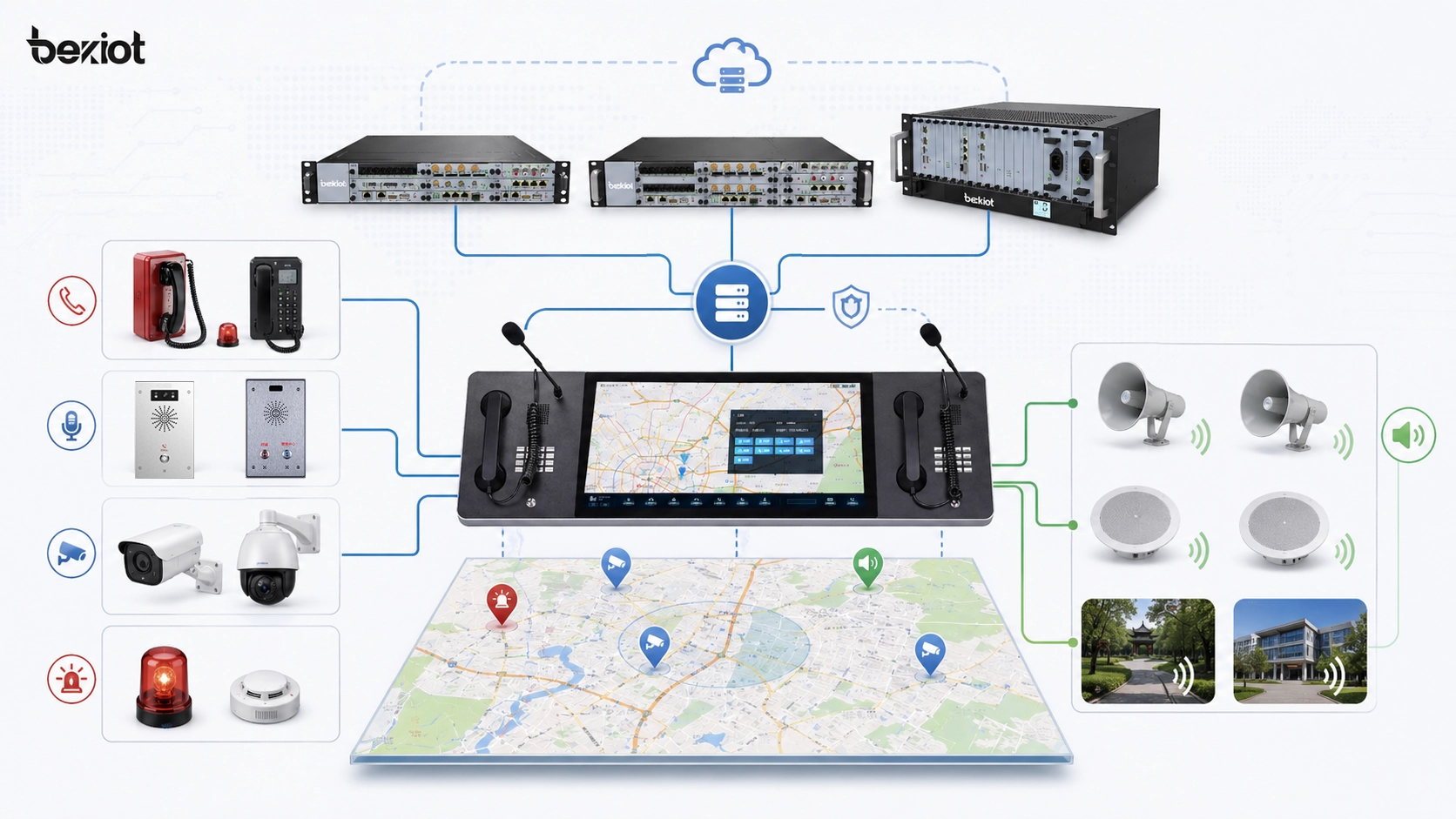
Functional Capabilities
Map-Based Calling, Intercom, and Paging
In a map-based dispatching system, devices on the map can become direct operation points. A dispatcher can click an emergency phone, SIP intercom, industrial telephone, dispatch console, or voice endpoint to initiate a call, start talkback, transfer the session, monitor the channel, or create a conference depending on system permissions.
Paging can also be map-driven. The dispatcher may select a building floor, tunnel section, production area, platform zone, warehouse block, or campus area and send a live announcement or prerecorded message to the corresponding paging zone. This is often more intuitive than selecting zones only by numbers or technical labels.
When calling, intercom, and paging are connected to map objects, dispatchers can operate by location instead of remembering every extension, terminal ID, or zone code.
Video, Alarm, and Communication Linkage
Map-based dispatching often works together with video surveillance and alarm systems. When a call or alarm is triggered, the platform can display nearby cameras, related alarm points, associated access-control devices, or linked field terminals. This helps the dispatcher confirm the scene before deciding how to respond.
Alarm linkage is also important. Fire alarms, intrusion alarms, equipment faults, environmental sensors, SOS calls, door events, and system health warnings can all be associated with map positions. The dispatcher can view the event location and then use voice, video, paging, and task assignment tools to handle the situation.
This turns map-based dispatching into more than a communication interface. It becomes a visual incident-handling layer across multiple systems.
System Value of Map-Based Dispatching
Faster Response and Shorter Decision Path
One of the strongest system values is faster response. Without a map-based view, a dispatcher may need to read an alarm message, search for the device, identify its location, open another system for video, find a paging zone, and then contact field personnel. Each step consumes time.
A map-based system reduces this decision path. The event appears in context. Nearby resources are visible. The dispatcher can open video, call the terminal, broadcast to the area, and assign a response action from the same visual environment. This is especially valuable in emergency and safety-related scenarios.
For large sites, even a few seconds saved in locating and understanding an incident can improve the quality of response.
Lower Cognitive Load for Dispatchers
Complex sites may include hundreds or thousands of devices, zones, extensions, cameras, alarms, and users. If the dispatcher must mentally connect all of these through names and numbers, the workload becomes heavy. Map-based dispatching reduces that burden by showing spatial relationships directly.
The dispatcher can see which resources surround the incident, which devices are online, which area should be paged, and which path is likely to work. This is useful for experienced operators and even more valuable for new staff, cross-shift teams, or temporary emergency command groups.
A good dispatching system is not only powerful. It must also be understandable under pressure.
Map-based dispatching simplifies complex field information by turning it into visible operational relationships.
Network Architecture of Map-Based Dispatching
Map Layer, Communication Layer, and Service Layer
A complete map-based dispatching architecture usually includes three major layers: the map layer, the communication layer, and the service layer. The map layer displays GIS maps, facility drawings, floor plans, tunnel diagrams, site zones, device points, and operational overlays. The communication layer connects SIP servers, IP PBX systems, dispatch servers, voice gateways, intercom terminals, paging systems, and communication trunks.
The service layer handles event workflows, permission control, alarm rules, logs, recordings, task records, device status, reports, and system integration. These layers must work together. The map shows where resources are. The communication layer makes action possible. The service layer gives the response process structure, authority, and traceability.
This architecture explains why map-based dispatching is not just a graphical interface. It is a combined system of map data, voice communication, device status, event logic, and operational workflow.
Role of SIP and IP Communication
SIP and IP communication are often important foundations for map-based dispatching. SIP intercoms, IP phones, industrial telephones, emergency phones, dispatch consoles, audio gateways, and IP paging terminals can be represented as map-based resources. When a dispatcher selects a device, the system can initiate SIP calling, group calling, conferencing, paging, or talkback.
IP-based architecture also makes integration easier. Voice endpoints can share network status, registration state, event triggers, logs, and control information with the dispatch platform. They can also be linked with cameras, alarms, access systems, and monitoring platforms more naturally than isolated analog devices.
In this way, map-based dispatching becomes a unified operational layer for IP communication resources rather than only a location display.
Typical Applications
Tunnels, Utility Corridors, and Transportation Infrastructure
Tunnels, utility corridors, highways, rail systems, metro stations, and transport hubs are strong application scenarios for map-based dispatching because their assets are often distributed along routes, zones, platforms, rooms, and service areas. A map or section diagram can show emergency phones, cameras, speakers, alarm points, maintenance teams, and control-room resources by location.
When an incident occurs, the dispatcher can quickly identify the section, contact the nearest terminal, view related cameras, and broadcast to the relevant area. This is more efficient than using only a device list, especially in linear or multi-zone environments where physical location determines response strategy.
In transportation infrastructure, map-based dispatching helps turn communication into a spatial response process.
Industrial Parks, Energy Sites, and Mining Areas
Industrial parks, energy facilities, refineries, power plants, mines, metallurgy sites, and large factories often include complex zones, noisy environments, safety risks, and distributed personnel. Map-based dispatching can display field phones, SIP intercoms, public address zones, cameras, alarm points, and duty positions across the site.
If an abnormal event occurs in one area, the control room can check the location, verify the nearest communication resources, contact field staff, and send instructions to a selected paging zone. If linked with alarms and video, the dispatcher can build a more complete understanding before making a decision.
In these environments, map-based dispatching supports both daily coordination and safety-critical response.
Campuses, Hospitals, Public Facilities, and Security Centers
Campuses, hospitals, public buildings, smart parks, commercial complexes, and security centers can use map-based dispatching to manage help points, entrances, cameras, patrol teams, paging zones, access points, and emergency terminals. When a user presses a call button or triggers an alarm, the control center can immediately see the event position.
The dispatcher can then speak with the caller, open the nearby video feed, notify security staff, and use paging or messaging to guide people in the affected area. This improves service quality and response efficiency in places where people may need assistance quickly.
Map-based dispatching is useful not only for emergencies, but also for visitor assistance, facility operations, patrol management, and daily security coordination.
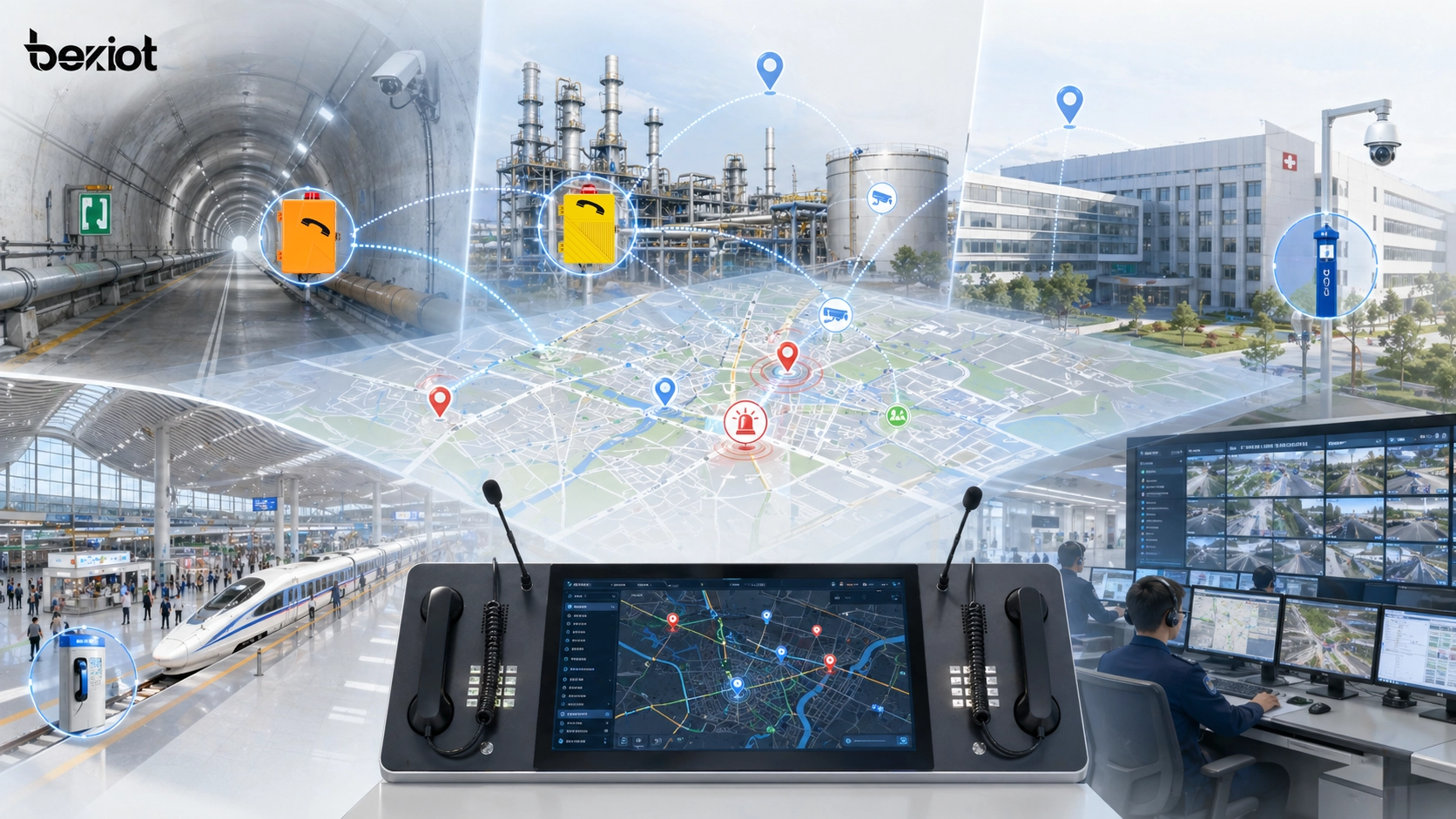
Analysis of the GIS Scheduling System Application of Becke Telcom
From Field Terminals to Visual Response
In Becke Telcom communication projects, map-based dispatching can connect field voice terminals with a visual control-room workflow. Industrial telephones, SIP intercom terminals, SOS emergency phones, IP paging endpoints, dispatch consoles, and unified communication platforms can all become visible and operable resources on the map.
For example, in a tunnel or utility corridor project, the map can show each emergency phone, horn speaker, camera, alarm point, and service area. When an SOS terminal initiates a call, the dispatcher can see the event location, open the nearby camera, talk to the field user, and broadcast guidance to the related section. In this logic, Becke Telcom is not inserted as a decorative brand name; its terminals and communication platform become part of the actual response chain.
The practical value is that the control room can move from “a device is calling” to “this location needs response, these resources are nearby, and this action should be taken.” That is exactly where map-based dispatching strengthens industrial and emergency communication.
Useful for Multi-System Industrial Communication
Many Becke Telcom-style deployment environments involve distributed sites, harsh conditions, emergency voice requirements, and multiple subsystems. Energy facilities, chemical plants, transport tunnels, rail stations, ports, campuses, and public safety projects often need more than a standalone phone system. They need voice, paging, alarms, video, and dispatch control to work together.
Map-based dispatching supports this need by placing SIP intercoms, rugged phones, emergency terminals, paging zones, cameras, and alarm points into one spatial interface. The dispatcher can locate the event first and then choose communication action, rather than searching for numbers and devices separately.
This makes the Becke Telcom integration logical from the project perspective: field communication terminals provide the voice entry points, while the map-based dispatching interface gives those endpoints visible location value and operational response value.
Deployment Considerations
Define the Right Map Scale and Layers
A successful map-based dispatching project should begin by defining the right map scale. Some projects need a city-level GIS map. Others need a campus map, building floor plan, tunnel section diagram, port layout, or industrial process area drawing. The map should match how dispatchers actually understand and manage the site.
Layer design is equally important. Too little information makes the map weak. Too much information makes it confusing. The system should allow dispatchers to show or hide devices, alarms, cameras, paging zones, personnel, vehicles, and maintenance layers according to the task.
Good map-based dispatching is not about placing every possible icon on the screen. It is about showing the right operational information at the right time.
Verify Device Location and Status Accuracy
The value of a map-based system depends on accurate data. If a device point is placed in the wrong location, if a camera is linked to the wrong area, or if a terminal status is outdated, the dispatcher may make poor decisions. Therefore, location verification and status testing are essential during deployment.
Project teams should test the full workflow from event trigger to map display, from map point to voice call, from event location to video linkage, from area selection to paging output, and from response completion to log record. A beautiful interface is not enough if the operational chain does not work correctly.
In emergency communication, accuracy and linkage reliability are more important than visual appearance alone.
A map-based dispatching system succeeds when map data, device status, and communication actions remain accurate under real operating conditions.
Maintenance and Management Tips
Keep Map Data Synchronized With Site Changes
Sites change over time. Devices may be added, moved, replaced, disabled, or renamed. Rooms may change function. Paging zones may be adjusted. Cameras may be re-aimed. If map data is not updated, the dispatching system slowly becomes disconnected from the real site.
Maintenance teams should create a process for keeping asset records, map points, device names, zone definitions, and system configuration synchronized. Critical resources such as emergency phones, SOS points, control-room terminals, paging zones, and alarm points should be checked regularly.
The long-term value of map-based dispatching depends on whether the map continues to reflect the real operating environment.
Use Logs to Improve Response Workflow
Map-based dispatching systems can generate useful logs, including call records, alarm records, paging actions, operator actions, device events, video linkage records, and response time data. These records can help managers understand how the system is used and where the response workflow can improve.
For example, logs may reveal high-frequency incident areas, terminals that are used often, devices that go offline repeatedly, zones where response takes longer, or workflows that require too many manual steps. This information can guide better device placement, staffing, training, and emergency planning.
In this way, map-based dispatching is not only a live response tool. It can also support long-term operational improvement.
Conclusion
Map-based dispatching is a visual dispatching method that combines maps, device status, communication terminals, alarms, video, paging zones, personnel, and event workflows into one operational interface. Its main value is helping dispatchers understand where an event happens and what resources can be used to respond.
Its key features include visual location management, real-time device status, map-based calling, SIP intercom control, area paging, video linkage, alarm positioning, resource filtering, and workflow records. It is widely used in tunnels, utility corridors, transportation hubs, industrial sites, energy facilities, campuses, hospitals, public safety centers, and large facility management projects.
In Becke Telcom-related communication solutions, map-based dispatching can organize SIP intercoms, industrial phones, emergency terminals, paging systems, dispatch consoles, and alarm-video resources into a clearer response architecture. It allows field devices to become visible, selectable, and actionable resources on the control-room map, making emergency and operational communication more direct and more efficient.
FAQ
What is map-based dispatching in simple terms?
Map-based dispatching is a dispatching method that shows people, devices, alarms, cameras, communication terminals, and response resources on a digital map. Dispatchers can locate incidents and operate communication resources directly through the map.
It helps control rooms respond faster because location, status, and action are connected in one interface.
What are the main features of map-based dispatching?
Main features include GIS map display, device location management, real-time status, alarm positioning, video linkage, map-based calling, SIP intercom control, area paging, resource filtering, permissions, and response logs.
These features help dispatchers understand the field situation more quickly and coordinate communication more accurately.
Where is map-based dispatching commonly used?
It is commonly used in tunnels, utility corridors, transport stations, industrial plants, energy sites, mines, campuses, hospitals, public facilities, emergency command centers, and security control rooms.
It is most valuable where many distributed resources must be managed by location.







