Introduction Overview After the phone rings and the called party
After the phone rings and the called party answers the call, the call is established with normal audio. When the called party hangs up, the phone returns to the idle state. However, the calling party remains in the call state and cannot end the call automatically.
All models of our company's IP phones.
This document is intended for all users encountering this issue.
When the called party hangs up, the phone actively sends a BYE message to the calling party to request call termination. The phone sends request messages to the address contained in the VIA header of the previously received message. In some network deployments, the PBX is located on an internal network but mapped to a public network via NAT. The SIP messages sent by this type of PBX contain a private IP address in the VIA header. As a result, the phone cannot deliver subsequent request messages to the peer end correctly, leading to a failure to hang up the call.
Enable the "Direct Contact" function in the phone configuration to allow the phone to send request messages directly to the address specified in the peer's Contact header. Follow the steps below:
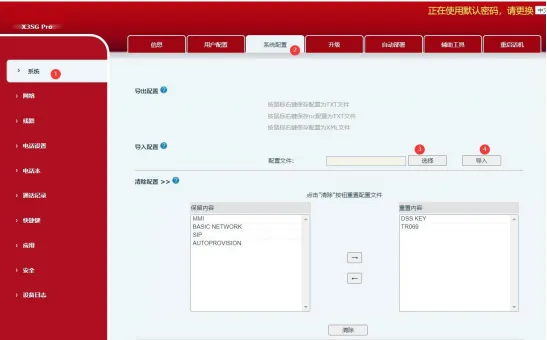
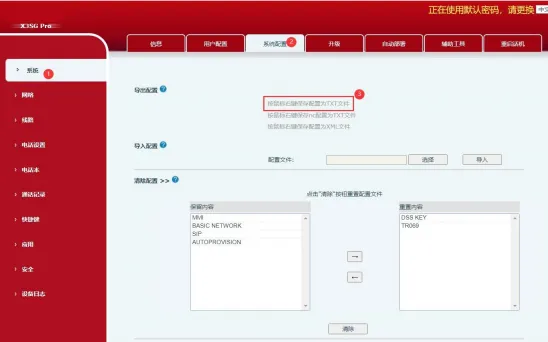
Log in to the phone's web interface, navigate to System > System Configuration, right-click and select Save link as... to save the configuration file as config.txt.
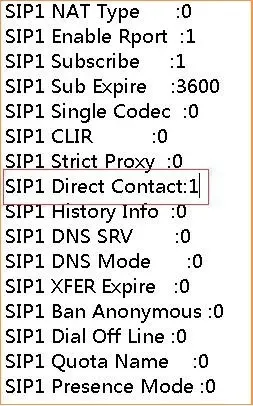
Open the config.txt file, use Ctrl+F to search for the keyword Direct Contact. Change the values of SIP1 Direct Contact :0 and SIP2 Direct Contact :0 to SIP1 Direct Contact :1 and SIP2 Direct Contact :1 respectively, then save the file.
Log in to the phone's web interface again, go to System > System Configuration > Import Configuration. Click Choose File, select the modified config.txt file, and click Import. The phone will restart automatically to complete the configuration update.