IntroductionOverviewSome PBX systems may send notifications that include multipl
Some PBX systems may send notifications that include multiple extended call states and the corresponding SIP dialogs. BLF dialog matching must be enabled so that the phone system can distinguish between them and display the correct status. In some cases, a mismatch between the phone’s subscription and notification messages can cause these problems. Administrators need to adjust certain settings to keep the BLF information synchronized.
This document applies to phones equipped with BLF keys.
This document is intended for routine maintenance personnel who troubleshoot phone issues.
Log in to the phone web interface;
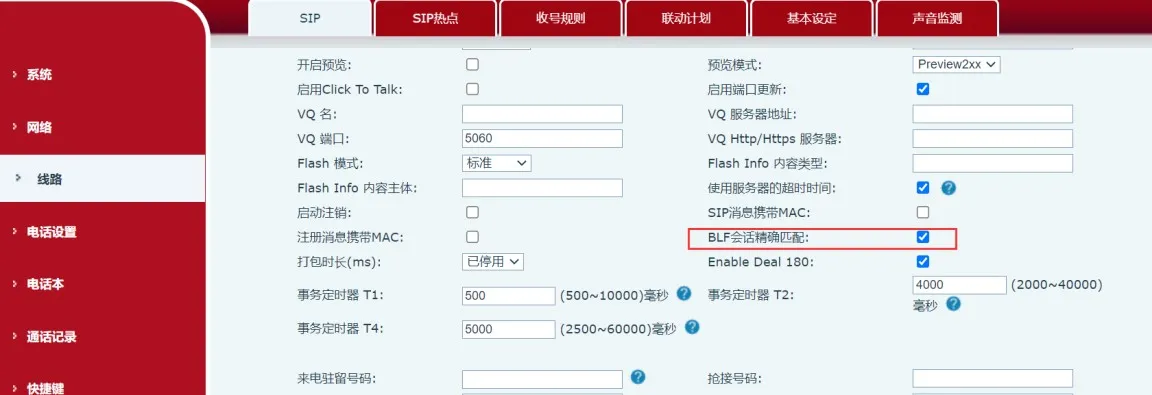
2. Go to the SIP advanced settings for the line;
3. Enable Accurate BLF Dialog Matching;
4. Click the Apply button;
5. Export the configuration file in TXT format;
6. Set SIP1 Update Reg Expire to 0. This is a hidden setting, so copy the following content into a text file;
(VOIP CONFIG FILE)Version:2.0002
(SIP CONFIG MODULE)
--SIP Line List-- :
SIP1 Update Reg Expire :0
(END OF FILE)
7. Import the text file into the phone.