IntroductionOverviewWhen the phone makes or receives a call, the number is not d
When the phone makes or receives a call, the number is not displayed, and the call history does not show the number either. Instead, the screen shows Outbound call.
Applies to all models of our phones.
This document is intended for maintenance personnel responsible for routine troubleshooting of phone issues.
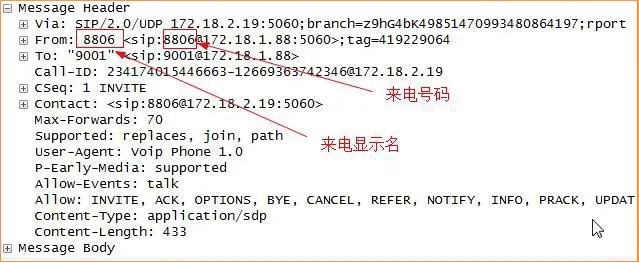
During an incoming call, the information shown on the phone depends on the data sent by the PBX. The phone simply displays the fields provided by the PBX, so incorrect PBX settings can cause abnormal caller ID information.
Log in to the phone’s web interface, then go to “Line” -- “Advanced Settings”. Change “Caller ID Header” to FROM , then submit the setting.

Log in to the phone’s web interface, then go to “Phone Settings” -- “Function Settings” -- “Basic Settings” – change “Display Name Priority” to SIP Display Name-Phonebook-LDAP, then submit the setting.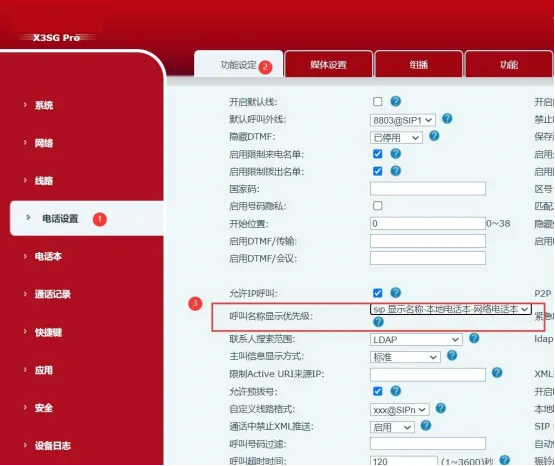
Note:
When placing a call from the phone, the name may not always be displayed. To enable this feature, the dialed number must be saved in the local phonebook, or an LDAP phonebook must be configured on the phone.
The name shown on the phone is registered on the PBX side. If you need to change it, update the relevant settings on the PBX. As shown below, the PBX sends the caller display name in the FROM field as 8806, while the SIP caller number field is 8806. Step 1 and Step 2 instruct the phone to read the values from the FROM field and the SIP field respectively.