
SIP Phone Digit Collection & Dialing Rules Manual covers Dial Plan/Dial Peer configuration, 8 dial modes, E.164 rules, custom dial plans for BX3S/BX4/BX5S/BX6/BX7/BX7C/GP210/GP210i/BXU series, easy web setup for internal R&D and testing teams.
For Series C IP Phones, the Dial Plan and Dial Peer functions can basically meet all user requirements for digit sending and replacement rules. However, new users or those who haven't used these two functions for a long time can hardly complete their configurations via the web interface without referring to the user manual. Even if they learn how to configure by reading the manual, they will forget the steps soon afterward. Therefore, we aim to optimize these two functions to enable users to master configuration directly via the web interface, or at least retain the configuration skills after reading the manual once.
This document applies to BX3S, BX4, BX5S, BX6, BX7, BX7C, GP210, GP210i, BXU series and other models.
This document is intended for internal R&D and testing personnel who want to learn about the improvements to the Dial Plan function.
Dial Plan: A function that allows the phone to automatically process dialed numbers with specific patterns and initiate calls.
Digit Map: A character sequence rule defined to fulfill specific Dial Plan requirements.
Dial Peer: A function that routes numbers with specific patterns to designated destination devices or networks.
8 Dialing Modes Supported by X34:
# Key Dialing: Dial the target number and press the # key to initiate a call;
Fixed-Length Dialing: The phone automatically initiates a call when the input number reaches the set fixed length (valid in dialing state);
Timeout Dialing: The phone automatically initiates a call after the timeout period (valid in dialing state);
Blind Transfer with # Suffix: Enter the transfer number and press the # key to transfer the current call to a third party;
On-Hook Blind Transfer: Enter the transfer number and hang up the handset or turn off the hands-free mode to transfer the current call to a third party;
On-Hook Attended Transfer: Hang up the handset or press the hands-free key to complete attended transfer and route the current call to a third party;
Conference On-Hook Attended Transfer: Hang up the handset during a three-way conference, and the other two parties remain connected;
DSS Key Blind Transfer: Set a number in the function key memory, press the [Transfer] key and then the DSS key to transfer the current call to a third party.
8 Dialing Modes Supported by X56:
# Key Dialing: Dial the target number and press the # key to initiate a call;
Fixed-Length Dialing: The phone automatically initiates a call when the input number reaches the set fixed length (valid in dialing state);
Timeout Dialing: The phone automatically initiates a call after the timeout period (valid in dialing state);
Blind Transfer with # Suffix: Enter the transfer number and press the # key to transfer the current call to a third party;
On-Hook Blind Transfer: Enter the transfer number and hang up the handset or turn off the hands-free mode to transfer the current call to a third party;
On-Hook Attended Transfer: Hang up the handset or press the hands-free key to complete attended transfer and route the current call to a third party;
Conference On-Hook Attended Transfer: Hang up the handset during a three-way conference, and the other two parties remain connected;
Enable E.164
8 Dialing Modes Supported by Android Phones:
# Key Dialing: Dial the target number and press the # key to initiate a call;
Fixed-Length Dialing: The phone automatically initiates a call when the input number reaches the set fixed length (valid in dialing state);
Timeout Dialing: The phone automatically initiates a call after the timeout period (valid in dialing state);
Blind Transfer with # Suffix: Enter the transfer number and press the # key to transfer the current call to a third party;
On-Hook Blind Transfer: Enter the transfer number and hang up the handset or turn off the hands-free mode to transfer the current call to a third party;
On-Hook Attended Transfer: Hang up the handset or press the hands-free key to complete attended transfer and route the current call to a third party;
Conference On-Hook Attended Transfer: Hang up the handset during a three-way conference, and the other two parties remain connected;
Enable E.164
Dial Out with # Key: Dial the target number and add the # key at the end.
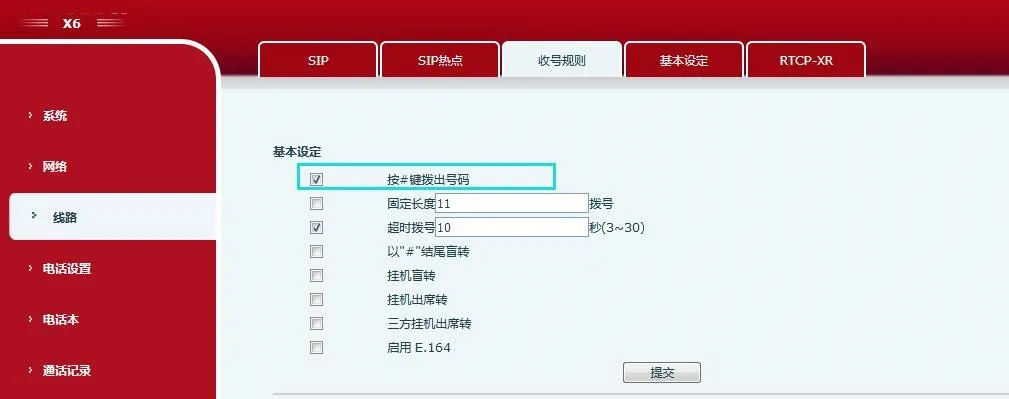
Configure the phone to end digit collection with the # key.
Fixed-Length Dialing: The phone intercepts the input number by the fixed length.
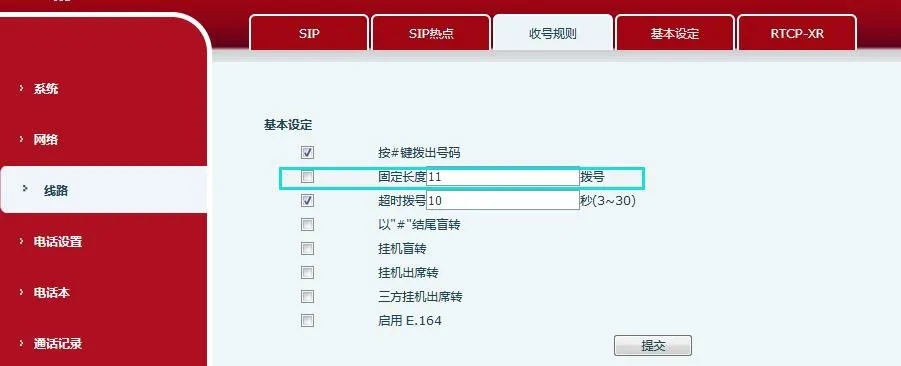
Configure fixed-length digit collection. For example, set to 11 digits: the phone automatically initiates a call with the 11-digit number after the user finishes dialing.
Timeout Dialing: The phone sends the collected digits after the timeout period.
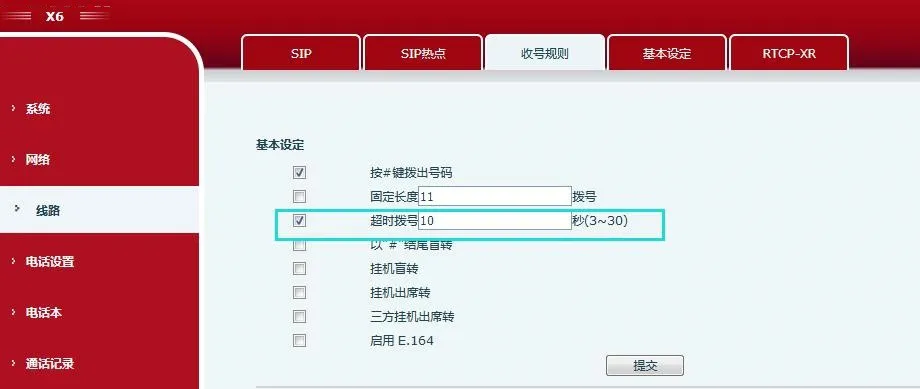
Configure the dialing timeout in seconds. For example, set to 10 seconds: if the user does not dial further digits within 10 seconds after receiving a digit, the phone regards the input as complete and sends the collected digits as the called number.
Blind Transfer with # Suffix
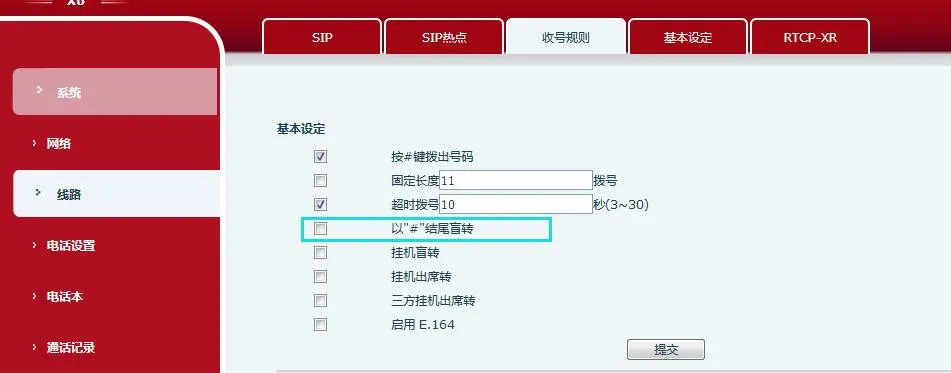
Check this option to perform blind transfer by entering the number in the transfer dial interface and pressing the # key; uncheck to disable blind transfer with the # key.
On-Hook Blind Transfer
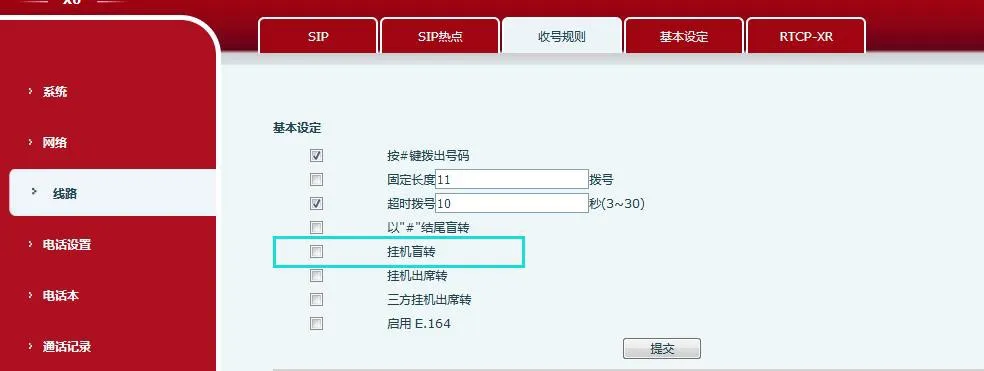
Check this option to perform blind transfer by entering the number in the transfer dial interface and hanging up the phone.
On-Hook Attended Transfer
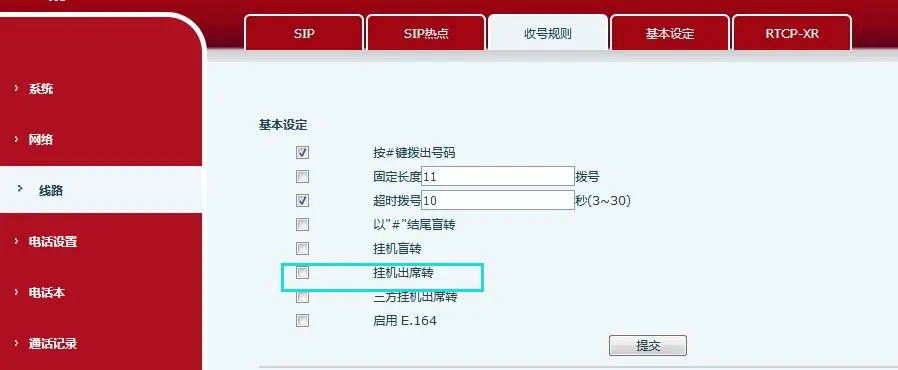
Check this option to perform attended transfer: enter the number in the transfer dial interface, initiate a call, hang up after the called party answers to complete the transfer.
Three-Way Conference On-Hook Attended Transfer
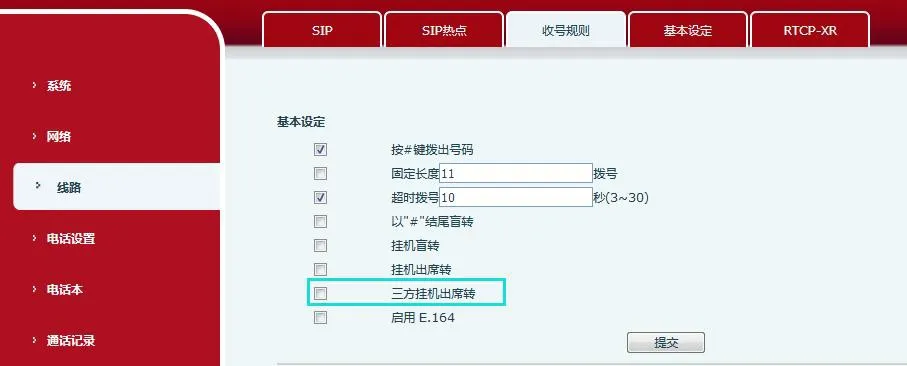
Test: The phone establishes a three-way conference with Party B and C. Hang up (hands-free mode: press hands-free key; headset mode: press headset key; handset mode: hang up handset). After hanging up, Party B and C remain connected, realizing attended transfer with mutual number display.
Enable E.164
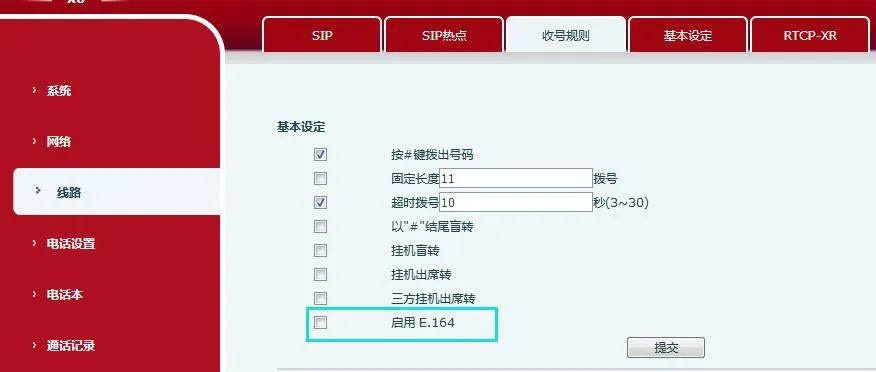
Numbers Starting with 0
Numbers starting with 00: No processing (usually international numbers or 0086 format);
Numbers starting with 010: Local number length 8 digits, auto-call when 11 digits are entered;
Numbers starting with 013/015/018: Mobile numbers, auto-call when 12 digits are entered;
Numbers starting with 02: Except 026/021, auto-call when 11 digits are entered;
Numbers starting with 08: 0812/0813/0816/0817, 0825/0826/0827, 083, 085, 087, 0883/0886/0887/0888, 089: auto-call when 11 digits are entered (0850, 0890/0899 invalid); 0898: auto-call when 12 digits are entered.
Other 0-starting prefixes (03,04,05,06,07,09) follow detailed regional auto-dial length rules as defined in the original specification.
Other Starting Digits
Numbers starting with 1, 4, 8, 9:
Starting with 1:
10xxxx: Auto-call at 5 digits (e.g., 10086);
11: 111 auto-call at 5 digits; others auto-call at 3 digits (e.g., 110);
12: 123 auto-call at 5 digits (e.g., 12315); others auto-call at 3 digits (e.g., 120,122);
13/15/18: Auto-call at 11 digits (mobile numbers);
400/800: Auto-call at 10 digits (toll-free hotlines);
9-starting (except 999): Auto-call at 5 digits; 999: Auto-call at 9 digits.
Note: Numbers starting with 2,3,5,6,7 are not processed.
If both E.164 and custom Dial Plan rules exist, the first matched rule takes effect.
DSS Key Blind Transfer
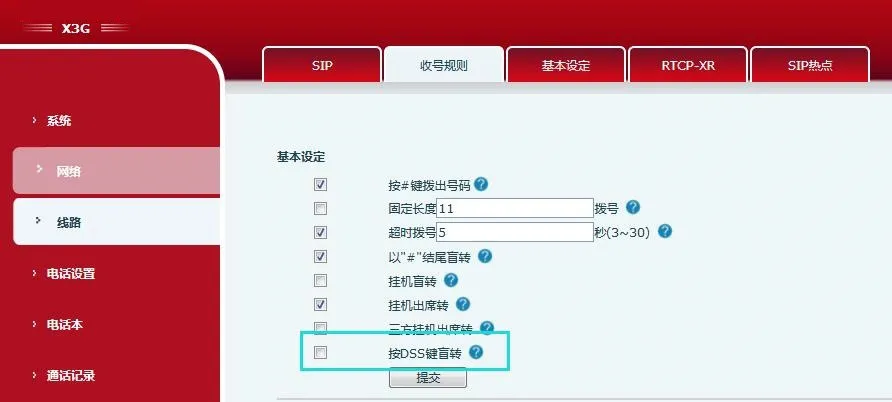
Set a number in the function key memory. Press the [Transfer] key and then the DSS key to transfer the current call to a third party directly.
These rules allow users to configure personalized dialing rules and server-compatible rules easily, greatly improving phone convenience and usability. Up to 100 rules can be added.
| Parameter | Description |
| Call Number | Two types: Exact Match (phone uses mapped IP only if fully matched); Prefix Match (add T after prefix for PSTN area code function). Max 30 digits. |
| Destination | Target IP address; enter peer IP for point-to-point calls. |
| Port | Peer signaling port (optional, default 5060). |
| Prefix | Alias (optional): Replacement number for peer number prefix. |
| Suffix | Suffix (optional): Added to the end of dialed numbers. |
| Apply to Call | Outbound, Inbound, Both. |
| Match & Send | Yes/No. |
| Delete Length | Digits to delete/replace from the start (optional). E.g., 3 = delete first 3 digits. |
| Alias Types (4 modes, with Delete Length): 1) add:xxx - Prepend xxx 2) all:xxx - Replace entire number 3) del - Delete first N digits 4) rep:xxx - Replace first N digits with xxx | Wildcards: x = any digit [ ] = digit range . = any length (including empty) Tn = end after n seconds (0-9, last 2 chars, default T0) , = stop digit collection + dial tone |
X5/6:
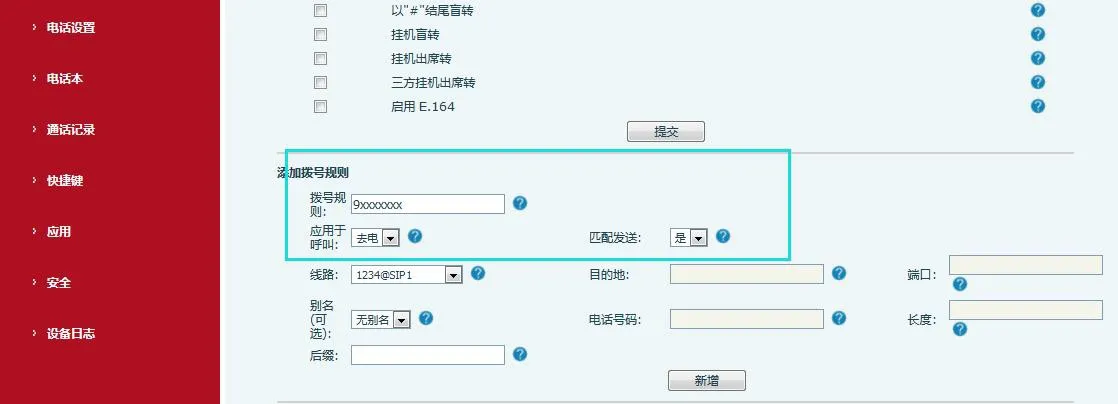
Dial Rule: Set custom dial rules
Apply to Call: Outbound/Inbound/Both
Match & Send: Yes/No (usually Yes); Line: AUTO/SIP1/SIP2/SIP3...
Destination: Leave blank for AUTO; fill IP for other lines; Port: Leave blank for AUTO
Alias (Optional): None/All/Add/Delete/Replace; Number/Length: Blank for None
Suffix: Set custom suffix
Dial Rule Options: Edit/Delete rules
Custom Dial Rule Table: Displays all configured rules
X3/4:
Number: Set target number
Destination/Port (Optional): Set peer IP and port
Suffix (Optional): Set custom suffix
Delete Length (Optional): Set digits to delete
Dial Peer Menu: Edit/Delete rules
Dial Peer Table: Displays all configured Dial Peer rules
Video Phones:
Dial Rule: Set custom dial rules
Apply to Call: Outbound/Inbound/Both
Match & Send: Yes/No (usually Yes); Media: Default/Audio/Video; Line: AUTO/SIP1/SIP2/SIP3...
Destination: Leave blank for AUTO; fill IP for other lines; Port: Leave blank for AUTO
Alias (Optional): None/All/Add/Delete/Replace; Number/Length: Blank for None
Suffix: Set custom suffix
Dial Rule Options: Edit/Delete rules
Custom Dial Rule Table: Displays all configured rules
X3/4 Examples:
Example 1: Global Replacement
Dial "32" → auto replace to "833333" (speed dial). Dial "322" → send "322" only.
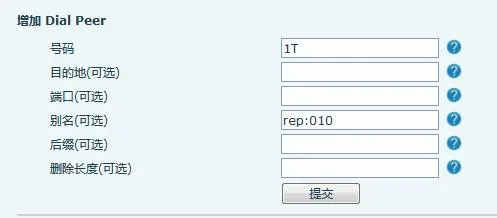
Example 2: Partial Replacement
Dial "162213123" → auto replace to "01062213123" (add Beijing area code 010).
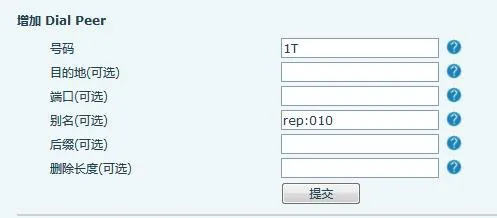
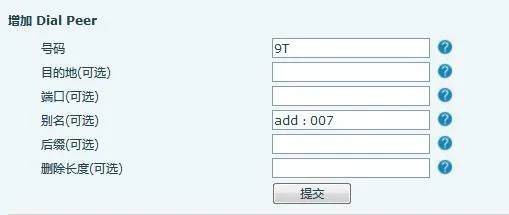
Example 3: Add Prefix
Dial "9312" → send "0079312".
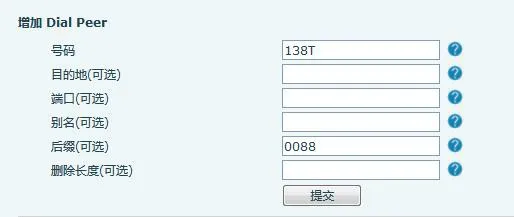
Example 4: Add Suffix
Dial "1383322" → send "13833220088".
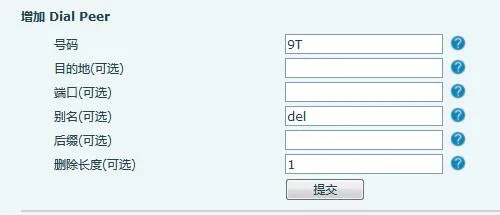
Example 5: Delete Prefix
Dial "98322" → send "8322" (delete prefix 9).
X5/6 & Video Phones Examples:
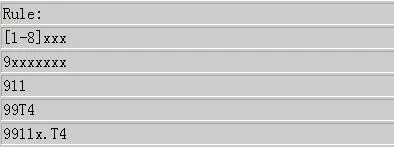
Example 1: [1-8]xxx → All 4-digit numbers from 1000-8999, send immediately when 4 digits are entered.
![Dial Rule [1-8]xxx Setup](/uploads/allimg/20260410/1-26041010594I19.webp)
Example 2: 9xxxxxxx → 8-digit numbers starting with 9, send immediately when 8 digits are entered.
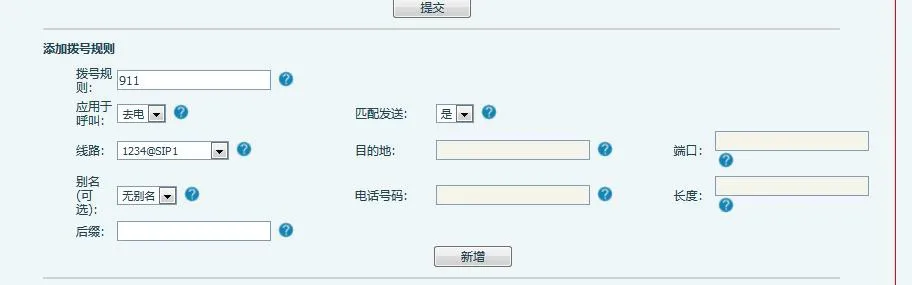
Example 3: 911 → Send immediately after dialing.
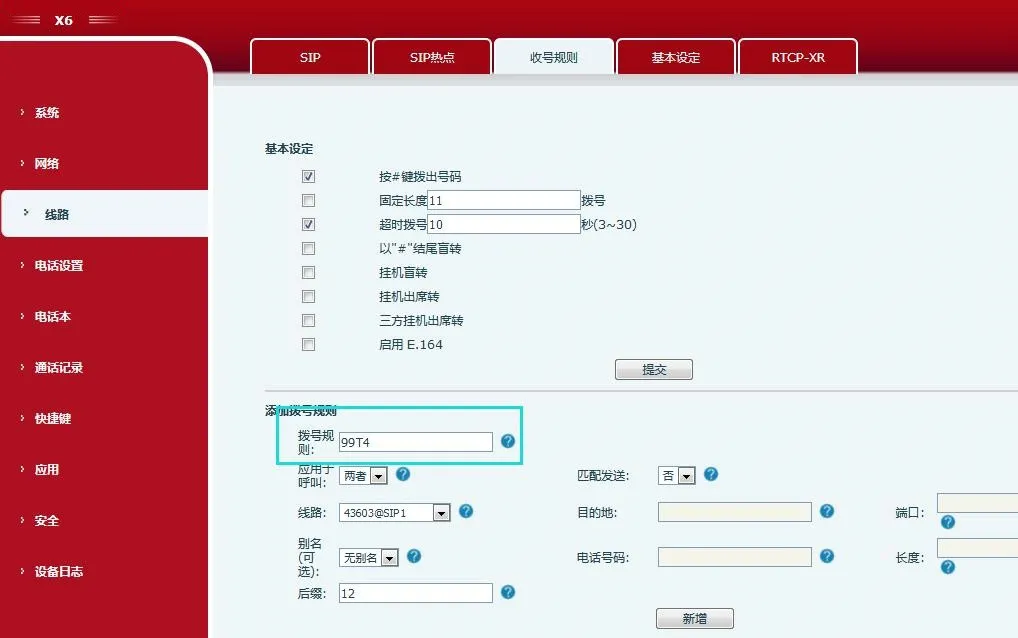
Example 4: 99T4 → Send 99 after 4 seconds.
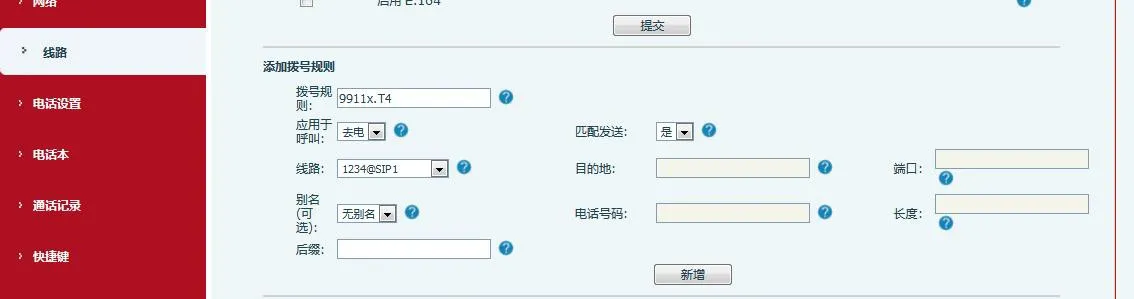
Example 5: 9911x.T4 → Numbers starting with 9911 (min 5 digits), send after 4 seconds.
Note 1: If 2+ rules match, the first configured rule takes effect.
Note 2: Each number can only match ONE custom rule; multiple matches cause rule failure.

