IntroductionOverviewAfter the called phone answers the call, no audio is heard.
After the called phone answers the call, no audio is heard. At this point, the called phone enters the active call state and starts counting the call duration, while the calling phone still hears the ringback tone.
This applies to all phone models provided by our company.
This document is intended for all customers who encounter this issue.
After the called party goes off-hook, the phone sends a 200 OK message back to the caller. The response message is sent to the address carried in the VIA field of the original SIP request. In some deployments, the PBX is located on a private network and is mapped to the public network through NAT, but the SIP messages sent by the PBX still contain a private IP address in the VIA field. As a result, the response message from the phone cannot be delivered correctly to the peer device.
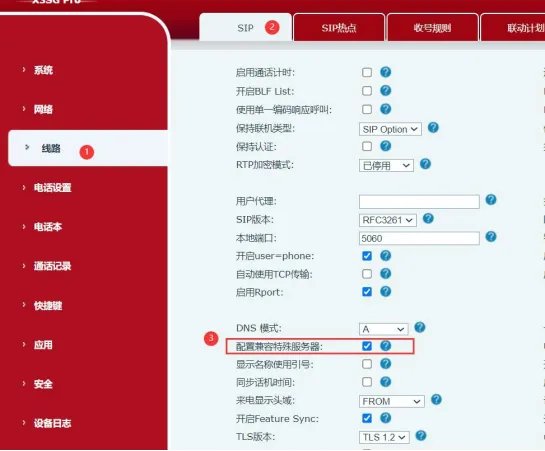
Enable the “Strict proxy” feature (Chinese option: “Compatible with special servers”) in the phone settings. After this feature is enabled, the phone will no longer send response messages to the address in the VIA header. Instead, it will send them directly to the address specified in the SIP Contact field.
How to enable the phone’s “Special Server Compatibility” option:
Log in to the phone’s WEB management page, then click “Line” - “Advanced Settings” -- check “Configure Special Server Compatibility” - click Submit at the bottom of the page, as shown below.