
This article details the configuration and application of firewall features on SIP phones, including inbound/outbound rules, protocol filtering, port ranges, source/destination addresses, and a practical example of blocking ICMP packets. Steps for deleting rules are also covered.
The firewall feature allows setting input and output rules, which can prevent malicious network access or restrict internal users from accessing external network resources, thereby improving security.
Web page layout of the firewall feature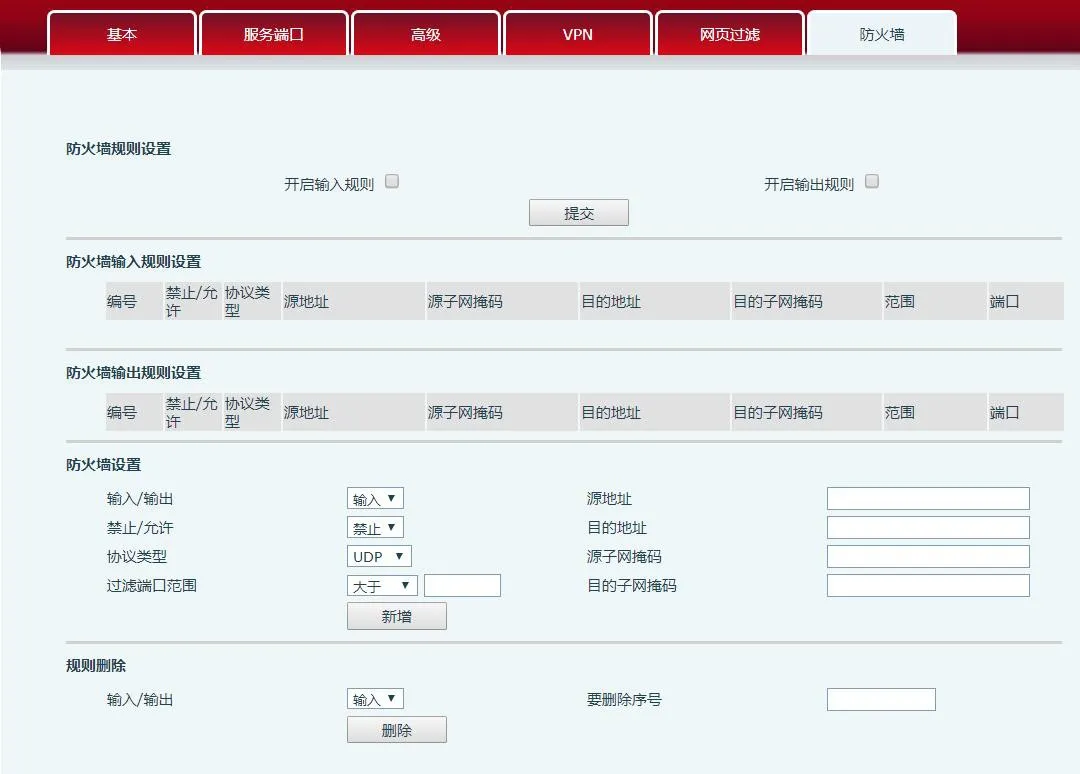
Detailed description of firewall configuration
Through this page, you can enable or disable the input and output firewall. This feature supports two types of rules: input rules and output rules. Each rule is assigned a sequence number, with a maximum of 10 rules per type.
Given the complexity of firewall configuration, an example is provided below:

Field Name Description
Enable Input Rules Indicates enabling input rule application. Enable Output Rules indicates enabling output rule application.
Input/Output Select whether the current rule is input or output; Block/Allow selects whether the rule is to block or allow.
Protocol Type Filter protocol type, four options: TCP, UDP, ICMP, IP.
Port Range Filtering Port range to filter
Source Address Source address. Can be a host address, network address, or all addresses (0.0.0.0); or a network address like *.*.*.0, e.g., 192.168.1.0.
Destination Address Destination address. Can be a specific IP, all addresses 0.0.0.0, or a network address like 192.168.1.0.
Source Subnet Mask Source address mask. 255.255.255.255 indicates a specific host; 255.255.255.0 indicates filtering a subnet.
Destination Subnet Mask Destination address mask. 255.255.255.255 indicates a specific host; 255.255.255.0 indicates filtering a subnet.
Local phone IP: 192.168.1.114
After setting, click [Add]; a new item will be added to the firewall output rules, as shown below:
Then enable output rules and click the [Submit] button. Procedure and phenomena:
1. When the phone (192.168.1.114) runs: ping 192.168.1.118, it cannot send packets to 192.168.1.118 due to the output rule being blocked.
2. When the phone (192.168.1.114) runs ping to any other IP in the 192.168.1.0 ~ 192.168.1.255 subnet, it also cannot send ICMP packets.
3. When device (192.168.1.118) runs ping 192.168.1.114, packet capture shows that (192.168.1.118) sends ICMP packets, (192.168.1.114) receives them, but due to the output block rule, (192.168.1.114) does not reply.
Note: The phone's ping function is in LCD menu -> Applications -> Ping
Select the list number to delete and click [Delete] to remove the selected entry.
Test document path: http://172.16.1.9/testlink/index.php?caller=login&viewer= X3s/x4
Color screen project -> web test cases -> network -> firewall
