
touchpoint

In addition to terminal devices, all personnel, places, and things connected to the network should also be considered.

View Details

resource

Understand best practices, explore innovative solutions, and establish connections with other partners throughout the Baker community.

×

touchpoint

touchpoint

In addition to terminal devices, all personnel, places, and things connected to the network should also be considered.

Learn more

resource

resource

Understand best practices, explore innovative solutions, and establish connections with other partners throughout the Baker community.

Contact Us
Introduction to the Do Not Disturb Function on Industrial Phones

Introduction

Overview

Users can enable the Do Not Disturb (DND) function on the phone to reject incoming calls, including call waiting.

Applicable Models

All of our phone models support this feature.

Feature Highlights

① Incoming calls are rejected, and missed calls will still be recorded on the phone.
② Outgoing calls are not affected.
③ DND can be enabled or disabled for individual lines.
④ A schedule can be configured to automatically enable or disable DND during specific time periods.

How to Use the Feature

Using the phone keypad, press “Menu” - “Features” - “DND”. After completing the settings, save and exit.
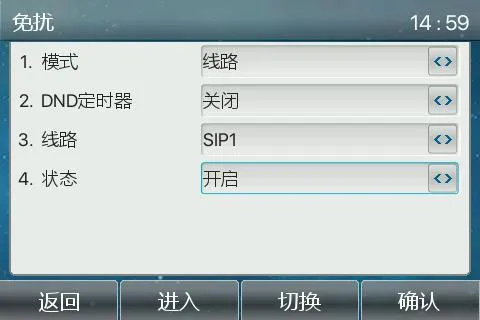
Menu
After DND is enabled, the phone interface will appear as shown below:
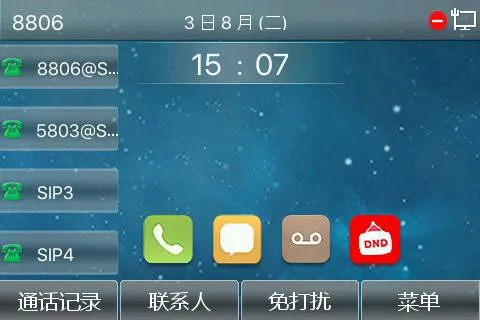
Display effect
Note: The DND icon turns red when the feature is enabled.

catalogue
Professional industrial communication manufacturer, providing high reliability communication guarantee!
Cooperation Consultation
customer service Phone