IntroductionOverviewTo fix bugs or add new features, the phone may need to be up
To fix bugs or add new features, the phone may need to be upgraded to a newer firmware version.
Applicable models: BX210 / BX210i / BX7 / BX7C / BX6U / BX5U / BX4U / BJ4G / BEXP200 / BX1SP / BX3U / BX3SG / BJ1SP / BJ3G / BH2U
For personnel who need to upgrade the firmware version of new phone models
1. Connect the phone to a power adapter for power supply. Use the phone WAN port 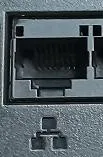 to connect by network cable to the computer. Set the computer IP address to 192.168.1.99 and the gateway to 192.168.1.1.
2. Restart the device. When the phone is powered on, the LED will flash once. When the LED flashes for the second time, press the # key continuously without interruption. The phone will enter POST mode, and the phone IP address will change to 192.168.1.179.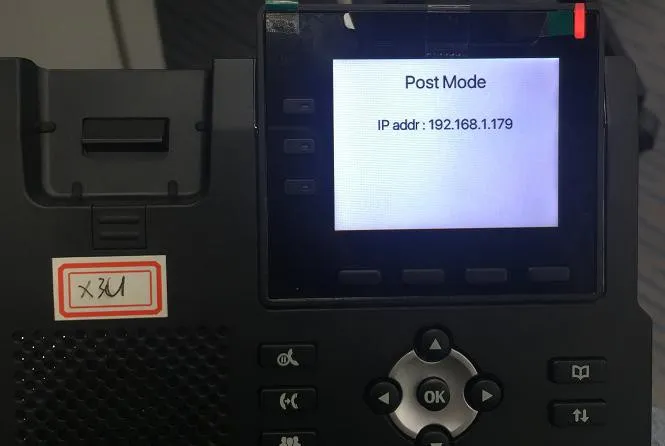
3. Open 192.168.1.179:8080 in a web browser. The username is root, and the password is *winline.
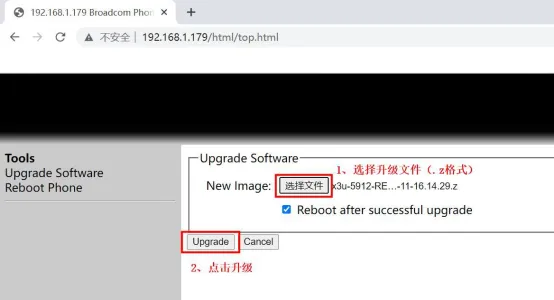
4. Enter the firmware upgrade page, select the required .z file, and start the upgrade.