
touchpoint

In addition to terminal devices, all personnel, places, and things connected to the network should also be considered.

View Details

resource

Understand best practices, explore innovative solutions, and establish connections with other partners throughout the Baker community.

×

touchpoint

touchpoint

In addition to terminal devices, all personnel, places, and things connected to the network should also be considered.

Learn more

resource

resource

Understand best practices, explore innovative solutions, and establish connections with other partners throughout the Baker community.

Contact Us
How to Fix No Audio from the Handset or Headset During a Call?

Introduction

Overview

During a call, the phone may have no audio when using the handset or headset, while speakerphone works normally.

Applicable Models

This applies to all models of our phones.

Target Audience

This document is intended for routine maintenance personnel who are troubleshooting phone issues.

Solution

Check whether the call status indicator icon appears on the phone screen. Although both the handset and the headset use RJ9 connectors, these two RJ9 ports are different. Make sure the handset or headset is plugged into the correct port.
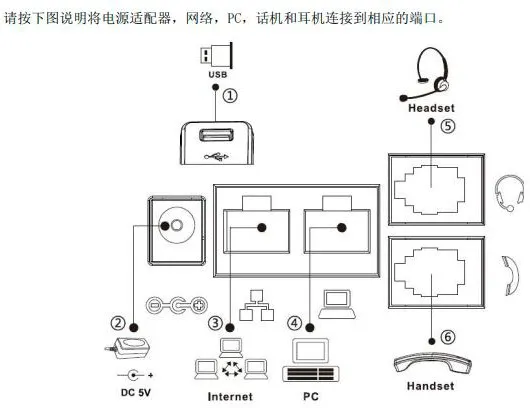
Call status indicator icon
Note: The X2C has two RJ9 headset ports. The upper port is the standard headset port for normal calls, while the lower port is a monitoring port, which supports listening only and does not support speaking.
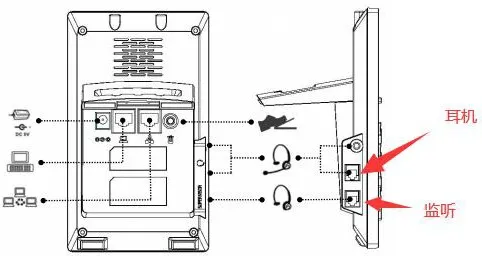
RJ9 headset port

catalogue
Professional industrial communication manufacturer, providing high reliability communication guarantee!
Cooperation Consultation
customer service Phone