touchpoint

In addition to terminal devices, all personnel, places, and things connected to the network should also be considered.

View Details

resource

Understand best practices, explore innovative solutions, and establish connections with other partners throughout the Baker community.

×

touchpoint

touchpoint

In addition to terminal devices, all personnel, places, and things connected to the network should also be considered.

Learn more

resource

resource

Understand best practices, explore innovative solutions, and establish connections with other partners throughout the Baker community.

Contact Us
How to Fix Echo During IP Phone Calls?

Introduction

Overview

Sometimes echo may occur during a call. In general, this issue is related to the server. For example, some Neox PBX systems may cause echo during calls. When call recording is enabled on the PBX, echo may be heard on the phone. When call recording is disabled on the PBX, the phone usually works normally without echo.

Applicable Models

This applies to all models of our phones.

Target Audience

This document is mainly intended to help customers troubleshoot echo problems during calls.

Solution

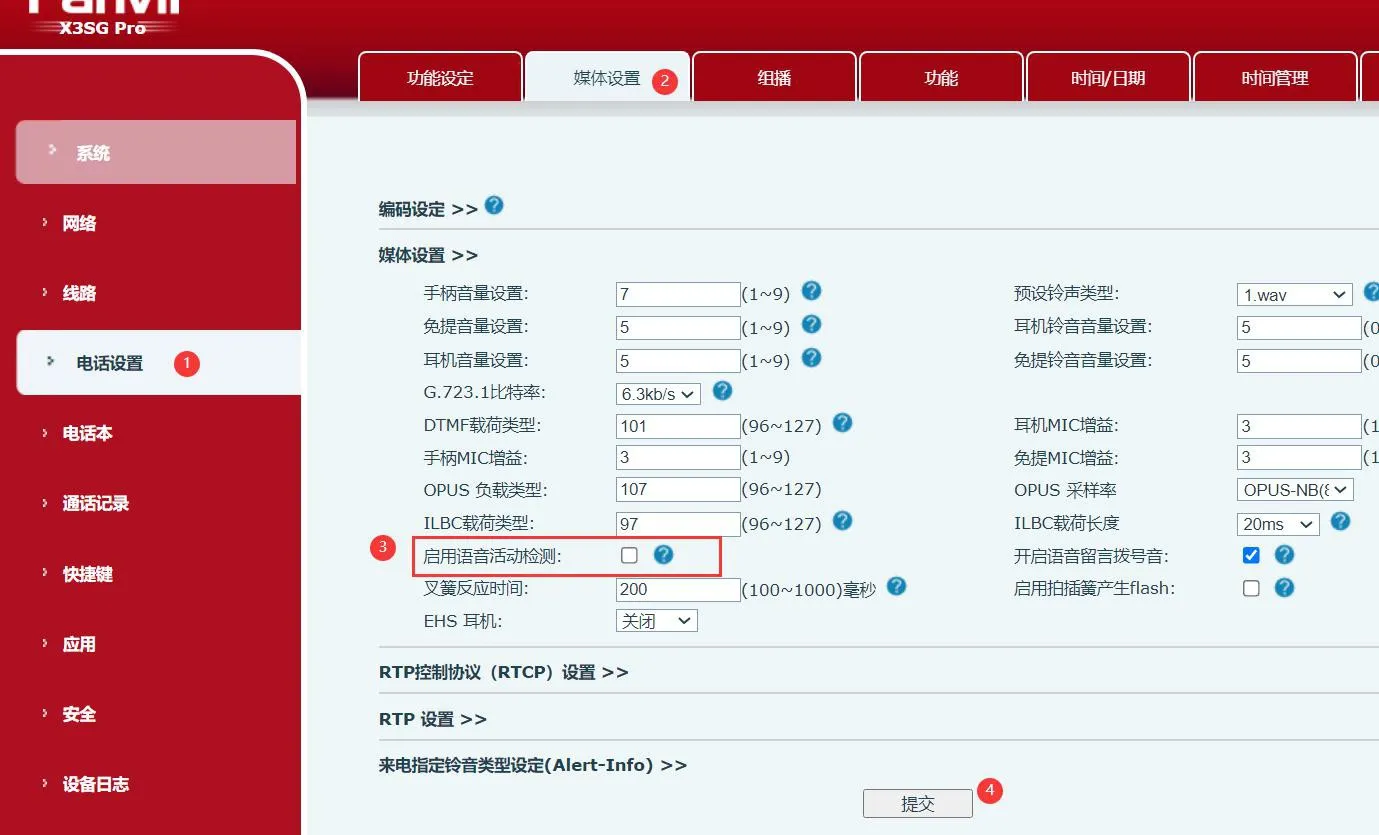
Disable the Voice Activity Detection function on the phone. Even if the Neox PBX supports call recording, echo will no longer occur after this setting is turned off.
Log in to the phone web interface, then go to “Phone Settings” → “Media Settings” → disable “Enable Voice Activity Detection
Enable Voice Activity Detection

catalogue
Professional industrial communication manufacturer, providing high reliability communication guarantee!
Cooperation Consultation
customer service Phone