


Presence is a unified communications feature that shows the real-time availability, status, or reachability of a user, device, team, or communication endpoint. In simple terms, it answers an important question before communication begins: is this person or resource available right now, busy, offline, on a call, away, in a meeting, or ready to respond? By making availability visible, presence helps people choose the right communication method at the right moment.
In modern communication platforms, presence is used across voice calling, instant messaging, video meetings, team collaboration, contact centers, dispatch systems, SIP endpoints, mobile clients, and enterprise communication consoles. It is no longer limited to a small colored dot beside a user name. Presence can reflect call state, calendar state, device registration, do-not-disturb status, queue availability, location-related status, work shift state, or operator readiness.
The value of presence is especially clear in environments where communication timing matters. If a user knows that a colleague is on a call, they may send a message instead of calling. If a dispatcher sees that one operator is busy and another is available, the task can be assigned faster. If a system knows that a terminal or endpoint is offline, it can avoid routing urgent communication to a dead path. Presence makes communication more intelligent before the first call, message, or alert is sent.
What Is Presence?
Definition and Core Meaning
Presence refers to the real-time or near-real-time indication of a communication participant’s availability and communication state. A participant may be a person, an extension, a mobile app, an operator console, a SIP phone, an intercom terminal, a call queue, or a device group. The presence state tells the platform and other users whether that participant can be contacted and how communication should be handled.
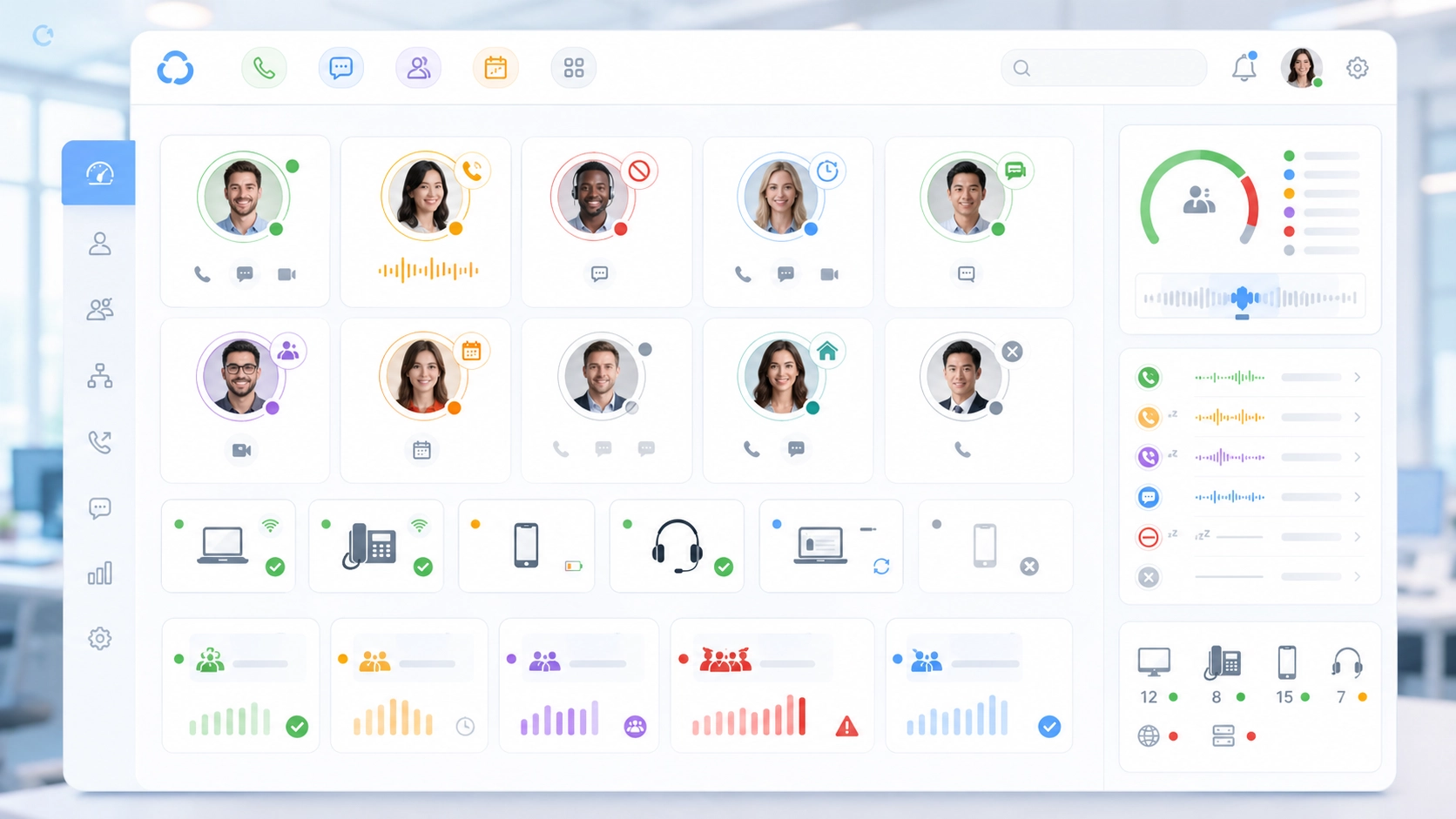
The core meaning of presence is communication awareness. Instead of treating every user or endpoint as equally reachable at all times, the system reflects their actual status. This may include available, busy, away, offline, on a call, in a meeting, do not disturb, forwarding enabled, or unavailable due to device registration loss.
In practical terms, presence reduces guesswork. It helps users avoid unnecessary calls, helps systems route communication more intelligently, and helps teams understand who is ready to respond without asking manually.
Presence is the visibility layer that helps a communication system understand who is reachable, who is busy, and which path is most likely to work.
Presence Versus Simple Online Status
Presence is often associated with online status, but in unified communications it is broader than simply showing whether someone is logged in. A person may be online but not available for a call. A device may be registered but currently busy. An operator may be at the console but in do-not-disturb mode. A team may appear active, but its queue may be overloaded.
A richer presence model combines multiple signals. It may use device registration, call activity, calendar integration, user selection, application login, mobile status, queue status, or system policy. This gives a more realistic view of communication readiness than a basic online or offline label.
This is why presence is so useful in professional communication systems. It provides context, not just connection status.
How Presence Works in Unified Communications
Status Collection From Users, Devices, and Applications
Presence begins with status collection. The unified communications platform receives signals from users, endpoints, and applications. A desktop client may report that a user is active. A calendar integration may show that the user is in a meeting. A SIP phone may report that the extension is registered and currently on a call. A mobile app may show that the user is online but away from the desktop.
The platform combines these inputs to build a presence state. Some states are set manually by users, such as available, busy, away, or do not disturb. Others are generated automatically by the system, such as on a call, offline, in a meeting, or not registered. In more advanced systems, presence may also reflect queue membership, duty schedule, operator role, or device health.
This collection process allows presence to represent practical communication readiness rather than only user preference.
Status Distribution to Other Users and Systems
Once the presence state is known, the platform distributes it to other users, clients, consoles, directories, and integrated systems. A coworker may see whether someone is available before starting a call. A receptionist may see which extension is busy before transferring a call. A dispatcher may see which operator or field terminal is ready before assigning a task.
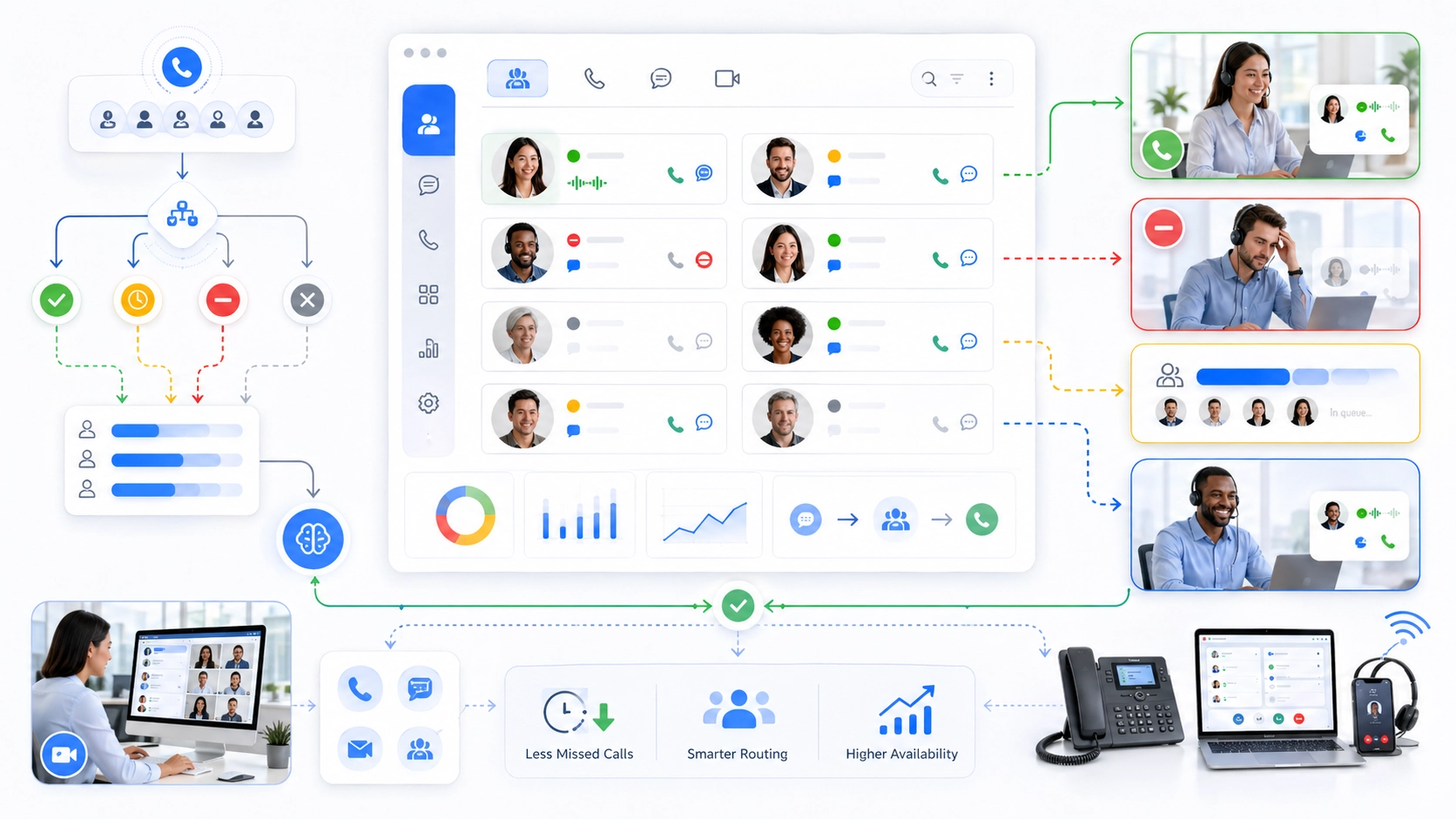
Presence can also influence automatic behavior. A call may route differently when a user is unavailable. A message may be escalated if no one acknowledges it. A queue may skip an unavailable agent. A control-room platform may highlight active, idle, or fault-state communication terminals.
This means presence is not only a visual indicator. It can become part of real communication logic.
Presence becomes more valuable when it is connected to routing, notification, escalation, and operational decision-making.
Main Presence States and What They Mean
Available, Busy, Away, and Offline
The most common presence states are available, busy, away, and offline. Available usually means the user or endpoint can receive communication. Busy means the user is occupied, often because of a call, meeting, or manual status setting. Away means the user may be logged in but not actively present at the device. Offline means the user or device is not connected to the communication platform.
These states help users make better choices. If someone is available, a voice call may be appropriate. If they are busy, a message may be better. If they are offline, the sender may choose voicemail, email, or another contact. This reduces wasted attempts and improves communication efficiency.
In unified communications, the value of these states depends on accuracy. If presence is outdated or misleading, users may lose trust in the feature. Therefore, real-time updates and good system integration are essential.
On a Call, In a Meeting, Do Not Disturb, and Custom States
More advanced presence states provide richer context. On a call indicates that the user is already in voice communication. In a meeting may come from calendar integration or meeting platform activity. Do not disturb means the user does not want interruptions and may prefer messages to be held or routed elsewhere.
Custom states may also be used. A contact center agent may be available, after-call working, on break, or not ready. A dispatcher may be active, monitoring, handling incident, or off duty. A device may show registered, offline, alarm active, or maintenance mode. These states are especially useful when presence is adapted to operational workflows instead of generic office collaboration alone.
The more closely presence reflects real work conditions, the more useful it becomes.
The Role of Presence in Unified Communications
Making Communication More Context-Aware
The central role of presence in unified communications is to make communication context-aware. Without presence, users often communicate blindly. They call someone without knowing whether that person is already speaking with another customer, sitting in a meeting, away from the desk, or offline. Presence adds context before the communication attempt begins.
This changes daily communication behavior. Users can decide whether to call, message, schedule, transfer, escalate, or wait. A receptionist can avoid transferring a caller to a busy extension. A support team can choose an available specialist. A manager can see whether a team member is reachable before starting a live conversation.
In this way, presence reduces friction and makes unified communications feel more intelligent and responsive.
Connecting Voice, Messaging, Meetings, and Collaboration
Presence is also important because unified communications combines many communication modes. A user may be reachable by desk phone, mobile app, video meeting, chat, email, or team workspace. Presence helps these modes work together rather than separately.
For example, if a user is in a video meeting, the platform may show busy and reduce call interruptions. If the user is away from the desktop but active on mobile, messages may still reach them. If an extension is on a call, another user may choose chat or call a different team member instead.
Presence therefore acts as a bridge between communication channels. It helps the platform decide which channel is most appropriate at a given moment.
Unified communications is not only about having many channels. It is about knowing which channel fits the user’s current state.
Technical Features of Presence Systems
Real-Time Status Synchronization
Real-time status synchronization is one of the most important technical features of a presence system. The status shown to users must update quickly when someone joins a call, ends a meeting, changes availability, logs out, or loses device connection. Slow updates reduce trust and may cause users to make poor communication decisions.
In business environments, even short delays can matter. A receptionist may transfer a caller to someone who looked available but has already started another call. A dispatcher may assign a task to an operator whose status has just changed. Good synchronization reduces these mismatches.
This is why presence needs reliable signaling, client updates, device reporting, and platform coordination.
Multi-Device and Multi-Platform Aggregation
Modern users often work across multiple devices. A person may have a desk phone, laptop client, mobile app, browser session, headset, and meeting platform active at the same time. A presence system must aggregate these signals into one meaningful state.
This is not always simple. One device may be idle while another is active. The user may be away from the desk but reachable on mobile. A desk phone may be registered, but the user may be in a meeting on another platform. The unified communications system must decide which state should be shown and how conflicts should be resolved.
Strong presence design therefore depends on clear priority rules and accurate integration between platforms.
Presence and Call Handling
Smarter Call Routing and Transfer Decisions
Presence can improve call handling by helping systems and users avoid poor routing choices. If an extension is busy, offline, or in do-not-disturb mode, a call may be routed to another user, a queue, voicemail, a mobile endpoint, or an alternative team. This reduces failed attempts and improves caller experience.
Presence is also valuable during call transfer. Before transferring a caller, the receptionist or operator can check whether the destination is available. This helps prevent blind transfers to unavailable users and supports smoother handoff. In attended transfer scenarios, presence can guide whether consultation is likely to succeed.
In practical telephony, presence helps make routing decisions more human-aware and less mechanical.
Reducing Missed Calls and Unnecessary Interruptions
Presence can reduce missed calls by showing the best available destination before the call is sent. It can also reduce unnecessary interruptions by discouraging calls to users who are already busy or in meetings. This benefits both the caller and the recipient.
In team environments, presence helps distribute communication pressure more intelligently. Instead of repeatedly trying the same person, users can choose another available team member or use a different channel. This improves responsiveness without increasing noise.
The result is a more respectful and efficient communication culture.
Presence in Team Collaboration and Messaging
Choosing the Right Communication Channel
Presence helps users choose the most suitable communication channel. If a colleague is available, a quick voice call may be efficient. If the colleague is busy, a message may be better. If the person is away, the sender may leave a note or schedule a later discussion. This reduces the friction of communication attempts that arrive at the wrong moment.
In messaging systems, presence gives context to response expectations. A message sent to someone marked away or in a meeting is understood differently from a message sent to someone available. This can reduce pressure and improve team etiquette.
In practical collaboration, presence helps teams communicate with better timing rather than only more tools.
Supporting Distributed and Hybrid Work
Presence is especially useful in distributed and hybrid work environments. When team members are not physically visible to one another, availability becomes harder to judge. Presence replaces some of the informal office awareness that comes from seeing whether someone is at a desk, in a meeting room, or already speaking with another person.
For remote teams, presence helps reduce uncertainty. It allows coworkers to know who is online, who is actively working, who is in a meeting, and who may not respond immediately. This can improve coordination across time zones, work locations, and device types.
As work becomes more flexible, presence becomes one of the signals that keeps communication organized.
Presence in Dispatch, Intercom, and Operational Communication
Beyond Office Collaboration
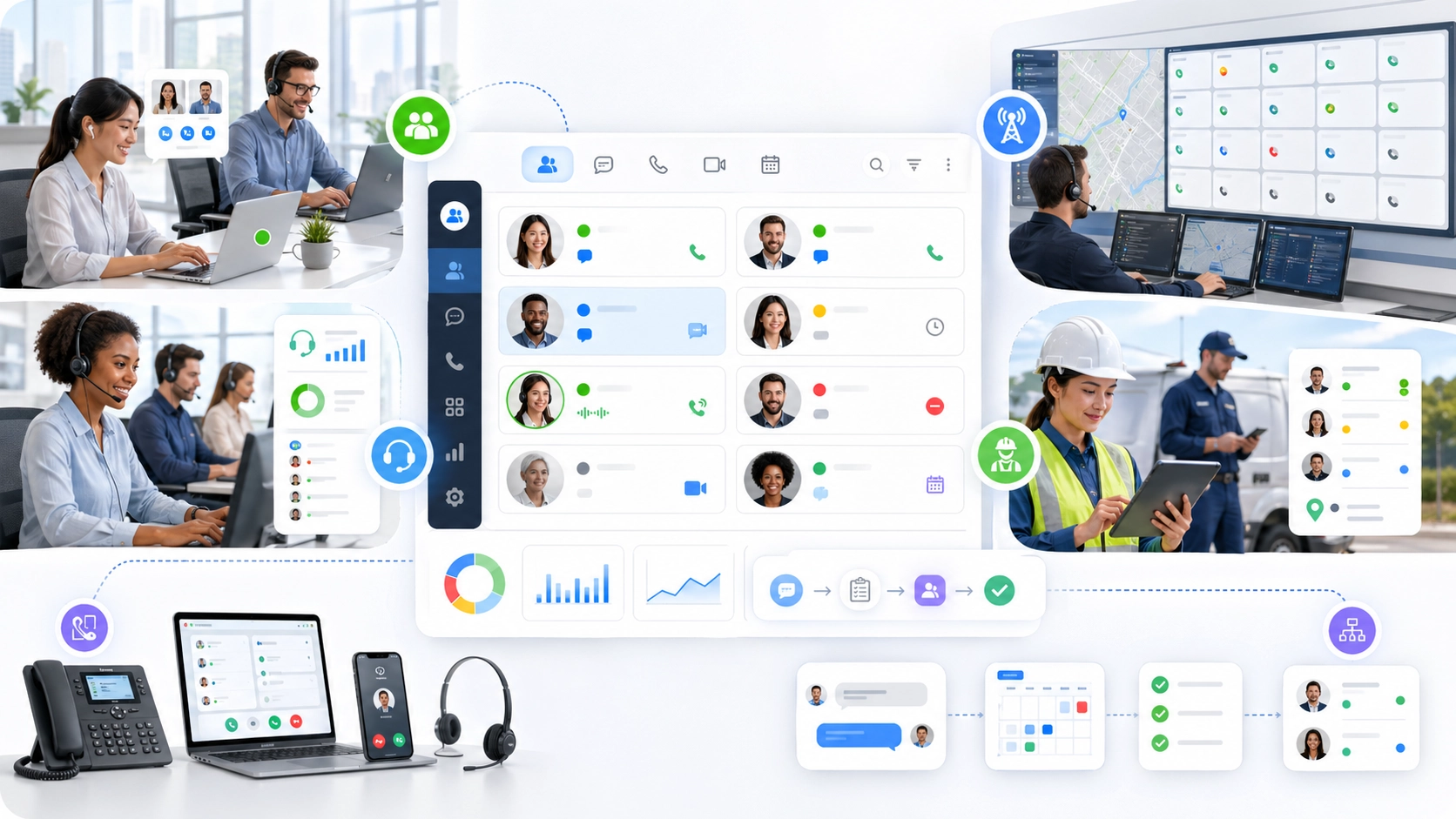
Presence is not limited to office chat or corporate softphones. In operational communication systems, presence can show whether an operator console is active, whether a field terminal is registered, whether an intercom is online, whether a duty room endpoint is available, or whether a communication device has lost network connection.
This is important because operational environments depend on reachability. A control room, dispatch desk, security post, help point, or industrial terminal must not be treated as available if it is offline or already engaged in another interaction. Presence gives supervisors and operators a clearer view of communication readiness.
In these environments, presence becomes part of operational awareness rather than only personal availability。
For instance, the deployment experience of the Becke Telcom unified communication project shows that, presence becomes meaningful when SIP intercoms, industrial telephones, emergency help points, paging consoles, dispatch seats, and control-room terminals need to work as one coordinated communication environment. The question is not only whether a person is online. The question is whether the right operator, device, or response point is reachable when an incident or request appears.
For example, a dispatch console may show whether a duty operator is ready to answer. A tunnel or campus help point may report whether the terminal is registered and healthy. A SIP intercom at an entrance may appear available, busy, or offline. A paging microphone position may show whether it is active or locked by a higher-priority announcement. In this kind of solution logic, presence helps Becke Telcom deployments move from simple device connectivity toward visible communication readiness.
The brand value here is practical rather than decorative. Presence supports the real operating question that industrial and emergency communication projects must answer: which person, terminal, or channel can respond right now?
System Value of Presence
Faster Response and Less Guesswork
One major system value of presence is faster response. When availability is visible, users do not waste time trying unavailable contacts. Operators can choose an active resource, route a call to the correct destination, or escalate when no one is available. This reduces communication delay and improves decision quality.
Presence also reduces guesswork. A team can understand whether a lack of response is caused by busyness, absence, disconnection, or deliberate do-not-disturb status. This helps users choose a better next action instead of repeatedly trying the same failed path.
In real communication workflows, less guesswork often means faster and calmer coordination.
Better Operational Visibility and Accountability
Presence can improve operational visibility by showing which users, endpoints, or teams are ready to participate in communication. In contact centers, this may support agent availability. In dispatch rooms, it may support operator readiness. In facility systems, it may show which terminals are online or offline.
This visibility also supports accountability. If a team is responsible for answering calls or responding to alerts, presence can show whether the responsible endpoints were available at the time. Combined with logs and reports, this helps organizations review workflows, staffing, and device reliability.
Presence therefore contributes to both live communication and long-term service improvement.
The system value of presence is that it makes availability visible before communication fails.
Deployment Considerations for Presence
Define Meaningful Presence States
A presence system should use states that match the organization’s actual communication workflow. Generic states such as available, busy, and offline are useful, but some environments need more specific states such as in meeting, on call, not ready, on break, monitoring, dispatching, fault, maintenance, or emergency mode.
The goal is not to create too many confusing labels. The goal is to make status meaningful enough to guide action. A user should be able to look at a status and understand what communication behavior is appropriate.
Good presence design starts with operational meaning, not just software options.
Integrate Presence With Calendars, Calls, and Devices
Presence becomes more accurate when it is integrated with calendars, call states, devices, and communication clients. If a user starts a call, the status should update. If a meeting begins, the platform should reflect it. If a SIP endpoint loses registration, the system should not continue showing it as reachable.
These integrations reduce manual work and improve trust. Users should not have to update every state by hand, and operators should not rely on status information that is disconnected from real device behavior.
In enterprise and industrial communication systems, accurate presence often depends on both user-level integration and endpoint-level monitoring.
Maintenance Tips for Presence Systems
Keep Status Data Accurate and Timely
Presence becomes less useful when status data is stale. If a user who left hours ago still appears available, or if a device that lost registration still appears online, people will stop trusting the system. Maintenance teams should therefore monitor whether presence updates are timely and correct.
This may involve checking client connectivity, server synchronization, SIP registration reporting, calendar integration, mobile app behavior, and endpoint monitoring. In larger deployments, administrators should also review whether status changes propagate correctly across platforms.
Accuracy is the foundation of presence value. A beautiful status display is not helpful if the status is wrong.
Review Privacy and Permission Rules
Presence can reveal useful information, but it can also create privacy concerns. Not every user may need to see every detail about another person’s status, location, calendar activity, or device state. Organizations should define who can see which presence information and how detailed that information should be.
In operational systems, some presence visibility is necessary for safety and response. In ordinary office collaboration, more limited visibility may be appropriate. The right policy depends on role, department, security level, and business culture.
Good presence management balances communication efficiency with privacy and access control.
Presence should make communication smarter without exposing more personal or operational detail than the role actually requires.
Applications of Presence
Enterprise Unified Communications
In enterprise unified communications, presence is used to support calling, messaging, meetings, directory lookup, call transfer, team collaboration, and mobile work. Employees can see whether colleagues are available before choosing how to communicate. Receptionists can avoid transferring calls blindly. Managers can coordinate distributed teams more easily.
Presence also helps reduce interruptions. Users who are in meetings or focused work can show busy or do not disturb, while others can choose asynchronous communication instead of forcing a live call. This makes communication more respectful and better timed.
For enterprise teams, presence is one of the features that makes unified communications feel unified in daily use.
Contact Centers, Dispatch Centers, and Service Teams
Presence is valuable in contact centers and service teams because availability directly affects customer response. Agents may be ready, busy, after-call working, on break, or offline. Supervisors need to understand these states to manage workload and service quality.
Dispatch centers also benefit from presence because response depends on knowing which operator, channel, or field endpoint is available. A dispatcher may need to assign an incident, transfer a call, send a message, or select a talkback channel based on real-time status.
In these environments, presence supports both speed and operational discipline.

Conclusion
Presence is a unified communications function that shows the availability, reachability, and communication state of users, devices, teams, or endpoints. Its role is to make communication more context-aware, helping people and systems choose the right channel, destination, and timing before communication begins.
Its value extends across voice calls, messaging, meetings, call routing, transfer decisions, contact centers, dispatch rooms, SIP intercoms, and operational communication systems. By reducing guesswork and showing real-time status, presence helps organizations improve responsiveness, reduce interruptions, and strengthen coordination.
In Becke Telcom-related communication scenarios, presence fits naturally into systems where operators, SIP terminals, industrial phones, help points, paging positions, and dispatch resources must be visible as available, busy, offline, or ready to respond. The practical value is simple: communication becomes more reliable when the system knows who and what can actually be reached.
FAQ
What is presence in unified communications?
Presence is a feature that shows whether a user, device, team, or endpoint is available, busy, away, offline, on a call, in a meeting, or in another communication state.
It helps users and systems decide how to communicate more effectively.
Why is presence important?
Presence is important because it reduces guesswork before communication begins. Users can see whether someone is reachable, and systems can route calls or messages based on availability.
This improves response speed, reduces missed communication, and prevents unnecessary interruptions.
Where is presence commonly used?
Presence is commonly used in unified communications platforms, IP PBX systems, messaging apps, video meeting tools, contact centers, dispatch systems, SIP intercoms, operator consoles, and service team workflows.
It is most valuable where real-time availability affects communication decisions.







