Outgoing vs Incoming Call: Key Differences, Features, and Use Cases
In business communication, calls are often grouped into two basic types: outgoing calls and incoming calls. The distinction sounds simple, but in real communication systems it affects routing logic, staffing models, response workflows, call reporting, customer experience, and even system design. Whether a company is running a sales desk, a customer service center, a hospital switchboard, a school office, a dispatch platform, or a multi-site enterprise phone system, understanding the difference between outgoing and incoming traffic helps teams make better operational decisions.
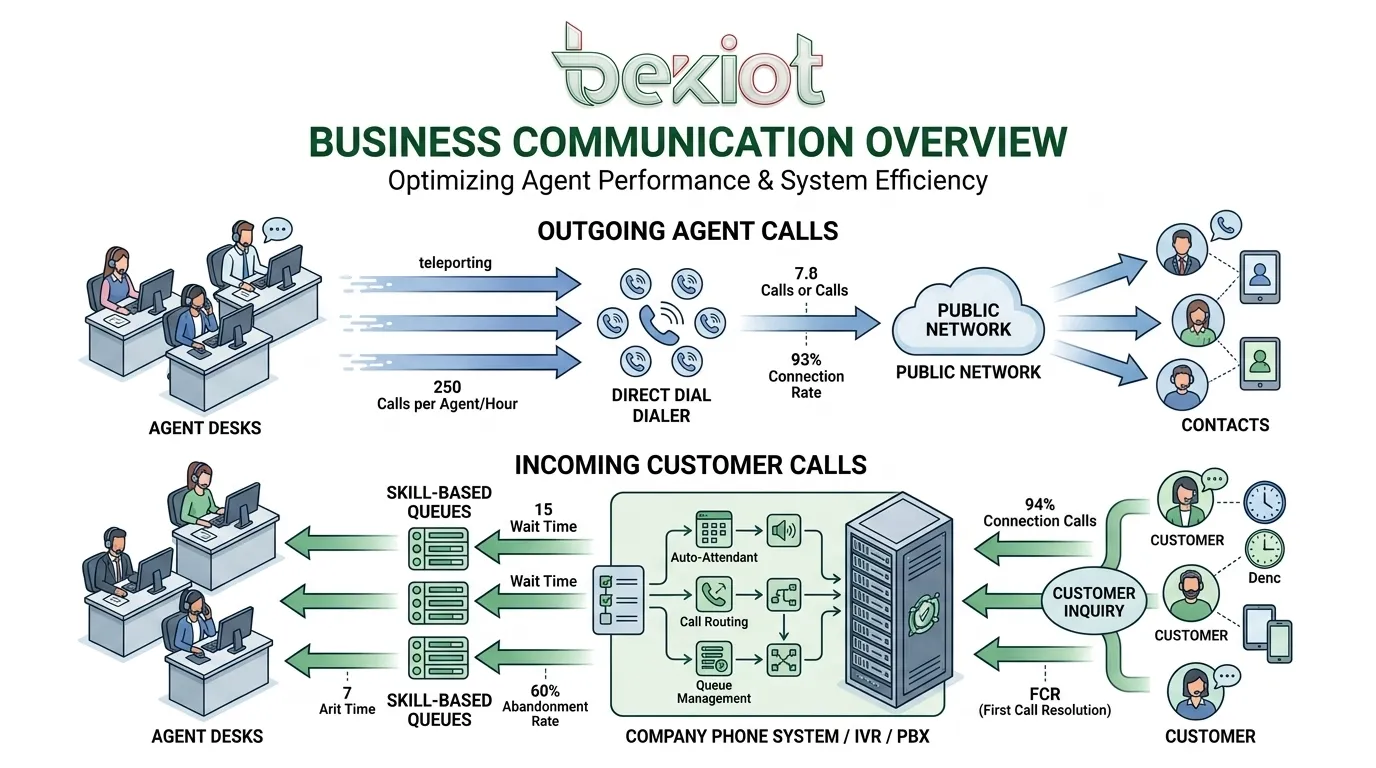
An outgoing call is initiated by a user, agent, or device toward another party. An incoming call is initiated by an external caller and received by a user, department, queue, or system endpoint. That directional difference influences what features matter most. Outgoing calling often focuses on dialing efficiency, caller identification, campaign management, and follow-up activity. Incoming calling usually focuses on answering speed, routing accuracy, queue handling, availability, and service quality. In practice, both are essential, and most organizations need to manage them together rather than treat them as separate worlds.
What Is an Outgoing Call?
Definition in Practical Terms
An outgoing call is a call placed from an internal extension, desk phone, softphone, mobile client, intercom endpoint, or communication platform to another person or organization. The call may be directed to a customer, supplier, colleague, field worker, remote site, public service number, or another branch office. In business use, outgoing calls are often associated with proactive communication such as sales outreach, appointment reminders, maintenance coordination, security verification, or operational follow-up.
From a system perspective, outgoing traffic starts inside the organization and moves outward through an IP PBX, SIP server, gateway, trunk, or carrier connection. That means the system must decide which caller ID to present, which route to use, whether the number is permitted, whether the call should be recorded, and how the activity should be logged. Even a simple outbound call may involve permissions, policies, and routing rules behind the scenes.
How Outgoing Calls Work
When a user dials a number, the communication platform analyzes the dialed digits and applies routing logic. The system may determine whether the call is internal, local, long-distance, international, emergency-related, or sent through a specific SIP trunk or gateway. In more advanced environments, the platform can also select routes based on cost control, branch policy, time of day, failover availability, or least-cost routing logic.
Outgoing calls also rely heavily on identity control. Businesses often need to present a main company number, a department number, or a direct inward dialing number rather than a random extension identity. In sales and service teams, this helps protect personal contact information and maintain a consistent customer-facing image. In regulated or sensitive environments, outbound call logging may also be required for auditing, complaint review, or workflow verification.
Typical Features of Outgoing Calling
Common outgoing call features include speed dialing, click-to-call from CRM platforms, caller ID selection, dial permissions, call recording, call notes, redial history, and integration with customer records. In campaign-oriented environments, agents may use preview dialing, power dialing, or list-based outbound workflows to improve productivity without losing call context.
Operational teams use outgoing calling in different ways. A maintenance center may call field technicians to confirm job status. A school office may contact parents or staff during schedule changes. A hospital coordination desk may place follow-up calls to departments or external contacts. A dispatch center may issue voice instructions to remote stations. In each case, the outgoing call is not just a voice connection. It is an action step within a larger process.
Outgoing calls are usually about initiative. They help an organization reach out, verify, coordinate, remind, promote, escalate, or resolve something before the other side contacts them first.
What Is an Incoming Call?
Definition in Practical Terms
An incoming call is a call received by the organization from an external caller. That caller may be a customer, visitor, patient, student, supplier, driver, tenant, field worker, alarm point, emergency help station, or partner organization. In a business setting, incoming calls often represent demand, urgency, or service expectation. Someone is trying to reach the company, and the system must decide where that call should go.
Incoming traffic is closely linked to responsiveness and customer experience. A missed outbound call can often be retried later. A missed incoming call may mean a lost sales opportunity, a poor service impression, a delayed response, or in some environments a safety risk. That is why incoming call design often receives special attention in front-desk systems, contact centers, public service hotlines, hospitals, and emergency communication platforms.
How Incoming Calls Work
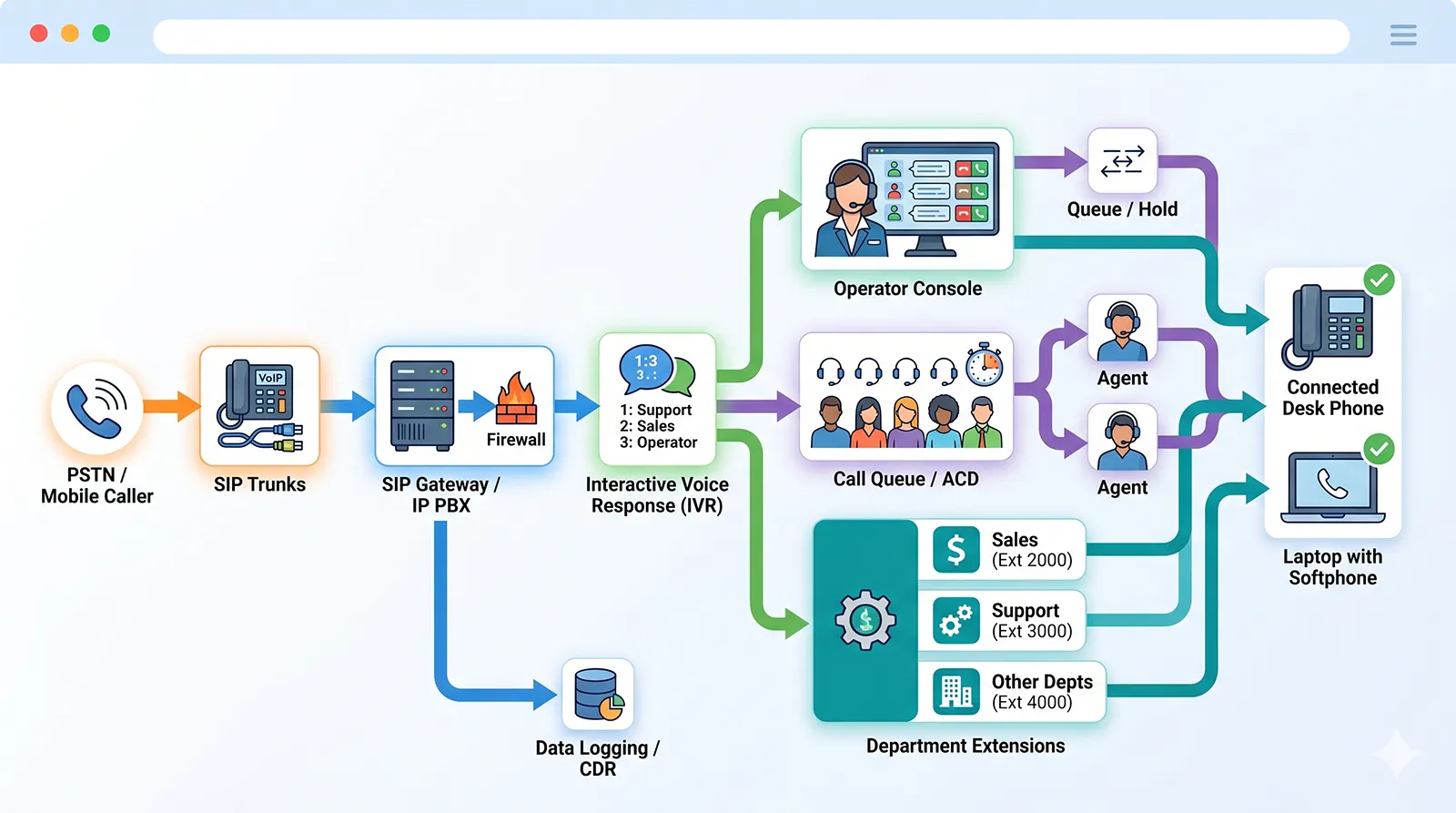
When an external caller dials a published number, the carrier or SIP provider delivers the call to the organization’s phone system. The system then checks inbound routing rules and may send the call to an auto attendant, IVR menu, operator, ring group, queue, direct extension, hunt group, help desk, or recorded announcement. The routing decision may depend on the dialed number, business hours, language selection, department logic, caller input, or failover conditions.
In more advanced deployments, incoming calls can trigger screen pops, CRM lookups, priority handling, skill-based routing, or time-based announcements. A support number may send callers into a queue with estimated wait logic. A service hotline may route VIP customers differently. A campus help point may ring both a security desk and a mobile responder. A hospital emergency extension may bypass routine menus and alert the right team immediately. The incoming side is where routing accuracy often matters most.
Typical Features of Incoming Calling
Important incoming call features include DID mapping, IVR menus, queue management, operator consoles, call distribution, voicemail fallback, overflow routing, business-hour scheduling, missed call notifications, and call recording. For service teams, live queue visibility and reporting are especially important because they reveal whether the organization is answering demand effectively.
Incoming call handling also shapes perception. A fast answer, clear greeting, and accurate transfer suggest professionalism. A long wait, repeated forwarding, or abandoned queue suggests weak process design. For this reason, incoming call systems are often combined with receptionist consoles, dispatch interfaces, paging, alarms, ticketing systems, and escalation workflows to reduce delay and confusion.
Outgoing vs Incoming Call: Core Differences
Direction and Call Initiation
The most basic difference is who starts the call. Outgoing calls begin inside the organization and move outward. Incoming calls begin outside the organization and move inward. That difference sounds obvious, but it changes how the platform is configured. Outgoing calling needs dialing authority, route control, and caller presentation. Incoming calling needs answer logic, queue design, and destination control.
Because initiation direction is different, the business objective is usually different too. Outgoing calling is often task-driven and proactive. Incoming calling is usually request-driven and reactive. One side is trying to reach out. The other side is being asked to respond. Strong communication systems are designed to support both patterns without creating operational blind spots.
Routing Logic and System Priorities
Outgoing calls focus on route selection, dialing permissions, least-cost routing, and trunk availability. The question is often, “How should this call leave the system?” Incoming calls focus on destination selection, queue handling, and answer priority. The question becomes, “Where should this call go, and how quickly can it be answered?”
This distinction matters in technical design. For example, a company may create strict outbound rules for international dialing while giving more flexibility to incoming routing during office hours. A dispatch platform may prioritize inbound emergency points while allowing selective outbound initiation only for authorized users. A business phone system that ignores these directional differences may work at a basic level but still create poor operational outcomes.
Performance Measurement
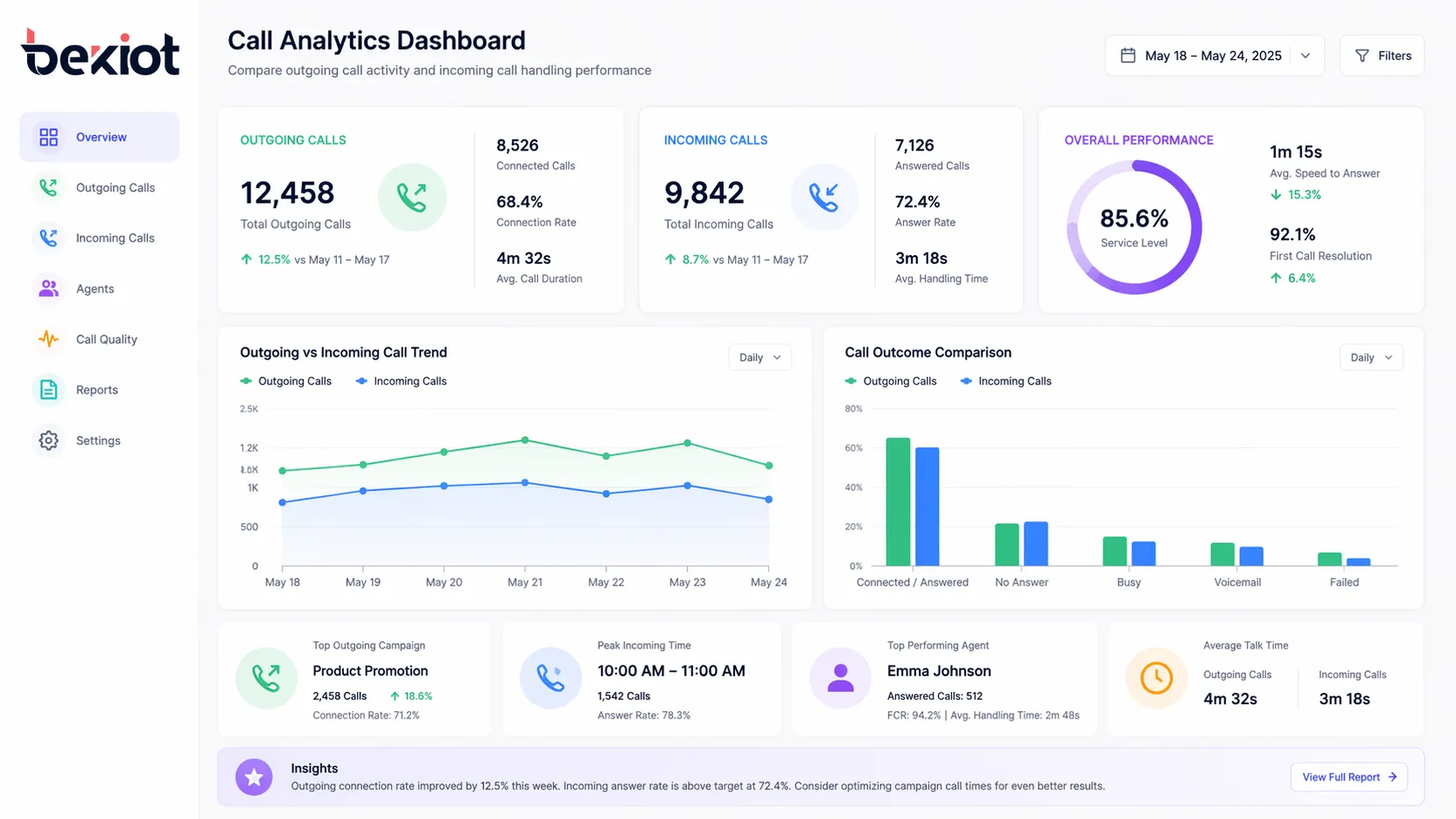
Outgoing calls are often measured through contact rate, answer rate, connection quality, completion status, talk time, follow-up activity, and campaign efficiency. Teams want to know whether they are reaching the right people, whether agents are productive, and whether the communication leads to a business result such as an appointment, confirmation, or resolution.
Incoming calls are often measured through response time, queue wait time, abandonment rate, first-call resolution, transfer frequency, missed call rate, and service level performance. The focus is less about initiative and more about responsiveness. This is why inbound and outbound reporting should not be mixed blindly. They reflect different workloads and different success criteria.
In simple terms, outgoing call performance is usually judged by how effectively the organization reaches out, while incoming call performance is judged by how effectively the organization receives and handles demand.
Key Features Associated with Outgoing and Incoming Calls
Features Commonly Linked to Outgoing Calls
Outgoing calling normally benefits from tools that improve efficiency and control. These include click-to-call integration, CRM call launching, approved number lists, automated dial plans, route preference settings, outbound caller ID rules, and call result tagging. In multi-site organizations, outbound policy may also determine which branch identity is presented or which trunk should be used for cost optimization.
Supervisors often care about outbound consistency as much as productivity. If agents call customers from uncontrolled identities, the brand experience becomes inconsistent. If numbers are dialed without proper permissions, unnecessary costs or compliance risks may appear. That is why well-designed outgoing call systems usually combine convenience with policy enforcement.
Features Commonly Linked to Incoming Calls
Incoming calling depends more heavily on structured accessibility. Typical features include DID assignment, IVR menus, hunt groups, call queues, overflow rules, announcement playback, voicemail fallback, scheduled routing, and operator transfer tools. These features help ensure that an external caller reaches the right person or team without excessive delay.
Visibility is also critical on the inbound side. Supervisors and receptionists benefit from queue dashboards, ringing status, agent state views, and missed call alerts. In sectors where every unanswered call matters, such as healthcare, public service, industrial support, and emergency assistance, inbound visibility is not just an efficiency tool. It is a risk-reduction mechanism.
Shared Capabilities Used by Both
Some features serve both outgoing and incoming traffic. Call recording, presence status, extension management, conferencing, transfer, hold, voicemail, and analytics can apply in either direction. SIP-based platforms may also integrate both traffic types with paging, intercom, mobile clients, video, dispatch screens, alarm events, or CRM records.
Even though the same platform may support both call directions, configuration should still reflect the actual use case. For example, call recording policies for outbound sales may differ from those for inbound support. Queue behavior for inbound public numbers differs from manual transfer behavior during outbound coordination. Shared infrastructure does not mean identical logic.
Common Use Cases for Outgoing Calls
Sales, Follow-Up, and Business Development
One of the most familiar uses of outgoing calls is direct business outreach. Sales teams use outbound calling to introduce services, qualify leads, confirm interest, schedule meetings, and follow up on quotations. In these environments, fast dialing, CRM integration, and accurate caller ID are important because they directly influence productivity and trust.
Account managers and service representatives also rely on outgoing calls for renewals, payment reminders, service updates, and relationship maintenance. These are not always aggressive sales calls. Many are structured follow-up actions that keep business relationships active and reduce communication delays.
Operations, Maintenance, and Field Coordination
In industrial and infrastructure environments, outgoing calls support coordination rather than promotion. A control room may contact field staff, a service center may call a site technician, or a transport supervisor may reach a remote station. The purpose is often to confirm status, issue instructions, or coordinate response across locations.
These outbound calls may be integrated with dispatch software, radio gateways, SIP endpoints, or emergency workflows. In such cases, the value of outgoing communication lies in speed, reach, and reliability. The call itself becomes part of operational control.
Notifications and Scheduled Communication
Organizations also use outgoing calls for reminders and scheduled notices. Clinics may confirm appointments, schools may notify departments, property managers may follow up on service requests, and support teams may call customers back after a ticket update. Outbound communication helps prevent missed events and gives the organization a more active service posture.
Where automation is allowed, scheduled outbound notifications can be combined with recordings, softphone actions, or list-driven workflows. Even then, the underlying logic remains the same: the organization is initiating contact to push information or request confirmation.
Common Use Cases for Incoming Calls
Customer Service and Help Desks
Incoming calls are central to customer service because they represent active requests for assistance. A caller may need product support, order clarification, fault reporting, billing help, or technical guidance. In these environments, speed of answer and routing accuracy matter more than dialing efficiency. The caller is already seeking help, and the organization must respond well.
Well-structured inbound systems reduce frustration by directing callers to the right queue, team, or operator quickly. They also support better records by linking calls with ticketing or CRM platforms. Without this structure, service teams spend too much time transferring calls or repeating the same intake questions.
Reception, Front Desk, and Department Access
Many incoming calls are not formal service tickets. They are everyday contact attempts directed at a reception desk, office administrator, hospital department, school office, branch location, or business unit. In these cases, incoming call design helps determine whether callers experience clarity or confusion. Clear DID assignment, group ringing, and backup routing are often more valuable than complex IVR trees.
For multi-site organizations, inbound design also helps manage public access. A main number may route by location, language, or service category. A reception console may view multiple branches. A backup destination may receive calls when a site is unavailable. These features turn simple inbound calling into controlled communication access.
Emergency, Assistance, and Critical Response
In some environments, incoming calls can signal urgency rather than routine contact. A tunnel help point, hospital assistance station, campus emergency phone, or industrial SOS terminal may generate an incoming call toward a control room or security position. Here, inbound communication must be treated as time-sensitive and often integrated with visual alerts, recording, and priority handling.
This is why many critical communication systems treat incoming call design as part of the safety workflow. The call may open a voice path, display the location, alert the operator, trigger logging, or connect to a dispatch sequence. The directional label “incoming” may sound ordinary, but the operational importance can be very high.
In high-responsibility environments, an incoming call is not just contact traffic. It may be an event that requires immediate recognition, prioritization, and action.
Why the Difference Matters in Real System Design
Staffing and Workflow Planning
Teams handling mainly outgoing calls are usually organized around planned activity. They work from lead lists, follow-up tasks, service schedules, or escalation sequences. Their workload can often be paced and prioritized internally. Teams handling mainly incoming calls face more unpredictable demand. They must be available when callers choose to connect, which makes queue design and staffing more dynamic.
Because of this difference, the same number of calls does not mean the same operational burden. One hundred outbound calls may be planned and distributed over a shift. One hundred inbound calls may arrive in concentrated bursts and require immediate answer capacity. That is why communication managers should separate inbound and outbound patterns in workforce planning.
Reporting, Compliance, and Service Quality
Different call directions often require different KPIs. Outbound teams may track attempts, connections, conversion, and callback completion. Inbound teams may track answer speed, missed calls, service levels, and abandonment. Combining everything into one undifferentiated call total hides performance reality and makes improvement harder.
Compliance needs can also differ. Some organizations must record or announce inbound support calls, while outbound consent rules may apply to promotional activity. Even where regulations are not the main issue, service quality still depends on direction-aware policy. The platform should know whether it is helping the organization reach out or helping the organization receive demand.
Integration with Modern IP Communication Platforms
In modern SIP environments, both incoming and outgoing calls can be integrated with broader communication tools such as paging, intercom, dispatch consoles, CRM platforms, mobile clients, alarm systems, and video workflows. This makes directional clarity even more important. A system may need one logic path for outbound coordination calls and another for inbound alarm-related assistance calls.
For example, a business may use outbound calls for branch coordination while routing incoming public numbers through IVR and queue logic. An industrial platform may support outbound operator calls to field devices while treating inbound calls from help points as priority events. The more integrated the system becomes, the more useful it is to distinguish call direction clearly at the design stage.
Common Challenges and Best-Practice Thinking
Problems on the Outgoing Side
Outgoing call problems usually involve poor dialing discipline, inconsistent caller ID, route misconfiguration, limited trunk capacity, or lack of follow-up tracking. If users can dial freely without structure, costs rise and reporting becomes unreliable. If caller identity is unclear, answer rates and trust may fall. If outbound activity is not linked to business workflow, the call may happen but the result may disappear.
A better approach is to define call permissions carefully, standardize presentation numbers, integrate call activity with records, and create route logic that balances reliability and cost. Outbound calling works best when it is easy for authorized users and controlled at the policy level.
Problems on the Incoming Side
Incoming call problems often involve missed calls, excessive queue time, confusing menus, weak after-hours routing, and poor transfer practice. These failures damage user experience quickly because the caller is already making the effort to connect. In high-demand environments, even small routing mistakes can cause repeated delays and rising abandonment rates.
The best improvement path is usually not “add more complexity.” It is often to simplify access, map numbers clearly, set sensible overflow rules, and give staff better visibility into queue and extension status. Good inbound design feels easier to the caller, not more impressive to the administrator.
Final Thoughts
Outgoing and incoming calls are both fundamental to business communication, but they are not interchangeable. Outgoing calling is about initiative, reach, and controlled contact from the organization to the outside world. Incoming calling is about accessibility, response, and the organization’s ability to receive demand efficiently and professionally. Each side uses different logic, different features, and different success metrics.
When businesses understand that difference, they can design phone systems more intelligently. They can set better routing rules, choose more useful reports, build stronger workflows, and improve both customer experience and internal coordination. If you are planning a SIP-based phone, intercom, paging, or dispatch environment, a platform designed around clear inbound and outbound logic will be easier to manage and more effective in daily use. Becke Telcom supports business and industrial communication solutions that can combine calling, intercom, paging, and operational coordination in one practical system architecture.
FAQ
What is the main difference between an outgoing call and an incoming call?
The main difference is direction and initiation. An outgoing call is placed by a user or system inside the organization toward another party. An incoming call is received by the organization from an external caller. That directional difference affects routing, reporting, staffing, and feature priorities.
In practical use, outgoing calls are often proactive and task-driven, while incoming calls are often response-driven and service-oriented. Both matter, but they are usually managed with different workflows.
Can the same phone system handle both outgoing and incoming calls?
Yes. Most modern IP PBX and SIP communication systems support both directions on the same platform. The system can place external calls, receive public calls, route them differently, record them under different policies, and report on them separately.
The important point is not whether one platform can do both. It is whether the configuration is designed properly for each direction. Shared infrastructure still needs direction-specific logic.
Which is more important for customer experience, outgoing or incoming calls?
Incoming calls usually have the stronger immediate effect on customer experience because they represent moments when the caller is actively seeking help, information, or access. Delays, missed calls, or confusing routing on the inbound side are noticed quickly.
That said, outgoing calls also influence experience, especially for follow-up, appointment management, service updates, and account care. A strong communication strategy improves both.
Why should inbound and outbound calls be reported separately?
They should be reported separately because they represent different workloads and different success criteria. Outbound performance often focuses on attempts, connections, and follow-up outcomes. Inbound performance often focuses on answer speed, wait time, abandonment, and resolution quality.
If both are mixed together without context, managers may get misleading conclusions. Separate reporting makes it easier to identify bottlenecks and improve the right part of the workflow.
Are incoming calls always from customers and outgoing calls always from agents?
No. Incoming calls can come from many sources, including help points, field staff, suppliers, patients, students, residents, or emergency devices. Outgoing calls can be made by agents, operators, administrators, dispatchers, technicians, or automated workflows depending on the system design.
The more accurate way to define them is by direction: incoming means into the organization, outgoing means out from the organization.
How does this difference apply in industrial or emergency communication systems?
In industrial and emergency environments, outgoing calls are often used for coordination, dispatch, notification, and follow-up. Incoming calls may come from help phones, intercom stations, assistance points, or alarm-related communication endpoints.
Because incoming traffic may represent urgency, these systems often give inbound events higher priority, clearer identification, and stronger integration with dispatch, paging, or visual monitoring tools.