Introduction to Internal Intercom Call
Definition of Internal Intercom Call
An Internal Intercom Call refers to a direct, real-time voice communication method between multiple devices or authorized users within the same closed communication system, typically eliminating the need to dial a full 7-digit or 10-digit phone number. Unlike external telephone calls that require routing through public networks, internal intercom calls are confined to the boundaries of a specific organization’s communication infrastructure, ensuring privacy, speed, and simplicity in internal interactions.
It is widely and extensively used in various settings such as modern offices, primary and secondary schools, hospitals and medical facilities, industrial plants, and commercial buildings to enable fast, efficient, and distraction-free internal communication. This type of call streamlines daily interactions, allowing staff to connect quickly without the delays associated with other communication methods like emails or text messages.
Role in Modern Communication Systems
Internal intercom functionality has become an indispensable and core component of modern IP communication systems and SIP-based enterprise telecommunication setups. As organizations increasingly adopt unified communication solutions, the intercom feature serves as a foundational tool that complements other communication channels, ensuring seamless collaboration across teams and departments.
It allows users to instantly connect with colleagues, supervisors, or team members with just a few simple operations, significantly improving workflow efficiency, reducing communication latency, and shortening response time in both routine and time-sensitive scenarios. This instant connectivity is particularly valuable in fast-paced environments where every second counts.
Internal intercom calls enable instant, one-touch communication within organizations of all sizes, effectively reducing communication delays, minimizing miscommunication, and enhancing overall coordination between different teams, departments, and individuals. This seamless connectivity fosters a more productive work environment and ensures that critical information is transmitted promptly.
How Internal Intercom Call Works
Direct Extension Calling
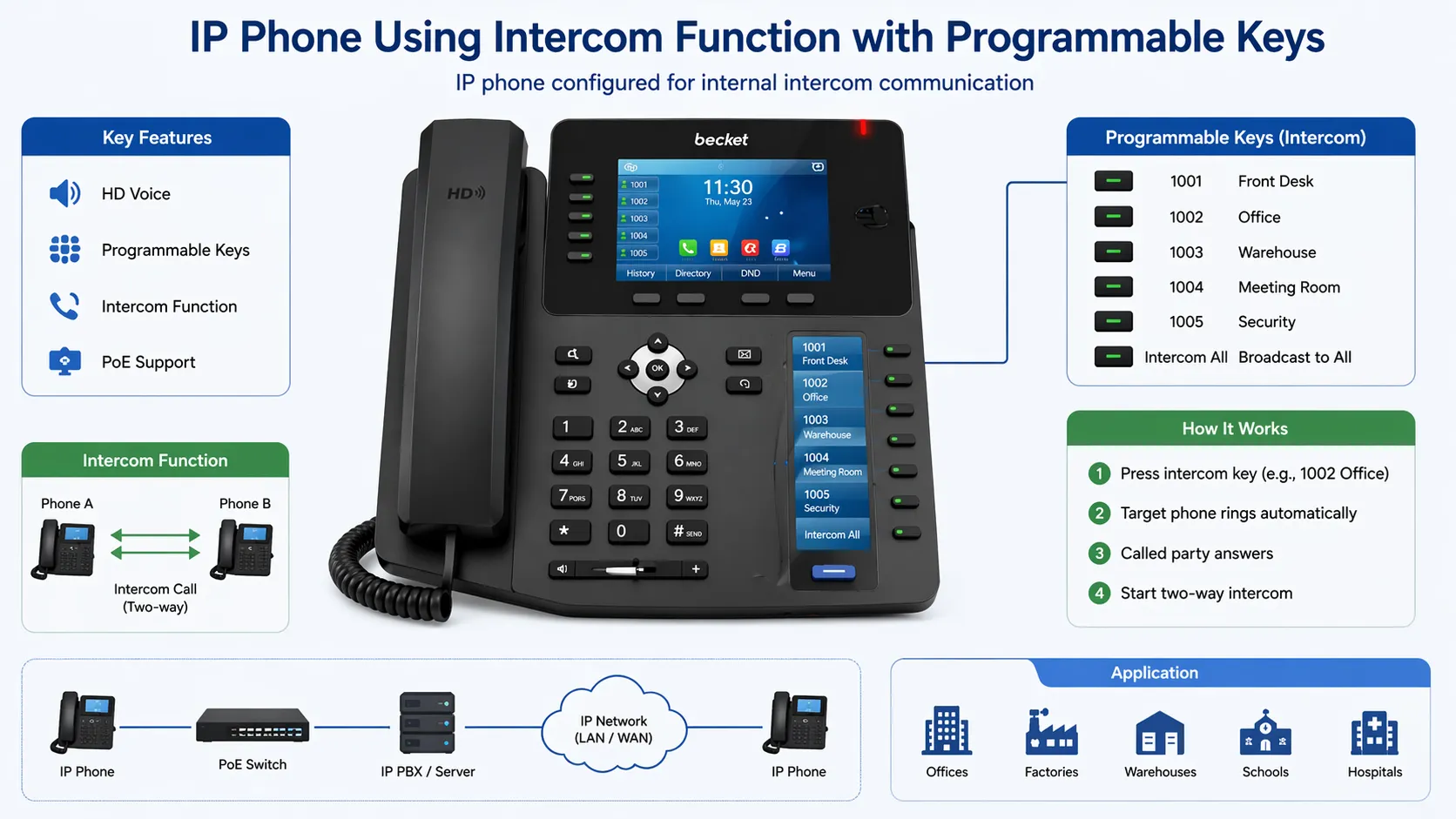
Users can easily initiate an internal intercom call by dialing a short, pre-assigned extension number (usually 2 to 4 digits) or by pressing a dedicated, programmed key on their communication device, such as an IP phone, intercom terminal, or wireless intercom handset. This simplified initiation process eliminates the need to remember or dial full phone numbers, making communication faster and more intuitive.
This user-friendly approach eliminates the need for complex dialing procedures, such as entering area codes or access codes, and reduces the risk of dialing errors. Whether in a small office or a large industrial complex, direct extension calling ensures that users can connect with their intended contact in seconds, without unnecessary steps.
Auto Answer Function
Many modern intercom systems come equipped with an auto-answer function, which allows the receiving device to automatically pick up the incoming intercom call without any manual intervention from the user. This feature can be customized based on user preferences or organizational needs, such as setting auto-answer only for specific extensions or during certain working hours.
This auto-answer capability is particularly useful in hands-free communication scenarios, such as when users are occupied with tasks that require both hands, such as operating machinery in a factory, caring for patients in a hospital, or typing in an office. It ensures that important messages are not missed, even when the user is unable to manually answer the call.
SIP and IP-Based Communication
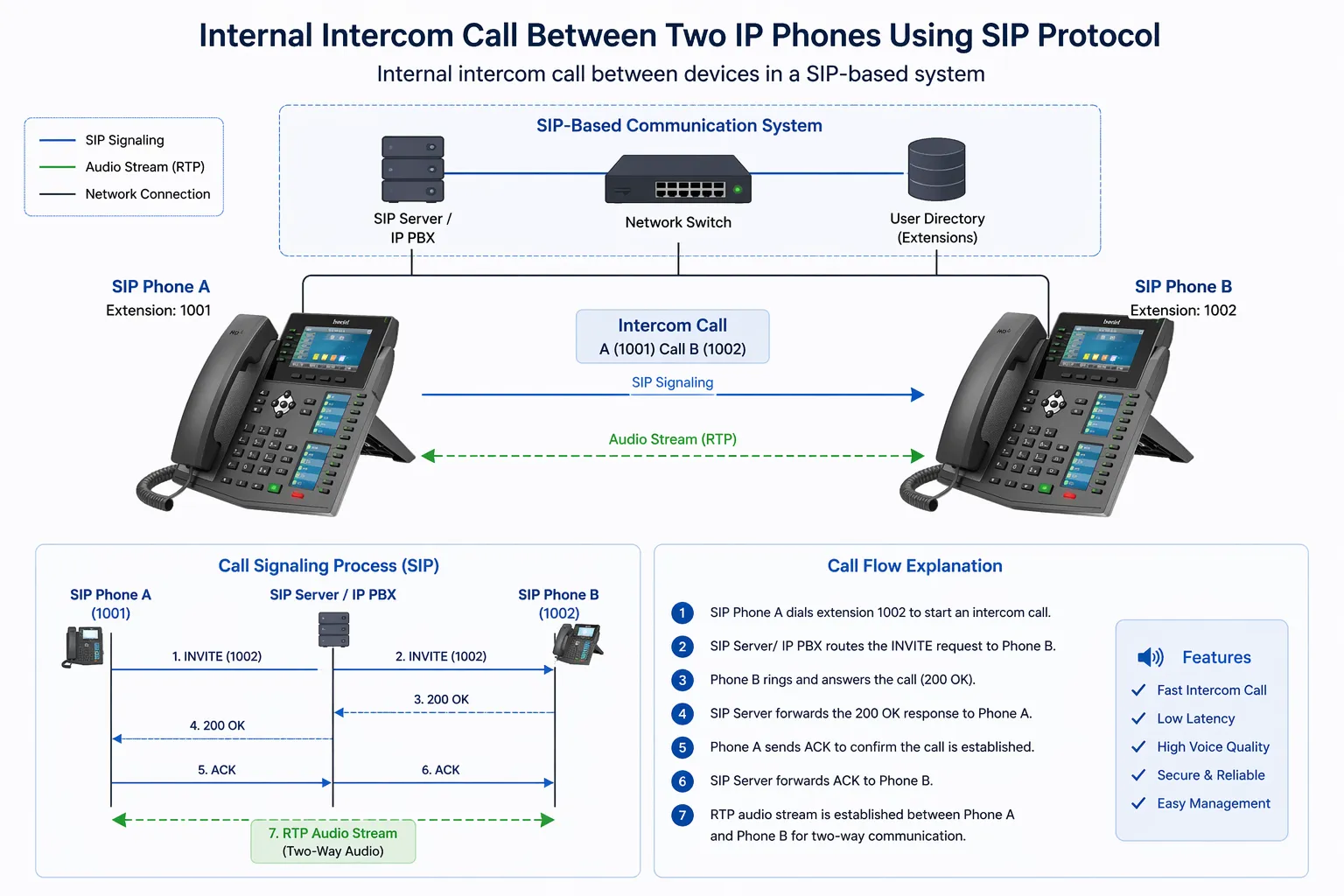
Modern internal intercom calls operate over IP (Internet Protocol) networks, leveraging the Session Initiation Protocol (SIP) to facilitate communication between devices. This IP-based approach enables seamless integration with other communication systems, including IP PBX (Private Branch Exchange) systems, unified communication platforms, and even cloud-based telecommunication solutions.
This integration allows intercom functionality to be extended across different physical locations, such as multiple office branches, factory floors, or hospital wings, and across various device types, including IP phones, smartphones, tablets, and intercom terminals. It ensures that users can initiate and receive intercom calls regardless of their location within the organization’s network, enhancing flexibility and connectivity.
Key Features of Internal Intercom Call
Instant Communication
One of the most prominent features of internal intercom calls is their ability to provide immediate, real-time connection between users without any noticeable delay. Unlike traditional phone calls that may require network routing or call setup time, intercom calls establish a direct link between devices almost instantly, ensuring that messages are transmitted and received in real time.
This instant connectivity makes intercom calls ideal for time-sensitive communication, such as emergency notifications, urgent task assignments, or immediate problem-solving. Whether it’s alerting a team to a safety issue in a factory or coordinating a last-minute change in a meeting, intercom calls ensure that critical information is delivered without delay.
Hands-Free Operation
With built-in support for auto-answer and high-quality speakerphone functionality, internal intercom systems enable users to communicate effectively without the need to pick up a handset or hold a device. This hands-free operation is made possible by advanced audio technology, including noise-canceling microphones and powerful speakers that ensure clear voice transmission even in noisy environments.
This hands-free capability significantly improves convenience and work efficiency, allowing users to continue with their tasks while engaging in a conversation. For example, factory workers can operate equipment while discussing production issues, nurses can attend to patients while receiving instructions from doctors, and office staff can type or file documents while on an intercom call.
One-Touch Dialing
Most modern intercom devices can be configured with programmable function keys, which can be set to directly initiate intercom calls to specific extensions, departments, or groups of users with a single press. These programmable keys can be customized based on the user’s daily communication needs, such as setting a key for the front desk, a team leader, or a specific department like IT or HR.
This one-touch dialing feature simplifies internal communication workflows, reducing the time and effort required to connect with colleagues. It eliminates the need to memorize extension numbers or navigate through complex menus, making communication more efficient and user-friendly, especially for users who make frequent intercom calls throughout the day.
Integration with Communication Systems
A key advantage of modern internal intercom functions is their ability to seamlessly integrate with a wide range of communication systems, including IP PBX systems, SIP servers, paging systems, and unified communication platforms. This integration allows organizations to create a cohesive communication ecosystem where intercom calls can be combined with other features like call forwarding, voice mail, and video conferencing.
Leading solutions from providers like Becke Telcom combine internal intercom, paging, and unified communication features into a single, integrated platform, enabling organizations to streamline their communication processes and reduce the need for multiple separate systems. This integration not only improves efficiency but also ensures consistency and compatibility across all communication channels.
Applications of Internal Intercom Call
Office Environments
Internal intercom calls are widely used in office environments of all sizes, from small startups to large corporations, to facilitate quick and efficient communication between departments, teams, and individual staff members. They are particularly useful for routine interactions such as asking a quick question, confirming a meeting time, or requesting assistance from a colleague in another part of the office.
By enabling instant communication, intercom calls reduce the need for time-consuming emails, text messages, or walking across the office to speak with someone in person. This not only saves time but also minimizes distractions, allowing employees to focus on their work while maintaining effective communication with their team.
Healthcare Facilities
Hospitals, clinics, and other healthcare facilities rely heavily on internal intercom systems for fast and reliable communication between nurses, doctors, administrative staff, and other healthcare professionals. In these high-stakes environments, quick communication can mean the difference between life and death, making intercom calls an essential tool for daily operations.
Intercom systems in healthcare facilities are used for a variety of purposes, including summoning nurses to patient rooms, coordinating emergency responses, communicating between operating rooms and recovery areas, and sharing critical patient information between departments. This improves response time in critical situations, ensures that patient care is delivered promptly, and enhances overall efficiency in healthcare operations.
Industrial and Factory Use
Factories, manufacturing plants, and industrial facilities depend on internal intercom calls for seamless coordination between control rooms, production lines, maintenance teams, and warehouse staff. These environments are often large, noisy, and spread out, making instant communication essential for ensuring smooth operations and maintaining safety.
Hands-free communication via intercom systems is especially valuable in noisy industrial environments, where workers may be wearing hearing protection or operating loud machinery. Intercom calls allow staff to communicate clearly without having to remove their hearing protection or stop their work, reducing the risk of accidents and improving productivity.
Educational Institutions
Schools, colleges, and universities use internal intercom systems to facilitate communication between classrooms, administrative offices, faculty rooms, and campus security. These systems are an essential tool for managing daily operations, ensuring student safety, and coordinating activities across the campus.
Intercom calls in educational institutions are used for a variety of purposes, including making announcements to all classrooms, coordinating between teachers and administrative staff, summoning staff in case of an emergency, and facilitating communication between different parts of the campus. They support efficient coordination across the entire campus, ensuring that daily operations run smoothly and that students and staff are kept informed.
FAQ
What is the difference between intercom and phone calls?
The key difference between internal intercom calls and regular phone calls lies in their scope, initiation process, and routing. Intercom calls are strictly internal to a specific organization’s communication system, are often instant to connect, and typically do not require dialing a full phone number—instead using short extensions or one-touch keys. In contrast, regular phone calls can be either internal or external, may require dialing a full phone number (including area codes for external calls), and often need to be routed through public or private telephone networks, which can introduce delays. Additionally, intercom calls are designed for quick, informal communication, while phone calls may be more formal and can include features like call waiting or voice mail that are less common in basic intercom systems.
Do intercom calls require SIP?
Modern internal intercom systems, especially those integrated with IP-based communication networks, typically use the Session Initiation Protocol (SIP) to facilitate communication between devices. SIP enables seamless integration with IP PBX systems, unified communication platforms, and other modern telecommunication tools, making it a standard for most contemporary intercom setups. However, traditional analog intercom systems do still exist, and these do not require SIP or IP networks—instead relying on physical wiring and analog signals to transmit voice communication. The use of SIP depends on the type of intercom system and the organization’s overall communication infrastructure.
Can intercom calls be hands-free?
Yes, many modern internal intercom systems support hands-free communication through a combination of auto-answer functionality and built-in speakerphone technology. Most intercom devices, including IP phones, intercom terminals, and wireless handsets, are equipped with high-quality speakers and noise-canceling microphones that allow users to speak and listen without picking up a handset or holding the device. This hands-free capability is particularly useful in environments where users need to keep their hands free for work tasks, such as factories, hospitals, or busy offices, and it can be customized based on user preferences or organizational needs.