A missed call log is a record of incoming calls that were not answered by the intended user, extension, team, or communication endpoint. It helps users identify who called, when the call arrived, whether the caller tried multiple times, and whether follow-up action is needed.
In business phone systems, mobile phones, PBX platforms, SIP systems, call centers, reception desks, customer service teams, and dispatch environments, missed call logs are more than simple call history. They are useful communication records that help organizations reduce lost opportunities, improve response speed, and understand where call handling may need improvement.
A missed call log turns an unanswered call into a visible task. Without it, many caller requests may disappear without follow-up.
Basic Meaning of a Missed Call Log
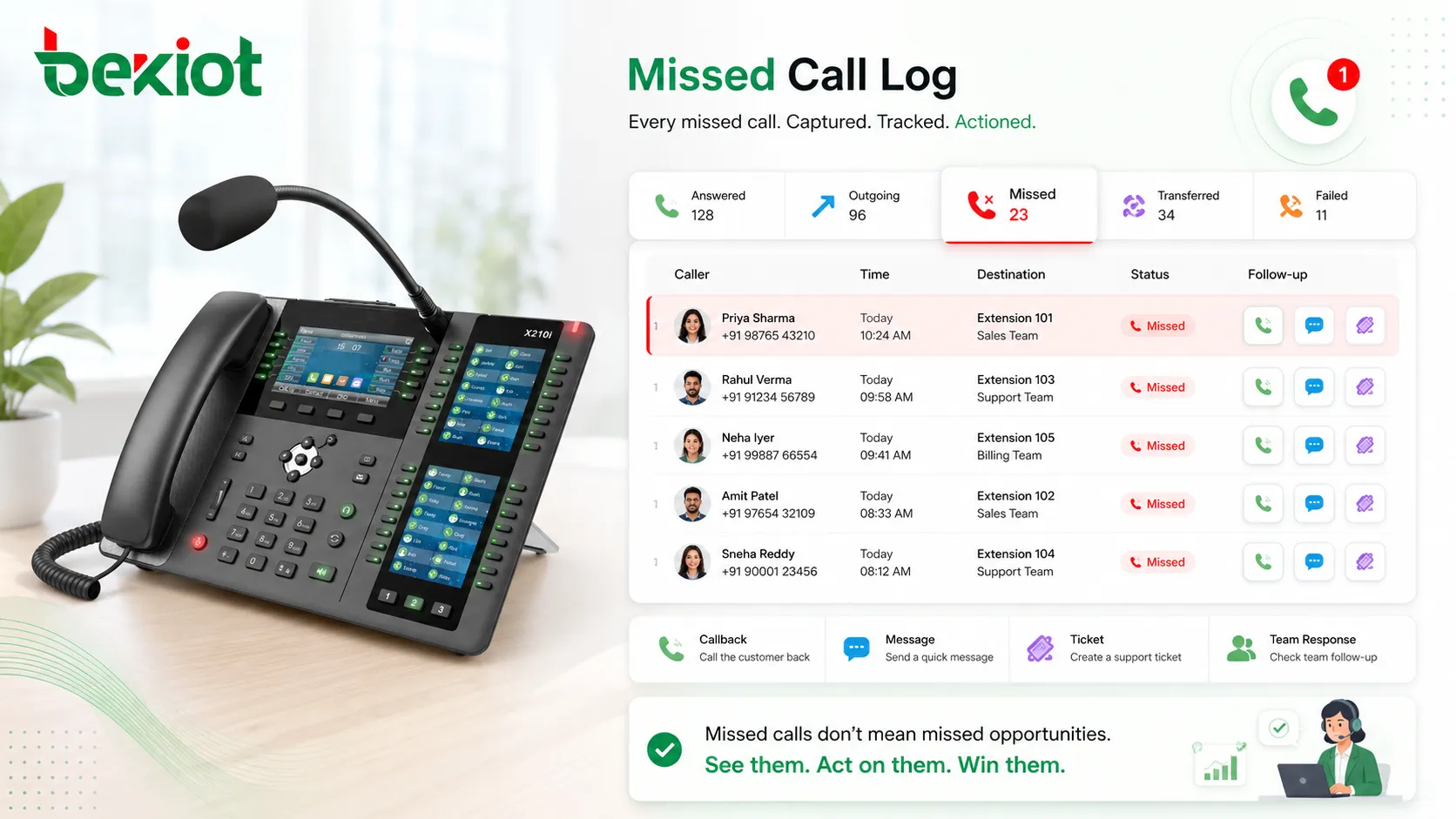
A missed call log stores information about calls that reached a phone system or device but were not answered. Depending on the platform, it may show caller ID, caller number, called extension, time, date, ring duration, call direction, call status, route, and callback state.
For individual users, it works as a reminder to return calls. For organizations, it provides a practical way to monitor service responsiveness and identify missed customer inquiries, support requests, internal calls, and urgent communication attempts.
What Counts as a Missed Call
A missed call usually means an incoming call rang but was not answered before the caller hung up, the call timed out, or the system redirected it. The exact definition may vary by device or platform.
For example, a call may be marked as missed if it rings a desk phone and the user does not answer. In a PBX system, a call may also be recorded as missed if it reaches a ring group, queue, or extension but no available member answers within the configured time.
Difference from Call History
Call history includes answered calls, outgoing calls, missed calls, transferred calls, and sometimes failed calls. A missed call log is more focused because it only highlights calls that did not receive a direct answer.
This focused view is useful because missed calls usually require action. A user may need to call back, send a message, create a service ticket, or check whether the caller already reached another team member.
How Missed Call Logging Works
Missed call logging begins when an incoming call reaches a phone, PBX, SIP platform, mobile device, or call management system. The system tracks whether the call is answered, rejected, forwarded, abandoned, or disconnected before answer.
If the call is not answered according to the platform’s call handling rules, the system writes a missed call record. This record may be stored locally on the phone, centrally on the PBX, in a cloud phone platform, or inside a call analytics system.
Call Detection
The system first detects the incoming call event. It identifies the caller number, called number, receiving endpoint, route, time, and call state. In SIP systems, this information may come from signaling messages between endpoints and the server.
When the call starts ringing, the system monitors whether a user answers. If no answer occurs before the caller disconnects or the no-answer rule activates, the system may classify the call as missed.
Record Creation
After the call ends, the system creates a log entry. This entry may include the caller ID, timestamp, extension, ring duration, trunk, queue, group, device, or reason code.
Some platforms also mark whether the call was later returned. This helps users avoid duplicate callbacks and makes team follow-up more organized.
Storage and Synchronization
Missed call logs may be stored in different places depending on the system architecture. A mobile phone stores logs locally. An IP phone may store recent records in the device. A PBX or cloud platform may store logs centrally for reporting and management.
Centralized storage is useful for business environments because administrators can review missed calls across users, departments, ring groups, and sites. It also supports reporting, export, retention, and callback tracking.
Main Features of Missed Call Logs
A useful missed call log should do more than display a number. It should help users understand call context and take the right follow-up action.
Caller Information
Caller information usually includes caller number and caller name if available. In business systems, the caller may also be matched with a contact record, customer account, CRM profile, or previous call history.
This helps users decide how urgent the callback may be. A missed call from a key customer, service partner, supervisor, or emergency contact may need faster response than an unknown number.
Time and Date Record
The time and date show when the call was missed. This is important for prioritizing callbacks and understanding service gaps.
If multiple missed calls happen close together, the log may reveal a temporary staffing issue, phone outage, call routing error, or unusually high call volume.
Called Destination
In PBX and SIP systems, the log may show which extension, group, queue, department, or trunk received the call. This is useful when several teams share incoming numbers.
For example, a missed call to the sales group should be handled differently from a missed call to technical support. Clear destination records help assign responsibility.
Ring Duration
Ring duration shows how long the call rang before it was missed. A very short ring time may mean the caller hung up quickly. A long ring time may mean the call was not answered despite enough opportunity.
This information helps administrators adjust ring timeout, call forwarding, queue rules, or staffing plans.
Callback Status
Some systems support callback status, such as pending, returned, ignored, assigned, or closed. This turns missed call handling into a managed workflow rather than a personal reminder.
Callback status is especially useful for teams. It prevents several employees from calling the same person repeatedly or assuming someone else already handled the missed call.
System Value for Communication Management
Missed call logs create value by making unanswered calls measurable and actionable. They help users follow up and help managers understand communication performance.
Reducing Lost Opportunities
In sales, service, and customer support, a missed call may represent a customer inquiry, order request, complaint, or urgent issue. If the call is not logged, the opportunity may be lost.
With a reliable missed call log, teams can review unanswered calls and return them before the caller chooses another provider or escalates the issue.
Improving Team Accountability
Missed call records help teams see which calls were not answered and who should follow up. This supports clearer responsibility for reception desks, service teams, sales groups, and support departments.
When logs are reviewed regularly, managers can identify patterns such as repeated missed calls during lunch hours, after-hours gaps, overloaded extensions, or inactive team members.
Supporting Service Quality Analysis
Missed call logs can be used as a service quality indicator. A high missed call rate may suggest that call routing, staffing, ring group design, queue settings, or working schedules need adjustment.
By comparing missed calls with answered calls and callbacks, organizations can better understand caller experience and response efficiency.
Helping Troubleshooting
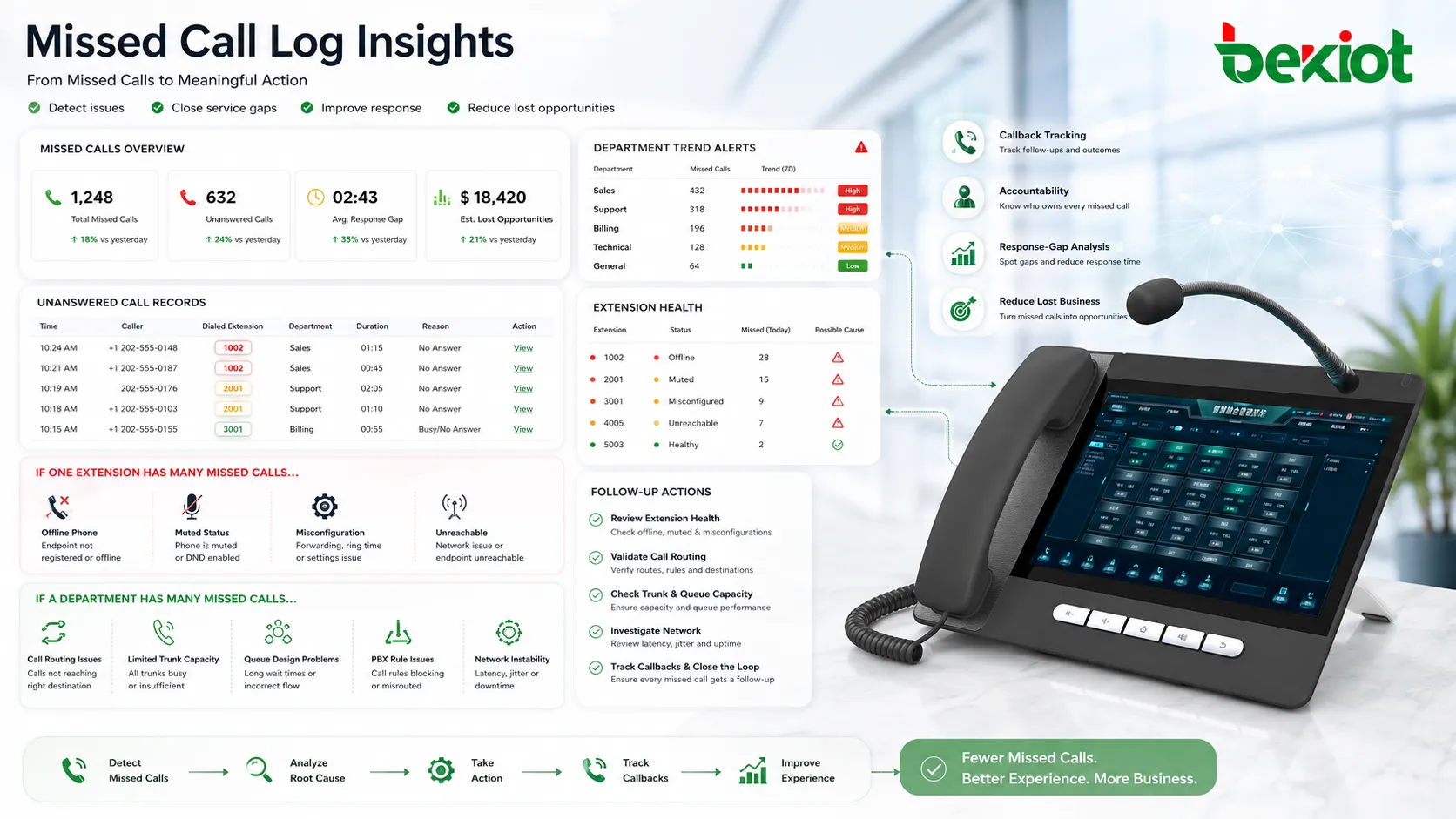
Missed call logs can also reveal technical problems. If one extension suddenly shows many missed calls, the user may be away, but the phone may also be offline, muted, misconfigured, or unreachable.
If an entire department has many missed calls, the issue may be call routing, trunk capacity, queue design, PBX rules, or network stability.
Applications in Phone Systems
Missed call logs are used in many communication environments. The feature may look simple on a personal phone, but in business systems it can support workflow management, analytics, and customer follow-up.
Mobile Phones and Personal Communication
On mobile phones, missed call logs help users return personal, work, or unknown calls. The log usually shows caller number, contact name, time, and call frequency.
For individual users, this is one of the most basic communication features. It helps prevent missed conversations from being forgotten.
Office PBX and SIP Extensions
In office PBX and SIP systems, missed call logs help employees check unanswered calls on desk phones, softphones, or web portals. The records may be linked to extension-level call history.
This is useful for employees who are in meetings, away from the desk, working remotely, or using multiple devices. Centralized missed call records help keep communication visible across endpoints.
Reception and Front Desk Teams
Reception desks often handle high call volume. Missed call logs help front desk staff identify callers who could not be answered during busy periods.
In hotels, clinics, office buildings, schools, and service centers, this helps maintain a professional caller experience and supports timely follow-up.
Sales and Customer Service
Sales and customer service teams use missed call logs to follow up on customer inquiries. A missed call may indicate buying interest, technical trouble, complaint escalation, or service urgency.
When missed call logs are integrated with CRM or ticket systems, staff can create tasks, assign ownership, and record callback results more effectively.
Call Centers and Support Teams
Call centers usually rely on queues and reporting tools, but missed call logs still matter. They can show abandoned calls, unanswered direct agent calls, queue overflow events, or calls missed outside service hours.
These records help supervisors adjust staffing, queue rules, callback campaigns, and service-level targets.
Missed Call Log in PBX and SIP Architecture
In PBX and SIP systems, missed call logging can happen at the endpoint level, server level, or platform level. The best design depends on whether the organization needs personal logs, team reporting, or centralized analytics.
Endpoint-Level Logs
Endpoint-level logs are stored on phones or softphones. They are convenient for individual users because the record appears directly on the device.
The limitation is that endpoint logs may not show the complete call path. If the phone is offline, replaced, reset, or synchronized poorly, the log may be incomplete.
PBX-Level Logs
PBX-level logs are stored by the phone system. They can record calls across extensions, groups, trunks, queues, and inbound routes.
This provides better visibility for administrators and managers. PBX-level logs are usually more reliable for reporting because they are not limited to one device.
Cloud Platform Logs
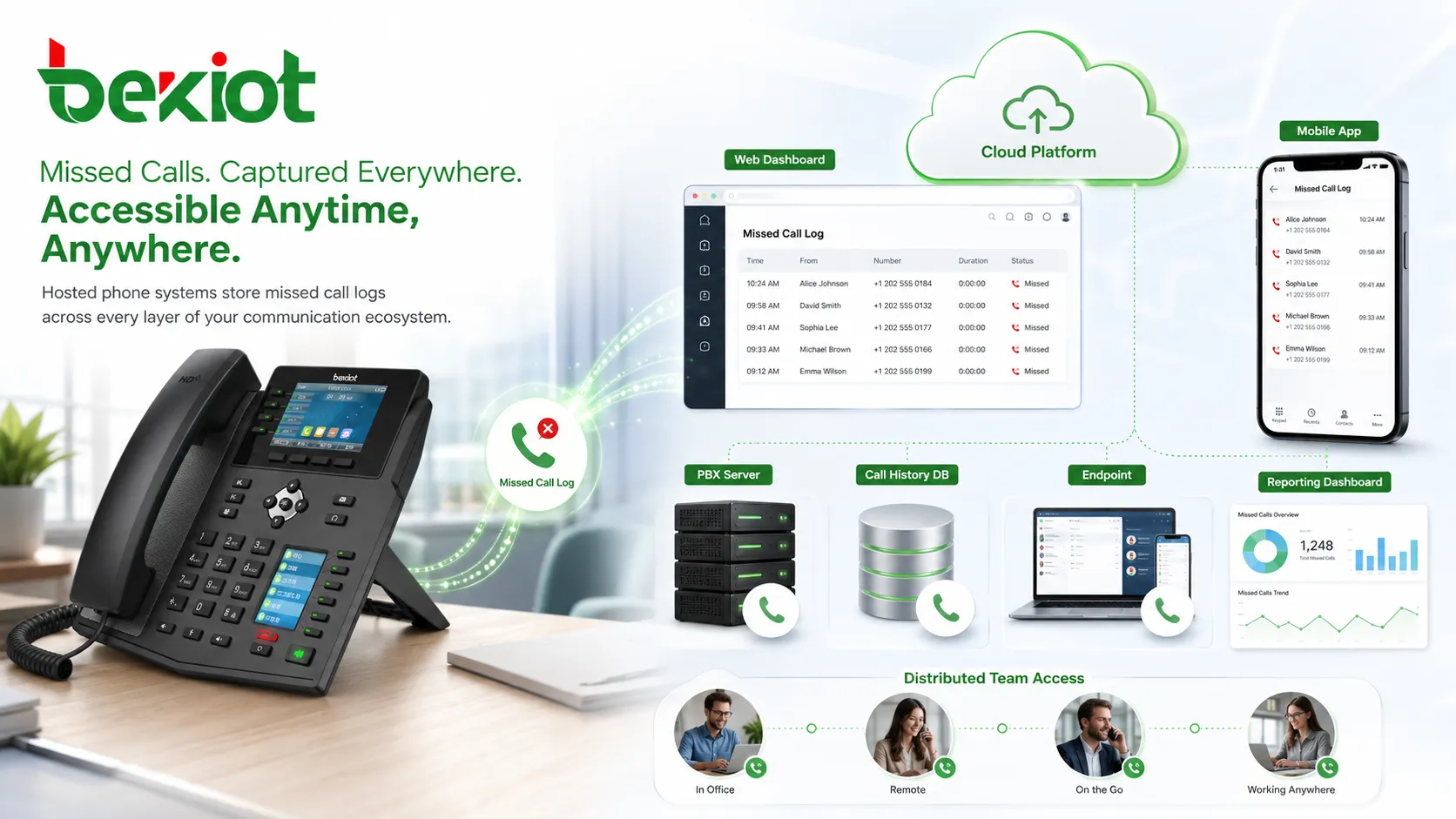
Hosted phone systems and cloud communication platforms often store missed call records in web dashboards. Users and administrators may access logs from browsers, mobile apps, or reporting tools.
Cloud logs are useful for distributed teams because users can review missed calls even when they are not near a specific desk phone.
Integration with Business Workflows
Missed call logs become more valuable when connected to daily work processes. Instead of only showing missed calls, the system can help teams decide who should respond and how the result should be recorded.
CRM Integration
CRM integration can match missed calls with customer records. This allows sales or service staff to see customer history before calling back.
It also helps organizations track whether missed calls lead to opportunities, support tickets, complaints, or follow-up tasks.
Ticket and Task Creation
Some systems can turn missed calls into tasks or tickets. This is useful when every customer contact attempt should be tracked until resolved.
For support teams, a missed call can become a pending service item. For sales teams, it can become a callback task assigned to a specific representative.
Email and Message Notification
Missed call alerts can be sent by email, SMS, mobile push, or chat notification. This helps users respond even when they are away from the phone.
Notification rules should be designed carefully. Too many alerts may become noise, while too few alerts may allow important calls to be ignored.
Configuration and Management Tips
Missed call logging is most useful when the system records the right information and makes it easy to act on. Administrators should review settings for call routing, logging scope, retention, permissions, and notification behavior.
Enable Centralized Logging
For business systems, centralized logging is usually better than relying only on device call history. It allows managers to review missed calls across users, groups, queues, and sites.
Centralized logs also remain available when endpoints are reset, replaced, or temporarily offline.
Define Callback Ownership
Missed calls should have clear ownership. If a missed call reaches a shared number, the team should know who is responsible for returning it.
Without ownership, several people may assume someone else will handle the callback. This can result in no follow-up at all.
Set Practical Retention Rules
Retention rules define how long missed call records are stored. Short retention may be enough for personal devices, while business reporting may require longer history.
Retention should consider privacy, compliance, storage capacity, and operational needs. Call records may contain personal information, so access should be controlled.
Use Reports to Improve Routing
Missed call reports can help optimize phone system design. If many calls are missed by one extension, a forwarding rule may help. If a ring group misses many calls, the team may need more members or a call queue.
Reports should be reviewed regularly rather than only after complaints. Missed call trends often reveal service problems early.
| Log Field | Purpose | Operational Value |
|---|---|---|
| Caller number | Identifies who called | Supports callback and customer lookup |
| Call time | Shows when the call arrived | Helps prioritize follow-up and analyze busy periods |
| Called destination | Shows which extension, group, or queue was reached | Clarifies team responsibility |
| Ring duration | Shows how long the caller waited | Helps adjust timeout and routing rules |
| Callback status | Shows whether follow-up happened | Prevents duplicate or missed follow-up |
Common Problems and How to Avoid Them
Missed call logs can become unreliable if the system definition of “missed” is unclear, if logs are stored only on devices, or if teams do not have a follow-up process.
Duplicate Missed Call Records
A single call may create multiple missed records if it rings several devices in a group. This can confuse users and make the missed call count look higher than it really is.
Systems should distinguish between one missed call attempt and multiple endpoint ring events where possible. Group-level reporting can reduce confusion.
No Callback Workflow
A missed call log is only useful if someone reviews it. Without a callback workflow, the log becomes passive information.
Teams should define when logs are checked, who returns calls, how callback completion is recorded, and how urgent missed calls are escalated.
Incorrect Time Settings
If device or PBX time is wrong, missed call records may appear under the wrong time. This makes follow-up and reporting less reliable.
Communication systems should use proper time synchronization so that call logs, recordings, and reports align correctly.
Hidden Missed Calls in Shared Numbers
Calls to shared numbers may be missed without clear ownership. If the system only shows missed calls on one phone, other team members may not see them.
Shared numbers should use centralized logs, group dashboards, or notifications so the responsible team can see and handle the missed calls.
FAQ
Can missed call logs be exported for reporting?
Yes. Many PBX and cloud phone systems allow missed call logs to be exported as CSV, Excel, or report files. This is useful for service analysis, callback tracking, and management review.
Why does one missed call sometimes appear multiple times?
This can happen when a call rings multiple endpoints, devices, or group members. Each endpoint may record a missed event even though the caller made only one call attempt.
Can missed call logs show whether someone returned the call?
Some systems can show callback status automatically or through manual marking. Others require users to compare missed calls with outgoing call records or CRM activity.
Do missed call logs include calls blocked by the system?
Not always. Blocked, rejected, or filtered calls may appear in separate security, spam, or system logs instead of the normal missed call list. The behavior depends on the platform.
How can missed call logs support after-hours service?
After-hours missed call records can show demand outside normal working time. This helps organizations decide whether they need voicemail, duty phones, callback scheduling, or extended support hours.
Should missed call logs be protected for privacy?
Yes. Missed call logs may contain caller numbers, names, customer information, and contact patterns. Access should be limited to authorized users, and retention should follow company policy and local privacy requirements.